
第八周作业
第八周作业
组员:李肖华、陆遥、杨飞越、林育锋
一、理论学习
1、慕课学习
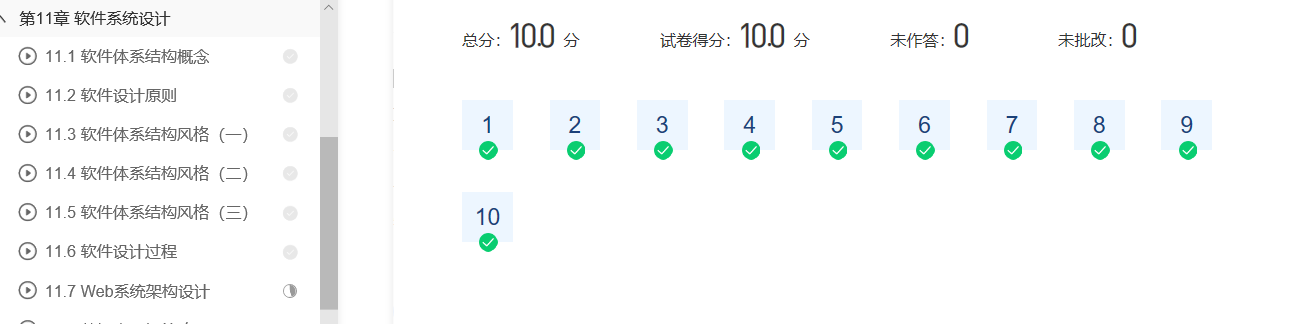
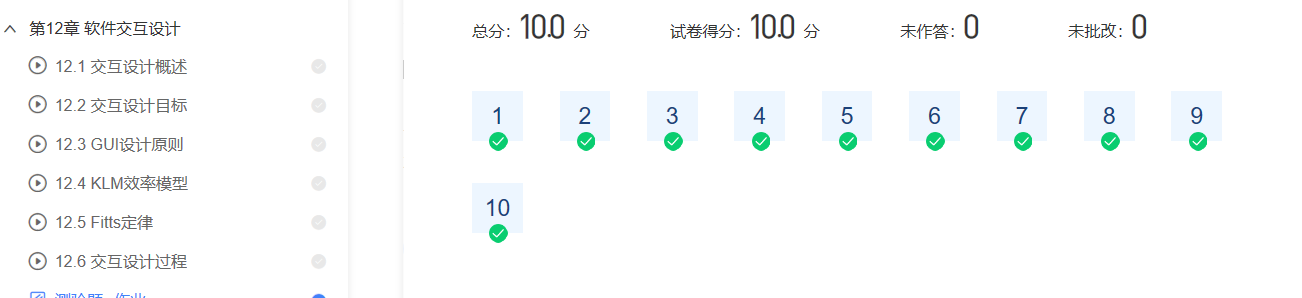
2、讲义学习
创新是在特定的环境中,本着理想化需要或为满足社会需求,而改进或创造新的事物、方法、元素、路径、环境,并能获得一定有益效果的行为。在日新月异的软件从事行业的人来说创新显得尤为重要。但是并不是所有的创新都是受人欢迎的。所以我们在从事软件创新的时候应该严格遵守NABC的原则。此外,创新并不是单打独斗,一个完成的团队往往能做出更多意想不到的创新。
二、实践学习
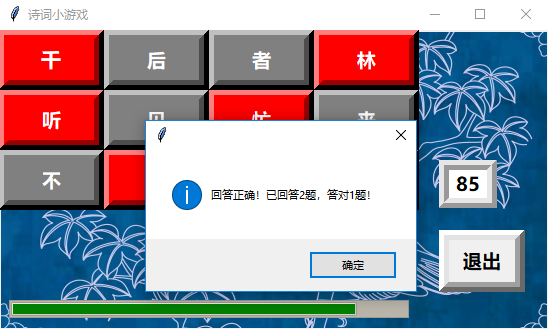
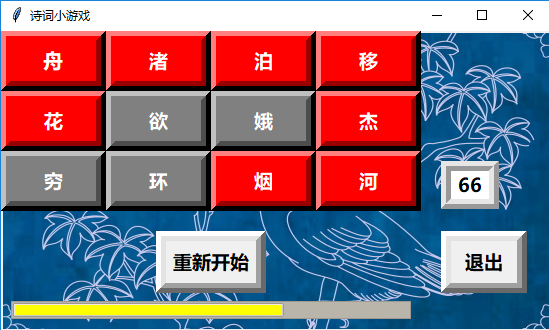
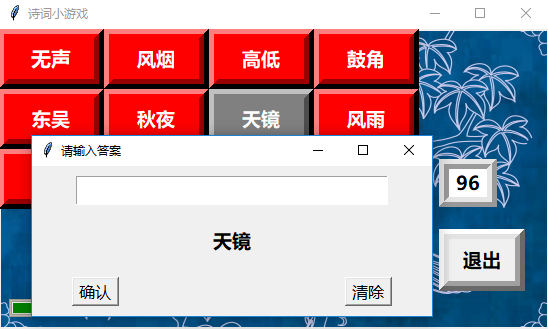


  1 # -*- coding: UTF-8 -*-
  2 # Author: Lu Yao and Li Xiaohua
  3
  4 import json
  5 import random
  6 import time
  7 import tkinter as tk
  8 import tkinter.ttk as ttk
  9 import tkinter.messagebox
 10 from PIL import Image, ImageTk
 11 import re
 12
 13
 14 def open_db(json_file):  # 打开诗词库
 15     text = open(json_file, "r", encoding="utf-8")
 16     poetry_dict = json.load(text)
 17     text.close()
 18     return poetry_dict
 19
 20
 21 def process_img(jpg_file):  # 处理jpg格式的图片
 22     source_img = Image.open(jpg_file)
 23     real_img = ImageTk.PhotoImage(source_img)
 24     return real_img
 25
 26
 27 def countdown(seconds):  # 倒计时模块
 28     t = seconds * 100 + 100
 29     i = 100000 // seconds
 30     j = seconds
 31     k = i // 100
 32     time_left["value"] += i * (seconds // 10) * 0.3
 33     time_lab = tk.Label(root, bg="white", fg="black", font=("微软雅黑", 14, "bold"), width=3, height=1, relief="ridge",
 34                         borderwidth=10)
 35     time_lab.place(x=440, y=130)
 36     for s in range(t, -1, -1):
 37         if seconds <= 2/3*j:
 38             time_left["style"] = "yellow.Horizontal.TProgressbar"
 39         if seconds <= 1/3*j:
 40             time_left["style"] = "red.Horizontal.TProgressbar"
 41         try:
 42             time_lab["text"] = s // 100
 43             time_left["value"] -= k
 44             root.update()
 45             time.sleep(0.01)
 46             seconds -= 0.01
 47         except tk.TclError:
 48             break
 49         if s == 0:
 50             tk.messagebox.showinfo(message="时间到!游戏结束!")
 51             change_btn["text"] = "重新开始"
 52
 53
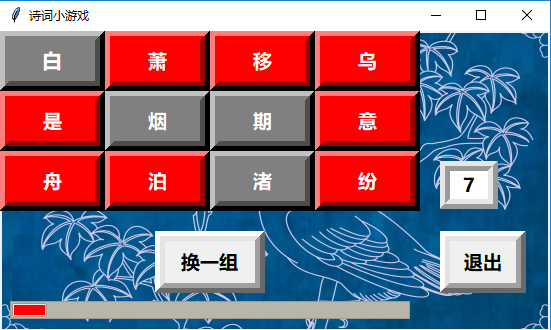
 54 def show_btns():  # 显示关键词按钮
 55     btn_1.place(x=0, y=0, width=105, height=60)
 56     btn_2.place(x=105, y=0, width=105, height=60)
 57     btn_3.place(x=210, y=0, width=105, height=60)
 58     btn_4.place(x=315, y=0, width=105, height=60)
 59     btn_5.place(x=0, y=60, width=105, height=60)
 60     btn_6.place(x=105, y=60, width=105, height=60)
 61     btn_7.place(x=210, y=60, width=105, height=60)
 62     btn_8.place(x=315, y=60, width=105, height=60)
 63     btn_9.place(x=0, y=120, width=105, height=60)
 64     btn_10.place(x=105, y=120, width=105, height=60)
 65     btn_11.place(x=210, y=120, width=105, height=60)
 66     btn_12.place(x=315, y=120, width=105, height=60)
 67
 68
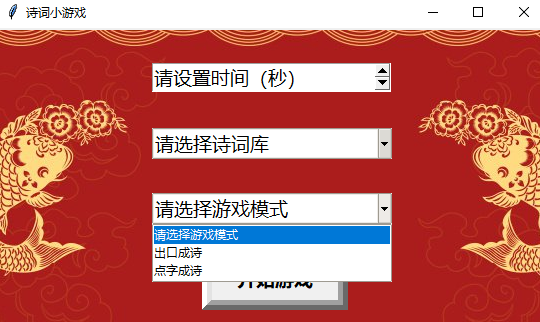
 69 def set_game():  # 游戏设置界面
 70     global set_bg
 71     enter_btn.place_forget()
 72     start_bg.pack_forget()
 73     set_bg.pack()
 74     set_time.place(x=155, y=35)
 75     choose_db.place(x=155, y=100)
 76     choose_mod.place(x=155, y=165)
 77     start_btn.place(x=205, y=220)
 78
 79
 80 def identify_db():  # 识别诗词库
 81     global db_file
 82     if db1.get() == "诗词库":
 83         db_file = "poetry_database.json"
 84     return db_file
 85
 86
 87 def choose_game():  # 选择游戏模式
 88     if db2.get() == "出口成诗":
 89         random_sel_1()
 90     elif db2.get() == "点字成诗":
 91         random_sel_2()
 92
 93
 94 def random_sel_1():  # 出口成诗游戏逻辑函数
 95     global ans_1, ans_2, ans_3, ans_4, ans_5, ans_6, ans_7, ans_8, ans_9, ans_10, ans_11, ans_12
 96     record = []
 97     seconds = eval(set_time.get())
 98     json_file = identify_db()
 99     poetry_dict = open_db(json_file)
100     set_time.place_forget()
101     choose_db.place_forget()
102     choose_mod.place_forget()
103     start_btn.place_forget()
104     set_bg.pack_forget()
105     change_btn.place(x=155, y=200)
106     quit_btn.place(x=440, y=200)
107     time_left.place(x=10, y=270)
108     play_bg.pack()
109     show_btns()
110     for i in range(100):
111         loc = random.randint(1, 100)
112         if loc not in record:
113             record.append(loc)
114             line_count = poetry_dict[loc - 1]["line"]
115             line_num = random.randint(1, line_count)
116             if len(record) == 1:
117                 kwd_1.set(poetry_dict[loc - 1]["keyword"][line_num - 1])
118                 ans_1 = poetry_dict[loc - 1]["text"][line_num - 1]
119             elif len(record) == 2:
120                 kwd_2.set(poetry_dict[loc - 1]["keyword"][line_num - 1])
121                 ans_2 = poetry_dict[loc - 1]["text"][line_num - 1]
122             elif len(record) == 3:
123                 kwd_3.set(poetry_dict[loc - 1]["keyword"][line_num - 1])
124                 ans_3 = poetry_dict[loc - 1]["text"][line_num - 1]
125             elif len(record) == 4:
126                 kwd_4.set(poetry_dict[loc - 1]["keyword"][line_num - 1])
127                 ans_4 = poetry_dict[loc - 1]["text"][line_num - 1]
128             elif len(record) == 5:
129                 kwd_5.set(poetry_dict[loc - 1]["keyword"][line_num - 1])
130                 ans_5 = poetry_dict[loc - 1]["text"][line_num - 1]
131             elif len(record) == 6:
132                 kwd_6.set(poetry_dict[loc - 1]["keyword"][line_num - 1])
133                 ans_6 = poetry_dict[loc - 1]["text"][line_num - 1]
134             elif len(record) == 7:
135                 kwd_7.set(poetry_dict[loc - 1]["keyword"][line_num - 1])
136                 ans_7 = poetry_dict[loc - 1]["text"][line_num - 1]
137             elif len(record) == 8:
138                 kwd_8.set(poetry_dict[loc - 1]["keyword"][line_num - 1])
139                 ans_8 = poetry_dict[loc - 1]["text"][line_num - 1]
140             elif len(record) == 9:
141                 kwd_9.set(poetry_dict[loc - 1]["keyword"][line_num - 1])
142                 ans_9 = poetry_dict[loc - 1]["text"][line_num - 1]
143             elif len(record) == 10:
144                 kwd_10.set(poetry_dict[loc - 1]["keyword"][line_num - 1])
145                 ans_10 = poetry_dict[loc - 1]["text"][line_num - 1]
146             elif len(record) == 11:
147                 kwd_11.set(poetry_dict[loc - 1]["keyword"][line_num - 1])
148                 ans_11 = poetry_dict[loc - 1]["text"][line_num - 1]
149             elif len(record) == 12:
150                 kwd_12.set(poetry_dict[loc - 1]["keyword"][line_num - 1])
151                 ans_12 = poetry_dict[loc - 1]["text"][line_num - 1]
152                 countdown(seconds)
153                 break
154         if loc in record:
155             continue
156
157
158 def random_sel_2():  # 点字成诗游戏逻辑函数
159     global click_ans1
160     refresh_btns()
161     seconds = eval(set_time.get())
162     json_file = identify_db()
163     poetry_dict = open_db(json_file)
164     set_time.place_forget()
165     choose_db.place_forget()
166     choose_mod.place_forget()
167     start_btn.place_forget()
168     set_bg.pack_forget()
169     change_btn.place(x=155, y=200)
170     quit_btn.place(x=440, y=200)
171     time_left.place(x=10, y=270)
172     play_bg.pack()
173     # 随机生成诗句及答案
174     show_btns()
175     loc = random.randint(1, 100)
176     line_count = poetry_dict[loc - 1]["line"]
177     line_num = random.randint(1, line_count)
178     sentences = re.findall(r'[\u4E00-\u9FA5]+',
179                            poetry_dict[loc - 1]["text"][line_num - 1])
180     sentence = sentences[random.randint(0, 1)]
181     words = re.findall(r'[\u4E00-\u9FA5]', sentence)
182     click_ans1 = re.findall(r'[\u4E00-\u9FA5]', sentence)
183     # 随机加入干扰字
184     for i in range(0, 12 - len(words)):
185         loc2 = random.randint(1, 100)
186         line_count2 = poetry_dict[loc2 - 1]["line"]
187         line_num2 = random.randint(1, line_count2)
188         sentences2 = re.findall(r'[\u4E00-\u9FA5]+', poetry_dict[loc2 - 1]["text"][line_num2 - 1])
189         sentence2 = sentences2[random.randint(0, 1)]
190         words2 = re.findall(r'[\u4E00-\u9FA5]', sentence2)
191         words.append(words2[random.randint(0, len(words2) - 1)])
192     # 将生成好的选项加入按钮
193     random.shuffle(words)
194     kwd_1.set(words[0])
195     kwd_2.set(words[1])
196     kwd_3.set(words[2])
197     kwd_4.set(words[3])
198     kwd_5.set(words[4])
199     kwd_6.set(words[5])
200     kwd_7.set(words[6])
201     kwd_8.set(words[7])
202     kwd_9.set(words[8])
203     kwd_10.set(words[9])
204     kwd_11.set(words[10])
205     kwd_12.set(words[11])
206     if count == 0:
207         countdown(seconds)
208
209
210 def answer_qu(btn_x, ans_x):  # 游戏回答界面及逻辑函数
211     global count, right_count
212     if db2.get() == "出口成诗":
213         global ans_entry
214         global ans_window
215         btn_x["bg"] = "grey"
216         ans_window = tk.Toplevel()
217         ans_window.protocol("WM_DELETE_WINDOW", lambda: change_color(btn_x))
218         window_width = root.winfo_screenwidth()
219         window_height = root.winfo_screenheight()
220         w = int((window_width - 300) / 2)
221         h = int((window_height - 100) / 2)
222         ans_window.geometry("400x150+%s+%s" % (w, h))
223         ans_window.title("请输入答案")
224         ans_entry = tk.Entry(ans_window, width=28, font=("微软雅黑", 14))
225         ans_entry.pack(pady=10)
226         ans_lab = tk.Label(ans_window, textvariable=btn_x["textvariable"], font=("微软雅黑", 14, "bold"))
227         ans_lab.pack(pady=10)
228         confirm_btn = tk.Button(ans_window, text="确认", command=lambda: judge_ans(btn_x, ans_x), font=("微软雅黑", 12))
229         confirm_btn.pack(anchor=tk.S, side=tk.LEFT, padx=40, pady=10)
230         clear_btn = tk.Button(ans_window, text="清除", command=clear_ans, font=("微软雅黑", 12))
231         clear_btn.pack(anchor=tk.S, side=tk.RIGHT, padx=40, pady=10)
232     elif db2.get() == "点字成诗":
233         btn_x["bg"] = "grey"
234         get_anwser.append(btn_x["text"])
235         if len(get_anwser) == len(click_ans1):
236             if get_anwser == click_ans1:
237                 count += 1
238                 right_count += 1
239                 if count == 10:
240                     tk.messagebox.showinfo(message="回答正确!已回答%s题,答对%s题!" % (count, right_count))
241                     change_btn["text"] = "重新开始"
242                     n = len(get_anwser) + 1
243                     del get_anwser[-n:]
244                     right_count = 0
245                     count = 0
246                 else:
247                     tk.messagebox.showinfo(message="回答正确!已回答%s题,答对%s题!" % (count, right_count))
248                     n = len(get_anwser) + 1
249                     del get_anwser[-n:]
250                     print(get_anwser)
251                     print(click_ans1)
252                     random_sel_2()
253             else:
254                 count += 1
255                 if count == 10:
256                     tk.messagebox.showinfo(message="回答错误!已回答%s题,答对%s题!" % (count, right_count))
257                     change_btn["text"] = "重新开始"
258                     n = len(get_anwser) + 1
259                     del get_anwser[-n:]
260                     right_count = 0
261                     count = 0
262                 else:
263                     tk.messagebox.showerror(message="回答错误!已回答%s题,答对%s题!" % (count, right_count))
264                     print(get_anwser)
265                     n = len(get_anwser) + 1
266                     del get_anwser[-n:]
267                     print(get_anwser)
268                     print(click_ans1)
269                     random_sel_2()
270
271
272 def refresh_btns():  # 刷新显示关键字的按钮
273     btn_1["bg"] = "red"
274     btn_2["bg"] = "red"
275     btn_3["bg"] = "red"
276     btn_4["bg"] = "red"
277     btn_5["bg"] = "red"
278     btn_6["bg"] = "red"
279     btn_7["bg"] = "red"
280     btn_8["bg"] = "red"
281     btn_9["bg"] = "red"
282     btn_10["bg"] = "red"
283     btn_11["bg"] = "red"
284     btn_12["bg"] = "red"
285
286
287 def judge_ans(btn_y, ans_y):  # 判断答案正误
288     if db2.get() == "出口成诗":
289         global right_count
290         if ans_entry.get() == ans_y:
291             tk.messagebox.showinfo(message="回答正确!")
292             ans_window.destroy()
293             btn_y.place_forget()
294             if right_count == 12:
295                 change_btn["text"] = "重新开始"
296                 tk.messagebox.showinfo(message="取得胜利!")
297                 right_count = 0
298         else:
299             tk.messagebox.showerror(message="回答错误!")
300
301
302 def change_color(btn_z):  # 改变按钮的背景色
303     ans_window.destroy()
304     btn_z["bg"] = "red"
305
306
307 def clear_ans():  # 清空答案
308     ans_entry.delete(0, tk.END)
309
310
311 def close_window():  # 关闭游戏窗口
312     if tk.messagebox.askokcancel(message="您确定要退出吗?"):
313         root.destroy()
314
315
316 def quit_game():  # 离开游戏
317     if tk.messagebox.askokcancel(message="您确定要退出吗?"):
318         root.destroy()
319
320
321 root = tk.Tk()
322 root.title("诗词小游戏")
323 root.geometry("550x300")
324
325 get_anwser = []
326 right_count = 0
327 count = 0
328 kwd_1 = tk.StringVar()
329 kwd_2 = tk.StringVar()
330 kwd_3 = tk.StringVar()
331 kwd_4 = tk.StringVar()
332 kwd_5 = tk.StringVar()
333 kwd_6 = tk.StringVar()
334 kwd_7 = tk.StringVar()
335 kwd_8 = tk.StringVar()
336 kwd_9 = tk.StringVar()
337 kwd_10 = tk.StringVar()
338 kwd_11 = tk.StringVar()
339 kwd_12 = tk.StringVar()
340 kwd_13 = tk.StringVar()
341 db1 = tk.StringVar()
342 db2 = tk.StringVar()
343 ans_1 = 0
344 ans_2 = 0
345 ans_3 = 0
346 ans_4 = 0
347 ans_5 = 0
348 ans_6 = 0
349 ans_7 = 0
350 ans_8 = 0
351 ans_9 = 0
352 ans_10 = 0
353 ans_11 = 0
354 ans_12 = 0
355
356 start_img = process_img("start.jpg")
357 start_bg = tk.Canvas(root, width=550, height=300)
358 start_bg.create_image(280, 160, image=start_img)
359 start_bg.pack()
360 start_bg.create_text(275, 120, font=("微软雅黑", 50, "bold"), fill="Snow", text="诗 词 小 游 戏")
361 set_img = process_img("start.jpg")
362 set_bg = tk.Canvas(root, width=550, height=300)
363 set_bg.create_image(280, 160, image=set_img)
364 play_img = process_img("play.jpg")
365 play_bg = tk.Canvas(root, width=550, height=300)
366 play_bg.create_image(275, 150, image=play_img)
367
368 choose_db = ttk.Combobox(root, font=("微软雅黑", 14), textvariable=db1)
369 choose_db["value"] = ("请选择诗词库", "诗词库")
370 choose_db.current(0)
371 choose_mod = ttk.Combobox(root, font=("微软雅黑", 14), textvariable=db2)
372 choose_mod["value"] = ("请选择游戏模式", "出口成诗", "点字成诗")
373 choose_mod.current(0)
374
375 style_yellow = ttk.Style()
376 style_yellow.theme_use("clam")
377 style_yellow.configure("yellow.Horizontal.TProgressbar", background="yellow")
378 style_red = ttk.Style()
379 style_red.theme_use("clam")
380 style_red.configure("red.Horizontal.TProgressbar", background="red")
381 style_green = ttk.Style()
382 style_green.theme_use("clam")
383 style_green.configure("green.Horizontal.TProgressbar", background="green")
384 time_left = ttk.Progressbar(root, length=400, mode="determinate", maximum=100000, style="green.Horizontal.TProgressbar")
385 time_left["value"] = 100000
386 set_time = tk.Spinbox(root, font=("微软雅黑", 14), from_=100, to=1000, increment=10)
387 set_time["values"] = ["请设置时间(秒)", 100, 110, 120, 130, 140, 150, 160, 170, 180, 190, 200, 210, 220, 230, 240, 250,
388                       260, 270, 280, 290, 300, 310, 320, 330, 340, 350, 360, 370, 380, 390, 400, 410, 420, 430, 440, 450,
389                       460, 470, 480, 490, 500]
390
391 enter_btn = tk.Button(root, text="进入游戏", font=('微软雅黑', 14, "bold"), width=10, height=1, command=set_game,
392                       relief="raised", borderwidth=10)
393 enter_btn.place(x=205, y=220)
394 start_btn = tk.Button(root, text="开始游戏", font=('微软雅黑', 14, "bold"), width=10, height=1,command=choose_game,
395                       relief="raised", borderwidth=10)
396 quit_btn = tk.Button(root, text="退出", font=('微软雅黑', 14, "bold"), width=5, height=1, command=quit_game,
397                      relief="raised", borderwidth=10)
398 change_btn = tk.Button(root, text="换一组", font=('微软雅黑', 14, "bold"), width=7, height=1, command=choose_game,
399                        relief="raised", borderwidth=10)
400
401 btn_1 = tk.Button(root, textvariable=kwd_1, bg="red", fg="white", font=("微软雅黑", 15, "bold"), relief="raised",
402                   borderwidth=10, command=lambda: answer_qu(btn_1, ans_1))
403 btn_2 = tk.Button(root, textvariable=kwd_2, bg="red", fg="white", font=("微软雅黑", 14, "bold"), relief="raised",
404                   borderwidth=10, command=lambda: answer_qu(btn_2, ans_2))
405 btn_3 = tk.Button(root, textvariable=kwd_3, bg="red", fg="white", font=("微软雅黑", 14, "bold"), relief="raised",
406                   borderwidth=10, command=lambda: answer_qu(btn_3, ans_3))
407 btn_4 = tk.Button(root, textvariable=kwd_4, bg="red", fg="white", font=("微软雅黑", 14, "bold"), relief="raised",
408                   borderwidth=10, command=lambda: answer_qu(btn_4, ans_4))
409 btn_5 = tk.Button(root, textvariable=kwd_5, bg="red", fg="white", font=("微软雅黑", 14, "bold"), relief="raised",
410                   borderwidth=10, command=lambda: answer_qu(btn_5, ans_5))
411 btn_6 = tk.Button(root, textvariable=kwd_6, bg="red", fg="white", font=("微软雅黑", 14, "bold"), relief="raised",
412                   borderwidth=10, command=lambda: answer_qu(btn_6, ans_6))
413 btn_7 = tk.Button(root, textvariable=kwd_7, bg="red", fg="white", font=("微软雅黑", 14, "bold"), relief="raised",
414                   borderwidth=10, command=lambda: answer_qu(btn_7, ans_7))
415 btn_8 = tk.Button(root, textvariable=kwd_8, bg="red", fg="white", font=("微软雅黑", 14, "bold"),
416                   relief="raised", borderwidth=10, command=lambda: answer_qu(btn_8, ans_8))
417 btn_9 = tk.Button(root, textvariable=kwd_9, bg="red", fg="white", font=("微软雅黑", 14, "bold"), relief="raised",
418                   borderwidth=10, command=lambda: answer_qu(btn_9, ans_9))
419 btn_10 = tk.Button(root, textvariable=kwd_10, bg="red", fg="white", font=("微软雅黑", 14, "bold"), relief="raised",
420                    borderwidth=10, command=lambda: answer_qu(btn_10, ans_10))
421 btn_11 = tk.Button(root, textvariable=kwd_11, bg="red", fg="white", font=("微软雅黑", 14, "bold"), relief="raised",
422                    borderwidth=10, command=lambda: answer_qu(btn_11, ans_11))
423 btn_12 = tk.Button(root, textvariable=kwd_12, bg="red", fg="white", font=("微软雅黑", 14, "bold"), relief="raised",
424                    borderwidth=10, command=lambda: answer_qu(btn_12, ans_12))
425
426 root.protocol("WM_DELETE_WINDOW", close_window)
427 root.mainloop()
总结:
| 学习阶段 | 学习内容 | 学习收获 |
| 2019.4.7 14:00-17:00 | 软件工程 |
了解软件系统和交互设计 |
| 2019.4.8 14:00-17:00 | 讲义学习 | 了解软件创新 |
| 2019.4.10 08:00-11:00 | 课堂讨论 | 对软件进行评价 |
| 2019.4.11 09:00-17:00 | 实践学习 | 完善出点字成诗游戏流程 |
| 2019.4.12 09:00-2100 | 实践学习 |
整合点字成诗游戏 |

 浙公网安备 33010602011771号