Unity ROI360 SDK 内购验证通过AF验证之后再给用户下发商品
官方文档
第一步
将连接器添加到您的项目中
下载最新版本地址
在这个位置,单独下载这个unitypackage包就行

如果是用srict-mode(严格模式),就是上面srict-mode文件夹中
然后导入Unity
第二步
如果你使用了自定义混淆proguard-user

那就在混淆文件中加入以下代码
-keep class com.appsflyer.** { *; }
-keep class kotlin.jvm.internal.Intrinsics{ *; }
-keep class kotlin.collections.**{ *; }
第三步
打开AppsFlyerObjectScript脚本
从上往下添加以下代码
修改1,继承接口
,IAppsFlyerPurchaseValidation
修改2,增加回调
 public Action<string,string, string> onPurchaseComplete;
    public Action<string> onPurchaseFailed;
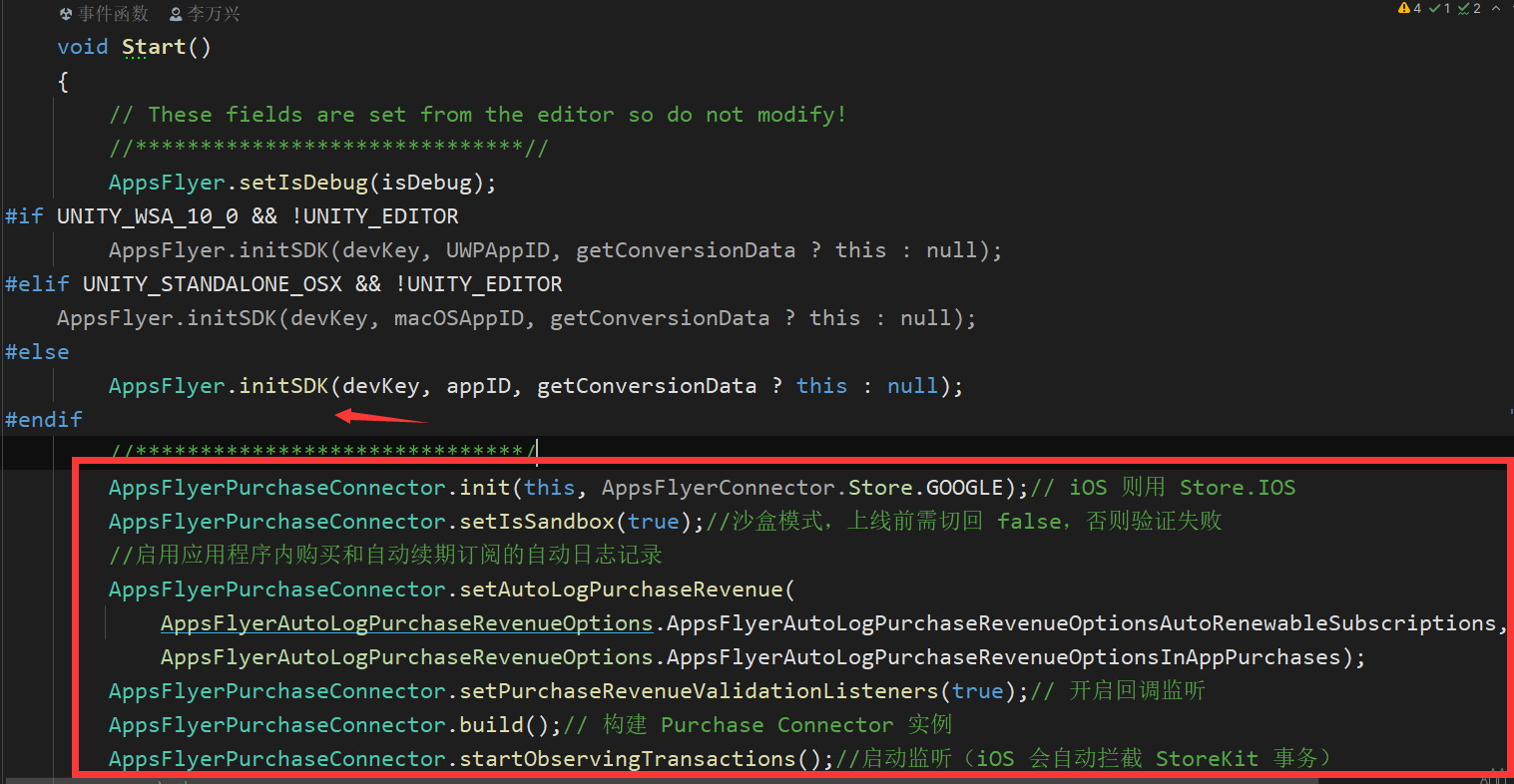
修改3,初始化连接器
注意:AppsFlyerPurchaseConnector.setIsSandbox(true);//沙盒模式,上线前需切回 false,否则验证失败
 AppsFlyerPurchaseConnector.init(this, AppsFlyerConnector.Store.GOOGLE);// iOS 则用 Store.IOS
        AppsFlyerPurchaseConnector.setIsSandbox(true);//沙盒模式,上线前需切回 false,否则验证失败
        //启用应用程序内购买和自动续期订阅的自动日志记录
        AppsFlyerPurchaseConnector.setAutoLogPurchaseRevenue(
            AppsFlyerAutoLogPurchaseRevenueOptions.AppsFlyerAutoLogPurchaseRevenueOptionsAutoRenewableSubscriptions,
            AppsFlyerAutoLogPurchaseRevenueOptions.AppsFlyerAutoLogPurchaseRevenueOptionsInAppPurchases);
        AppsFlyerPurchaseConnector.setPurchaseRevenueValidationListeners(true);// 开启回调监听
        AppsFlyerPurchaseConnector.build();// 构建 Purchase Connector 实例
        AppsFlyerPurchaseConnector.startObservingTransactions();//启动监听(iOS 会自动拦截 StoreKit 事务)
放在
AppsFlyer.initSDK(devKey, appID, getConversionData ? this : null);
的下面
修改4,完成接口方法,并校验订单
    public void didReceivePurchaseRevenueValidationInfo(string validationInfo)
    {
        Debug.Log("wx----IAP----收到购买信息"+validationInfo);
        //AppsFlyer.AFLog("didReceivePurchaseRevenueValidationInfo", validationInfo);
        // deserialize the string as a dictionnary, easy to manipulate
        Dictionary<string, object> dictionary = AFMiniJSON.Json.Deserialize(validationInfo) as Dictionary<string, object>;
        // if the platform is Android, you can create an object from the dictionnary
#if UNITY_ANDROID
        if (dictionary.ContainsKey("subscriptionPurchase") && dictionary["subscriptionPurchase"] != null)
        {
            SubscriptionValidationResult iapObject = JsonUtility.FromJson<SubscriptionValidationResult>(validationInfo);
            Debug.Log("wx----IAP----"+iapObject.success);
            if (iapObject.success && iapObject.subscriptionPurchase != null&& iapObject.subscriptionPurchase.lineItems != null)
            {
                Debug.Log("wx----IAP----"+"订阅验证通过");
                // 订阅验证通过
                string productId = iapObject.subscriptionPurchase.lineItems[0].productId;
                string orderId = iapObject.subscriptionPurchase.latestOrderId;
                string expiryTime = iapObject.subscriptionPurchase.lineItems[0].expiryTime;
                Debug.Log("wx----IAP----发放奖励"+productId);
                GrantSubscriptionToUser(productId, orderId,expiryTime);
                return;
            }
        }else  if (dictionary.ContainsKey("productPurchase") && dictionary["productPurchase"] != null)
        {
            // Create an object from the JSON string.
            InAppPurchaseValidationResult iapObject = JsonUtility.FromJson<InAppPurchaseValidationResult>(validationInfo);
            Debug.Log("wx----IAP----"+iapObject.success);
            if (iapObject.success && iapObject.productPurchase != null)
            {
                Debug.Log("wx----IAP----"+"商品验证通过");
                // 商品验证通过
                GrantItemToUser(iapObject.productPurchase.productId, iapObject.productPurchase.orderId);
                return;
            }
        }
        onPurchaseFailed?.Invoke("订阅验证失败");
#endif
    }
    public void didReceivePurchaseRevenueError(string error)
    {
        Debug.Log("wx----IAP----didReceivePurchaseRevenueError----:"+error);
        onPurchaseFailed?.Invoke("链接错误");
    }
    private void GrantItemToUser(string productId, string orderId)
    {
        Debug.Log($"wx----IAP发放内购商品:{productId}, 订单:{orderId}");
        // 根据 productId 发放对应道具
        onPurchaseComplete?.Invoke(productId, orderId, "");
    }

    private void GrantSubscriptionToUser(string productId, string orderId, string expiryTimeMillis)
    {
        Debug.Log($"wx----IAP激活订阅:{productId}, 到期时间:{expiryTimeMillis}, 订单:{orderId}");
        //  设置订阅状态,比如开启 VIP
        onPurchaseComplete?.Invoke(productId, orderId, expiryTimeMillis);
    }
搞定
把之前的购买成功发放奖励回调关闭,然后根据AF的回调发放
AppsFlyerObjectScript AF
  AF.onPurchaseComplete = onPurchaseComplete;
        AF.onPurchaseFailed = onPurchaseFailed;
public void onPurchaseComplete(string productId, string orderId, string expiryTimeMillis)
    {
        if (!string.IsNullOrEmpty(productId))
        {
            switch (productId)
            {
                case ConstantData.VipWeekId:
                case ConstantData.VipMonthId:
                case ConstantData.VipYearId:
                //发放该ID奖励
                    break;
            }
        }
    }
    public void onPurchaseFailed(string error)
    {
    	 //购买失败了怎么办
    }
测试查看日志
过滤关键字wx----IAP
链接错误,应该是后台没配置
wx----IAP----didReceivePurchaseRevenueE
代表收到AF回调
wx----IAP----收到购买信息…
校验成功
wx----IAP----True
wx----IAP----内购/商品验证通过

 浙公网安备 33010602011771号