
第七周作业
一、理论学习
1、学习慕课第十二章。
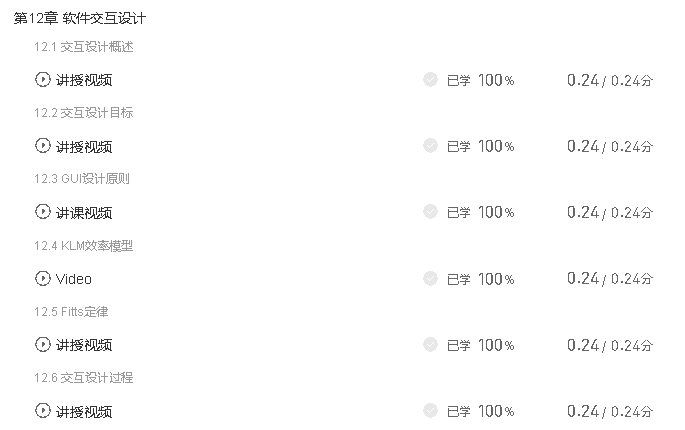
2、学习软件工程讲义“设计和开发”章节。
3、学习UML行为建模。
学习体会:
(1)学会了用例图、状态图、序列图等的基本描述方法,通过UML建模可以理顺软件的一些需求、软件与用户交互过程动作的执行顺序以及对象所处的一些状态,可以为程序员进行程序的编写建立良好的思路。
(2)对于一些复杂交错的情况,建模画图时还不知道该从何处下手。
二、实践学习(小组成员:曹宇轩,刘昕昕)
1、用例图,进入游戏后选择游戏模式,进入出口成诗游戏,则自动生成题目,选择题目后输入答案进行回答并提交,超时或完成所有回答后显示得分情况,点击返回主界面按钮可以回到选择游戏界面,点击退出游戏按钮直接退出游戏;进入点字成诗游戏,不同的是,不需要选择题目,回答时只需进行点击即可,不用进行输入。
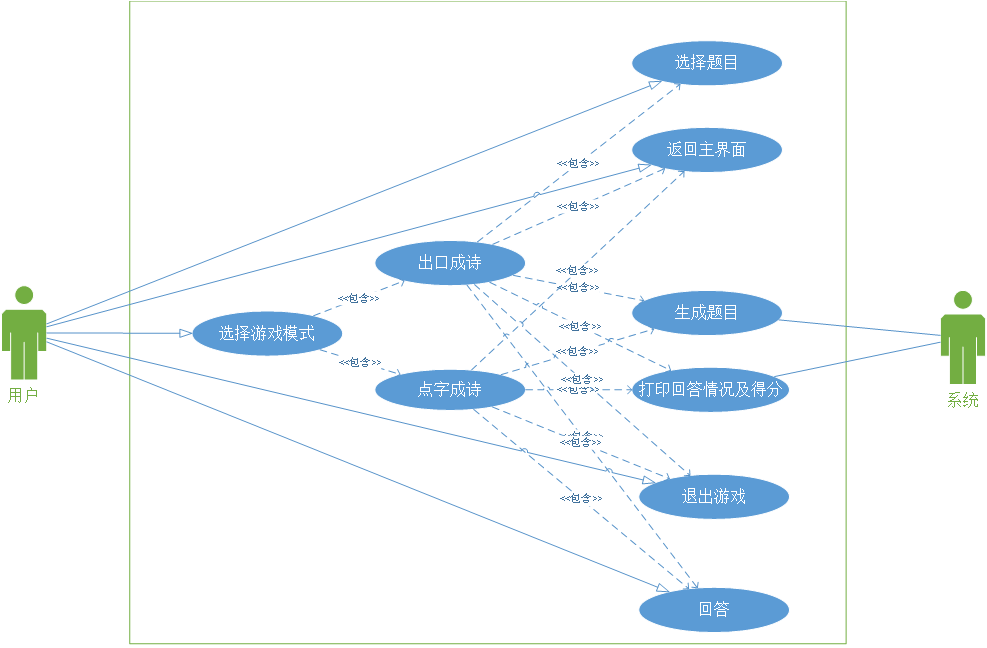
2、本周项目计划、执行情况及改进建议。
项目计划:
(1)编写模式选择界面(2h)
(2)编写出口成诗界面(5h)
(3)编写点字成诗界面(5h)
(4)编写显示得分情况界面(30min)
(5)代码规范性检查(30min)
执行情况:
(1)模式选择界面已完成(1.5h)
(2)出口成诗界面已完成(6h)
(3)点字成诗界面已完成(6h)
(4)显示得分情况界面已完成(40min)
(5)代码规范性检查已完成(20min)
改进建议:
(1)界面排版和美化
(2)多次运行寻找bug并修改
(3)进一步完善功能
3、程序编写(见https://github.com/lxxlccly/rjgc4下的scds_dzcs.py文件)
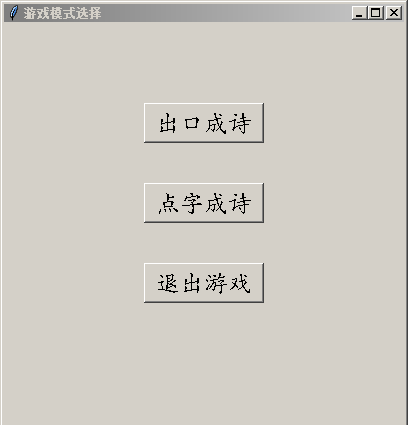
(1)模式选择界面,建立三个按钮(出口成诗、点字成诗、退出游戏)以及对应的响应函数。代码如下:


 1 class ModeSelection(object):
 2     '''诗词大赛游戏'''
 3     def start(self):
 4         '''开始游戏'''
 5         global is_running
 6         while is_running:
 7             self.selection()
 8
 9     def selection(self):
10         '''模式选择界面'''
11         saying_poet = SayPoet()
12         clicking_poet = ClickPoet()
13         global is_running, mode_select_interface
14         if is_running:
15             mode_select_interface = tkinter.Tk()
16             mode_select_interface.title("游戏模式选择")
17             mode_select_interface.geometry("400x400+500+150")
18             mode1 = tkinter.Button(mode_select_interface, text="出口成诗", font=('楷体', 18),
19                                    activeforeground='blue', command=saying_poet.run)
20             mode1.place(relwidth=0.3, relheight=0.1, relx=0.35, rely=0.2)
21             mode2 = tkinter.Button(mode_select_interface, text="点字成诗", font=('楷体', 18),
22                                    activeforeground='blue', command=clicking_poet.run)
23             mode2.place(relwidth=0.3, relheight=0.1, relx=0.35, rely=0.4)
24             exit0 = tkinter.Button(mode_select_interface, text="退出游戏", font=('楷体', 18),
25                                    activeforeground='red', command=self.exit_mode_select)
26             exit0.place(relwidth=0.3, relheight=0.1, relx=0.35, rely=0.6)
27             mode_select_interface.protocol("WM_DELETE_WINDOW", self.exit_mode_select)
28             mode_select_interface.mainloop()
29
30     def exit_mode_select(self):
31         '''模式选择界面的退出游戏函数'''
32         global mode_select_interface, is_running
33         is_running = False
34         mode_select_interface.destroy()
运行结果如下(点击出口成诗即进入出口成诗环节,点击点字成诗则进入点字成诗环节,点击退出游戏即可退出):
(2)出口成诗界面,首先获取诗词库、生成题目,然后在界面上以按钮形式显示十二个题目,创建一个输入框进行回答,创建一个“提交”按钮提交答案,创建一个“返回主界面”按钮和一个“退出游戏”按钮,超时或完成所有回答后进入“显示得分情况”界面。代码如下:
  1 class SayPoet(object):
  2     '''出口成诗游戏'''
  3     def __init__(self):
  4         self.time_limit = 60
  5         self.say_poet_interface = None
  6         self.say_poet = ckcs.PoetGame()
  7         self.exiting = 0
  8         self.answering_state = [0] * self.say_poet.question_amount
  9         self.answer = None
 10
 11     def run(self):
 12         '''出口成诗运行函数'''
 13         global mode_select_interface
 14         mode_select_interface.destroy()
 15         self.say_poet.get_question()
 16         self.say_poet.get_poet_library()
 17         start_time = time.time()
 18         while not self.exiting:
 19             end_time = time.time()
 20             if end_time - start_time > self.time_limit:
 21                 break
 22             self.say_poet_display()
 23             if self.exiting == 1:
 24                 break
 25             if self.say_poet.unanswered == [0] * self.say_poet.question_amount:
 26                 break
 27         if self.exiting == 0:
 28             self.show_grade()
 29
 30     def say_poet_display(self):
 31         '''出口成诗界面'''
 32         background_color = ['skyblue', 'green', 'grey']
 33         self.say_poet_interface = tkinter.Tk()
 34         self.say_poet_interface.title("出口成诗")
 35         self.say_poet_interface.geometry("400x400+500+150")
 36         question_button1 = tkinter.Button(self.say_poet_interface,
 37                                           text=self.say_poet.questions[0],
 38                                           bg=background_color[self.answering_state[0]],
 39                                           font=('楷体', 18),
 40                                           activeforeground='green',
 41                                           command=self.button1_response)
 42         question_button1.place(relwidth=0.3, relheight=0.1, relx=0, rely=0.02)
 43         question_button2 = tkinter.Button(self.say_poet_interface,
 44                                           text=self.say_poet.questions[1],
 45                                           bg=background_color[self.answering_state[1]],
 46                                           font=('楷体', 18),
 47                                           activeforeground='green',
 48                                           command=self.button2_response)
 49         question_button2.place(relwidth=0.3, relheight=0.1, relx=0.35, rely=0.02)
 50         question_button3 = tkinter.Button(self.say_poet_interface,
 51                                           text=self.say_poet.questions[2],
 52                                           bg=background_color[self.answering_state[2]],
 53                                           font=('楷体', 18),
 54                                           activeforeground='green',
 55                                           command=self.button3_response)
 56         question_button3.place(relwidth=0.3, relheight=0.1, relx=0.7, rely=0.02)
 57         question_button4 = tkinter.Button(self.say_poet_interface,
 58                                           text=self.say_poet.questions[3],
 59                                           bg=background_color[self.answering_state[3]],
 60                                           font=('楷体', 18),
 61                                           activeforeground='green',
 62                                           command=self.button4_response)
 63         question_button4.place(relwidth=0.3, relheight=0.1, relx=0, rely=0.14)
 64         question_button5 = tkinter.Button(self.say_poet_interface,
 65                                           text=self.say_poet.questions[4],
 66                                           bg=background_color[self.answering_state[4]],
 67                                           font=('楷体', 18),
 68                                           activeforeground='green',
 69                                           command=self.button5_response)
 70         question_button5.place(relwidth=0.3, relheight=0.1, relx=0.35, rely=0.14)
 71         question_button6 = tkinter.Button(self.say_poet_interface,
 72                                           text=self.say_poet.questions[5],
 73                                           bg=background_color[self.answering_state[5]],
 74                                           font=('楷体', 18),
 75                                           activeforeground='green',
 76                                           command=self.button6_response)
 77         question_button6.place(relwidth=0.3, relheight=0.1, relx=0.7, rely=0.14)
 78         question_button7 = tkinter.Button(self.say_poet_interface,
 79                                           text=self.say_poet.questions[6],
 80                                           bg=background_color[self.answering_state[6]],
 81                                           font=('楷体', 18),
 82                                           activeforeground='green',
 83                                           command=self.button7_response)
 84         question_button7.place(relwidth=0.3, relheight=0.1, relx=0, rely=0.26)
 85         question_button8 = tkinter.Button(self.say_poet_interface,
 86                                           text=self.say_poet.questions[7],
 87                                           bg=background_color[self.answering_state[7]],
 88                                           font=('楷体', 18),
 89                                           activeforeground='green',
 90                                           command=self.button8_response)
 91         question_button8.place(relwidth=0.3, relheight=0.1, relx=0.35, rely=0.26)
 92         question_button9 = tkinter.Button(self.say_poet_interface,
 93                                           text=self.say_poet.questions[8],
 94                                           bg=background_color[self.answering_state[8]],
 95                                           font=('楷体', 18),
 96                                           activeforeground='green',
 97                                           command=self.button9_response)
 98         question_button9.place(relwidth=0.3, relheight=0.1, relx=0.7, rely=0.26)
 99         question_button10 = tkinter.Button(self.say_poet_interface,
100                                            text=self.say_poet.questions[9],
101                                            bg=background_color[self.answering_state[9]],
102                                            font=('楷体', 18),
103                                            activeforeground='green',
104                                            command=self.button10_response)
105         question_button10.place(relwidth=0.3, relheight=0.1, relx=0, rely=0.38)
106         question_button11 = tkinter.Button(self.say_poet_interface,
107                                            text=self.say_poet.questions[10],
108                                            bg=background_color[self.answering_state[10]],
109                                            font=('楷体', 18),
110                                            activeforeground='green',
111                                            command=self.button11_response)
112         question_button11.place(relwidth=0.3, relheight=0.1, relx=0.35, rely=0.38)
113         question_button12 = tkinter.Button(self.say_poet_interface,
114                                            text=self.say_poet.questions[11],
115                                            bg=background_color[self.answering_state[11]],
116                                            font=('楷体', 18),
117                                            activeforeground='green',
118                                            command=self.button12_response)
119         question_button12.place(relwidth=0.3, relheight=0.1, relx=0.7, rely=0.38)
120         label = tkinter.Label(self.say_poet_interface, text="请输入答案:", font=("宋体", 18))
121         label.place(relwidth=0.37, relheight=0.1, relx=0, rely=0.5)
122         self.answer = tkinter.Entry(self.say_poet_interface, font=("宋体", 14))
123         self.answer.place(relwidth=0.8, relheight=0.1, relx=0, rely=0.6)
124         submit_button = tkinter.Button(self.say_poet_interface,
125                                        text='提交',
126                                        font=('楷体', 18),
127                                        activeforeground='green',
128                                        command=self.submit_response)
129         submit_button.place(relwidth=0.18, relheight=0.1, relx=0.81, rely=0.6)
130         exit0 = tkinter.Button(self.say_poet_interface, text="退出游戏", font=('楷体', 18),
131                                activeforeground='red', command=self.exit_say_poet)
132         exit0.place(relwidth=0.3, relheight=0.1, relx=0.7, rely=0.9)
133         back0 = tkinter.Button(self.say_poet_interface, text="返回首页", font=('楷体', 18),
134                                activeforeground='red', command=self.back_mode_selection)
135         back0.place(relwidth=0.3, relheight=0.1, relx=0, rely=0.9)
136         self.say_poet_interface.protocol("WM_DELETE_WINDOW", self.exit_say_poet)
137         self.say_poet_interface.mainloop()
138
139     def show_grade(self):
140         '''显示回答情况和最终得分'''
141         right_amounts = 0
142         conclusion = ''
143         for i in range(self.say_poet.question_amount):
144             if self.say_poet.answers[i] != '':
145                 right_amounts += 1
146                 conclusion += '{0:>2}、回答正确:{1}\n'.format(i + 1, self.say_poet.answers[i])
147             else:
148                 conclusion += '{0:>2}、回答错误/未回答。\n'.format(i + 1)
149         self.say_poet.grade = right_amounts / self.say_poet.question_amount * 100
150         score = '您的总得分为:{0:.1f}分'.format(self.say_poet.grade)
151         self.say_poet_interface = tkinter.Tk()
152         self.say_poet_interface.title("回答情况总结")
153         self.say_poet_interface.geometry("400x400+500+150")
154         label = tkinter.Label(self.say_poet_interface, text=conclusion,
155                               font=("宋体", 12), anchor='w', justify='left')
156         label.place(relwidth=1, relheight=0.55, relx=0, rely=0.05)
157         label2 = tkinter.Label(self.say_poet_interface, text=score, font=("宋体", 18), anchor='w')
158         label2.place(relwidth=1, relheight=0.1, relx=0, rely=0.65)
159         exit0 = tkinter.Button(self.say_poet_interface, text="退出游戏", font=('楷体', 18),
160                                activeforeground='red', command=self.exit_say_poet)
161         exit0.place(relwidth=0.3, relheight=0.1, relx=0.7, rely=0.85)
162         back0 = tkinter.Button(self.say_poet_interface, text="返回首页", font=('楷体', 18),
163                                activeforeground='red', command=self.back_mode_selection)
164         back0.place(relwidth=0.3, relheight=0.1, relx=0, rely=0.85)
165         self.say_poet_interface.protocol("WM_DELETE_WINDOW", self.exit_say_poet)
166         self.say_poet_interface.mainloop()
167
168     def submit_response(self):
169         '''提交回答并处理'''
170         number = 0
171         for i in range(self.say_poet.question_amount):
172             if self.answering_state[i] == 1:
173                 number = i
174         answers = self.answer.get()
175         answer_right = self.say_poet.verification(number, answers)
176         if answer_right:
177             self.answering_state[number] = 2
178         self.say_poet_interface.destroy()
179
180     def exit_say_poet(self):
181         '''出口成诗界面的退出游戏函数'''
182         global is_running
183         is_running = False
184         self.say_poet_interface.destroy()
185         self.exiting = 1
186
187     def back_mode_selection(self):
188         '''出口成诗界面返回游戏模式选择界面的函数'''
189         self.say_poet_interface.destroy()
190         self.exiting = 1
191
192     def clear_select_state(self):
193         '''清除选中的状态'''
194         for i in range(self.say_poet.question_amount):
195             if self.answering_state[i] == 1:
196                 self.answering_state[i] = 0
197         self.say_poet_interface.destroy()
198
199     def button1_response(self):
200         '''点击第一个单词的响应'''
201         if self.answering_state[0] == 0:
202             self.clear_select_state()
203             self.answering_state[0] = 1
204
205     def button2_response(self):
206         '''点击第二个单词的响应'''
207         if self.answering_state[1] == 0:
208             self.clear_select_state()
209             self.answering_state[1] = 1
210
211     def button3_response(self):
212         '''点击第三个单词的响应'''
213         if self.answering_state[2] == 0:
214             self.clear_select_state()
215             self.answering_state[2] = 1
216
217     def button4_response(self):
218         '''点击第四个单词的响应'''
219         if self.answering_state[3] == 0:
220             self.clear_select_state()
221             self.answering_state[3] = 1
222
223     def button5_response(self):
224         '''点击第五个单词的响应'''
225         if self.answering_state[4] == 0:
226             self.clear_select_state()
227             self.answering_state[4] = 1
228
229     def button6_response(self):
230         '''点击第六个单词的响应'''
231         if self.answering_state[5] == 0:
232             self.clear_select_state()
233             self.answering_state[5] = 1
234
235     def button7_response(self):
236         '''点击第七个单词的响应'''
237         if self.answering_state[6] == 0:
238             self.clear_select_state()
239             self.answering_state[6] = 1
240
241     def button8_response(self):
242         '''点击第八个单词的响应'''
243         if self.answering_state[7] == 0:
244             self.clear_select_state()
245             self.answering_state[7] = 1
246
247     def button9_response(self):
248         '''点击第九个单词的响应'''
249         if self.answering_state[8] == 0:
250             self.clear_select_state()
251             self.answering_state[8] = 1
252
253     def button10_response(self):
254         '''点击第十个单词的响应'''
255         if self.answering_state[9] == 0:
256             self.clear_select_state()
257             self.answering_state[9] = 1
258
259     def button11_response(self):
260         '''点击第十一个单词的响应'''
261         if self.answering_state[10] == 0:
262             self.clear_select_state()
263             self.answering_state[10] = 1
264
265     def button12_response(self):
266         '''点击第十二个单词的响应'''
267         if self.answering_state[11] == 0:
268             self.clear_select_state()
269             self.answering_state[11] = 1
运行结果如下:
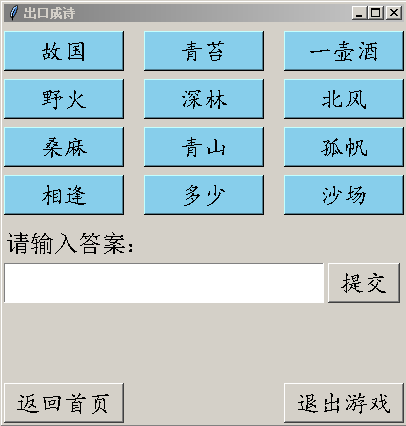
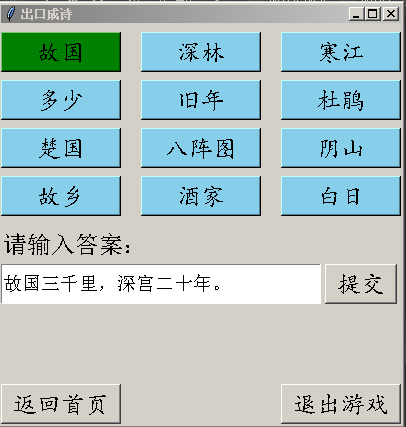
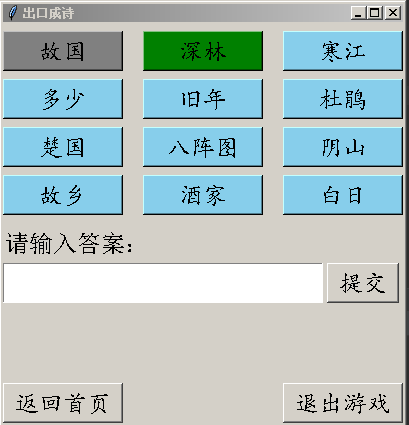
选中题目后,题目颜色会变绿,如下方左图,表示正在回答,通过在下方输入框中进行答案的输入,输入完成后点击提交按钮,若回答正确,则题目会变为灰色,如右图,此时再次点击该题目则无效,只能选择其它题目进行回答:
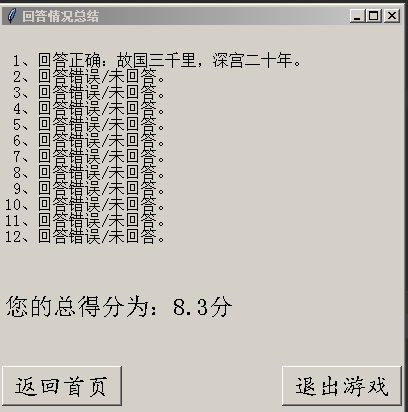
当超时或完成所有题目的回答后,会跳入下图所示界面,显示回答及得分情况,点击返回首页按钮即可回到游戏模式选择界面,点击退出游戏按钮即可退出游戏(在回答过程中也可点击):
(3)点字成诗界面,首先生成题目和相应的答案,然后在界面上以按钮形式显示一个题目的十二个字,创建一个文本框进行回答的显示,创建一个“返回主界面”按钮和一个“退出游戏”按钮,超时或完成所有回答后进入“显示得分情况”界面。代码如下:
  1 class ClickPoet(object):
  2     def __init__(self):
  3         self.click_poet_interface = None
  4         self.click_poet = dzcs.PoetGame()
  5         self.question_number = 0
  6         self.exiting = 0
  7         self.time_limit = 60
  8         self.answers = [''] * self.click_poet.question_amount
  9         self.click_state = [0] * 12
 10         self.right_amount = 0
 11
 12     def run(self):
 13         '''点字成诗运行函数'''
 14         global mode_select_interface
 15         mode_select_interface.destroy()
 16         start_time = time.time()
 17         end_time = 0
 18         for i in range(self.click_poet.question_amount):
 19             self.click_state = [0] * 12
 20             self.question_number = i
 21             self.click_poet.get_question(i)
 22             while not self.exiting:
 23                 end_time = time.time()
 24                 if end_time - start_time > self.time_limit or self.exiting == 1 or \
 25                         len(self.click_poet.right_answer[i]) == len(self.answers[i]):
 26                     break
 27                 self.click_poet_display()
 28             if end_time - start_time > self.time_limit or self.exiting == 1:
 29                 break
 30             if self.answers[i] == self.click_poet.right_answer[i]:
 31                 self.right_amount += 1
 32         if self.exiting == 0:
 33             self.show_grade()
 34
 35     def click_poet_display(self):
 36         '''点字成诗界面'''
 37         background_color = ['skyblue', 'grey']
 38         self.click_poet_interface = tkinter.Tk()
 39         self.click_poet_interface.title("点字成诗")
 40         self.click_poet_interface.geometry("400x400+500+150")
 41         if self.question_number > 0:
 42             if self.answers[self.question_number - 1] == self.click_poet.right_answer[self.question_number - 1]:
 43                 label0 = tkinter.Label(self.click_poet_interface, text='上一题回答正确', font=("宋体", 12), bg='green')
 44             else:
 45                 label0 = tkinter.Label(self.click_poet_interface, text='上一题回答错误', font=("宋体", 12), bg='red')
 46             label0.place(relwidth=0.49, relheight=0.08, relx=0, rely=0.01)
 47         grade = self.right_amount / self.click_poet.question_amount * 100
 48         score = '当前得分为:{0:.1f}分'.format(grade)
 49         label2 = tkinter.Label(self.click_poet_interface, text=score, font=("宋体", 12))
 50         label2.place(relwidth=0.49, relheight=0.08, relx=0.51, rely=0.01)
 51         word1 = tkinter.Button(self.click_poet_interface, font=('楷体', 18),
 52                                bg=background_color[self.click_state[0]],
 53                                text=self.click_poet.questions[self.question_number][0],
 54                                activeforeground='green', command=self.word1_response)
 55         word1.place(relwidth=0.1, relheight=0.1, relx=0.12, rely=0.1)
 56         word2 = tkinter.Button(self.click_poet_interface, font=('楷体', 18),
 57                                bg=background_color[self.click_state[1]],
 58                                text=self.click_poet.questions[self.question_number][1],
 59                                activeforeground='green', command=self.word2_response)
 60         word2.place(relwidth=0.1, relheight=0.1, relx=0.34, rely=0.1)
 61         word3 = tkinter.Button(self.click_poet_interface, font=('楷体', 18),
 62                                bg=background_color[self.click_state[2]],
 63                                text=self.click_poet.questions[self.question_number][2],
 64                                activeforeground='green', command=self.word3_response)
 65         word3.place(relwidth=0.1, relheight=0.1, relx=0.56, rely=0.1)
 66         word4 = tkinter.Button(self.click_poet_interface, font=('楷体', 18),
 67                                bg=background_color[self.click_state[3]],
 68                                text=self.click_poet.questions[self.question_number][3],
 69                                activeforeground='green', command=self.word4_response)
 70         word4.place(relwidth=0.1, relheight=0.1, relx=0.78, rely=0.1)
 71         word5 = tkinter.Button(self.click_poet_interface, font=('楷体', 18),
 72                                bg=background_color[self.click_state[4]],
 73                                text=self.click_poet.questions[self.question_number][4],
 74                                activeforeground='green', command=self.word5_response)
 75         word5.place(relwidth=0.1, relheight=0.1, relx=0.12, rely=0.3)
 76         word6 = tkinter.Button(self.click_poet_interface, font=('楷体', 18),
 77                                bg=background_color[self.click_state[5]],
 78                                text=self.click_poet.questions[self.question_number][5],
 79                                activeforeground='green', command=self.word6_response)
 80         word6.place(relwidth=0.1, relheight=0.1, relx=0.34, rely=0.3)
 81         word7 = tkinter.Button(self.click_poet_interface, font=('楷体', 18),
 82                                bg=background_color[self.click_state[6]],
 83                                text=self.click_poet.questions[self.question_number][6],
 84                                activeforeground='green', command=self.word7_response)
 85         word7.place(relwidth=0.1, relheight=0.1, relx=0.56, rely=0.3)
 86         word8 = tkinter.Button(self.click_poet_interface, font=('楷体', 18),
 87                                bg=background_color[self.click_state[7]],
 88                                text=self.click_poet.questions[self.question_number][7],
 89                                activeforeground='green', command=self.word8_response)
 90         word8.place(relwidth=0.1, relheight=0.1, relx=0.78, rely=0.3)
 91         word9 = tkinter.Button(self.click_poet_interface, font=('楷体', 18),
 92                                bg=background_color[self.click_state[8]],
 93                                text=self.click_poet.questions[self.question_number][8],
 94                                activeforeground='green', command=self.word9_response)
 95         word9.place(relwidth=0.1, relheight=0.1, relx=0.12, rely=0.5)
 96         word10 = tkinter.Button(self.click_poet_interface, font=('楷体', 18),
 97                                 bg=background_color[self.click_state[9]],
 98                                 text=self.click_poet.questions[self.question_number][9],
 99                                 activeforeground='green', command=self.word10_response)
100         word10.place(relwidth=0.1, relheight=0.1, relx=0.34, rely=0.5)
101         word11 = tkinter.Button(self.click_poet_interface, font=('楷体', 18),
102                                 bg=background_color[self.click_state[10]],
103                                 text=self.click_poet.questions[self.question_number][10],
104                                 activeforeground='green', command=self.word11_response)
105         word11.place(relwidth=0.1, relheight=0.1, relx=0.56, rely=0.5)
106         word12 = tkinter.Button(self.click_poet_interface, font=('楷体', 18),
107                                 bg=background_color[self.click_state[11]],
108                                 text=self.click_poet.questions[self.question_number][11],
109                                 activeforeground='green', command=self.word12_response)
110         word12.place(relwidth=0.1, relheight=0.1, relx=0.78, rely=0.5)
111         label = tkinter.Label(self.click_poet_interface, text="请点击上方的字进行回答:", font=("宋体", 18))
112         label.place(relwidth=0.8, relheight=0.1, relx=0, rely=0.65)
113         label2 = tkinter.Label(self.click_poet_interface, text=self.answers[self.question_number],
114                                font=("宋体", 18), bg='white', anchor='w', justify='left')
115         label2.place(relwidth=0.7, relheight=0.1, relx=0.05, rely=0.76)
116         delete_button = tkinter.Button(self.click_poet_interface, text='×', font=('楷体', 18),
117                                        activeforeground='red', command=self.delete_response)
118         delete_button.place(relwidth=0.1, relheight=0.1, relx=0.85, rely=0.76)
119         exit0 = tkinter.Button(self.click_poet_interface, text="退出游戏", font=('楷体', 18),
120                                activeforeground='red', command=self.exit_click_poet)
121         exit0.place(relwidth=0.3, relheight=0.1, relx=0.7, rely=0.9)
122         back0 = tkinter.Button(self.click_poet_interface, text="返回首页", font=('楷体', 18),
123                                activeforeground='red', command=self.back_mode_selection)
124         back0.place(relwidth=0.3, relheight=0.1, relx=0, rely=0.9)
125         self.click_poet_interface.protocol("WM_DELETE_WINDOW", self.exit_click_poet)
126         self.click_poet_interface.mainloop()
127
128     def exit_click_poet(self):
129         '''点字成诗界面的退出游戏函数'''
130         global is_running
131         is_running = False
132         self.click_poet_interface.destroy()
133         self.exiting = 1
134
135     def back_mode_selection(self):
136         '''点字成诗界面返回游戏模式选择界面的函数'''
137         self.click_poet_interface.destroy()
138         self.exiting = 1
139
140     def delete_response(self):
141         '''删除选择的字'''
142         if len(self.answers[self.question_number]) > 0:
143             string0 = self.answers[self.question_number][len(self.answers[self.question_number]) - 1]
144             self.answers[self.question_number] = self.answers[self.question_number][
145                                                  0:len(self.answers[self.question_number]) - 1]
146             for i in range(12):
147                 if string0 == self.click_poet.questions[self.question_number][i]:
148                     self.click_state[i] = 0
149                     break
150             self.click_poet_interface.destroy()
151
152     def show_grade(self):
153         '''显示回答情况和最终得分'''
154         conclusion = ''
155         for i in range(self.click_poet.question_amount):
156             if self.answers[i] == '':
157                 conclusion += '{0:>2}、未回答。\n'.format(i + 1)
158             else:
159                 if self.answers[i] == self.click_poet.right_answer[i]:
160                     conclusion += '{0:>2}、回答正确。\n'.format(i + 1)
161                 else:
162                     conclusion += '{0:>2}、回答错误。\n'.format(i + 1)
163         grade = self.right_amount / self.click_poet.question_amount * 100
164         score = '您的总得分为:{0:.1f}分'.format(grade)
165         self.click_poet_interface = tkinter.Tk()
166         self.click_poet_interface.title("回答情况总结")
167         self.click_poet_interface.geometry("400x400+500+150")
168         label = tkinter.Label(self.click_poet_interface, text=conclusion,
169                               font=("宋体", 14), anchor='w', justify='left')
170         label.place(relwidth=1, relheight=0.55, relx=0, rely=0.05)
171         label2 = tkinter.Label(self.click_poet_interface, text=score, font=("宋体", 18), anchor='w')
172         label2.place(relwidth=1, relheight=0.1, relx=0, rely=0.65)
173         exit0 = tkinter.Button(self.click_poet_interface, text="退出游戏", font=('楷体', 18),
174                                activeforeground='red', command=self.exit_click_poet)
175         exit0.place(relwidth=0.3, relheight=0.1, relx=0.7, rely=0.85)
176         back0 = tkinter.Button(self.click_poet_interface, text="返回首页", font=('楷体', 18),
177                                activeforeground='red', command=self.back_mode_selection)
178         back0.place(relwidth=0.3, relheight=0.1, relx=0, rely=0.85)
179         self.click_poet_interface.protocol("WM_DELETE_WINDOW", self.exit_click_poet)
180         self.click_poet_interface.mainloop()
181
182     def change_state(self, number):
183         '''改变按钮状态'''
184         if self.click_state[number] == 0:
185             self.answers[self.question_number] += self.click_poet.questions[self.question_number][number]
186             self.click_state[number] = 1
187             self.click_poet_interface.destroy()
188
189     def word1_response(self):
190         '''字1的响应函数'''
191         self.change_state(0)
192
193     def word2_response(self):
194         '''字2的响应函数'''
195         self.change_state(1)
196
197     def word3_response(self):
198         '''字3的响应函数'''
199         self.change_state(2)
200
201     def word4_response(self):
202         '''字4的响应函数'''
203         self.change_state(3)
204
205     def word5_response(self):
206         '''字5的响应函数'''
207         self.change_state(4)
208
209     def word6_response(self):
210         '''字6的响应函数'''
211         self.change_state(5)
212
213     def word7_response(self):
214         '''字7的响应函数'''
215         self.change_state(6)
216
217     def word8_response(self):
218         '''字8的响应函数'''
219         self.change_state(7)
220
221     def word9_response(self):
222         '''字9的响应函数'''
223         self.change_state(8)
224
225     def word10_response(self):
226         '''字10的响应函数'''
227         self.change_state(9)
228
229     def word11_response(self):
230         '''字11的响应函数'''
231         self.change_state(10)
232
233     def word12_response(self):
234         '''字12的响应函数'''
235         self.change_state(11)
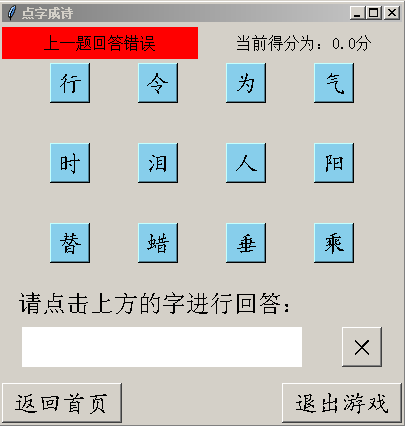
运行结果如下,点击相应的字后,该字会在文本框中进行显示,并且字的颜色变为灰色,不可再次点击:
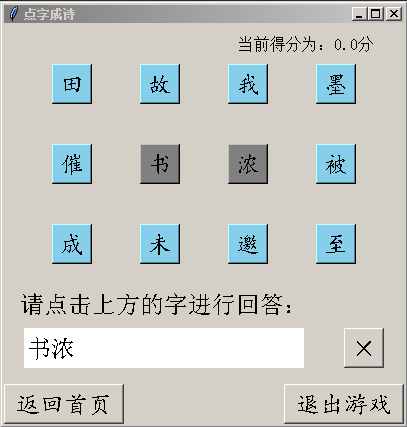
当点击的字数与正确答案字数一致时,系统自动提交答案并进行验证,在左上角显示上一题的回答情况,右上角显示当前得分:
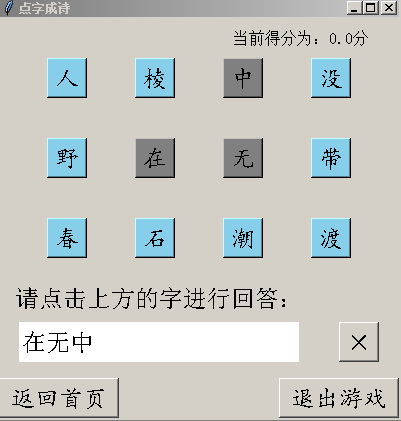
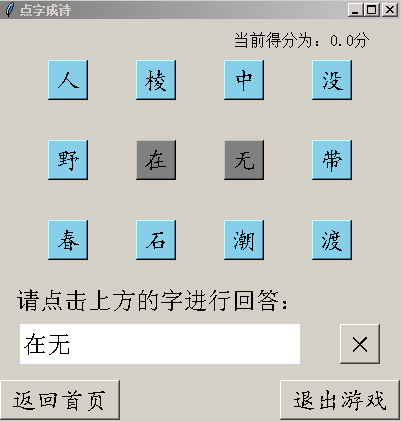
当点错字时,可以点击文本框右边的X进行删除,点击删除按钮后对应的字会消失,字的颜色也会从灰色回复天蓝色,如下图所示,为点击删除按钮前后的情况:
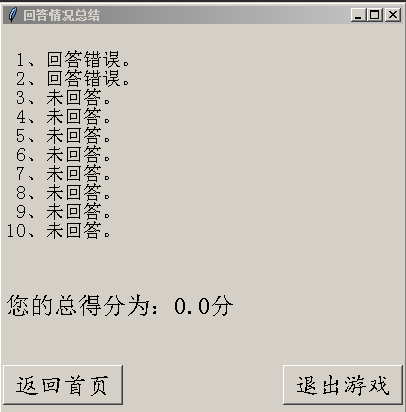
当超时或完成所有题目的回答后,会跳入下图所示界面,显示回答及得分情况,点击返回首页按钮即可回到游戏模式选择界面,点击退出游戏按钮即可退出游戏(在回答过程中也可点击):
(4)进行了代码规范性检查,以前的程序也有部分进行了简单的修改以满足最新程序的要求。
总结:
1)软件的基本界面及功能已经完成。
2)界面还需进行美化。
3)点字成诗还可以增加一个“下一题”按钮,若此题不会,可以点击直接进入下一题。
三、学习记录
| 学习时间 | 学习内容 |
| 3.30 20:00-21:10 | 慕课第十二章 |
| 4.2 14:10-17:30 | 学习UML行为建模并尝试画相应的图 |
| 4.2 18:30-19:30 | 软件工程讲义“设计与开发”章节 |
|
3.31 8:00-12:00 3.31 13:00-18:00 |
编写游戏模式选择界面、出口成诗界面、显示回答及得分情况界面、代码规范性检查、对上周的代码进行修改 |

 浙公网安备 33010602011771号