
17-13 多维 std::array
在上节课(17.12 多维C风格数组)中,我们讨论了C风格的多维数组。
// C-style 2d array
int arr[3][4] {
    { 1, 2, 3, 4 },
    { 5, 6, 7, 8 },
    { 9, 10, 11, 12 }};
但正如你所知,我们通常希望避免使用C风格数组(除非它们用于存储全局数据)。
在本节课中,我们将探讨多维数组如何与std::array配合使用。
标准库中不存在多维数组类
请注意,std::array 实现为一维数组。因此你首先应该问的是:“标准库中有多维数组类吗?”答案是...没有。真遗憾。唉。
二维 std::array
创建二维 std::array 的标准方法是创建一个模板类型参数为另一个 std::array 的 std::array。这将导致类似以下形式:
std::array<std::array<int, 4>, 3> arr {{  // note double braces
    { 1, 2, 3, 4 },
    { 5, 6, 7, 8 },
    { 9, 10, 11, 12 }}};
关于这一点有几个值得注意的“有趣”之处:
- 初始化多维 std::array 时需要使用双花括号(具体原因将在第 17.4 节讨论——类型的 std::array 与花括号省略)。
- 该语法冗长且不易阅读。
- 由于模板嵌套机制,数组维度顺序被颠倒。我们期望创建一个3行4列的数组,因此arr[3][4]才是自然写法。而std::array<std::array<int, 4>, 3>的维度顺序恰好相反。
对二维std::array元素的索引操作,与对二维C风格数组的索引方式完全一致:
std::cout << arr[1][2]; // print the element in row 1, column 2
我们也可以像传递一维 std::array 那样,将二维 std::array 传递给函数:
#include <array>
#include <iostream>

template <typename T, std::size_t Row, std::size_t Col>
void printArray(const std::array<std::array<T, Col>, Row> &arr)
{
    for (const auto& arow: arr)   // get each array row
    {
        for (const auto& e: arow) // get each element of the row
            std::cout << e << ' ';

        std::cout << '\n';
    }
}

int main()
{
    std::array<std::array<int, 4>, 3>  arr {{
        { 1, 2, 3, 4 },
        { 5, 6, 7, 8 },
        { 9, 10, 11, 12 }}};

    printArray(arr);

    return 0;
}

呕。这还是二维的std::array。三维或更高维的std::array就更冗长了!
使用别名模板简化二维 std::array 的使用
在第 10.7 课——类型别名与类型别名中,我们介绍了类型别名,并指出其用途之一是简化复杂类型的使用。然而,使用常规类型别名时,必须显式指定所有模板参数。例如:
using Array2dint34 = std::array<std::array<int, 4>, 3>;
这使我们能在需要3×4二维std::array整型数组的任何地方使用Array2dint34。但请注意,我们需要为每种元素类型与维度的组合都定义一个别名!
此时正是使用别名模板alias template的绝佳时机——它允许我们将元素类型、行长度和列长度作为模板参数指定给类型别名!
// An alias template for a two-dimensional std::array
template <typename T, std::size_t Row, std::size_t Col>
using Array2d = std::array<std::array<T, Col>, Row>;
然后我们就可以在任何需要3×4二维整型std::array的地方使用Array2d<int, 3, 4>了。这样就完美多了!
以下是一个完整示例:
#include <array>
#include <iostream>

// An alias template for a two-dimensional std::array
template <typename T, std::size_t Row, std::size_t Col>
using Array2d = std::array<std::array<T, Col>, Row>;

// When using Array2d as a function parameter, we need to respecify the template parameters
template <typename T, std::size_t Row, std::size_t Col>
void printArray(const Array2d<T, Row, Col> &arr)
{
    for (const auto& arow: arr)   // get each array row
    {
        for (const auto& e: arow) // get each element of the row
            std::cout << e << ' ';

        std::cout << '\n';
    }
}

int main()
{
    // Define a two-dimensional array of int with 3 rows and 4 columns
    Array2d<int, 3, 4> arr {{
        { 1, 2, 3, 4 },
        { 5, 6, 7, 8 },
        { 9, 10, 11, 12 }}};

    printArray(arr);

    return 0;
}

注意这种写法多么简洁易用!
我们别名模板的一个巧妙之处在于,可以按任意顺序定义模板参数。由于 std::array 先指定元素类型再指定维度,我们遵循该约定。但实际可灵活定义行或列参数的顺序。鉴于 C 风格数组定义采用行优先原则,我们在此别名模板中将 Row 置于 Col 之前。
此方法同样适用于更高维度的 std::array:
// An alias template for a three-dimensional std::array
template <typename T, std::size_t Row, std::size_t Col, std::size_t Depth>
using Array3d = std::array<std::array<std::array<T, Depth>, Col>, Row>;
获取二维数组的维度长度
对于一维 std::array,我们可以使用 size() 成员函数(或 std::size())获取数组长度。但当遇到二维 std::array 时该怎么办?此时 size() 只会返回第一维的长度。
一种看似可行的(但存在潜在风险)方案是:先获取目标维度的某个元素,再对该元素调用size():
#include <array>
#include <iostream>

// An alias template for a two-dimensional std::array
template <typename T, std::size_t Row, std::size_t Col>
using Array2d = std::array<std::array<T, Col>, Row>;

int main()
{
    // Define a two-dimensional array of int with 3 rows and 4 columns
    Array2d<int, 3, 4> arr {{
        { 1, 2, 3, 4 },
        { 5, 6, 7, 8 },
        { 9, 10, 11, 12 }}};

    std::cout << "Rows: " << arr.size() << '\n';    // get length of first dimension (rows)
    std::cout << "Cols: " << arr[0].size() << '\n'; // get length of second dimension (cols), undefined behavior if length of first dimension is zero!

    return 0;
}

要获取第一维度的长度,我们对数组调用 size() 函数。要获取第二维度的长度,我们先调用 arr[0] 获取第一个元素,再对该元素调用 size()。要获取三维数组的第三维度长度,则需调用 arr[0][0].size()。
然而上述代码存在缺陷:若除末维度外的任何维度长度为0,将导致未定义行为!
更优方案是使用函数模板,直接通过关联的非类型模板参数返回维度长度:
#include <array>
#include <iostream>

// An alias template for a two-dimensional std::array
template <typename T, std::size_t Row, std::size_t Col>
using Array2d = std::array<std::array<T, Col>, Row>;

// Fetch the number of rows from the Row non-type template parameter
template <typename T, std::size_t Row, std::size_t Col>
constexpr int rowLength(const Array2d<T, Row, Col>&) // you can return std::size_t if you prefer
{
    return Row;
}

// Fetch the number of cols from the Col non-type template parameter
template <typename T, std::size_t Row, std::size_t Col>
constexpr int colLength(const Array2d<T, Row, Col>&) // you can return std::size_t if you prefer
{
    return Col;
}

int main()
{
    // Define a two-dimensional array of int with 3 rows and 4 columns
    Array2d<int, 3, 4> arr {{
        { 1, 2, 3, 4 },
        { 5, 6, 7, 8 },
        { 9, 10, 11, 12 }}};

    std::cout << "Rows: " << rowLength(arr) << '\n'; // get length of first dimension (rows)
    std::cout << "Cols: " << colLength(arr) << '\n'; // get length of second dimension (cols)

    return 0;
}

这避免了任何维度长度为零时可能出现的未定义行为,因为它仅使用数组的类型信息而非实际数据。同时,若需将长度作为整数返回时,此方法也提供了便捷途径(无需静态转换,因为从 constexpr std::size_t 转换为 constexpr int 属于非窄化转换,故隐式转换完全可行)。
展平二维数组
二维及以上维度的数组存在若干挑战:
- 定义和操作时更冗长
- 获取首维之后的维度长度较为麻烦
- 遍历难度逐渐增加(每个维度需额外增加一个循环)
为简化多维数组操作,可采用展平处理。展平Flattening即降低数组维度(通常降至单维)。
例如,可将包含Row行与Col列的二维数组,转换为包含Row * Col元素的单维数组。此举在单维存储下实现等效容量。
然而,由于一维数组仅有一维,我们无法将其作为多维数组操作。为解决此问题,可提供模拟多维数组的接口:该接口接受二维坐标,并将它们映射到一维数组中的唯一位置。
以下是在 C++11 或更高版本中实现该方法的示例:
#include <array>
#include <iostream>
#include <functional>

// An alias template to allow us to define a one-dimensional std::array using two dimensions
template <typename T, std::size_t Row, std::size_t Col>
using ArrayFlat2d = std::array<T, Row * Col>;

// A modifiable view that allows us to work with an ArrayFlat2d using two dimensions
// This is a view, so the ArrayFlat2d being viewed must stay in scope
template <typename T, std::size_t Row, std::size_t Col>
class ArrayView2d
{
private:
    // You might be tempted to make m_arr a reference to an ArrayFlat2d,
    // but this makes the view non-copy-assignable since references can't be reseated.
    // Using std::reference_wrapper gives us reference semantics and copy assignability.
    std::reference_wrapper<ArrayFlat2d<T, Row, Col>> m_arr {};

public:
    ArrayView2d(ArrayFlat2d<T, Row, Col> &arr)
        : m_arr { arr }
    {}

    // Get element via single subscript (using operator[])
    T& operator[](int i) { return m_arr.get()[static_cast<std::size_t>(i)]; }
    const T& operator[](int i) const { return m_arr.get()[static_cast<std::size_t>(i)]; }

    // Get element via 2d subscript (using operator(), since operator[] doesn't support multiple dimensions prior to C++23)
    T& operator()(int row, int col) { return m_arr.get()[static_cast<std::size_t>(row * cols() + col)]; }
    const T& operator()(int row, int col) const { return m_arr.get()[static_cast<std::size_t>(row * cols() + col)]; }

    // in C++23, you can uncomment these since multidimensional operator[] is supported
//    T& operator[](int row, int col) { return m_arr.get()[static_cast<std::size_t>(row * cols() + col)]; }
//    const T& operator[](int row, int col) const { return m_arr.get()[static_cast<std::size_t>(row * cols() + col)]; }

    int rows() const { return static_cast<int>(Row); }
    int cols() const { return static_cast<int>(Col); }
    int length() const { return static_cast<int>(Row * Col); }
};

int main()
{
    // Define a one-dimensional std::array of int (with 3 rows and 4 columns)
    ArrayFlat2d<int, 3, 4> arr {
        1, 2, 3, 4,
        5, 6, 7, 8,
        9, 10, 11, 12 };

    // Define a two-dimensional view into our one-dimensional array
    ArrayView2d<int, 3, 4> arrView { arr };

    // print array dimensions
    std::cout << "Rows: " << arrView.rows() << '\n';
    std::cout << "Cols: " << arrView.cols() << '\n';

    // print array using a single dimension
    for (int i=0; i < arrView.length(); ++i)
        std::cout << arrView[i] << ' ';

    std::cout << '\n';

    // print array using two dimensions
    for (int row=0; row < arrView.rows(); ++row)
    {
        for (int col=0; col < arrView.cols(); ++col)
            std::cout << arrView(row, col) << ' ';
        std::cout << '\n';
    }

    std::cout << '\n';

    return 0;
}
这将输出:
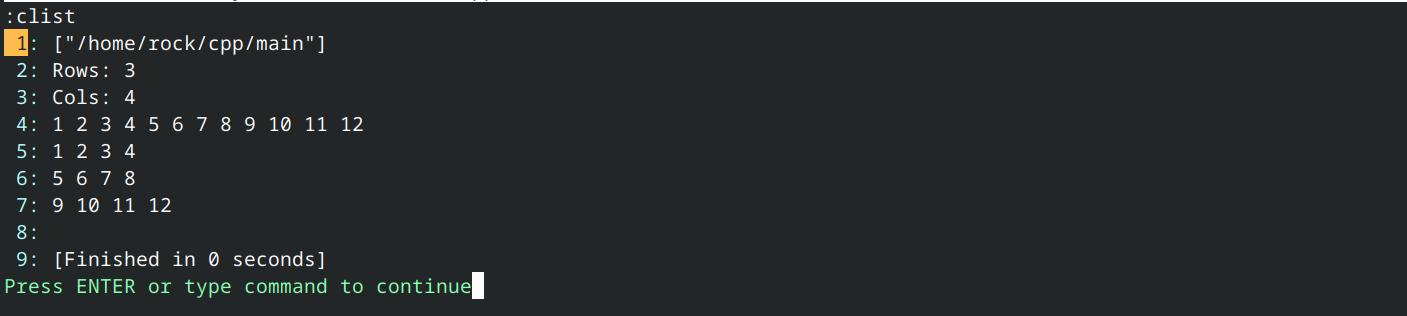
由于在C++23之前operator[]只能接受单个下标,因此存在两种替代方案:
使用operator()替代,它可接受多个下标。这允许使用[]进行单维索引,使用()进行多维索引。我们在上文选择了此方案。
让 operator[] 返回一个同样重载 operator[] 的子视图,从而实现链式操作。此方案更为复杂,且在高维度时扩展性较差。
在 C++23 中,operator[] 已扩展为支持多重下标,因此可通过重载同时处理单下标与多下标(无需再用 operator() 处理多重下标)。
相关内容:
第17.5课 通过std::reference_wrapper实现引用数组 将讲解std::reference_wrapper。
std::mdspan (C++23)
std::mdspan 是 C++23 中引入的可修改视图,为连续元素序列提供多维数组接口。所谓可修改视图,是指 std::mdspan 不仅是只读视图(如 std::string_view)——若底层元素序列为非 const 类型,则可修改其中元素。
以下示例与前例输出相同,但使用 std::mdspan 替代自定义视图:
#include <array>
#include <iostream>
#include <mdspan>

// An alias template to allow us to define a one-dimensional std::array using two dimensions
template <typename T, std::size_t Row, std::size_t Col>
using ArrayFlat2d = std::array<T, Row * Col>;

int main()
{
    // Define a one-dimensional std::array of int (with 3 rows and 4 columns)
    ArrayFlat2d<int, 3, 4> arr {
        1, 2, 3, 4,
        5, 6, 7, 8,
        9, 10, 11, 12 };

    // Define a two-dimensional span into our one-dimensional array
    // We must pass std::mdspan a pointer to the sequence of elements
    // which we can do via the data() member function of std::array or std::vector
    std::mdspan mdView { arr.data(), 3, 4 };

    // print array dimensions
    // std::mdspan calls these extents
    std::size_t rows { mdView.extents().extent(0) };
    std::size_t cols { mdView.extents().extent(1) };
    std::cout << "Rows: " << rows << '\n';
    std::cout << "Cols: " << cols << '\n';

    // print array in 1d
    // The data_handle() member gives us a pointer to the sequence of elements
    // which we can then index
    for (std::size_t i=0; i < mdView.size(); ++i)
        std::cout << mdView.data_handle()[i] << ' ';
    std::cout << '\n';

    // print array in 2d
    // We use multidimensional [] to access elements
    for (std::size_t row=0; row < rows; ++row)
    {
        for (std::size_t col=0; col < cols; ++col)
            std::cout << mdView[row, col] << ' ';
        std::cout << '\n';
    }
    std::cout << '\n';

    return 0;
}
这应该相当简单,但有几点值得注意:
- std::mdspan 允许我们定义任意维度的视图。
- std::mdspan 构造函数的首个参数应为数组数据的指针。该指针可以是衰变的 C 风格数组,也可以通过 std::array 或 std::vector 的 data() 成员函数获取数据。
- 要对 std::mdspan 进行一维索引,需先通过 data_handle() 成员函数获取数组数据指针,再进行下标操作。
- 在C++23中,operator[]支持多重索引,因此我们使用[行, 列]而非[行][列]作为索引。
C++26将引入std::mdarray,该类型实质上将std::array与std::mdspan融合为具有所有权的多维数组!

 浙公网安备 33010602011771号