
[知识管理] Obsidian FAQ
FAQ for Obsidian
Q: Obsidian 常用插件
Q: Obsidian 与 Typora 混合使用时图片链接展示的兼容性问题的解决方法?
- 需求描述: Typora 针对单个markdown文件的UI/渲染效果要优于Obsidian,所以日常使用时,我喜欢同时混合使用这2个软件。但因此产生了一个问题——图片链接展示方面有兼容性问题,需要我们主动配置来解决。
Obsidian
- step1 选择菜单:设置-文件与链接
- step2 指定的配置项设置为指定选项:
附件默认存放路径 = 当前文件所在文件夹下指定的子文件夹
子文件夹名称 = attachments

内部链接类型 = 基于当前笔记的相对路径
始终更新内部链接 = √(勾选)
使用Wiki链接 = X(取消勾选)
注:【使用Wiki链接】的格式(Typora无法识别),例如: ![[attachments/data-as-company-of-tactic-assets.20260714184759.png]]
注:【使用标准Markdown格式链接】的格式(Typora可以识别),例如: 

- step3 平时使用
Typora
- step1 将Makrdown(
.md)文件设置的系统默认应用设置为Typora。
- 设置完成后,平时在Obsidian中编辑、预览markdown文件时,可在obsidian中选择指定文件后右键选择【使用默认应用打开】选项来打开目标文件。

- step2 目标配置项设置为指定的值:
- 菜单路径: 文件-偏好设置
图像:
    插入图片时:
        复制到指定路径
        ./attachments
        优先使用相对路径

Q: Obsidian 源码模式下的(图片/文档)链接均看不见
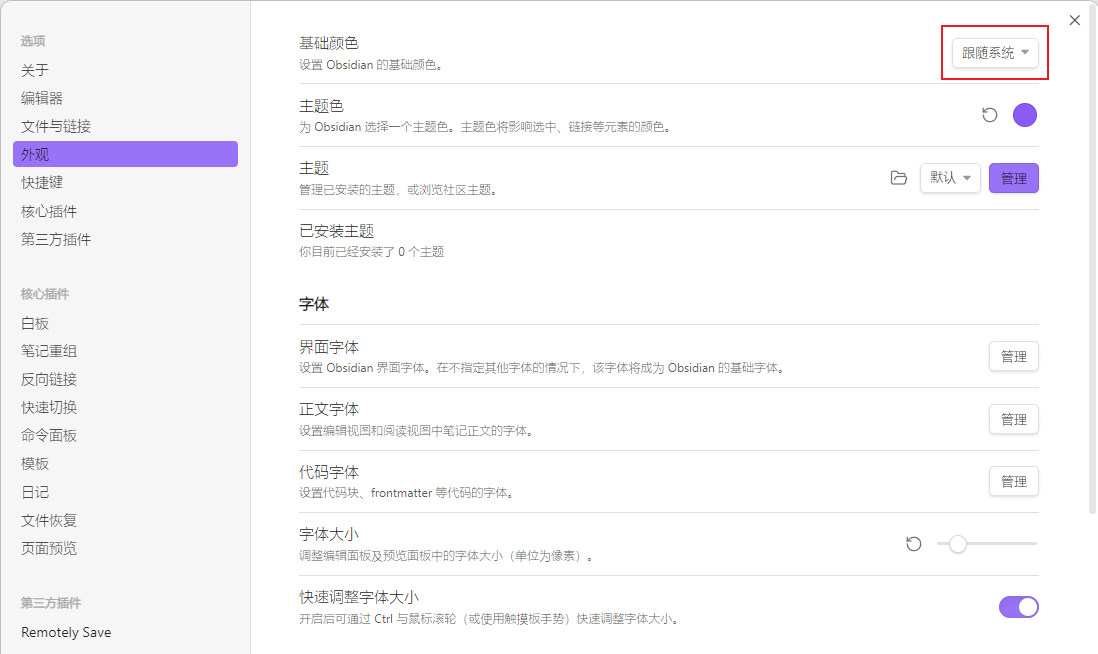
- 解决方法
- 设置-外观-基础颜色:浅色 => 跟随系统
X 参考文献

本文作者:
千千寰宇
本文链接: https://www.cnblogs.com/johnnyzen
关于博文:评论和私信会在第一时间回复,或直接私信我。
版权声明:本博客所有文章除特别声明外,均采用 BY-NC-SA 许可协议。转载请注明出处!
日常交流:大数据与软件开发-QQ交流群: 774386015 【入群二维码】参见左下角。您的支持、鼓励是博主技术写作的重要动力!
本文链接: https://www.cnblogs.com/johnnyzen
关于博文:评论和私信会在第一时间回复,或直接私信我。
版权声明:本博客所有文章除特别声明外,均采用 BY-NC-SA 许可协议。转载请注明出处!
日常交流:大数据与软件开发-QQ交流群: 774386015 【入群二维码】参见左下角。您的支持、鼓励是博主技术写作的重要动力!

 浙公网安备 33010602011771号