
redis的一个序列化与协议问题
org.springframework.data.redis.RedisSystemException: Redis exception; nested exception is io.lettuce.core.protocol.RedisProtocolException: Invalid first byte: 0 () at buffer index 130978 decoding using RESP3
········
Caused by: io.lettuce.core.protocol.RedisProtocolException: Invalid first byte: 0 () at buffer index 130978 decoding using RESP3org.springframework.data.redis.RedisSystemException: Redis exception; nested exception is io.lettuce.core.protocol.RedisProtocolException: Invalid first byte: 0 () at buffer index 130978 decoding using RESP3
···········
Caused by: io.lettuce.core.protocol.RedisProtocolException: Invalid first byte: 0 () at buffer index 130978 decoding using RESP3
根据异常信息和相关技术资料分析,该问题的核心在于Redis协议解析失败,具体原因和解决方案如下:
一、问题根源分析
-
RESP协议版本不匹配
- Lettuce客户端默认使用RESP3协议,而Redis服务端可能未完全支持RESP3或存在兼容性问题。
- 当客户端发送的请求与服务端支持的协议不一致时,会因数据格式解析失败导致
Invalid first byte异常。
-
JdkSerializationRedisSerializer隐患
-
数据首字节为0x00:JDK序列化后的二进制数据可能以空字节开头,与RESP3协议帧头冲突。
-
版本兼容性问题:不同JDK版本生成的序列化数据可能不兼容(如JDK 8 → JDK 11升级)。
-
-
混合序列化污染
-
其他服务或线程可能使用不同的序列化器(如String/JSON)修改了同一Redis Key的数据。
-
手动通过redis-cli或其他工具写入未序列化的原始数据。
-
-
Lettuce客户端升级
- Lettuce 6.x版本默认启用RESP3协议,而JDK序列化数据格式与RESP3的嵌套结构不兼容。
二、解决方案
方案1:强制使用RESP2协议
在Lettuce客户端配置中显式指定协议版本:
// 协议降级使用RESP2协议 + 连接池配置
@Bean
public LettuceConnectionFactory lettuceConnectionFactory() {
    LettuceClientConfiguration config = LettuceClientConfiguration.builder()
        .protocolVersion(RedisProtocol.RESP2)
        .clientOptions(ClientOptions.builder()
            .autoReconnect(true)
            .socketOptions(SocketOptions.builder()
                .connectTimeout(Duration.ofSeconds(10))
                .build())
            .build())
        .commandTimeout(Duration.ofSeconds(5))
        .build();

    RedisStandaloneConfiguration serverConfig = new RedisStandaloneConfiguration("localhost", 6379);
    return new LettuceConnectionFactory(serverConfig, config);
}
方案2:统一序列化器配置
在Spring Boot中自定义RedisTemplate,避免二进制序列化:
@Configuration
public class RedisConfig {
    @Bean
    public RedisTemplate<String, Object> redisTemplate(RedisConnectionFactory factory) {
        RedisTemplate<String, Object> template = new RedisTemplate<>();
        template.setConnectionFactory(factory);

        // Key序列化为String
        template.setKeySerializer(new StringRedisSerializer());
        // Value序列化为JSON(彻底替换JDK序列化器(推荐))
        Jackson2JsonRedisSerializer<Object> serializer = new Jackson2JsonRedisSerializer<>(Object.class);
        template.setValueSerializer(serializer);

        // Hash类型序列化配置
        template.setHashKeySerializer(new StringRedisSerializer());
        template.setHashValueSerializer(serializer);

        // 启用事务支持(可选)
    	template.setEnableTransactionSupport(true);
    	template.afterPropertiesSet();
        return template;
    }
}
方案3:清理并修复数据
-
检查数据污染
通过redis-cli手动读取异常键值:redis-cli --raw GET your_key | hexdump -C若首字节为
00(空字节),则数据可能被错误序列化。 -
删除异常数据
清除损坏的键:redisTemplate.delete("your_key"); -
编写迁移脚本,将旧数据反序列化后重新序列化为JSON
public void migrateData(String keyPattern) { // 旧Template(JDK序列化) RedisTemplate<String, Object> oldTemplate = createJdkSerializedTemplate(); // 新Template(JSON序列化) RedisTemplate<String, Object> newTemplate = createJsonSerializedTemplate(); Set<String> keys = oldTemplate.keys(keyPattern); for (String key : keys) { Object value = oldTemplate.opsForValue().get(key); newTemplate.opsForValue().set(key, value); oldTemplate.delete(key); // 可选:删除旧数据 } } -
手动修复命令
# 1. 导出二进制数据
redis-cli --raw DUMP problem_key > dump.hex

# 2. 使用Java程序反序列化(需相同类路径)
Object obj = new JdkSerializationRedisSerializer().deserialize(dump.hex);

# 3. 重新序列化为JSON并写入
redisTemplate.opsForValue().set("problem_key", obj);
方案4:升级客户端版本
检查并更新Lettuce和Spring Data Redis版本至最新,修复已知协议兼容性问题:
<dependency>
    <groupId>io.lettuce</groupId>
    <artifactId>lettuce-core</artifactId>
    <version>6.2.4.RELEASE</version> <!-- 或更高版本 -->
</dependency>
三、预防措施
-
协议兼容性测试
在集群升级时,确保客户端与服务端协议版本一致。 -
序列化规范
- 所有写入操作统一使用JSON或String序列化器。
- 禁用
JdkSerializationRedisSerializer,避免二进制污染。
-
数据隔离
不同业务使用独立Redis数据库(DB Index),避免跨服务数据格式冲突。 -
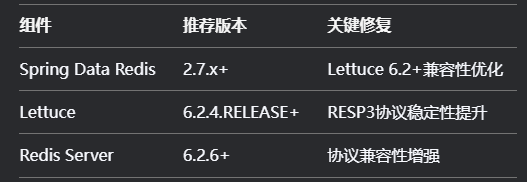
版本视图
![image]()
-
并发操作检查
// 添加线程安全保护, 确保RedisTemplate操作同步,
public synchronized void safeSPop(String key) {
	redisTemplate.opsForSet().pop(key);
}
四、扩展排查
若上述方案未解决问题,可进一步:
-
通过Wireshark抓包分析客户端与服务端的通信数据流。
-
启用Lettuce的DEBUG日志:
logging.level.io.lettuce=DEBUG -
检查Redis服务端配置(如
redis.conf中protocol-version参数)。 -
数据监控告警
添加Redis数据格式监控@Aspect @Component public class RedisOperationMonitor { @Before("execution(* org.springframework.data.redis.core.RedisTemplate.*(..))") public void validateKeyFormat(JoinPoint jp) { Object key = jp.getArgs()[0]; if (key instanceof String && ((String) key).contains("\u0000")) { throw new IllegalStateException("检测到非法空字节键: " + key); } } } -
测试保障
@SpringBootTest public class RedisSerializationTest { @Autowired private RedisTemplate<String, Object> redisTemplate; @Test void testCrossSerialization() { TestObject obj = new TestObject("value"); redisTemplate.opsForValue().set("test_key", obj); // 验证反序列化 TestObject result = (TestObject) redisTemplate.opsForValue().get("test_key"); assertThat(result.getValue()).isEqualTo("value"); } } -
紧急修复
若需立即恢复服务,可临时增加异常处理:try { return redisTemplate.opsForSet().pop(key); } catch (RedisSystemException ex) { // 捕获协议异常后,强制删除损坏数据 if (ex.contains(RedisProtocolException.class)) { redisTemplate.delete(key); logger.warn("Deleted corrupted key: {}", key); } return null; }

 浙公网安备 33010602011771号