
Latex学习笔记
一篇 LATEX 文档, 由三个部分组成: 文档类声明, 导言区, 正文
###中文
\documentclass{ctexart} #声明部分,常用的有:article(英文格式), book,report
\newcommand{\wuda}{中国湖北省武汉大学} #导言区
\begin{document}
你好 #正文部分
\end{document}
导言区:上例中, 我们自己定义了一个全新的命令 \wuda, 在正文使用该命令时, 得到的就是该命令的内容“中国湖北省武汉大学”. 还可以定义更复杂的结构或内容.可能你需要定义的东西太多, 这时可以把它们写在一个文档里面, 这种文档就是宏包. 使用时在导言区使用 \usepackage{...}, 即可以插入该文档的内容.例如我们想书写一个数学符号 ⊵. 该数学符号已经由宏包 amssymb 定义过了, 这样只需要在导言区写上 \usepackage{amssymb}, 加载该宏包即可.
例:
\documentclass{ctexart}
\usepackage{amssymb}
\begin{document}
$\unrhd$
\end{document}
使用 pdfLATEX 编译得到的pdf 文件, 其中文是乱码. 需要增加 UTF8 选项:
例:
\documentclass[UTF8]{ctexart}
\begin{document}
中文文档测试.
\end{document}
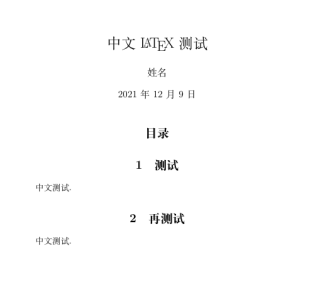
中文文档例子:
\documentclass{ctexart}
\begin{document}
\title{中文 \LaTeX{} 测试}
\author{姓名}
\maketitle
\tableofcontents
\section{测试}
中文测试.
\section{再测试}
中文测试.
\end{document}
运行结果:
第一PPT例子:
\documentclass{beamer}
\usepackage[UTF8]{ctex}
\usetheme{Warsaw}
\begin{document}
\begin{frame}{中文演示文档}
\begin{itemize}[<+->]
\item 这是一个幻灯片;
\item 你可以使用 XeLaTeX 编译;
\item 也可以使用 pdfLaTeX 编译;
\item 推荐使用 XeLaTeX 编译.
\end{itemize}
\end{frame}
\end{document}

 浙公网安备 33010602011771号