

旁挂式AC+AP直连路由+AC只做AP的DHCP
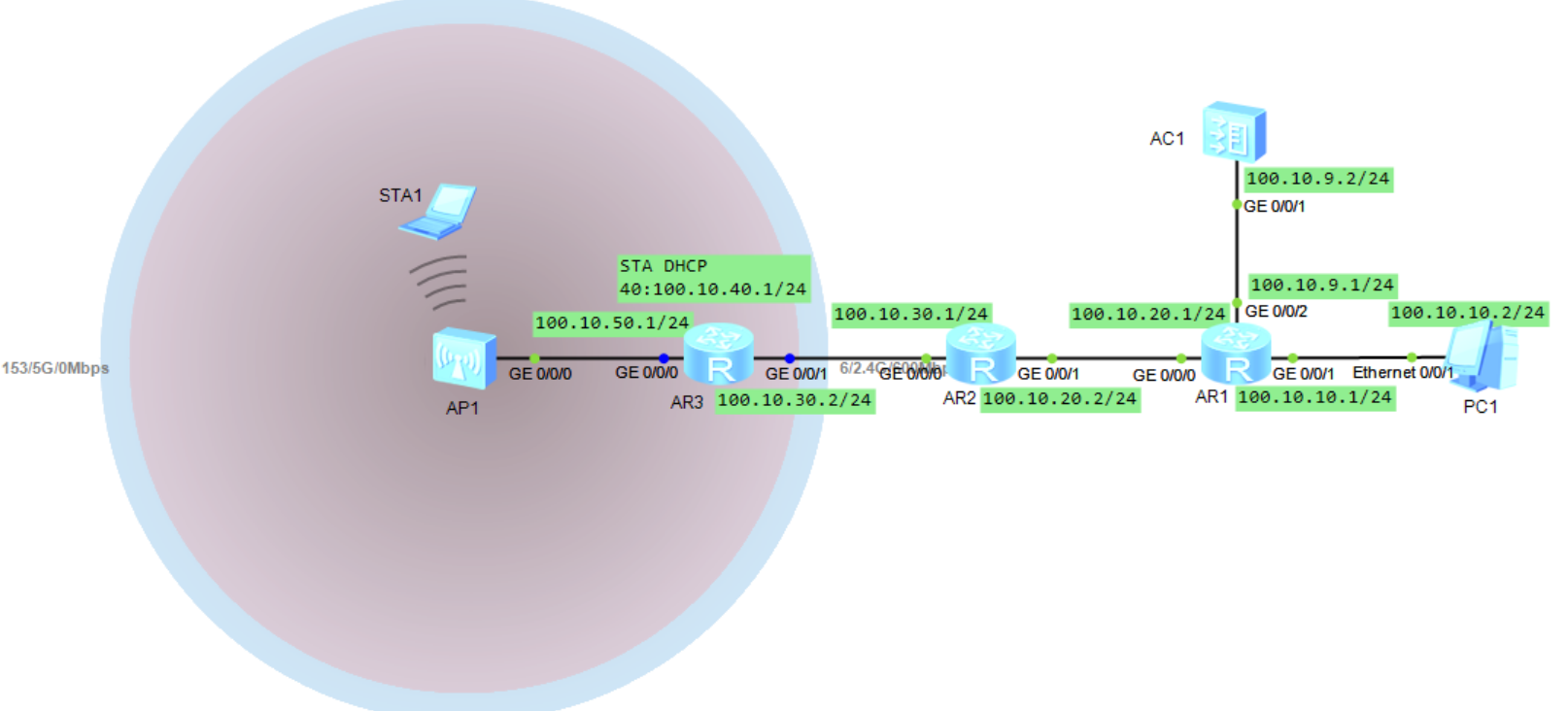
如上图所示网络的设计说明如下:
1、AC1只做AP的DHCP服务,下发的网段地址是100.10.50.0
2、AP1的wifi设备sta1,通过AR3的dhcp分配ip,网段是100.10.40.0
3、全网通采用ospf方式
关键位置设置说明:
1、AC1与AR1之间采用access,原因是AC1的功能只管理AP不再提供wifi业务服务,所以仅需要一个vlan即可
2、AP1与AR3之间采用普通接口+子接口的方式(40),普通接口用来管理AP,子接口用来传输wifi的业务数据(vlan40)
具体各设备的配置命令如下:
AC1:
sy
un in e
v b 9
ip pool p50
network 100.10.50.0 mask 24
gateway-list 100.10.50.1
option 43 sub-option 3 ascii 100.10.9.2
dhcp enable
in v 9
ip a 100.10.9.2 24
dhcp select global
in g0/0/1
p l a
p d v 9
ospf
area 0
network 100.10.9.0 0.0.0.255
capwap source interface vlanif9
wlan
ap auth-mode mac-auth
ap-id 0 ap-mac 00e0-fcf9-37b0
ap-name WIFI50AP1
ssid-profile name ssf
ssid WIFI50
security-profile name sef
security wpa-wpa2 psk pass-phrase 12345678 aes
y
vap-profile name vaf
forward-mode direct-forward
service-vlan vlan-id 40
ssid-profile ssf
security-profile sef
ap-id 0
vap-profile vaf wlan 1 radio 0
vap-profile vaf wlan 1 radio 1
AR1:
sy
un in e
in g0/0/0
ip a 100.10.20.1 24
in g0/0/1
ip a 100.10.10.1 24
in g0/0/2
ip a 100.10.9.1 24
ospf
area 0
network 100.10.9.0 0.0.0.255
network 100.10.10.0 0.0.0.255
network 100.10.20.0 0.0.0.255
AR2:
sy
un in e
in g0/0/0
ip a 100.10.30.1 24
in g0/0/1
ip a 100.10.20.2 24
ospf
area 0
network 100.10.30.0 0.0.0.255
network 100.10.20.0 0.0.0.255
AR3:
sy
un in e
dhcp enable
in g0/0/0.40
ip a 100.10.40.1 24
dot1q termination vid 40
arp broadcast enable
dhcp select interface
in g0/0/0
ip a 100.10.50.1 24
dhcp select relay
dhcp relay server-ip 100.10.9.2
in g0/0/1
ip a 100.10.30.2 24
ospf
area 0
network 100.10.40.0 0.0.0.255
network 100.10.50.0 0.0.0.255
network 100.10.30.0 0.0.0.255
上述命令中的具体操作解释可参照另一篇博客:

 浙公网安备 33010602011771号