
第四周(0914~0921)
本周作业
1、自建yum仓库,分别为网络源和本地源
2、编译安装http2.4,实现可以正常访问,并将编译步骤和结果提交。
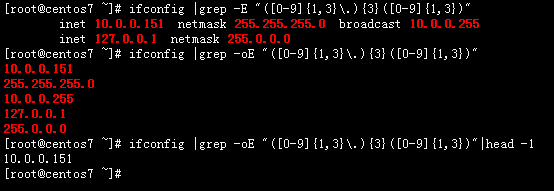
3、利用sed 取出ifconfig命令中本机的IPv4地址
4、删除/etc/fstab文件中所有以#开头,后面至少跟一个空白字符的行的行首的#和空白字符
5、处理/etc/fstab路径,使用sed命令取出其目录名和基名
6、列出ubuntu软件管理工具apt的一些用法(自由总结)
(一)自建yum仓库,分别为网络源和本地源
学习总结:
(一)yum,主要用于redhat系列,常见centos(开源社区版),redhat(企业版),基于rpm包管理功能,解决自动依赖,提升包管理效率,可以理解为高效的RPM管理集成工具。
(二)自建yum仓库,解决基础环境需求和三方依赖包需求的问题,根据包来源的不同分为网络源和本地源。
(三)对安全要求不高的环境,可以配置网络源,配置网络源相对是简单的,将对应的repo源地址,配置到repo文件中,可以wget下载现成的repo源文件到/etc/yum.repos.d/FILENAME.repo,再增加其他备用源,如清华的,网易的,搜狐的等等国内靠谱源站信息;
基于目前的网络安全环境,大一些的企业,其生产系统,即私有云,集群,都要求配置本地源。
本地源的搭建内容主要包括:
(1)基础源(操作系统自带)---操作系统iso镜像带的一套repo源,可以挂载后直接使用;
(2)epel.repo(三方各种功能源)---一般是网络配置,也可以通过下载到磁盘,再本地制作repo源,此repo源整体较大,下载时间较长,占用磁盘空间也较大,除非必要,可选;
(3)生产系统有需要用到的软件编译安装,依赖的特定源(将rpm包都到一个目录下,自制repo源),---适用场景:公司的定制开发软件搭配开源软件使用时,开源软件需要通过源码编译安装,匹配生产流,此时在测试环境,将需要的rpm源下载后,归档到一个文件,然后在生产系统中,自制repo源(这一点具体操作在补充中)
(4)其他特殊的源如elrepo.repo(kernel有关的源)
自建yum仓库,并实现内网web访问,实现网内yum源配置,环境基于centos7。
需要补充的另外两点是:
1、自动挂载rpm功能包autofs:
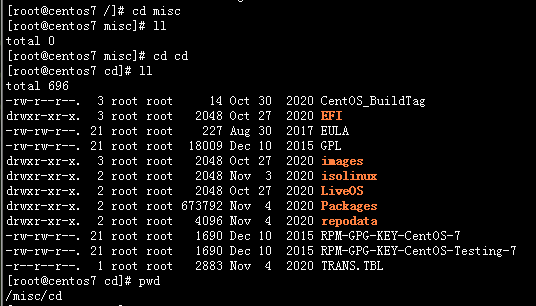
关于本地光盘挂载的方式:可以安装一个autofs的rpm包,实现自动挂载:
rpm -q autofs;||yum install autofs -y
systemctl enable --now autofs
ls /   ---确认一下,根目录下新生成一个misc目录
cd /misc/cd    --直接进入这个misc里面的cd目录,刚开始cd目录不可见
2、dnf 目前推荐的比yum更高级好用的包管理工具,可以用来下载epel源
yum install dnf -y
dnf install 'dnf-command(reposync)'   ---安装额外的dnf 选项命令 --reposync
dnf reposync --repoid=epel --download-metadata -p /var/www/html/epel_files    ---下载epel的metadata  到 /var/www/html/epel_files目录

文件量很大,一般企业服务器单独找个位置存放,下载下来直接可以用, Packages repodata
对于需要的一些特定rpm包,拿来做yum源的话,需要安装一个repo制作工具createrepo,切换到放rpm包的同目录,执行
yum install createrepo -y
createrepo .
执行完毕,就可以将这个文件目录的全路径,作为文件目录yum源的方式写入repo文件,然后yum repolist 即可看到
(二)编译安装http2.4,实现可以正常访问,并将编译步骤和结果提交。
(1)安装环境:centos 7.9
(2)目录安排:
安装到 /data/apache/apps
配置文件/data/apache/etc
源文件下载放入/data/source_file/
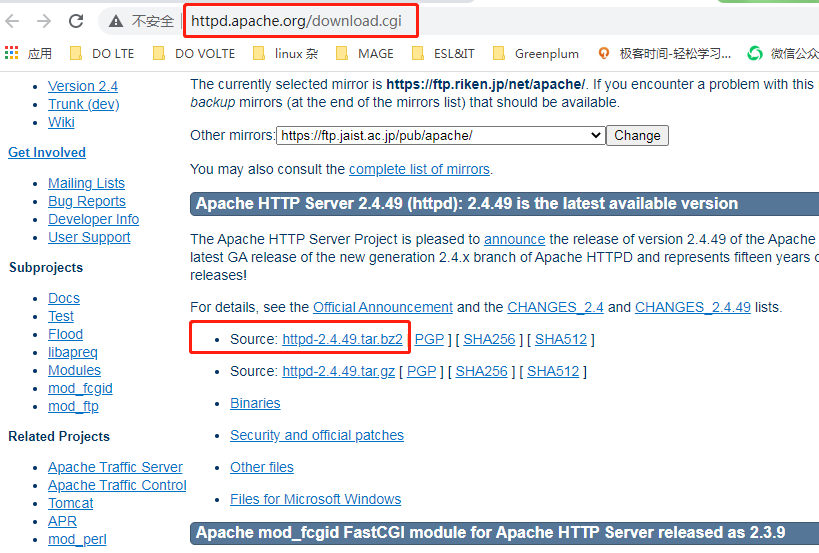
(3)最新源码版本:2.4.9,下载官网 http://httpd.apache.org/download.cgi
(4)需要的依赖包,
yum install gcc make autoconf apr-devel apr-util-devel pcre-devel openssl-devel redhat-rpm-config -y
(5)开始执行安装部分操作
#1 上传并解压
cd /data/source_file/
rz 上传源码包 httpd-2.4.49.tar.bz2
tar -xvf httpd-2.4.49.tar.bz2
#2 配置、编译并安装(最后的结果如果不确定是否报错,调用一下内部变量$?)
cd /data/source_file/httpd-2.4.49
./configure --prefix=/data/apache/apps --sysconfdir=/data/apache/etc --enable-ssl
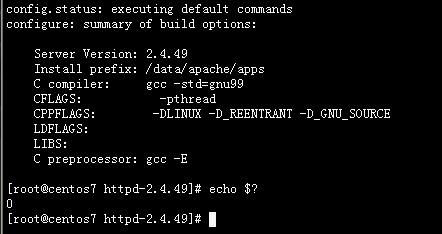
make -j 4 && make install
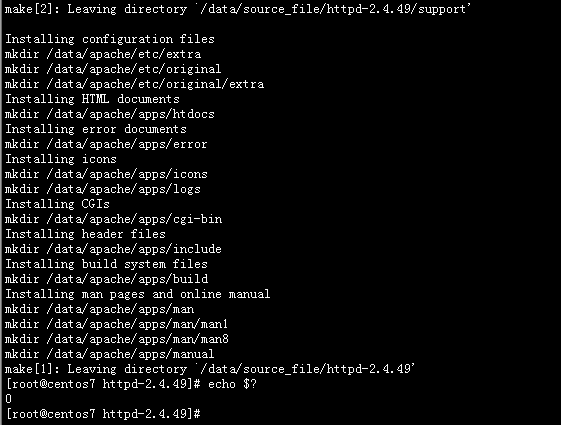
查看一下安装目标下的主要目录文件
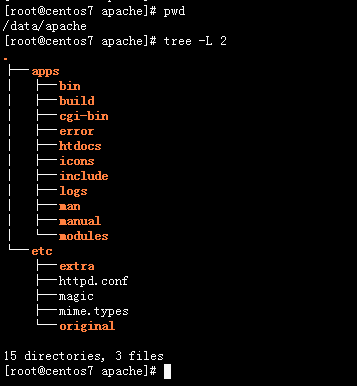
#3 配置环境
将httpd的二进制脚本目录,放入全局环境变量中,并生效
[root@centos7 apache]# echo 'PATH=/data/apache/apps/bin:$PATH' > /etc/profile.d/httpd.sh
[root@centos7 apache]# cat /etc/profile.d/httpd.sh
PATH=/data/apache/apps/bin:$PATH
[root@centos7 apache]# . /etc/profile.d/httpd.sh
[root@centos7 apache]# echo $PATH
/data/apache/apps/bin:/usr/local/sbin:/usr/local/bin:/usr/sbin:/usr/bin:/root/bin
[root@centos7 apache]#
# 4 创建用户apache,并修改配置文件中默认demon为apache

useradd -r -s /sbin/nologin -d /var/www -c Apache -u 48 apache
vim httpd.conf
#5 启动httpd服务
apachectl start
[root@centos7 etc]# ps aux|grep httpd
root      21710  0.0  0.1 103772  3344 ?        Ss   21:05   0:00 /data/apache/apps/bin/httpd
apache    21936  0.0  0.2 456136  4572 ?        Sl   21:24   0:00 /data/apache/apps/bin/httpd
apache    21937  0.0  0.2 456136  4916 ?        Sl   21:24   0:00 /data/apache/apps/bin/httpd
apache    21938  0.0  0.2 456136  4316 ?        Sl   21:24   0:00 /data/apache/apps/bin/httpd
apache    22021  0.0  0.2 456136  4312 ?        Sl   21:25   0:00 /data/apache/apps/bin/httpd
root      22064  0.0  0.0 112808   968 pts/1    S+   21:29   0:00 grep --color=auto httpd
#6 浏览器打开,显示正常
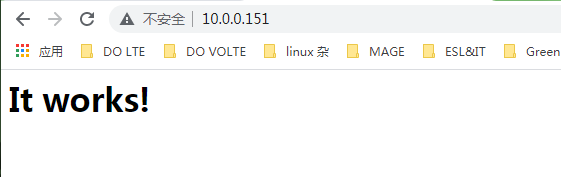
(三)利用sed 取出ifconfig命令中本机的IPv4地址
ifconfig |grep -oE "([0-9]{1,3}\.){3}([0-9]{1,3})"|head -1
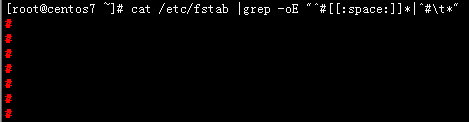
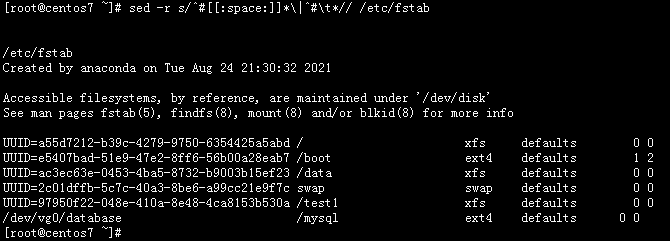
(四)删除/etc/fstab文件中所有以#开头,后面至少跟一个空白字符的行的行首的#和空白字符
修改前看一下源文件
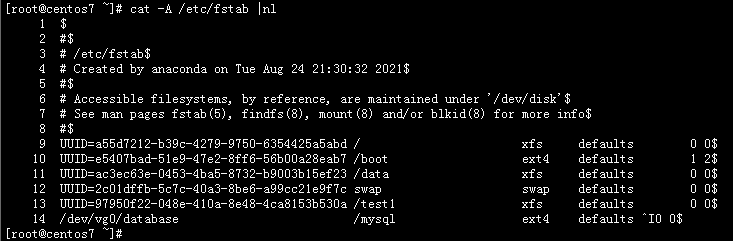
cat /etc/fstab |grep -oE "^#[[:space:]]*|^#\t*"
sed -ri s/^#[[:space:]]*\|^#\t*// /tmp/fstab ----i 参数需要在r后面(最后确定修改)
(五)处理/etc/fstab路径,使用sed命令取出其目录名和基名
这里用到sed的后向引用,sed 第1个括号,后面用转意\1,第2个括号,后面用转意\2,依次类推。
正则,sed -r 参数
方括号内^ ,[^/] ---表示:非斜杠
加号+ ----表示1个或n个
斜杠问号 /? ---表示 有或没有斜杠(加上这个为了对目录文件,也有效)
目录分解对应:
/etc/fstab ----->(/etc)/(fstab)----->(.*)/([^/+])
[root@centos7 ~]# ls /etc/fstab |sed -r 's#(.*)/([^/]+)/?#\1#'
/etc
[root@centos7 ~]# ls /etc/fstab |sed -r 's#(.*)/([^/]+)/?#\2#'
fstab
(六)列出ubuntu软件管理工具apt的一些用法(自由总结)
APT 用于Debian Linux,Ubuntu为目前主流的Debian分支,高级的包管理工具,用来查找和安装新软件包、升级软件包、删除软件包等。、
目前apt继承合并了 ape-get apt-cache apt-config 三套工具集。
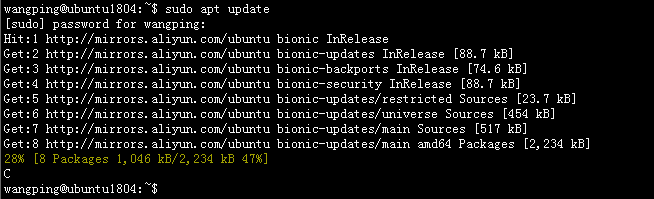
(1)使用 apt 更新包数据库(这个只更新包的数据库,获取到有新的更新包信息,实际更新升级需要用到下面的upgrade)
sudo apt update
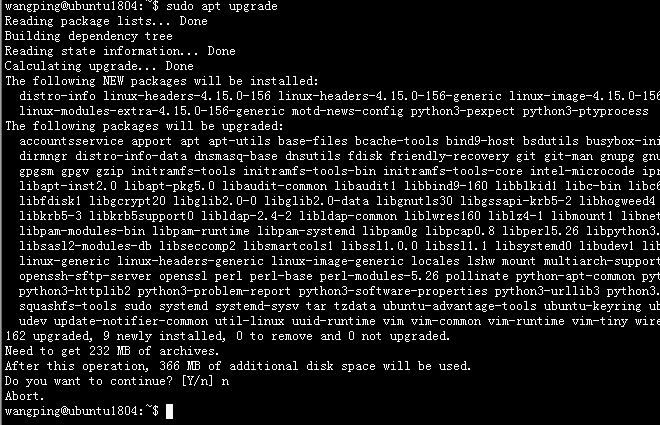
(2)使用 apt 升级已安装的软件包(如果用full-upgrade,会删除原来系统安装的软件包)
sudo apt upgrade
sudo apt update && sudo apt upgrade -y     -----没有网络带宽压力,可以一起
(3)使用 apt 安装新软件包
sudo apt install <package_name>
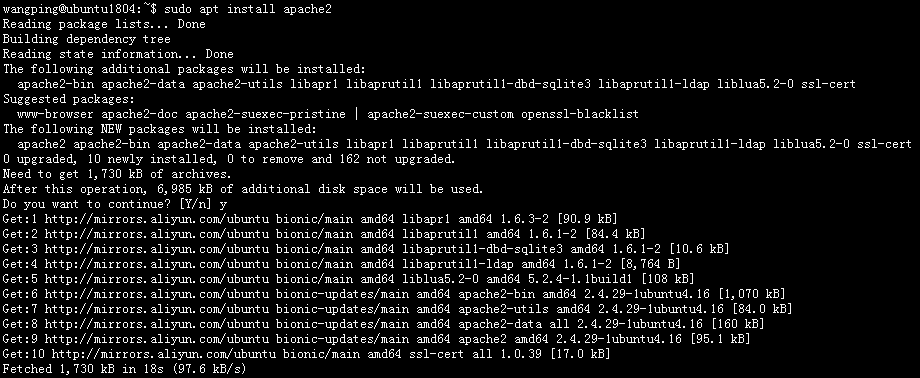
安装软件包的时候,如果用apt安装,如果有新的,会自动更新软件包。如果不想更新,仅仅是安装,需要加参数
sudo apt install <package_name> --no-upgrade
如果只是想升级,不想安装
sudo apt install <package_name> --only-upgrade
sudo apt install apache2 --only-upgrade
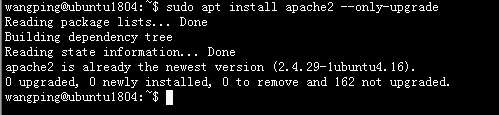
如果是同时安装多个包
sudo apt install <package_name1> <package_name2> <package_name3>
如果想安装特定的版本
sudo apt install <package_name>=<version_number>
sudo apt install nginx-light=1.14.0-0ubuntu1.9
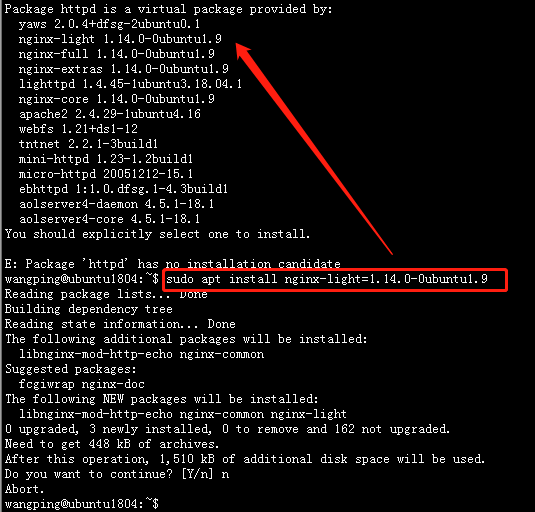
(4)使用 apt 删除/卸载已安装的软件包
在这里,中文解释不了这两个词的差异,需要补充一段话。
remove:删除包的二进制文件,保留配置文件。
purge:删除与包相关的所有内容,不保留配置文件,一般可用于配文件错乱,无法手工恢复。
sudo apt remove <package_name>
sudo apt purge <package_name>
(五)使用 apt 搜索包组
sudo apt search nginx
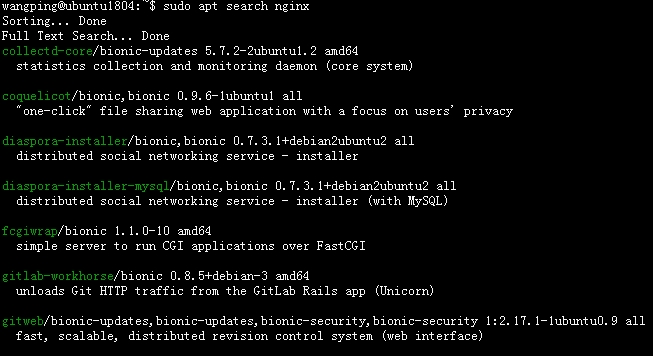
(6)使用 apt 查看包相关信息
会显示有关包的信息,例如依赖项、安装和下载大小、包的不同来源、包内容的描述等,-a 可以查看更多信息
apt show apache2
(7)使用apt 列出安装包有关的信息 apt list
--upgradable 可升级的包信息
--installed 已安装的包信息
--all-versions 所有软件包
wangping@ubuntu1804:~$ apt list --upgradable
Listing... Done
accountsservice/bionic-updates,bionic-security 0.6.45-1ubuntu1.3 amd64 [upgradable from: 0.6.45-1ubuntu1]
apport/bionic-updates,bionic-updates,bionic-security,bionic-security 2.20.9-0ubuntu7.26 all [upgradable from: 2.20.9-0ubuntu7.16]
apt/bionic-updates 1.6.14 amd64 [upgradable from: 1.6.12ubuntu0.1]
apt-utils/bionic-updates 1.6.14 amd64 [upgradable from: 1.6.12ubuntu0.1]
base-files/bionic-updates 10.1ubuntu2.11 amd64 [upgradable from: 10.1ubuntu2.9]
(8)清理系统,针对已删除的软件,remove后残留的包
sudo apt autoremove
wangping@ubuntu1804:~$ sudo apt autoremove
Reading package lists... Done
Building dependency tree
Reading state information... Done
0 upgraded, 0 newly installed, 0 to remove and 162 not upgraded.
wangping@ubuntu1804:~$ sudo apt remove apache2
Reading package lists... Done
Building dependency tree
Reading state information... Done
The following packages were automatically installed and are no longer required:
  apache2-bin apache2-data apache2-utils libapr1 libaprutil1 libaprutil1-dbd-sqlite3 libaprutil1-ldap liblua5.2-0 ssl-cert
Use 'sudo apt autoremove' to remove them.
The following packages will be REMOVED:
  apache2
0 upgraded, 0 newly installed, 1 to remove and 162 not upgraded.
After this operation, 536 kB disk space will be freed.
Do you want to continue? [Y/n] y
(Reading database ... 67868 files and directories currently installed.)
Removing apache2 (2.4.29-1ubuntu4.16) ...
Processing triggers for man-db (2.8.3-2ubuntu0.1) ...
Processing triggers for ufw (0.36-0ubuntu0.18.04.1) ...
wangping@ubuntu1804:~$
wangping@ubuntu1804:~$ sudo apt autoremove
Reading package lists... Done
Building dependency tree
Reading state information... Done
The following packages will be REMOVED:
  apache2-bin apache2-data apache2-utils libapr1 libaprutil1 libaprutil1-dbd-sqlite3 libaprutil1-ldap liblua5.2-0 ssl-cert
0 upgraded, 0 newly installed, 9 to remove and 162 not upgraded.
After this operation, 6,449 kB disk space will be freed.
Do you want to continue? [Y/n] y
(Reading database ... 67816 files and directories currently installed.)
Removing apache2-bin (2.4.29-1ubuntu4.16) ...
dpkg: warning: while removing apache2-bin, directory '/var/lib/apache2' not empty so not removed
Removing apache2-data (2.4.29-1ubuntu4.16) ...
Removing apache2-utils (2.4.29-1ubuntu4.16) ...
Removing libaprutil1-dbd-sqlite3:amd64 (1.6.1-2) ...
Removing libaprutil1-ldap:amd64 (1.6.1-2) ...
Removing libaprutil1:amd64 (1.6.1-2) ...
Removing libapr1:amd64 (1.6.3-2) ...
Removing liblua5.2-0:amd64 (5.2.4-1.1build1) ...
Removing ssl-cert (1.0.39) ...
Processing triggers for man-db (2.8.3-2ubuntu0.1) ...
Processing triggers for libc-bin (2.27-3ubuntu1.2) ...
wangping@ubuntu1804:~$

 浙公网安备 33010602011771号