
CentOS 扩展分区
在 VMWare 里安装了 CentOS7 ,当时设置的磁盘大小不够大,希望扩容。类似 Windows 上给 C 盘扩容。
先把虚拟机关机,然后扩展磁盘到想要的大小,最好一次扩容到位。
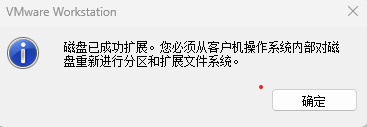
下面虚拟机启动后的设置操作,让 CentOS 系统识别到新扩容的磁盘。
查看信息
查看新硬盘分区
fdisk -l
[root@ran ~]# fdisk -l

磁盘 /dev/sda:53.7 GB, 53687091200 字节,104857600 个扇区
Units = 扇区 of 1 * 512 = 512 bytes
扇区大小(逻辑/物理):512 字节 / 512 字节
I/O 大小(最小/最佳):512 字节 / 512 字节
磁盘标签类型:dos
磁盘标识符:0x000d6293

   设备 Boot      Start         End      Blocks   Id  System
/dev/sda1   *        2048     2099199     1048576   83  Linux
/dev/sda2         2099200    62914559    30407680   8e  Linux LVM

磁盘 /dev/mapper/centos_ran-root:27.9 GB, 27913093120 字节,54517760 个扇区
Units = 扇区 of 1 * 512 = 512 bytes
扇区大小(逻辑/物理):512 字节 / 512 字节
I/O 大小(最小/最佳):512 字节 / 512 字节


磁盘 /dev/mapper/centos_ran-swap:3221 MB, 3221225472 字节,6291456 个扇区
Units = 扇区 of 1 * 512 = 512 bytes
扇区大小(逻辑/物理):512 字节 / 512 字节
I/O 大小(最小/最佳):512 字节 / 512 字节

[root@ran ~]#
lsblk
[root@ran ~]# lsblk
NAME                MAJ:MIN RM  SIZE RO TYPE MOUNTPOINT
sda                   8:0    0   50G  0 disk
├─sda1                8:1    0    1G  0 part /boot
└─sda2                8:2    0   29G  0 part
  ├─centos_ran-root 253:0    0   26G  0 lvm  /
  └─centos_ran-swap 253:1    0    3G  0 lvm  [SWAP]
sr0                  11:0    1  988M  0 rom
[root@ran ~]#
操作
创建分区
fdisk /dev/sda
m:帮助
p:显示现在磁盘分区
n:新建一个磁盘分区
w:保存改变
q:不保存退出
记录
[root@bogon ~]# fdisk /dev/sda
Welcome to fdisk (util-linux 2.23.2).

Changes will remain in memory only, until you decide to write them.
Be careful before using the write command.


Command (m for help): p

Disk /dev/sda: 75.2 GB, 75161927680 bytes, 146800640 sectors
Units = sectors of 1 * 512 = 512 bytes
Sector size (logical/physical): 512 bytes / 512 bytes
I/O size (minimum/optimal): 512 bytes / 512 bytes
Disk label type: dos
Disk identifier: 0x000a787a

   Device Boot      Start         End      Blocks   Id  System
/dev/sda1   *        2048     2099199     1048576   83  Linux
/dev/sda2         2099200    83886079    40893440   8e  Linux LVM

Command (m for help): n
Partition type:
   p   primary (2 primary, 0 extended, 2 free)
   e   extended
Select (default p):
Using default response p
Partition number (3,4, default 3):
First sector (83886080-146800639, default 83886080):
Using default value 83886080
Last sector, +sectors or +size{K,M,G} (83886080-146800639, default 146800639):
Using default value 146800639
Partition 3 of type Linux and of size 30 GiB is set

Command (m for help): w
The partition table has been altered!

Calling ioctl() to re-read partition table.

WARNING: Re-reading the partition table failed with error 16: Device or resource busy.
The kernel still uses the old table. The new table will be used at
the next reboot or after you run partprobe(8) or kpartx(8)
Syncing disks.
[root@bogon ~]#
重启系统,来识别新分区
不一定需要重启系统才能找到新分区。你可以使用以下步骤来避免重启:
- 使用
partprobe命令让系统重新读取分区表:sudo partprobe /dev/sda
- 通过
fdisk -l命令来检查是否已经识别到了新分区。如果这些方法无效,可能需要重新启动系统才能让操作系统识别到新创建的分区。
执行 pvcreate /dev/sda3 会将 /dev/sda3 这个分区标记为 LVM 物理卷,之后你可以将它添加到卷组 (Volume Group) 中,并创建逻辑卷 (Logical Volume)。
[root@bogon ~]# pvcreate /dev/sda3
  Physical volume "/dev/sda3" successfully created.
[root@bogon ~]#
添加到卷组
查看卷组名字
vgdisplay
记录操作
[root@bogon ~]# vgdisplay
  --- Volume group ---
  VG Name               centos
  System ID
  Format                lvm2
  Metadata Areas        1
  Metadata Sequence No  4
  VG Access             read/write
  VG Status             resizable
  MAX LV                0
  Cur LV                2
  Open LV               2
  Max PV                0
  Cur PV                1
  Act PV                1
  VG Size               <39.00 GiB
  PE Size               4.00 MiB
  Total PE              9983
  Alloc PE / Size       9983 / <39.00 GiB
  Free  PE / Size       0 / 0
  VG UUID               8LHZ52-X4jn-2eFm-FGuG-qc7o-i52M-KISo80

[root@bogon ~]#
扩展卷组,把新建的分区添加到卷组
vgextend centos /dev/sda3
操作
[root@bogon ~]# vgextend centos /dev/sda3
  Volume group "centos" successfully extended
[root@bogon ~]#
查看信息
[root@bogon ~]# lvs
  LV   VG     Attr       LSize   Pool Origin Data%  Meta%  Move Log Cpy%Sync Convert
  root centos -wi-ao---- <37.00g
  swap centos -wi-ao----   2.00g
[root@bogon ~]#
扩展 xfs 文件系统
使用 df -h 能看到 要挂载的根目录 / 设备路径是 /dev/mapper/centos-root
lvextend -l +100%FREE /dev/mapper/centos-root
lvextend -l +100%FREE /dev/mapper/centos-root 是一个在 Linux 系统中用于扩展逻辑卷 (Logical Volume) 的命令。具体解释如下:
- lvextend:这是一个用于扩展逻辑卷大小的命令。
- -l +100%FREE:这是一个参数,用于指定扩展逻辑卷的大小。
+100%FREE表示将逻辑卷扩展到卷组中所有剩余的未分配空间。 - /dev/mapper/centos-root:这是你要扩展的逻辑卷的路径。在这个例子中,它是位于
/dev/mapper下的名为centos-root的逻辑卷。
简而言之,执行 lvextend -l +100%FREE /dev/mapper/centos-root 会将 centos-root 逻辑卷扩展到卷组中所有剩余的未分配空间。
xfs_growfs /dev/mapper/centos-root
执行 xfs_growfs /dev/mapper/centos-root 这个命令会将 /dev/mapper/centos-root 上的 XFS 文件系统扩展到逻辑卷的当前最大可用空间。
操作记录
[root@bogon ~]# lvextend -l +100%FREE /dev/mapper/centos-root
  Size of logical volume centos/root changed from <37.00 GiB (9471 extents) to 66.99 GiB (17150 extents).
  Logical volume centos/root successfully resized.
[root@bogon ~]# lvs
  LV   VG     Attr       LSize  Pool Origin Data%  Meta%  Move Log Cpy%Sync Convert
  root centos -wi-ao---- 66.99g
  swap centos -wi-ao----  2.00g
[root@bogon ~]# xfs_growfs /dev/mapper/centos-root
meta-data=/dev/mapper/centos-root isize=512    agcount=5, agsize=2424320 blks
         =                       sectsz=512   attr=2, projid32bit=1
         =                       crc=1        finobt=0 spinodes=0
data     =                       bsize=4096   blocks=9698304, imaxpct=25
         =                       sunit=0      swidth=0 blks
naming   =version 2              bsize=4096   ascii-ci=0 ftype=1
log      =internal               bsize=4096   blocks=4735, version=2
         =                       sectsz=512   sunit=0 blks, lazy-count=1
realtime =none                   extsz=4096   blocks=0, rtextents=0
data blocks changed from 9698304 to 17561600
[root@bogon ~]# df -h
Filesystem               Size  Used Avail Use% Mounted on
/dev/mapper/centos-root   67G   33G   35G  48% /
devtmpfs                 3.8G     0  3.8G   0% /dev
tmpfs                    3.9G     0  3.9G   0% /dev/shm
tmpfs                    3.9G   13M  3.8G   1% /run
tmpfs                    3.9G     0  3.9G   0% /sys/fs/cgroup
/dev/sda1               1014M  179M  836M  18% /boot
tmpfs                    781M  8.0K  781M   1% /run/user/42
overlay                   67G   33G   35G  48% /var/lib/docker/overlay2/33a7cd3bb76d02db9c8fac79869975278a37f8e61baf9a184a1ba0c4fb255e42/merged
overlay                   67G   33G   35G  48% /var/lib/docker/overlay2/ae5014f37fc026f8d6424f17ea039d7ebbdd166d8377292fe8e9fee5c2403d66/merged
overlay                   67G   33G   35G  48% /var/lib/docker/overlay2/2d853cbe275bca962e8dbb529c752ad59f2e34c979e2cc4851a0d492c916d430/merged
overlay                   67G   33G   35G  48% /var/lib/docker/overlay2/baf1d7574a177f989bf38cfe461ad6b36e47518be5b6e9c9093bc2c7b7d02f9e/merged
overlay                   67G   33G   35G  48% /var/lib/docker/overlay2/118cb66351fb8e4cf426c843fe6ed102d2bc805a7681e62380a19a00c9575649/merged
tmpfs                    781M     0  781M   0% /run/user/0
[root@bogon ~]#
限制
主分区限制
[root@bogon vas]# fdisk /dev/sda
Welcome to fdisk (util-linux 2.23.2).

Changes will remain in memory only, until you decide to write them.
Be careful before using the write command.

Command (m for help): p

Disk /dev/sda: 118.1 GB, 118111600640 bytes, 230686720 sectors
Units = sectors of 1 * 512 = 512 bytes
Sector size (logical/physical): 512 bytes / 512 bytes
I/O size (minimum/optimal): 512 bytes / 512 bytes
Disk label type: dos
Disk identifier: 0x000a787a

Device Boot Start End Blocks Id System
/dev/sda1 * 2048 2099199 1048576 83 Linux
/dev/sda2 2099200 83886079 40893440 8e Linux LVM
/dev/sda3 83886080 146800639 31457280 83 Linux
/dev/sda4 146800640 230686719 41943040 83 Linux

Command (m for help): n
If you want to create more than four partitions, you must replace a
primary partition with an extended partition first.

Command (m for help):
为什么会报
If you want to create more than four partitions, you must replace a
primary partition with an extended partition first.
因为在传统的 MBR (Master Boot Record) 分区表中,一个硬盘最多只能有四个主分区。
如果需要创建超过四个分区,就必须将其中的一个主分区转换为扩展分区。在扩展分区内部,可以创建多个逻辑分区。
在你的情况中,/dev/sda 上已经有了四个主分区(/dev/sda1, /dev/sda2, /dev/sda3, /dev/sda4),因此再创建新的分区时,fdisk 命令提示你需要将其中一个主分区转换为扩展分区,然后在扩展分区中创建新的逻辑分区。

 浙公网安备 33010602011771号