Git基本概念及一般使用

-
develop追踪origin/develop,origin/develop追踪develop,追踪关系层层递进.同时pull操作是层层递进的,先fetch到origin/develop,origin/develop合并到develop.
-
开发者能设置的追踪关系是本地分支与上游分支的追踪关系,而上游分支与远程分支的关系是不能改变的.
-
git pull
是先把远程的develop下载到本地,和本地的origin/develop合并,再与本地的develop合并. -
git push
是先把本地的develop和本地orgin/develop合并,再拔origin/develop推送到远程和远程的develop合并. -
在develop上,pull = fetch+ merge origin/develop
-
git push <远程主机名> <本地分支名>:<远程分支名>
例如:
git push origin mybranch:develop
git push origin mybranch //省略远程分支名,代表创建同名远程分支.
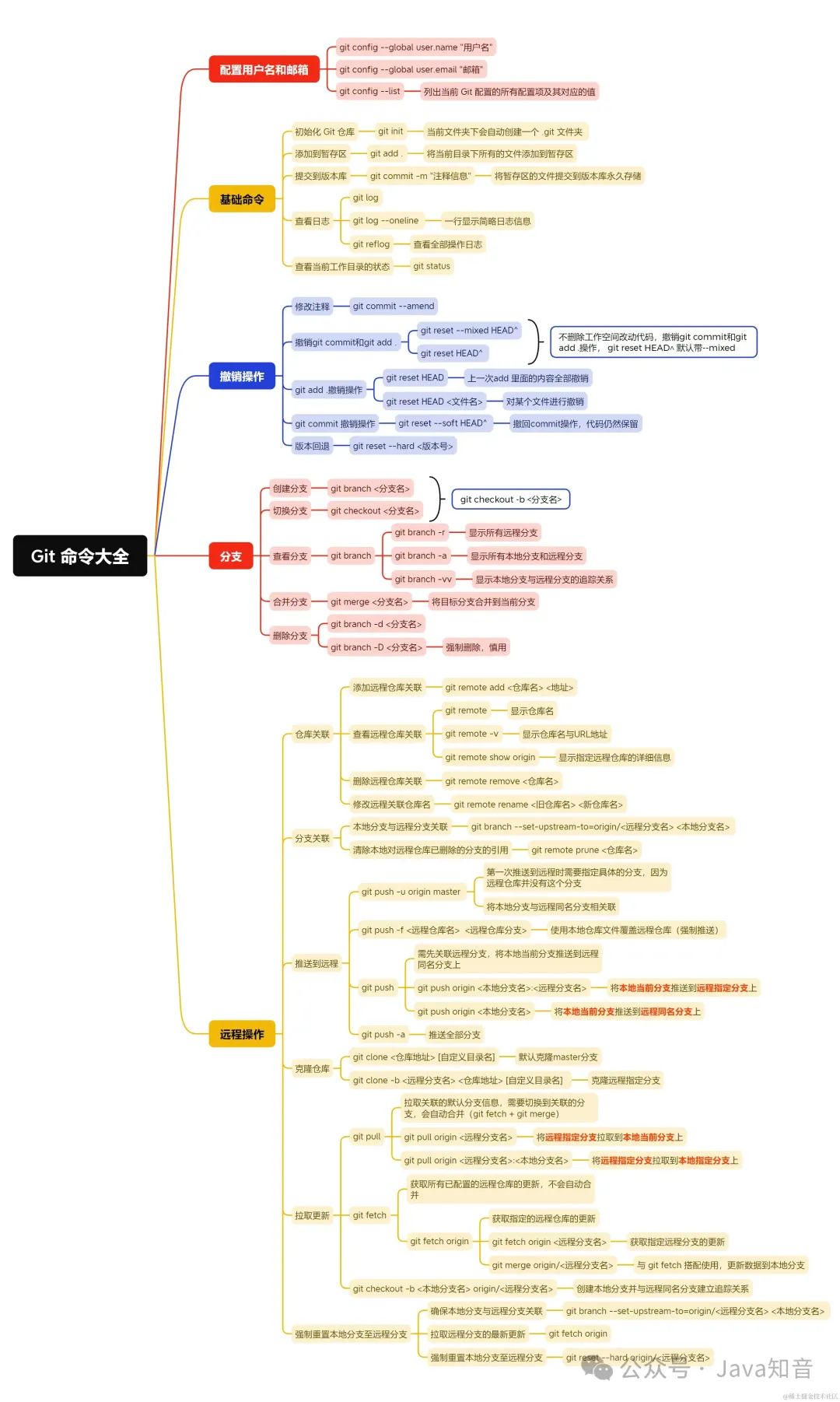
删除分支
# 删除本地分支
$ git branch -d [branch-name]

# 删除远程分支
$ git push origin --delete [branch-name]
$ git branch -dr [remote/branch]`
补充
git checkout 命令dos多用途:
- 创建分支
git checkout -b foo
等同于
git branch foo
- 切换分支
git checkout foo
等同于
git switch foo
- 本地分支改名
如果对于分支不是当前分支,可以使用下面代码:
git branch -m "原分支名" "新分支名"
如果是当前,那么可以使用加上新名字
git branch -m "新分支名称"
还原
-
如果本地的修改不要了.
git checkout a.txt -
如果提交了,还没push.
git reset HEAD -
如果提交了,也push了.
git revert HEAD
git push
克隆含有子项目的仓库
git clone --recursive https://github.com/example/example.git

//更新子模块
git submodule update --init --recursive
清除本地未追踪文件
Git 2.11 and newer versions:
git clean -d -f .
Older versions of Git:
git clean -d -f ""
Where -d can be replaced with the following:
-x ignored files are also removed as well as files unknown to Git.
-d remove untracked directories in addition to untracked files.
-f is required to force it to run.

 浙公网安备 33010602011771号