nuxt3中配置 i18n
1、将 @nuxtjs/i18n 安装为项目的开发依赖项:
npx nuxi@latest module add @nuxtjs/i18n
此处 nuxt的版本与 i18n的版本一定要能匹配正确,否则会在 nuxt.config.ts会报错。
错误大致为: 对象字面量只能指定已知属性, 不在类型'InputConfig<NuxtConfig, ConfigLayerMeta>'中
2、在 nuxt.config.ts中配置:
import path from 'path'
export default defineNuxtConfig({
  modules:[
    '@nuxtjs/i18n',
  ],
  i18n:{
    defaultLocale: 'en',
    locales: [
      { code: 'en', name: 'English', file: 'en.json' },
      { code: 'nl', name: 'Nederlands', file: 'nl.json' }
    ],
    lazy:true,
    langDir:path.resolve(__dirname,"i18n/locales")
  },
  compatibilityDate: '2024-11-01',
  devtools: { enabled: true },
  ssr:true
})
3、
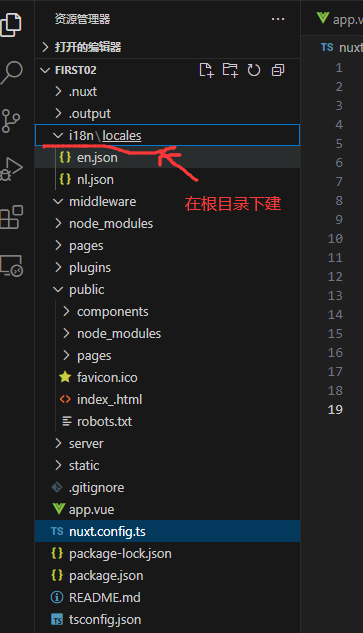
4、使用案例:
<script setup>
const { locales, setLocale } = useI18n()
</script>

<template>
  <div>
    <button v-for="locale in locales" @click="setLocale(locale.code)">
      {{ locale.name }}
    </button>
    <h1>{{ $t('welcome') }}</h1>
  </div>
</template>


 浙公网安备 33010602011771号