


ajax(前端实现局部刷新) + JDBC(连接数据库查询数据) + jackson(处理json的工具库)
文章目录
简介
AJAX = Asynchronous JavaScript and XML(异步的 JavaScript 和 XML)。
AJAX 是一种在无需重新加载整个网页的情况下,能够更新部分页面内容的新方法
0. 总的工程目录

1. 创建maven工程

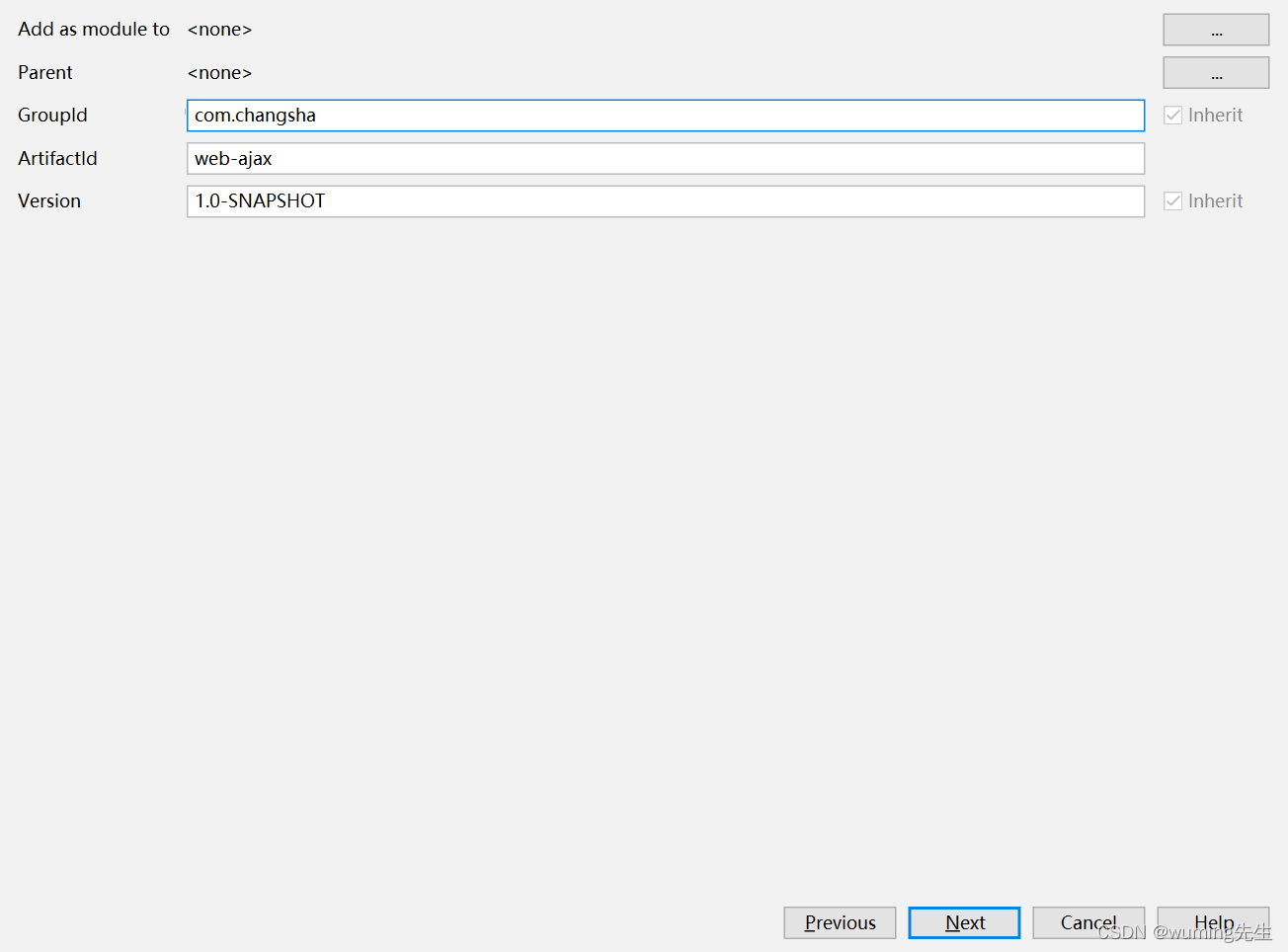


2. 加入依赖
  <dependencies>
    <!--单元测试依赖-->
    <dependency>
      <groupId>junit</groupId>
      <artifactId>junit</artifactId>
      <version>4.11</version>
      <scope>test</scope>
    </dependency>
    <!--servlet-->
    <dependency>
      <groupId>javax.servlet</groupId>
      <artifactId>javax.servlet-api</artifactId>
      <version>3.1.0</version>
      <scope>provided</scope>
    </dependency>
    <!-- jsp 依赖 -->
    <dependency>
      <groupId>javax.servlet.jsp</groupId>
      <artifactId>jsp-api</artifactId>
      <version>2.2.1-b03</version>
      <scope>provided</scope>
    </dependency>

    <!--jackson-->
    <dependency>
      <groupId>com.fasterxml.jackson.core</groupId>
      <artifactId>jackson-core</artifactId>
      <version>2.9.0</version>
    </dependency>
    <dependency>
      <groupId>com.fasterxml.jackson.core</groupId>
      <artifactId>jackson-databind</artifactId>
      <version>2.9.0</version>
    </dependency>

    <!--mysql驱动-->
    <dependency>
      <groupId>mysql</groupId>
      <artifactId>mysql-connector-java</artifactId>
      <version>8.0.24</version>
    </dependency>

  </dependencies>
完整的pom.xml配置文件
<?xml version="1.0" encoding="UTF-8"?>

<project xmlns="http://maven.apache.org/POM/4.0.0" xmlns:xsi="http://www.w3.org/2001/XMLSchema-instance"
  xsi:schemaLocation="http://maven.apache.org/POM/4.0.0 http://maven.apache.org/xsd/maven-4.0.0.xsd">
  <modelVersion>4.0.0</modelVersion>

  <groupId>com.changsha</groupId>
  <artifactId>web-ajax</artifactId>
  <version>1.0-SNAPSHOT</version>
  <packaging>war</packaging>


  <properties>
    <project.build.sourceEncoding>UTF-8</project.build.sourceEncoding>
    <maven.compiler.source>1.8</maven.compiler.source>
    <maven.compiler.target>1.8</maven.compiler.target>
  </properties>

  <dependencies>
    <!--单元测试依赖-->
    <dependency>
      <groupId>junit</groupId>
      <artifactId>junit</artifactId>
      <version>4.11</version>
      <scope>test</scope>
    </dependency>
    <!--servlet-->
    <dependency>
      <groupId>javax.servlet</groupId>
      <artifactId>javax.servlet-api</artifactId>
      <version>3.1.0</version>
      <scope>provided</scope>
    </dependency>
    <!-- jsp 依赖 -->
    <dependency>
      <groupId>javax.servlet.jsp</groupId>
      <artifactId>jsp-api</artifactId>
      <version>2.2.1-b03</version>
      <scope>provided</scope>
    </dependency>

    <!--jackson-->
    <dependency>
      <groupId>com.fasterxml.jackson.core</groupId>
      <artifactId>jackson-core</artifactId>
      <version>2.9.0</version>
    </dependency>
    <dependency>
      <groupId>com.fasterxml.jackson.core</groupId>
      <artifactId>jackson-databind</artifactId>
      <version>2.9.0</version>
    </dependency>

    <!--mysql驱动-->
    <dependency>
      <groupId>mysql</groupId>
      <artifactId>mysql-connector-java</artifactId>
      <version>8.0.24</version>
    </dependency>

  </dependencies>


  <build>
    <resources>
      <resource>
        <directory>src/main/java</directory><!--所在的目录-->
        <includes><!--包括目录下的.properties,.xml 文件都会扫描到-->
          <include>**/*.properties</include>
          <include>**/*.xml</include>
        </includes>
        <filtering>false</filtering>
      </resource>
    </resources>
    <plugins>
      <plugin>
        <artifactId>maven-compiler-plugin</artifactId>
        <version>3.1</version>
        <configuration>
          <source>1.8</source>
          <target>1.8</target>
        </configuration>
      </plugin>
    </plugins>
  </build>
</project>
3. 创建实体类(存储数据库表的一行数据)
package com.changsha.EntityClass;

public class Student {
    private Integer id;
    private String name;
    private Integer age;

    public Student() {
    }

    public Student(Integer id, String name, Integer age) {
        this.id = id;
        this.name = name;
        this.age = age;
    }

    public Integer getId() {
        return id;
    }

    public void setId(Integer id) {
        this.id = id;
    }

    public String getName() {
        return name;
    }

    public void setName(String name) {
        this.name = name;
    }

    public Integer getAge() {
        return age;
    }

    public void setAge(Integer age) {
        this.age = age;
    }

    @Override
    public String toString() {
        return "Student{" +
                "id=" + id +
                ", name='" + name + '\'' +
                ", age=" + age +
                '}';
    }
}
4. 创建Dao类操作数据库(涉及数据库连接和操作数据库)
package com.changsha.ServletClass;

import com.changsha.Dao.StudentDao;
import com.changsha.EntityClass.Student;
import com.fasterxml.jackson.databind.ObjectMapper;

import javax.servlet.ServletException;
import javax.servlet.http.HttpServlet;
import javax.servlet.http.HttpServletRequest;
import javax.servlet.http.HttpServletResponse;
import java.io.IOException;
import java.io.PrintWriter;

public class DoAjaxServlet extends HttpServlet {
    private StudentDao studentDao = new StudentDao();
    @Override
    protected void service(HttpServletRequest request, HttpServletResponse
            response) throws ServletException, IOException {
        System.out.println("接受请求");
        String strJson = "{}";
        String parm = request.getParameter("id");
        System.out.println(parm);
        if(parm != null && !parm.equals("")) {
            Student student = studentDao.selectStudentById(Integer.valueOf(parm));
            ObjectMapper om = new ObjectMapper();
            strJson = om.writeValueAsString(student);
        }
        //将json数据传回浏览器
        response.setContentType("application/json;charset=utf-8");
        PrintWriter pw = response.getWriter();
        pw.write(strJson);
        pw.flush();
        pw.close();
    }
}
5. 创建jsp页面用ajax发送请求
<%@ page contentType="text/html;charset=UTF-8" language="java" %>
<html>
<head>
    <title>ajax更新数据</title>
    <script type="text/javascript">
        function doAjaxRequst() {
        //    1.创建异步对象
            let xmlHttp = new XMLHttpRequest();
        //    2. 绑定事件(回调函数)
            xmlHttp.onreadystatechange = function () {
            //    处理返回数据,更新当前页面
                if (xmlHttp.status == 200 && xmlHttp.readyState == 4){
                    let res = eval("("+xmlHttp.responseText+")");
                    document.getElementById("searchName").value = res.name
                    document.getElementById("searchAge").value = res.age
                }
            }
        //    3.初始化参数
            let parm = document.getElementById("searchId").value;
            xmlHttp.open("get","doSome?id=" + parm,true);
        //    4.发生请求
            xmlHttp.send();

        }
    </script>
</head>
<body>
    <h1>ajax请求</h1>
    <div>
        <table>
            <tr>
                <td>id:</td>
                <td><input  type="text" name="id" id="searchId"></td>
                <td><input  type="button" value="搜索" onclick="doAjaxRequst()"></td>
            </tr>
            <tr>
                <td>name:</td>
                <td><input  type="text" name="name" id="searchName"></td>
            </tr>
            <tr>
                <td>age:</td>
                <td><input  type="text" name="age" id="searchAge"></td>
            </tr>
        </table>
    </div>
</body>
</html>
AJAX 异步实现步骤
(1)创建对象方式
var xmlHttp = new XMLHttpRequest();
(2) onreadstatechange 事件
当请求被发送到服务器时,我们需要执行一些基于响应的任务。每当 readyState 改变时,就会触发 onreadystatechange 事件。此事件可以指定一个处理函数 function。
通过判断 XMLHttpReqeust 对象的状态,获取服务端返回的数据。
语法:
xmlHttp.onreadystatechange= function() {
	 if( xmlHttp.readyState == 4 && xmlHttp.status == 200){
	 	处理服务器返回数据
	 }
 }
下面是 XMLHttpRequest 对象的三个重要的属性:
属性说明:
- onreadystatechange 属性:一个 js 函数名 或 直接定义函数,每当 readyState 属性改变时,就会调用该函数
- readyState 属性:
存有 XMLHttpRequest 的状态。从 0 到 4 发生变化。
• 0: 请求未初始化,创建异步请求对象 var xmlHttp = new XMLHttpRequest()
• 1: 初始化异步请求对象, xmlHttp.open(请求方式,请求地址,true)
• 2: 异步对象发送请求, xmlHttp.send()
• 3: 异步对象接收应答数据 从服务端返回数据。XMLHttpRequest 内部处理。
• 4: 异步请求对象已经将数据解析完毕。 此时才可以读取数据。 - status 属性:
200: “OK”
404: 未找到页面
(3) 初始化请求参数
方法:
open(method,url,async) : 初始化异步请求对象
参数说明:
• method:请求的类型;GET 或 POST
• url:服务器的 servlet 地址
• async:true(异步)或 false(同步)
例如:
xmlHttp.open(“get”,http:192.168.1.20:8080/myweb/query”,true)
(4) 发送请求
xmlHttp.send()
(5) 接收服务器响应的数据
如需获得来自服务器的响应,请使用 XMLHttpRequest 对象的 responseText 或responseXML 属性。
responseText:获得字符串形式的响应数据(json数据用这个)
responseXML:获得 XML 形式的响应数据
6. 创建后台处理数据的Servlet(对象数据转json,数据发回前端)
package com.changsha.ServletClass;

import com.changsha.Dao.StudentDao;
import com.changsha.EntityClass.Student;
import com.fasterxml.jackson.databind.ObjectMapper;

import javax.servlet.ServletException;
import javax.servlet.http.HttpServlet;
import javax.servlet.http.HttpServletRequest;
import javax.servlet.http.HttpServletResponse;
import java.io.IOException;
import java.io.PrintWriter;

public class DoAjaxServlet extends HttpServlet {
    private StudentDao studentDao = new StudentDao();
    @Override
    protected void service(HttpServletRequest request, HttpServletResponse
            response) throws ServletException, IOException {
        System.out.println("接受请求");
        String strJson = "{}";
        String parm = request.getParameter("id");
        System.out.println(parm);
        if(parm != null && !parm.equals("")) {

			//对象转JSON数据
            Student student = studentDao.selectStudentById(Integer.valueOf(parm));
            ObjectMapper om = new ObjectMapper();
            strJson = om.writeValueAsString(student);

        }


        //将json数据传回浏览器
response.setContentType("application/json;charset=utf-8");
        PrintWriter pw = response.getWriter();
        pw.write(strJson);
        pw.flush();
        pw.close();

    }
}
思维导图

本文来自博客园,作者:墨镜一戴谁也不爱,转载请注明原文链接:https://www.cnblogs.com/hnuzmh/p/16196497.html

 浙公网安备 33010602011771号