


GAMES101作业5
声明:使用的是vs2022版,以下内容如有问题,感谢各位大佬指正!
作业要求:
将专注于使用光线追踪来渲染图像。在光线追踪中最重要的操作之一就是找到光线与物体的交点。一旦找到光线与物体的交点,就可以执行着色并返回像素颜色。在这次作业中,我们需要实现两个部分:光线的生成和光线与三角的相交。
工作框架:
Main 函数
└─> 2. 定义场景参数
└─> 3. 添加球体 / 三角形到场景
└─> 4. 设置物体材质属性
└─> 5. 添加光源到场景
└─> 6. 调用 Render (scene) 函数
- 调用函数Render(scene)函数。在遍历所有像素的循环里,生成对应的光线并将返回的颜色保存在帧缓冲区(framebuffer)中。
- 在生成像素对应的光线后,调用CastRay函数,该函数调用 trace 来查询光线与场景中最近的对象的交点。
- 然后为交点执行着色
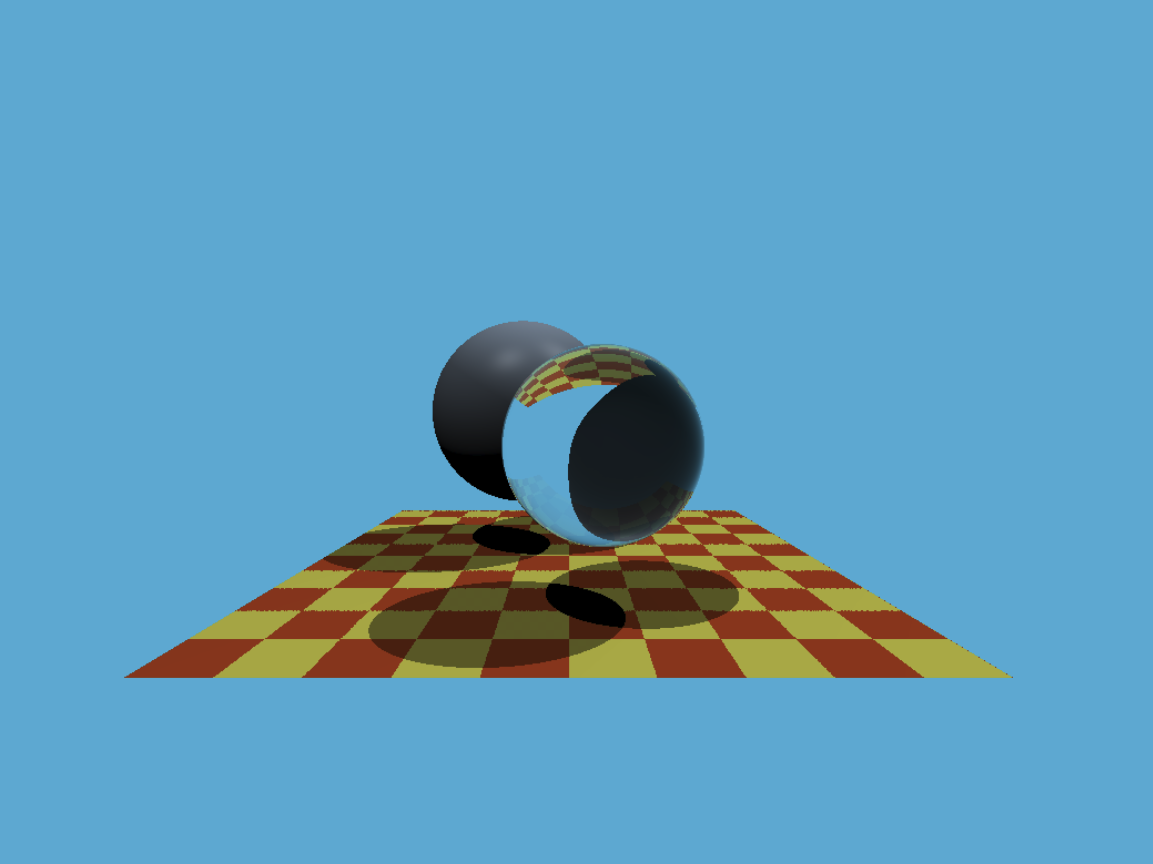
作业效果:
💡我们需要做的:
关键词: Möller-Trumbore 算法;光线追踪
1.在Renderer.cpp中修改Render函数:
void Renderer::Render(const Scene& scene)
{
    //创建帧缓冲区
    std::vector<Vector3f> framebuffer(scene.width * scene.height);
    //将屏幕坐标映射到世界坐标
    float scale = std::tan(deg2rad(scene.fov * 0.5f));
    //图像宽高比
    float imageAspectRatio = scene.width / (float)scene.height;

    // Use this variable as the eye position to start your rays.
    Vector3f eye_pos(0);
    int m = 0;
    //遍历屏幕上每一个像素
    for (int j = 0; j < scene.height; ++j)
    {
        for (int i = 0; i < scene.width; ++i)
        {
            // generate primary ray direction
            float x;
            float y;
            // TODO: Find the x and y positions of the current pixel to get the direction
            // vector that passes through it.
            // Also, don't forget to multiply both of them with the variable *scale*, and
            // x (horizontal) variable with the *imageAspectRatio*


            //i * 2.0 / (float)scene.width - 1将像素坐标映射到[-1,1]
            //乘以imageAspectRatio调整宽高比;乘以scale因子基于视场角进行缩放
            x = (i * 2.0 / (float)scene.width - 1) * imageAspectRatio * scale;

            y = (1 - j * 2.0 / (float)scene.height) * scale;
            Vector3f dir = normalize(Vector3f(x, y, -1));
            // Don't forget to normalize this direction!

            // 参数分别为: 光线起点、光线方向、场景信息、递归深度(初始为0)
            framebuffer[m++] = castRay(eye_pos, dir, scene, 0);
        }
        // 更新渲染进度(按扫描线)
        UpdateProgress(j / (float)scene.height);
    }
2.在Triangle.hpp中修改rayTriangleIntersect():函数:
// 浮点数比较的误差容限
const float EPLISON = 0.00001;

bool rayTriangleIntersect(const Vector3f& v0, const Vector3f& v1, const Vector3f& v2, const Vector3f& orig,
                          const Vector3f& dir, float& tnear, float& u, float& v)
{
    // TODO: Implement this function that tests whether the triangle
    // that's specified bt v0, v1 and v2 intersects with the ray (whose
    // origin is *orig* and direction is *dir*)
    // Also don't forget to update tnear, u and v.

    // 计算三角形的两条边向量
    const Vector3f E1 = v1 - v0;
    const Vector3f E2 = v2 - v0;
    // 计算辅助向量
    const Vector3f S = orig - v0;               // 光线原点到v0的向量
    const Vector3f S1 = crossProduct(dir, E2);  // 光线方向与E2的叉积
    const Vector3f S2 = crossProduct(S, E1);    // S与E1的叉积

    float S1E1 = dotProduct(S1, E1);

    // 计算交点参数
    float t = dotProduct(S2, E2) / S1E1;
    float b1 = dotProduct(S1, S) / S1E1;
    float b2 = dotProduct(S2, dir) / S1E1;

    // 注意这里和误差值 EPLISON 比较,否则会因为精度问题,阴影下有蓝点出现。
    // 判断交点是否有效,t >= 0,确保交点在光线前进方向上(而不是反向)
    if (t >= 0 && b1 >= -EPLISON && b2 >= -EPLISON && (1.f - b1 - b2) >= -EPLISON) {
        tnear = t;  // 交点距离
        u = b1;     // 重心坐标u
        v = b2;     // 重心坐标v
        return true;
    }

    return false;
}

 浙公网安备 33010602011771号