【Canvas与艺术】淡雅海蓝底金字时钟表盘
【关键点】
三根表针的画法突破了矩形的藩篱,用控制点围成更像真实表针的形状。
金色与海军蓝对比度强烈,很适合表现表盘,显得高贵与素雅并存。
【图例】
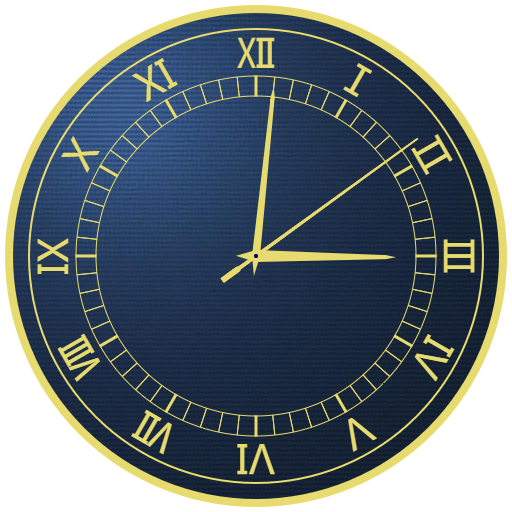
【代码】
<!DOCTYPE html>
<html lang="utf-8">
<meta http-equiv="Content-Type" content="text/html; charset=utf-8"/>
<head>
     <title>淡雅海蓝底金字时钟表盘</title>
     <style type="text/css">
     .centerlize{
        margin:0 auto;
        width:1200px;
     }
     </style>
     </head>

     <body onload="init();">
        <div class="centerlize">
            <canvas id="myCanvas" width="512px" height="512px" style="border:1px dotted black;">
                如果看到这段文字说您的浏览器尚不支持HTML5 Canvas,请更换浏览器再试.
            </canvas>
            <img id="myImg" src="88.jpg" style="display:none;"/>
        </div>
     </body>
</html>
<script type="text/javascript">
<!--
/*****************************************************************
* 将全体代码(从<!DOCTYPE到script>)拷贝下来,粘贴到文本编辑器中,
* 另存为.html文件,再用chrome浏览器打开,就能看到实现效果。
******************************************************************/

// canvas的绘图环境
var ctx;

// 边长
const LENGTH=512;

// 舞台对象
var stage;

//-------------------------------
// 初始化
//-------------------------------
function init(){
    // 获得canvas对象
    var canvas=document.getElementById('myCanvas');

    // 初始化canvas的绘图环境
    ctx=canvas.getContext('2d');
    ctx.translate(LENGTH/2,LENGTH/2);// 原点平移到画布中央

    // 准备
    stage=new Stage();
    stage.init();
}

// 每一秒调用paintClock函数
setInterval(paintClock,1000);

//-------------------------------
// 绘制时钟
//-------------------------------
function paintClock(){
    stage.update();
    stage.paintBg(ctx);
    stage.paintFg(ctx);
}

// 舞台类
function Stage(){

    // 初始化
    this.init=function(){

    }

    // 更新
    this.update=function(){

    }

    // 画背景
    this.paintBg=function(ctx){
        ctx.clearRect(-LENGTH/2,-LENGTH/2,LENGTH,LENGTH);// 清屏

        // 用圆去截取底纹
        ctx.save();
        ctx.rotate(Math.PI/2*3-Math.PI/4);
        ctx.beginPath();
        ctx.arc(0,0,248,0,2*Math.PI,true);
        ctx.closePath();
        ctx.clip();
        var img=document.getElementById("myImg");
        ctx.drawImage(img,0,0,300,300,-LENGTH/2,-LENGTH/2,LENGTH,LENGTH);
        ctx.restore();

        // 金色外缘
        ctx.beginPath();
        ctx.arc(0,0,247,0,2*Math.PI,true);
        ctx.closePath();
        ctx.lineWidth=8;
        ctx.strokeStyle="rgb(231,219,111)";
        ctx.stroke();

        // 淡金色外缘
        ctx.beginPath();
        ctx.arc(0,0,227,0,2*Math.PI,true);
        ctx.closePath();
        ctx.lineWidth=2;
        ctx.strokeStyle="rgb(231,219,111)";
        ctx.stroke();

        // 刻度外的淡金色外缘
        ctx.beginPath();
        ctx.arc(0,0,180,0,2*Math.PI,true);
        ctx.closePath();
        ctx.lineWidth=1;
        ctx.strokeStyle="rgb(231,219,111)";
        ctx.stroke();

        // 内圈刻度
        for(var i=0;i<60;i++){
            var theta=i*Math.PI/30;
            var x1=180*Math.cos(theta);
            var y1=180*Math.sin(theta);
            var x2=160*Math.cos(theta);
            var y2=160*Math.sin(theta);

            ctx.lineWidth=(i%5==0)?3:1;
            ctx.strokeStyle="rgb(231,219,111)";
            ctx.beginPath();
            ctx.moveTo(x1,y1);
            ctx.lineTo(x2,y2);
            ctx.closePath();
            ctx.stroke();
        }

        // 刻度内的淡金色外缘
        ctx.beginPath();
        ctx.arc(0,0,160,0,2*Math.PI,true);
        ctx.closePath();
        ctx.lineWidth=1;
        ctx.strokeStyle="rgb(231,219,111)";
        ctx.stroke();


        var hours=["Ⅲ","Ⅳ","Ⅴ","Ⅵ","Ⅶ","Ⅷ","Ⅸ","Ⅹ","Ⅺ","Ⅻ","Ⅰ","Ⅱ"];
        for(var i=0;i<12;i++){
            var theta=i*Math.PI/6;

            // 写罗马数字
            var x3=188*Math.cos(theta);
            var y3=188*Math.sin(theta);

            ctx.save();
            ctx.translate(x3,y3);
            ctx.rotate(theta+Math.PI/2);
            ctx.font="40px Microsoft YaHei UI";
            ctx.textAlign="center";
            ctx.textBaseLine="Middle";
            ctx.fillStyle="rgb(231,219,111)";
            ctx.fillText(hours[i],0,0);// 12是经验值
            ctx.restore();
        }
    }

    // 画前景
    this.paintFg=function(ctx){
        // 得到当前时间
        var now=new Date();
        var s=now.getSeconds();
        var m=now.getMinutes();
        var h=now.getHours()+m/60;

        // 画时针
        ctx.save();
        ctx.rotate(h*Math.PI/6-Math.PI/2);
        ctx.beginPath();
        ctx.moveTo(140,0);
        ctx.lineTo(130,2);
        ctx.lineTo(0,6);
        ctx.lineTo(-20,0);
        ctx.lineTo(0,-6);
        ctx.lineTo(130,-2);
        ctx.closePath();
        ctx.fillStyle="rgb(231,219,111)";
        ctx.fill();
        ctx.restore();

        // 画分针
        ctx.save();
        ctx.rotate(m*Math.PI/30-Math.PI/2);
        ctx.beginPath();
        ctx.moveTo(170,0);
        ctx.lineTo(160,2);
        ctx.lineTo(0,4);
        ctx.lineTo(-20,0);
        ctx.lineTo(0,-4);
        ctx.lineTo(160,-2);
        ctx.closePath();
        ctx.fillStyle="rgb(231,219,111)";
        ctx.fill();
        ctx.restore();

        // 画秒针
        ctx.save();
        ctx.rotate(s*Math.PI/30-Math.PI/2);
        ctx.beginPath();
        ctx.moveTo(200,1);
        ctx.lineTo(-20,2);
        ctx.lineTo(-22,3);
        ctx.lineTo(-42,3);
        ctx.lineTo(-42,-3);
        ctx.lineTo(-22,-3);
        ctx.lineTo(-20,-2);
        ctx.lineTo(200,-1);
        ctx.closePath();
        ctx.fillStyle="rgb(231,219,111)";
        ctx.fill();
        ctx.restore();

        // 画中心小圆点
        ctx.beginPath();
        ctx.arc(0,0,2,0,Math.PI*2,true);
        ctx.closePath();
        ctx.fillStyle="navy";
        ctx.fill();
    }
}
/*---------------------------------------------
或许
做梦时
误会了自己
否则怎么
能有
醒来后的孤独
......
想低声说句不在乎
可会飞的心总是在高处
想低声说句不在乎
可会飞的心总是在高处
不知道什么时候
学会了沉默
什么时候学会了倾诉
----------------------------------------------*/
//-->
</script>
【使用到的底图】
88.jpg

END

 浙公网安备 33010602011771号