![]()
<!DOCTYPE html>
<html>
    <head>
        <meta charset="utf-8">
        <title></title>
    </head>
    <style type="text/css">
        *{
            margin: 0;
            padding: 0;
            font-family: 'Popins',sans-serif;
        }
        body{
            background-color: #ffccbc;
        }
        .action{
            position: fixed;
            top: 20px;
            right: 30px;
        }
        .action .profile{
            position: relative;
            width: 60px;
            height: 60px;
            border-radius: 50%;
            overflow: hidden;
            cursor: pointer;
        }
        .action .profile img{
            position: absolute;
            top: 0;
            left: 0;
            width:100% ;
            height: 100%;
            object-fit: cover;
        }
        .action .menu{
            position: absolute;
            /* 显示就是80了,有过度效果 */
            top: 120px;
            right: -10px;
            padding: 10px 20px;
            background-color: #fff;
            width: 200px;
            box-sizing: 0 5px 25px rgba(0,0,0,0.1);
            border-radius: 15px;
            transition: 0.5s;
            /* 重点来了 */
            visibility: hidden;
            opacity: 0;
        }
        .action .menu.active{
            /* 重点来了 */
            visibility: visible;
            opacity: 1;
            top: 80px;
        }
        .action .menu::before{
            content: "";
            position: absolute;
            top: -5px;
            right: 28px;
            width: 20px;
            height: 20px;
            background-color: #fff;
            transform: rotate(45deg);
        }
        .action .menu h3{
            width: 100%;
            text-align: center;
            font-size: 18px;
            padding: 20px 0;
            font-size: 18px;
            color: #555;
            line-height: 1.2em;
        }

        .action .menu h3 span{
            font-size: 14px;
            color: #cecece;
            font-weight: 400;
        }
        .action .menu ul li{
            list-style: none;
            border-top: 1px solid rgba(0,0,0,0.05);
            display: flex;
            align-items: center;
            justify-content: center;
            }
            .action .menu ul li img{
                max-width: 20px;
                margin-right: 10px;
                opacity: 0.5;
                transition: 0.5s;
            }
            .action .menu ul li:hover img{
                opacity: 1;
            }
            .action .menu ul li a{
                display: inline-block;
                text-decoration: none;
                color: #555;
                font-weight: 500;
                transition: 0.5s;
            }
            .action .menu ul li:hover a{
                color: #FFC0CB;
            }


    </style>
    <body>
        <div class="action">
            <!-- 事件 -->
            <div class="profile" onclick="menuToggle();">
                <img src="https://img1.baidu.com/it/u=1926656975,222571069&fm=26&fmt=auto" alt="">
            </div>
            <div class="menu">
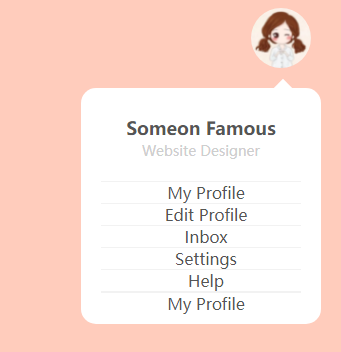
                <h3>Someon Famous<br><span>Website Designer</span></h3>
                <ul>
                    <li><img src="" alt=""><a href="#">My Profile</a></li>
                    <li><img src="" alt=""><a href="#">Edit Profile</a></li>
                    <li><img src="" alt=""><a href="#">Inbox</a></li>
                    <li><img src="" alt=""><a href="#">Settings</a></li>
                    <li><img src="" alt=""><a href="#">Help</a></li>
                    <li><img src="" alt=""><a href="#"></a></li>
                    <li><img src="" alt=""><a href="#">My Profile</a></li>
                </ul>
            </div>

        </div>

        <script type="text/javascript">
            // 重点
            function menuToggle(){
                const toggleMenu=document.querySelector(".menu");
                toggleMenu.classList.toggle('active');
            }
        </script>
    </body>


</html>


 浙公网安备 33010602011771号