


Python实现京东商品评论爬虫(学习使用)
目标网址:
https://item.jd.com/10108323353757.html
爬虫实现的基本流程:
一、数据来源分析
1.明确需求
明确采集的网站和数据内容
网站:https://item.jd.com/10108323353757.html
数据:评论内容
2.抓包分析
通过浏览器的开发者工具分析对应的数据位置
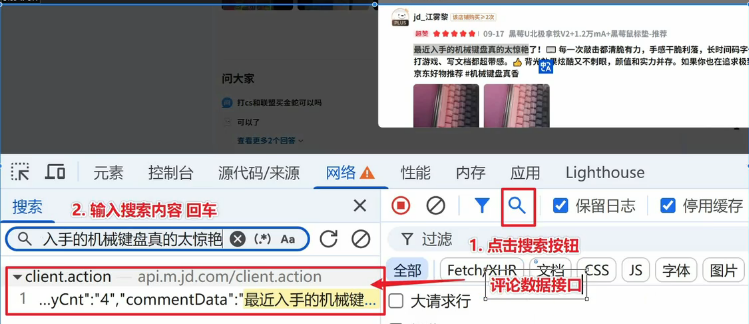
数据接口:
https://api.m.jd.com/client.action
二、代码实现步骤
request模块
1.发送请求:模拟浏览器对于url地址发送请求
2.获取数据:获取服务器返回响应数据
3.解析数据:提取我们需要的数据
4.保存数据:把提取出的数据保存到本地文件中
模拟浏览器去进行请求,当我们请求接口存在反爬(加密内容),是需要进行逆向的
京东评论数据:h5st加密参数(分析这个参数是如何生成的)
逆向爬虫对新手不友好(难度大)
drissionpage模块
自动化模块:模拟人的行为对浏览器进行相关操作(使用真实浏览器进行访问获取数据 )
可以绕过一些加密的反爬:请求头/请求参数存在加密
准备工作
官方文档:https://drissionpage.cn/get_start/before_start/
新建一个临时 py 文件,并输入以下代码,填入您电脑里的 Chrome (浏览器)可执行文件路径,然后运行。
from DrissionPage import ChromiumOptions

path = r'C:\Program Files (x86)\Lenovo\SLBrowser\SLBrowser.exe'  # 请改为你电脑内Chrome(浏览器)可执行文件路径
ChromiumOptions().set_browser_path(path).save()
浏览器的可执行文件路径如何查看
对于浏览器logo右键选择打开文件位置->找到浏览器应用程序路径
运行上述程序输出:
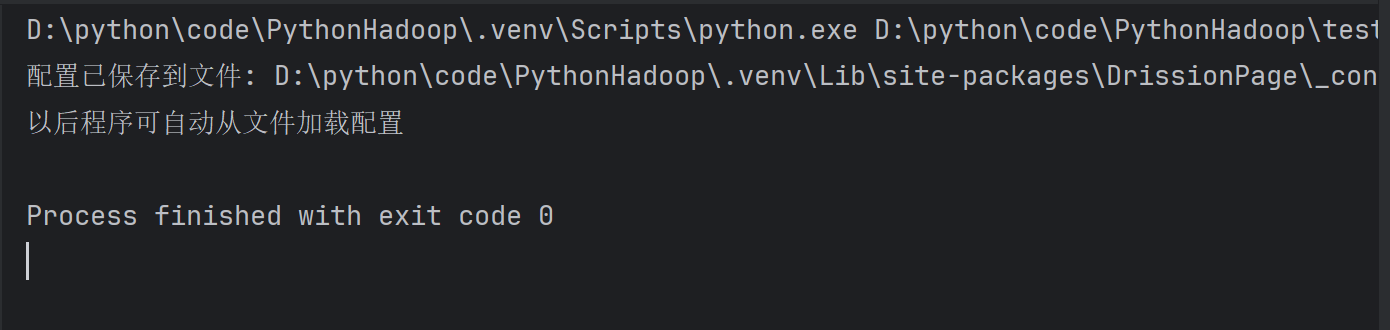
只需要配置一次即可
后续不更改浏览器/浏览器路径即可
1.打开浏览器,访问网站
2.获取数据
3.解析数据
4.保存数据
代码具体实现
1.打开浏览器访问网站
#导入自动化模块
from DrissionPage import ChromiumPage
#打开浏览器
dp = ChromiumPage()
#访问网站
dp.get('https://item.jd.com/10108323353757.html')
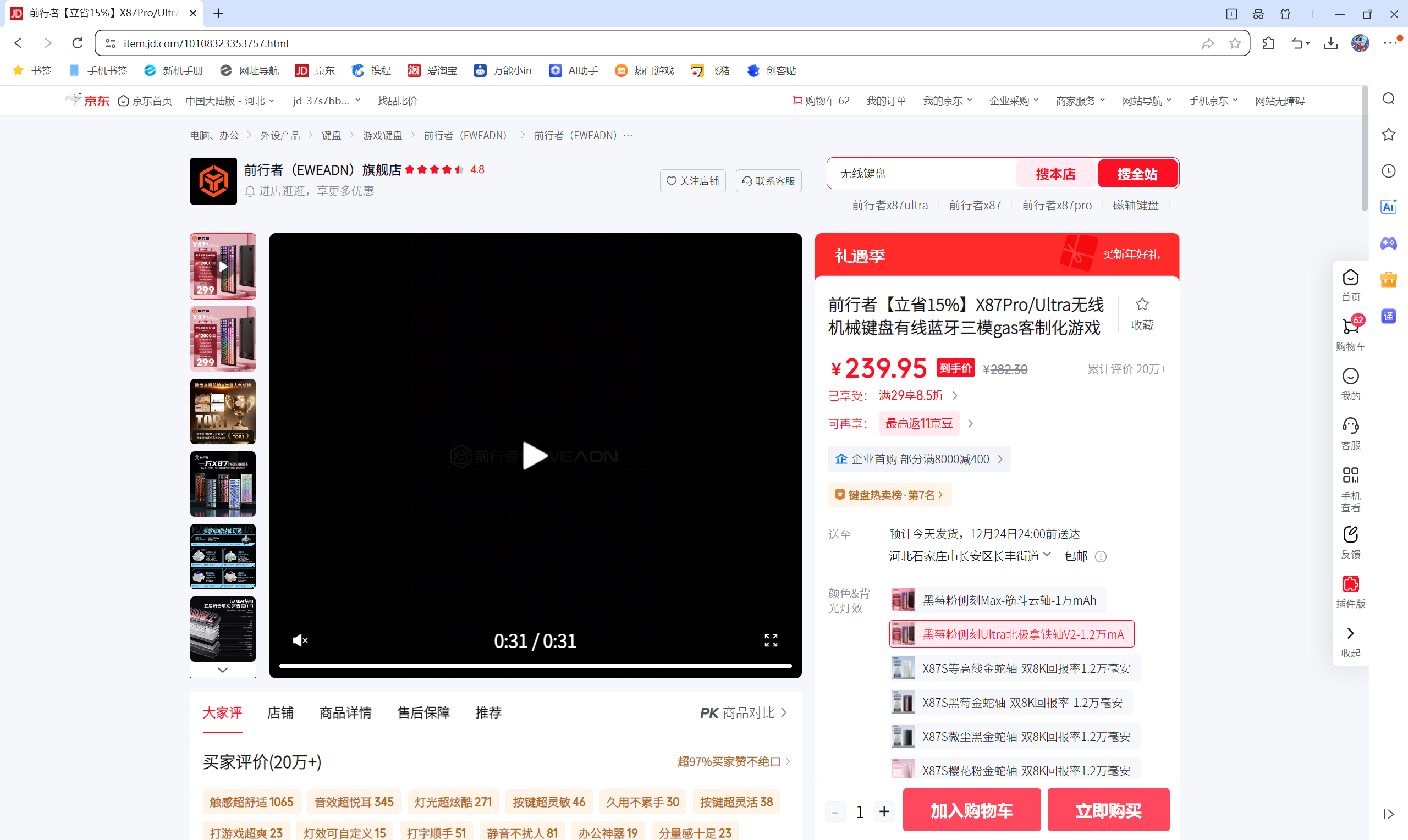
运行上述程序成功访问网站:
2.获取数据
2.1让程序自动点击网页中的全部评价按钮
元素定位:
    -通过开发者工具中的元素面板,查看‘全部评价’按钮的标签
    -根据标签实现相关语法(css/xpath)
# 定位全部评价按钮,进行点击操作
dp.ele('css:.all-btn').click()
    -dp.ele()元素定位方法 ele是元素英文element缩写
    -css:.all-btn 通过css语法定位类名为arrow标签
    -click()表示点击

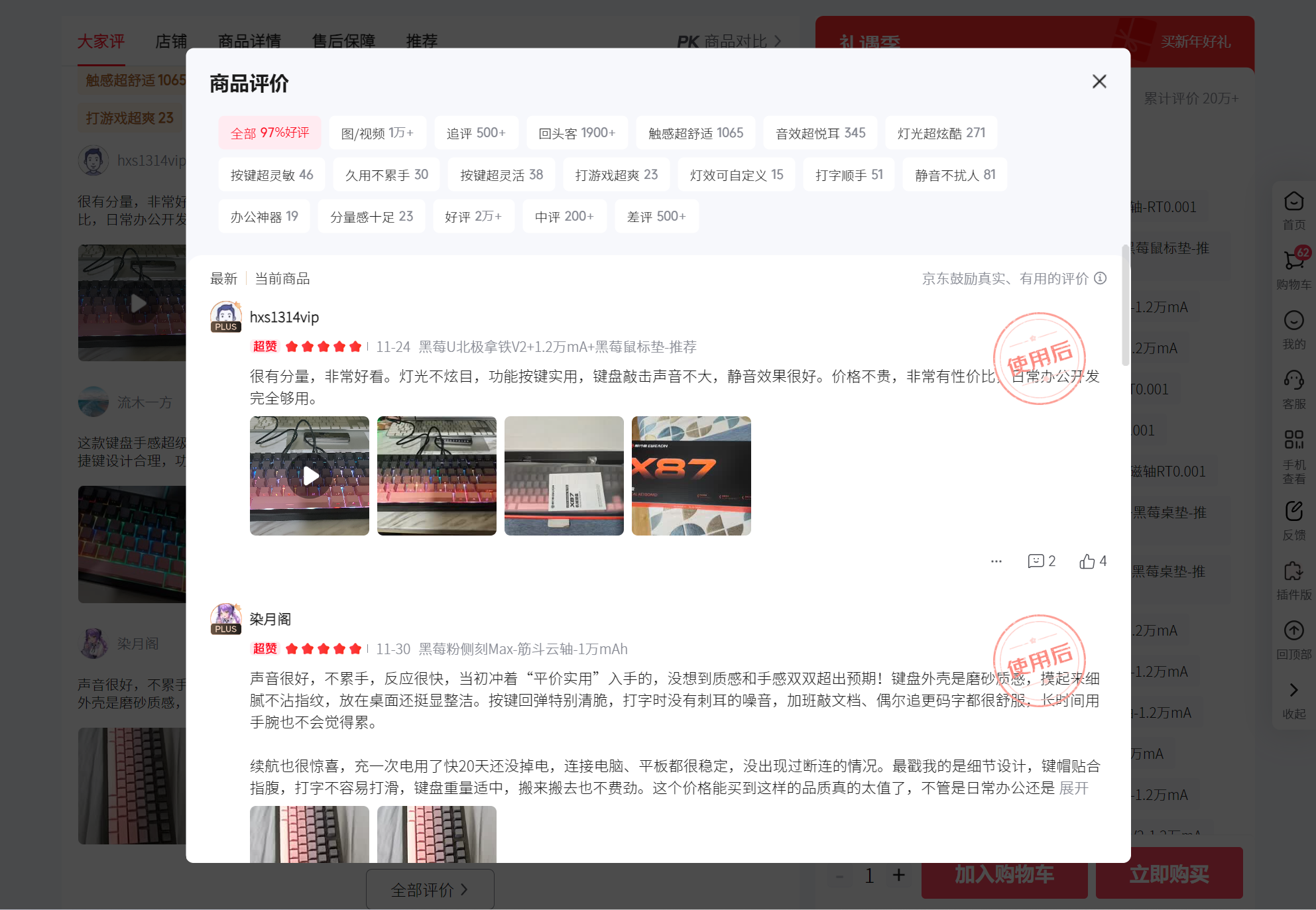
运行之后成功打开全部评价页面:
2.2获取评论数据内容
监听数据包:监听数据接口特征,只要当网站加载含有该特征接口,可以直接获取返回响应数据
通过抓包分析找到数据接口:https://api.m.jd.com/client.action
监听要在执行动作之前:
在加载全部评论之前监听:
#导入自动化模块
from DrissionPage import ChromiumPage
#打开浏览器
dp = ChromiumPage()
#访问网站
dp.get('https://item.jd.com/10108323353757.html')
# 监听数据包
dp.listen.start('client.action')
# 定位全部评价按钮,进行点击操作
dp.ele('css:.all-btn').click()
# 等待数据包加载
resp = dp.listen.wait()
# 获取响应数据
json_data = resp.response.body
print(json_data)
可能会出现问题的解决方案:
##可能会出现问题解决方案,1.设置延时,让没有加载完的完成加载
#time.sleep(2)
# #2.等待数据包加载,监听两个
# resp = dp.listen.wait(2)
# # 获取响应数据
# json_data = resp[1].response.body
2.3解析数据
# #字典取值,提取评论所在列表
datas = json_data['result']['floors'][2]['data']
#for循环遍历,提取列表里面元素
for index in datas:

    keys = index.keys()
    if 'commentInfo' in keys:
        # 在循环中提取具体评论数据
        dit = {
            '昵称': index['commentInfo']['userNickName'],
            '购买产品': index['commentInfo']['productSpecifications'].replace('已购',''),
            '购买次数': index['commentInfo']['buyCount'],
            '评论内容': index['commentInfo']['commentData'],
            '评论时间(日期)': index['commentInfo']['commentDate'],
            '评分': index['commentInfo']['commentScore'],
        }
        print(dit)
    else:
        pass
2.4保存数据
两种方法:
csv保存(完整代码)
import time
# 导入csv模块
import csv
# 创建文件对象
f = open('data.csv',mode='w', encoding='utf-8',newline='')
#字典写入方法
csv_writer = csv.DictWriter(f,fieldnames=[
    '昵称',
    '购买产品',
    '购买次数',
    '评论内容',
    '评论时间(日期)',
    '评分',
])
#写入表头
csv_writer.writeheader()
#导入自动化模块
from DrissionPage import ChromiumPage
#打开浏览器
dp = ChromiumPage()
#访问网站
dp.get('https://item.jd.com/10108323353757.html')
#可能会出现问题解决方案,1.设置延时,让没有加载完的完成加载
time.sleep(2)
# 2.等待数据包加载,监听两个
# resp = dp.listen.wait(2)
# # 获取响应数据
# json_data = resp[1].response.body
# 监听数据包
dp.listen.start('client.action')
# 定位全部评价按钮,进行点击操作
dp.ele('css:.all-btn').click()
# 等待数据包加载
resp = dp.listen.wait()
# 获取响应数据
json_data = resp.response.body
print(json_data)
# #字典取值,提取评论所在列表
datas = json_data['result']['floors'][2]['data']
#for循环遍历,提取列表里面元素
for index in datas:

    keys = index.keys()
    if 'commentInfo' in keys:
        # 在循环中提取具体评论数据
        dit = {
            '昵称': index['commentInfo']['userNickName'],
            '购买产品': index['commentInfo']['productSpecifications'].replace('已购',''),
            '购买次数': index['commentInfo']['buyCount'],
            '评论内容': index['commentInfo']['commentData'],
            '评论时间(日期)': index['commentInfo']['commentDate'],
            '评分': index['commentInfo']['commentScore'],
        }
        # 写入数据
        csv_writer.writerow(dit)
        print(dit)
    else:
        pass
json数据形式(完整代码):
import time
# 导入json模块
import json
#导入自动化模块
from DrissionPage import ChromiumPage
#打开浏览器
dp = ChromiumPage()
#访问网站
dp.get('https://item.jd.com/10108323353757.html')
#可能会出现问题解决方案,1.设置延时,让没有加载完的完成加载
time.sleep(2)
# 2.等待数据包加载,监听两个
# resp = dp.listen.wait(2)
# # 获取响应数据
# json_data = resp[1].response.body
# 监听数据包
dp.listen.start('client.action')
# 定位全部评价按钮,进行点击操作
dp.ele('css:.all-btn').click()
# 等待数据包加载
resp = dp.listen.wait()
# 获取响应数据
json_data = resp.response.body
print(json_data)
# #字典取值,提取评论所在列表
datas = json_data['result']['floors'][2]['data']
# 存储所有评论的列表
all_comments = []

# for循环遍历,提取列表里面元素
for index in datas:
    keys = index.keys()
    if 'commentInfo' in keys:
        # 在循环中提取具体评论数据
        dit = {
            '昵称': index['commentInfo']['userNickName'],
            '购买产品': index['commentInfo']['productSpecifications'].replace('已购', ''),
            '购买次数': index['commentInfo']['buyCount'],
            '评论内容': index['commentInfo']['commentData'],
            '评论时间(日期)': index['commentInfo']['commentDate'],
            '评分': index['commentInfo']['commentScore'],
            # # 可以根据需要添加更多字段
            # '用户等级': index['commentInfo'].get('userLevelName', '未知'),
            # '商品颜色': index['commentInfo'].get('productColor', '未知'),
            # '商品尺寸': index['commentInfo'].get('productSize', '未知'),
            # '评论ID': index['commentInfo'].get('commentId', '')
        }
        all_comments.append(dit)  # 添加到列表
        print(dit)
    else:
        pass
# 保存为JSON文件
if all_comments:
    # 定义文件名
    filename = 'jd_users_comments.json'

    # 写入文件(ensure_ascii=False确保中文正常显示)
    with open(filename, 'w', encoding='utf-8') as f:
        json.dump(all_comments, f, ensure_ascii=False, indent=2)

    print(f'\n✅ 成功保存 {len(all_comments)} 条评论到 {filename}')

    # 显示文件信息
    print(f'📁 文件位置: {filename}')
    print('📊 数据结构示例:')
    if all_comments:
        print(json.dumps(all_comments[0], ensure_ascii=False, indent=2))
else:
    print('❌ 未找到评论数据')
实现批量的数据采集
下滑评论页面会加载更多的数据内容
1.定位评论页面
2.针对评论页面进行下滑操作
添加修改的代码块
# 构建循环翻页
for page in range(1, 21):
    print(f'正在采集第{page}页的内容')
    # 等待数据包加载
    resp = dp.listen.wait()
    # 获取响应数据
    json_data = resp.response.body
    print(json_data)
    # #字典取值,提取评论所在列表
    datas = json_data['result']['floors'][2]['data']
    #for循环遍历,提取列表里面元素
    for index in datas:

        keys = index.keys()
        if 'commentInfo' in keys:
            # 在循环中提取具体评论数据
            dit = {
                '昵称': index['commentInfo']['userNickName'],
                '购买产品': index['commentInfo']['productSpecifications'].replace('已购',''),
                '购买次数': index['commentInfo']['buyCount'],
                '评论内容': index['commentInfo']['commentData'],
                '评论时间(日期)': index['commentInfo']['commentDate'],
                '评分': index['commentInfo']['commentScore'],
            }
            # 写入数据
            csv_writer.writerow(dit)
            print(dit)
        else:
            pass

    # 定位评论页面
    comment_tab = dp.ele('css:._rateListContainer_1ygkr_45')
    # 下滑
    comment_tab.scroll.to_bottom()
json形式的完整代码:
import time
import json
from DrissionPage import ChromiumPage

# 打开浏览器
dp = ChromiumPage()

# 访问网站
dp.get('https://item.jd.com/10108323353757.html')

# 设置延时,让页面加载完成
time.sleep(2)

# 监听数据包
dp.listen.start('client.action')

# 定位全部评价按钮,进行点击操作
dp.ele('css:.all-btn').click()

# 存储所有评论的列表
all_comments = []

# 构建循环翻页
for page in range(1, 21):
    print(f'正在采集第{page}页的内容')

    # 等待数据包加载
    resp = dp.listen.wait()

    # 获取响应数据
    json_data = resp.response.body

    # 字典取值,提取评论所在列表
    datas = json_data['result']['floors'][2]['data']

    # for循环遍历,提取列表里面元素
    for index in datas:
        keys = index.keys()
        if 'commentInfo' in keys:
            # 在循环中提取具体评论数据
            dit = {
                '昵称': index['commentInfo']['userNickName'],
                '购买产品': index['commentInfo']['productSpecifications'].replace('已购', ''),
                '购买次数': index['commentInfo']['buyCount'],
                '评论内容': index['commentInfo']['commentData'],
                '评论时间(日期)': index['commentInfo']['commentDate'],
                '评分': index['commentInfo']['commentScore'],
                # # 添加更多字段以满足作业要求
                # '用户等级': index['commentInfo'].get('userLevelName', ''),
                # '商品颜色': index['commentInfo'].get('productColor', ''),
                # '商品尺寸': index['commentInfo'].get('productSize', ''),
                # '评论ID': index['commentInfo'].get('commentId', ''),
                # '参考时间': index['commentInfo'].get('referenceTime', '')  # 收货时间,用于计算评论周期
            }
            all_comments.append(dit)
            print(dit)
        else:
            pass

    # 定位评论页面
    comment_tab = dp.ele('css:._rateListContainer_1ygkr_45')
    # 下滑到底部,触发加载更多
    comment_tab.scroll.to_bottom()
    time.sleep(2)  # 等待加载

# 保存为JSON文件
if all_comments:
    filename = 'jd_comments.json'

    # 写入JSON文件
    with open(filename, 'w', encoding='utf-8') as f:
        json.dump(all_comments, f, ensure_ascii=False, indent=2)

    print(f'\n✅ 成功采集 {len(all_comments)} 条评论,已保存至 {filename}')

    # 显示统计信息
    print('\n📊 数据统计:')
    print(f'  总评论数: {len(all_comments)}')
    print(f'  数据字段: {list(all_comments[0].keys())}')

    # 可选:显示前几条数据作为示例
    print('\n📋 前3条评论示例:')
    for i, comment in enumerate(all_comments[:3]):
        print(f'  评论{i + 1}: {comment["评论内容"][:50]}...')
else:
    print('❌ 未采集到任何评论数据')

# 关闭浏览器
dp.quit()
总结
基础知识:for循环/字典列表取值/if判断
爬虫方面:drissionpage模块使用/开发者工具抓包/css语法/csv模块使用(固定写法)/time延时操作
附件
完整的代码:
保存结果为.csv形式
import time
# 导入csv模块
import csv
# 创建文件对象
f = open('data.csv',mode='w', encoding='utf-8',newline='')
#字典写入方法
csv_writer = csv.DictWriter(f,fieldnames=[
    '昵称',
    '购买产品',
    '购买次数',
    '评论内容',
    '评论时间(日期)',
    '评分',
])
#写入表头
csv_writer.writeheader()
#导入自动化模块
from DrissionPage import ChromiumPage
#打开浏览器
dp = ChromiumPage()
#访问网站
dp.get('https://item.jd.com/10108323353757.html')
#可能会出现问题解决方案,1.设置延时,让没有加载完的完成加载
time.sleep(2)
# 2.等待数据包加载,监听两个
# resp = dp.listen.wait(2)
# # 获取响应数据
# json_data = resp[1].response.body
# 监听数据包
dp.listen.start('client.action')
# 定位全部评价按钮,进行点击操作
dp.ele('css:.all-btn').click()
# 构建循环翻页
for page in range(1, 21):
    print(f'正在采集第{page}页的内容')
    # 等待数据包加载
    resp = dp.listen.wait()
    # 获取响应数据
    json_data = resp.response.body
    print(json_data)
    # #字典取值,提取评论所在列表
    datas = json_data['result']['floors'][2]['data']
    #for循环遍历,提取列表里面元素
    for index in datas:

        keys = index.keys()
        if 'commentInfo' in keys:
            # 在循环中提取具体评论数据
            dit = {
                '昵称': index['commentInfo']['userNickName'],
                '购买产品': index['commentInfo']['productSpecifications'].replace('已购',''),
                '购买次数': index['commentInfo']['buyCount'],
                '评论内容': index['commentInfo']['commentData'],
                '评论时间(日期)': index['commentInfo']['commentDate'],
                '评分': index['commentInfo']['commentScore'],
            }
            # 写入数据
            csv_writer.writerow(dit)
            print(dit)
        else:
            pass

    # 定位评论页面
    comment_tab = dp.ele('css:._rateListContainer_1ygkr_45')
    # 下滑
    comment_tab.scroll.to_bottom()
保存结果为json形式
import time
import json
from DrissionPage import ChromiumPage

# 打开浏览器
dp = ChromiumPage()

# 访问网站
dp.get('https://item.jd.com/10108323353757.html')

# 设置延时,让页面加载完成
time.sleep(2)

# 监听数据包
dp.listen.start('client.action')

# 定位全部评价按钮,进行点击操作
dp.ele('css:.all-btn').click()

# 存储所有评论的列表
all_comments = []

# 构建循环翻页
for page in range(1, 21):
    print(f'正在采集第{page}页的内容')

    # 等待数据包加载
    resp = dp.listen.wait()

    # 获取响应数据
    json_data = resp.response.body

    # 字典取值,提取评论所在列表
    datas = json_data['result']['floors'][2]['data']

    # for循环遍历,提取列表里面元素
    for index in datas:
        keys = index.keys()
        if 'commentInfo' in keys:
            # 在循环中提取具体评论数据
            dit = {
                '昵称': index['commentInfo']['userNickName'],
                '购买产品': index['commentInfo']['productSpecifications'].replace('已购', ''),
                '购买次数': index['commentInfo']['buyCount'],
                '评论内容': index['commentInfo']['commentData'],
                '评论时间(日期)': index['commentInfo']['commentDate'],
                '评分': index['commentInfo']['commentScore'],
                # # 添加更多字段以满足作业要求
                # '用户等级': index['commentInfo'].get('userLevelName', ''),
                # '商品颜色': index['commentInfo'].get('productColor', ''),
                # '商品尺寸': index['commentInfo'].get('productSize', ''),
                # '评论ID': index['commentInfo'].get('commentId', ''),
                # '参考时间': index['commentInfo'].get('referenceTime', '')  # 收货时间,用于计算评论周期
            }
            all_comments.append(dit)
            print(dit)
        else:
            pass

    # 定位评论页面
    comment_tab = dp.ele('css:._rateListContainer_1ygkr_45')
    # 下滑到底部,触发加载更多
    comment_tab.scroll.to_bottom()
    time.sleep(2)  # 等待加载

# 保存为JSON文件
if all_comments:
    filename = 'jd_comments.json'

    # 写入JSON文件
    with open(filename, 'w', encoding='utf-8') as f:
        json.dump(all_comments, f, ensure_ascii=False, indent=2)

    print(f'\n✅ 成功采集 {len(all_comments)} 条评论,已保存至 {filename}')

    # 显示统计信息
    print('\n📊 数据统计:')
    print(f'  总评论数: {len(all_comments)}')
    print(f'  数据字段: {list(all_comments[0].keys())}')

    # 可选:显示前几条数据作为示例
    print('\n📋 前3条评论示例:')
    for i, comment in enumerate(all_comments[:3]):
        print(f'  评论{i + 1}: {comment["评论内容"][:50]}...')
else:
    print('❌ 未采集到任何评论数据')

# # 关闭浏览器
# dp.quit()

 浙公网安备 33010602011771号