


NoSQL和关系数据库的操作比较
NoSQL和关系数据库的操作比较
1.目的
(1)理解四种数据库(MySQL、HBase、Redis和MongoDB)的概念以及不同点;
(2)熟练使用四种数据库操作常用的Shell命令;
(3)熟悉四种数据库操作常用的Java API。
2.平台
(1)操作系统:Linux(建议Ubuntu16.04或Ubuntu18.04);
(2)Hadoop版本:3.1.3;
(3)MySQL版本:5.6;
(4)HBase版本:2.2.2;
(5)Redis版本:5.0.5;
(6)MongoDB版本:4.0.16;
(7)JDK版本:1.8;
(8)Java IDE:Eclipse;
3.步骤
(一) MySQL数据库操作
学生表如14-7所示。
表14-7 学生表Student
Name English Math Computer
zhangsan 69 86 77
lisi 55 100 88
- 根据上面给出的Student表,在MySQL数据库中完成如下操作:
(1)在MySQL中创建Student表,并录入数据;
(2)用SQL语句输出Student表中的所有记录;
(3)查询zhangsan的Computer成绩;
(4)修改lisi的Math成绩,改为95。
2.根据上面已经设计出的Student表,使用MySQL的JAVA客户端编程实现以下操作:
(1)向Student表中添加如下所示的一条记录:
scofield 45 89 100
(2)获取scofield的English成绩信息
(二)HBase数据库操作
学生表Student如表14-8所示。
表14-8 学生表Student
name score
English Math Computer
zhangsan 69 86 77
lisi 55 100 88
- 根据上面给出的学生表Student的信息,执行如下操作:
(1)用Hbase Shell命令创建学生表Student;
(2)用scan命令浏览Student表的相关信息;
(3)查询zhangsan的Computer成绩;
(4)修改lisi的Math成绩,改为95。
2.根据上面已经设计出的Student表,用HBase API编程实现以下操作:
(1)添加数据:English:45 Math:89 Computer:100
scofield 45 89 100
(2)获取scofield的English成绩信息。
(三)Redis数据库操作
Student键值对如下:
zhangsan:{
English: 69
Math: 86
Computer: 77
}
lisi:{
English: 55
Math: 100
Computer: 88
}
- 根据上面给出的键值对,完成如下操作:
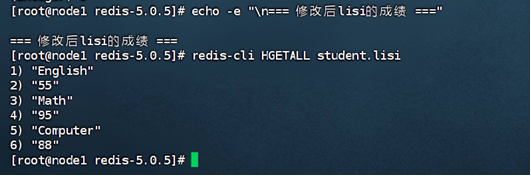
(1)用Redis的哈希结构设计出学生表Student(键值可以用student.zhangsan和student.lisi来表示两个键值属于同一个表);
(2)用hgetall命令分别输出zhangsan和lisi的成绩信息;
(3)用hget命令查询zhangsan的Computer成绩;
(4)修改lisi的Math成绩,改为95。
2.根据上面已经设计出的学生表Student,用Redis的JAVA客户端编程(jedis),实现如下操作:
(1)添加数据:English:45 Math:89 Computer:100
该数据对应的键值对形式如下:
scofield:{
English: 45
Math: 89
Computer: 100
}
(2)获取scofield的English成绩信息
(四)MongoDB数据库操作
Student文档如下:
{
“name”: “zhangsan”,
“score”: {
“English”: 69,
“Math”: 86,
“Computer”: 77
}
}
{
“name”: “lisi”,
“score”: {
“English”: 55,
“Math”: 100,
“Computer”: 88
}
}
1.根据上面给出的文档,完成如下操作:
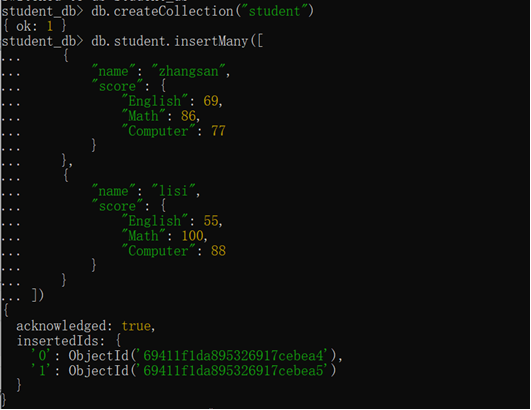
(1)用MongoDB Shell设计出student集合;
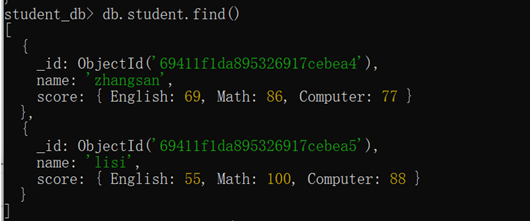
(2)用find()方法输出两个学生的信息;
(3)用find()方法查询zhangsan的所有成绩(只显示score列);
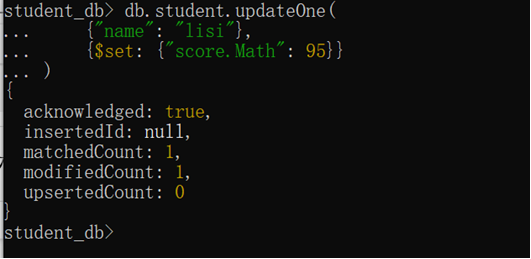
(4)修改lisi的Math成绩,改为95。
2.根据上面已经设计出的Student集合,用MongoDB的Java客户端编程,实现如下操作:
(1)添加数据:English:45 Math:89 Computer:100
与上述数据对应的文档形式如下:
{
“name”: “scofield”,
“score”: {
“English”: 45,
“Math”: 89,
“Computer”: 100
}
}
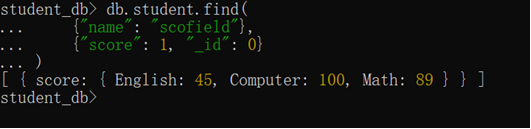
(2)获取scofield的所有成绩成绩信息(只显示score列)
4.实验报告
题目: NoSQL和关系数据库的操作比较
实验环境:操作系统:Linux(centos7);Hadoop版本:3.3.4;JDK版本:1.8;Mysql为5.7, hbase版本:2.4.17。Redis版本:5.0.5;
本机上的相关环境:Java IDE:IDEA; MongoDB版本:8.2;
实验内容与完成情况:
(一) MySQL数据库操作
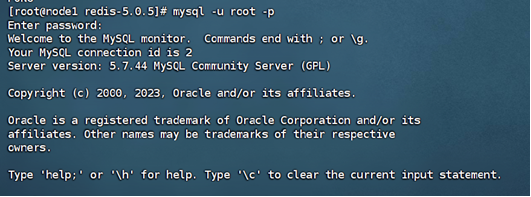
1.根据上面给出的Student表,在MySQL数据库中完成如下操作:
(1)在MySQL中创建Student表,并录入数据;
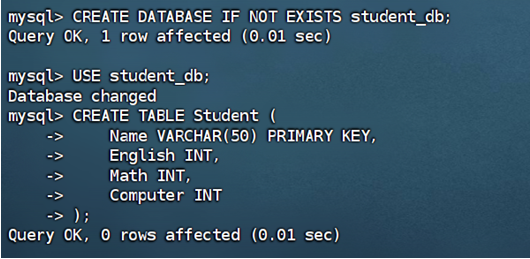
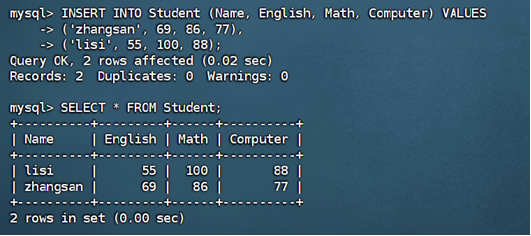
(2) 用SQL语句输出Student表中的所有记录;
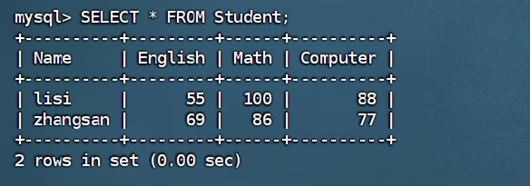
(3)查询zhangsan的Computer成绩;
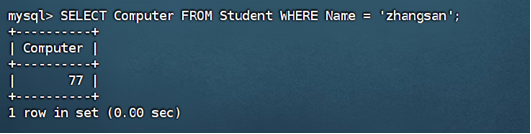
(4)修改lisi的Math成绩,改为95。
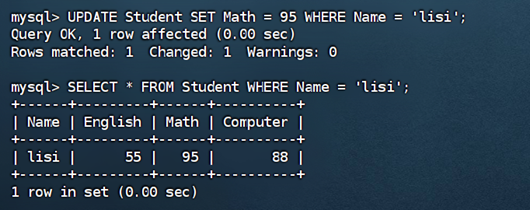
2.根据上面已经设计出的Student表,使用MySQL的JAVA客户端编程实现以下操作:
相关代码和配置:
package com.example;
import java.sql.*;
public class MySQLStudentOperations {
// 修改1:将localhost改为虚拟机IP地址
private static final String URL = "jdbc:mysql://192.168.88.101:3306/student_db?useSSL=false&serverTimezone=UTC&allowPublicKeyRetrieval=true";
private static final String USER = "root";
private static final String PASSWORD = "123456"; // 修改为你的实际密码
public static void main(String[] args) {
    try {
        // 1. 加载驱动
        Class.forName("com.mysql.cj.jdbc.Driver");

        // 2. 建立连接
        Connection conn = DriverManager.getConnection(URL, USER, PASSWORD);
        System.out.println("数据库连接成功!");

        // (1)向Student表添加记录
        addStudent(conn, "scofield", 45, 89, 100);

        // (2)获取scofield的English成绩
        getEnglishScore(conn, "scofield");

        // 可选:查看所有学生
        showAllStudents(conn);

        conn.close();
    } catch (Exception e) {
        e.printStackTrace();
    }
}

private static void addStudent(Connection conn, String name, int english, int math, int computer)
        throws SQLException {
    String sql = "INSERT INTO Student (Name, English, Math, Computer) VALUES (?, ?, ?, ?)";
    try (PreparedStatement pstmt = conn.prepareStatement(sql)) {
        pstmt.setString(1, name);
        pstmt.setInt(2, english);
        pstmt.setInt(3, math);
        pstmt.setInt(4, computer);
        pstmt.executeUpdate();
        System.out.println("成功添加学生: " + name);
    }
}

private static void getEnglishScore(Connection conn, String name) throws SQLException {
    String sql = "SELECT English FROM Student WHERE Name = ?";
    try (PreparedStatement pstmt = conn.prepareStatement(sql)) {
        pstmt.setString(1, name);
        ResultSet rs = pstmt.executeQuery();
        if (rs.next()) {
            System.out.println(name + "的English成绩: " + rs.getInt("English"));
        } else {
            System.out.println("未找到学生: " + name);
        }
    }
}

// 新增:查看所有学生的辅助方法
private static void showAllStudents(Connection conn) throws SQLException {
    String sql = "SELECT * FROM Student";
    try (Statement stmt = conn.createStatement()) {
        ResultSet rs = stmt.executeQuery(sql);
        System.out.println("\n所有学生记录:");
        System.out.println("姓名\t\t英语\t数学\t计算机");
        while (rs.next()) {
            System.out.println(rs.getString("Name") + "\t\t" +
                    rs.getInt("English") + "\t" +
                    rs.getInt("Math") + "\t" +
                    rs.getInt("Computer"));
        }
    }
}
}
<groupId>com.example</groupId>
<artifactId>mysql-client</artifactId>
<version>1.0-SNAPSHOT</version>

<properties>
    <maven.compiler.source>8</maven.compiler.source>
    <maven.compiler.target>8</maven.compiler.target>
</properties>

<dependencies>
    <dependency>
        <groupId>mysql</groupId>
        <artifactId>mysql-connector-java</artifactId>
        <version>8.0.33</version>
    </dependency>
</dependencies>
(二) HBase数据库操作
1.根据上面给出的学生表Student的信息,执行如下操作:
(1)用Hbase Shell命令创建学生表Student;

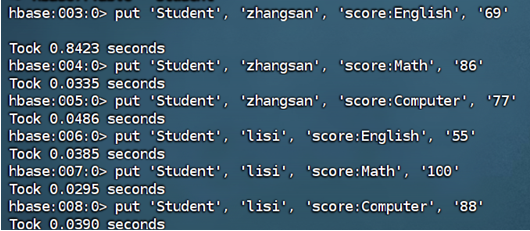
(2)用scan命令浏览Student表的相关信息;
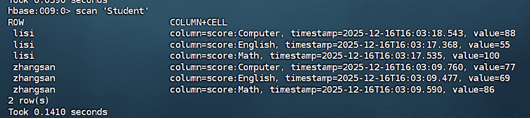
(3) 查询zhangsan的Computer成绩;

(4)修改lisi的Math成绩,改为95。


- 根据上面已经设计出的Student表,用HBase API编程实现以下操作:
相关代码:
package com.example;
import org.apache.hadoop.conf.Configuration;
import org.apache.hadoop.hbase.HBaseConfiguration;
import org.apache.hadoop.hbase.TableName;
import org.apache.hadoop.hbase.client.*;
import org.apache.hadoop.hbase.util.Bytes;
public class HBaseStudentOperations {
private static Connection connection;
public static void main(String[] args) {
    try {
        System.out.println("开始连接 HBase...");

        // 配置HBase连接
        Configuration config = HBaseConfiguration.create();
        config.set("hbase.zookeeper.quorum", "192.168.88.101"); // 使用服务器IP而不是localhost
        config.set("hbase.zookeeper.property.clientPort", "2181");
        config.set("hbase.client.pause", "1000");
        config.set("hbase.client.retries.number", "3");
        config.set("zookeeper.recovery.retry", "3");
        config.set("hbase.rpc.timeout", "5000");
        config.set("hbase.client.operation.timeout", "5000");
        config.set("hbase.client.scanner.timeout.period", "5000");

        // 添加调试日志
        config.set("hbase.client.log.scanner", "true");

        System.out.println("正在创建连接...");
        connection = ConnectionFactory.createConnection(config);
        System.out.println("连接创建成功!");

        // 检查表是否存在
        Admin admin = connection.getAdmin();
        TableName tableName = TableName.valueOf("Student");

        if (!admin.tableExists(tableName)) {
            System.out.println("表 Student 不存在,正在创建...");
            TableDescriptorBuilder tableDesc = TableDescriptorBuilder.newBuilder(tableName);
            ColumnFamilyDescriptorBuilder cfDesc = ColumnFamilyDescriptorBuilder.newBuilder(Bytes.toBytes("score"));
            tableDesc.setColumnFamily(cfDesc.build());
            admin.createTable(tableDesc.build());
            System.out.println("表 Student 创建成功");
        }

        // (1)添加数据
        System.out.println("正在添加学生数据...");
        addStudentData("scofield", 45, 89, 100);

        // (2)获取scofield的English成绩
        System.out.println("正在获取成绩...");
        getEnglishScore("scofield");

        admin.close();
        connection.close();
        System.out.println("程序执行完成!");
    } catch (Exception e) {
        System.err.println("发生错误: " + e.getMessage());
        e.printStackTrace();
    }
}

private static void addStudentData(String name, int english, int math, int computer)
        throws Exception {
    Table table = connection.getTable(TableName.valueOf("Student"));

    Put put = new Put(Bytes.toBytes(name));
    put.addColumn(Bytes.toBytes("score"), Bytes.toBytes("English"),
            Bytes.toBytes(String.valueOf(english)));
    put.addColumn(Bytes.toBytes("score"), Bytes.toBytes("Math"),
            Bytes.toBytes(String.valueOf(math)));
    put.addColumn(Bytes.toBytes("score"), Bytes.toBytes("Computer"),
            Bytes.toBytes(String.valueOf(computer)));

    table.put(put);
    table.close();
    System.out.println("成功添加学生数据: " + name);
}

private static void getEnglishScore(String name) throws Exception {
    Table table = connection.getTable(TableName.valueOf("Student"));

    Get get = new Get(Bytes.toBytes(name));
    Result result = table.get(get);

    byte[] englishBytes = result.getValue(Bytes.toBytes("score"),
            Bytes.toBytes("English"));
    if (englishBytes != null) {
        String englishScore = Bytes.toString(englishBytes);
        System.out.println(name + "的English成绩: " + englishScore);
    } else {
        System.out.println("未找到 " + name + " 的 English 成绩");
    }

    table.close();
}
}
程序运行结果:
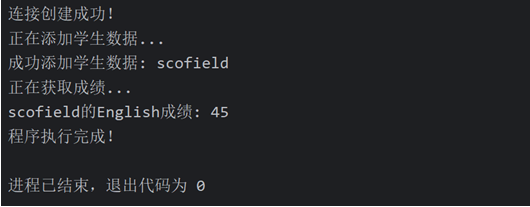
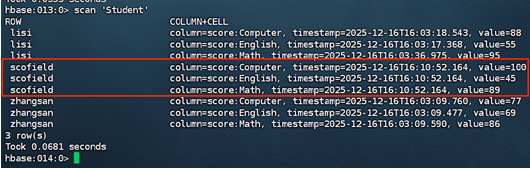
(1)添加数据:English:45 Math:89 Computer:100
(2)获取scofield的English成绩信息。
结果验证:
(三) Redis数据库操作
- 根据上面给出的键值对,完成如下操作:
(1)用Redis的哈希结构设计出学生表Student(键值可以用student.zhangsan和student.lisi来表示两个键值属于同一个表);
![image]()

(2)用hgetall命令分别输出zhangsan和lisi的成绩信息;
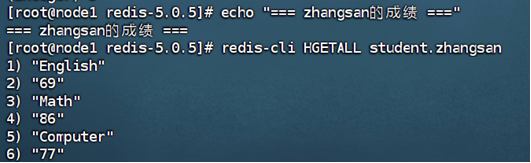
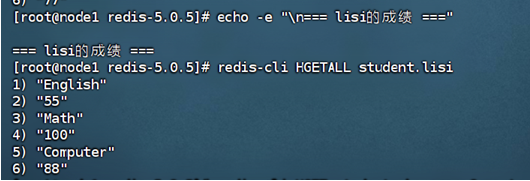
(3)用hget命令查询zhangsan的Computer成绩;

(4) 修改lisi的Math成绩,改为95。

2.根据上面已经设计出的学生表Student,用Redis的JAVA客户端编程(jedis),实现如下操作:
相关代码和配置:
package com.example;
import redis.clients.jedis.Jedis;
import java.util.Map;
public class RedisStudentOperations {
public static void main(String[] args) {
// 连接Redis服务器
Jedis jedis = new Jedis("192.168.88.101", 6379);
// 如果设置了密码
// jedis.auth("your_password");
    try {
        // (1)添加数据
        addStudent(jedis, "scofield", 45, 89, 100);

        // (2)获取scofield的English成绩信息
        getEnglishScore(jedis, "scofield");

    } finally {
        jedis.close();
    }
}

private static void addStudent(Jedis jedis, String name, int english, int math, int computer) {
    String key = "student." + name;

    jedis.hset(key, "English", String.valueOf(english));
    jedis.hset(key, "Math", String.valueOf(math));
    jedis.hset(key, "Computer", String.valueOf(computer));

    System.out.println("成功添加学生: " + name);
}

private static void getEnglishScore(Jedis jedis, String name) {
    String key = "student." + name;
    String englishScore = jedis.hget(key, "English");

    if (englishScore != null) {
        System.out.println(name + "的English成绩: " + englishScore);
    } else {
        System.out.println("未找到" + name + "的English成绩");
    }
}
}
package com.example;
import redis.clients.jedis.Jedis;
import java.util.Map;
public class RedisStudentOperations {
public static void main(String[] args) {
// 连接Redis服务器
Jedis jedis = new Jedis("192.168.88.101", 6379);
// 如果设置了密码
// jedis.auth("your_password");
    try {
        // (1)添加数据
        addStudent(jedis, "scofield", 45, 89, 100);

        // (2)获取scofield的English成绩信息
        getEnglishScore(jedis, "scofield");

    } finally {
        jedis.close();
    }
}

private static void addStudent(Jedis jedis, String name, int english, int math, int computer) {
    String key = "student." + name;

    jedis.hset(key, "English", String.valueOf(english));
    jedis.hset(key, "Math", String.valueOf(math));
    jedis.hset(key, "Computer", String.valueOf(computer));

    System.out.println("成功添加学生: " + name);
}

private static void getEnglishScore(Jedis jedis, String name) {
    String key = "student." + name;
    String englishScore = jedis.hget(key, "English");

    if (englishScore != null) {
        System.out.println(name + "的English成绩: " + englishScore);
    } else {
        System.out.println("未找到" + name + "的English成绩");
    }
}
}
配置:
程序输出结果:
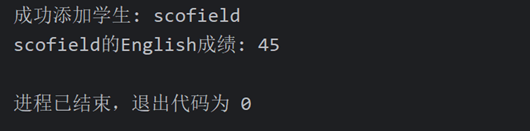
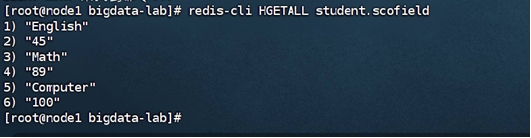
结果验证:
(1)添加数据:English:45 Math:89 Computer:100
(2)获取scofield的English成绩信息
(四) MongoDB数据库操作
1.根据上面给出的文档,完成如下操作:
(1)用MongoDB Shell设计出student集合;
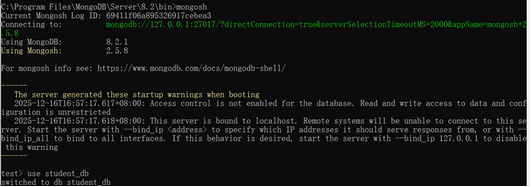
插入数据:
(2)用find()方法输出两个学生的信息;
(3)用find()方法查询zhangsan的所有成绩(只显示score列);

(4)修改lisi的Math成绩,改为95。
- 根据上面已经设计出的Student集合,用MongoDB的Java客户端编程,实现如下操作:
相关代码和配置:
package com.example;
import com.mongodb.client.MongoClient;
import com.mongodb.client.MongoClients;
import com.mongodb.client.MongoCollection;
import com.mongodb.client.MongoDatabase;
import com.mongodb.client.model.Filters;
import com.mongodb.client.model.Updates;
import com.mongodb.client.result.UpdateResult;
import org.bson.Document;
import org.bson.conversions.Bson;
import java.util.HashMap;
import java.util.Map;
public class MongoDBStudentOperations {
public static void main(String[] args) {
// 连接字符串
String connectionString = "mongodb://localhost:27017";
    try (MongoClient mongoClient = MongoClients.create(connectionString)) {
        // 获取数据库和集合
        MongoDatabase database = mongoClient.getDatabase("student_db");
        MongoCollection<Document> collection = database.getCollection("student");

        // (1)添加数据
        addStudent(collection, "scofield", 45, 89, 100);

        // (2)获取scofield的所有成绩信息(只显示score列)
        getStudentScores(collection, "scofield");

    } catch (Exception e) {
        e.printStackTrace();
    }
}

private static void addStudent(MongoCollection<Document> collection,
                               String name, int english, int math, int computer) {
    // 创建成绩子文档
    Map<String, Object> score = new HashMap<>();
    score.put("English", english);
    score.put("Math", math);
    score.put("Computer", computer);

    // 创建主文档
    Document student = new Document();
    student.put("name", name);
    student.put("score", score);

    // 插入数据
    collection.insertOne(student);
    System.out.println("成功添加学生: " + name);
}

private static void getStudentScores(MongoCollection<Document> collection, String name) {
    Bson filter = Filters.eq("name", name);
    Bson projection = new Document("score", 1).append("_id", 0);

    Document result = collection.find(filter)
            .projection(projection)
            .first();

    if (result != null) {
        System.out.println(name + "的成绩信息: " + result.toJson());
    } else {
        System.out.println("未找到学生: " + name);
    }
}
}
配置:
运行结果:

(1)添加数据:English:45 Math:89 Computer:100
(2)获取scofield的所有成绩成绩信息(只显示score列)
结果展示:
出现的问题:
之前安装好的MongoDB突然启动失败,需要我重新安装MonggoDB服务
解决方案(列出遇到的问题和解决办法,列出没有解决的问题):
上述问题的解决方式入下图:
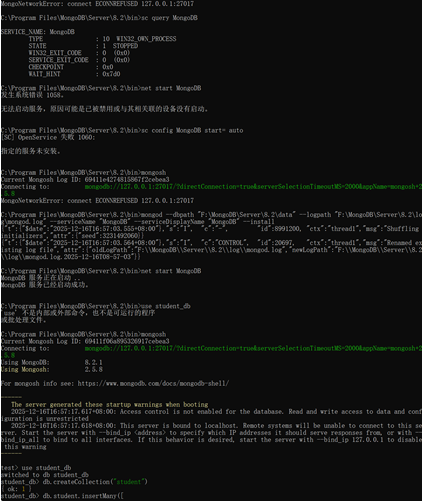
在 Windows 系统中重新安装 MongoDB 为系统服务。
在 C:\Program Files\MongoDB\Server\8.2\bin 目录下运行:
输入:
mongod --dbpath "F:\MongoDB\Server\8.2\data" --logpath "F:\MongoDB\Server\8.2\log\mongod.log" --serviceName "MongoDB" --serviceDisplayName "MongoDB" --install

 浙公网安备 33010602011771号