


学习进度条
今日所花时间:一小时
今日代码量:100行
博客量:一篇
了解到的知识点:整站使用vue vue项目的开发流程
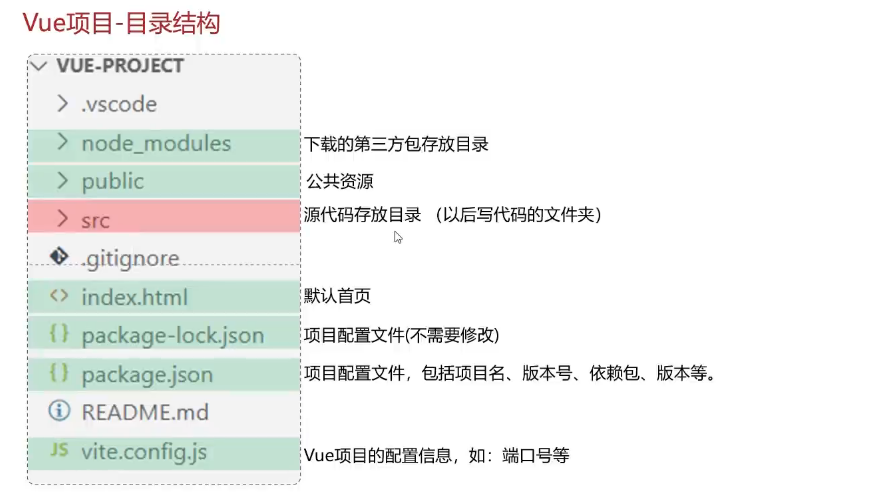
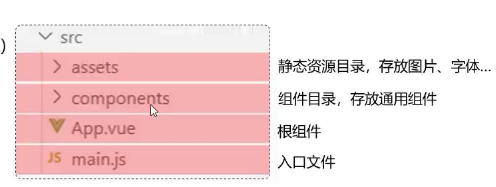
vue的开发流程
<!-- vue项目的入口文件是main.js -->
 <!-- vue的单文件组件中包含哪几个部分 -->
  <!-- 三部分 -->
<!-- 1.逻辑部分 控制模板的数据和行为 -->
<!-- <script>
//写数据
//方法一
export default{
  data(){
    return{
      msg:'上海'
    }
  }
}
</script> -->
<!-- 方法二 -->
<script setup>
import {ref} from 'vue';
//调用ref函数,定义响应式数据
const msg = ref('西安')
</script>

<!-- 2.模板部分,由它生成HTML -->
<template>
  <!-- <h1>背景</h1> -->
   <h1>{{ msg }}</h1>
</template>
<!-- 3.当前组件的CSS样式 -->
<style scoped>
h1 {
  color: red;
}
</style>
main.js
import './assets/main.css'

import { createApp } from 'vue'
import App from './App.vue'

createApp(App).mount('#app')
vue的API风格
组合式API的使用
setup:是一个标识,告诉Vue需要进行一些处理,让我们可
以更简洁的使用组合式API。
ref():接收一个内部值,返回一个响应式的ref对象,此对
象只有一个指向内部值的属性value。
onMounted():在组合式API中的钩子方法,注册一个回调函
数,在组件挂载完成后执行。
在src文件下创建Api.vue文件,书写以下代码
<!-- vue的组件书写分为几种风格 -->
 <!-- 选项式API 组合式API(推荐) -->
<script setup>
import {ref,onMounted} from 'vue'
//声明响应式数据 ref 响应式对象有一个内部的属性value
const count = ref(0);//在组合式API中,一般需要把数据定义为响应式数据
//声明函数
function increment(){
    count.value++;
}
//声明钩子函数onMounted
onMounted(()=>{
    console.log('vue已经加载完毕了');

})
</script>
<template>
    <!-- 写html函数 -->
     <button @click="increment">count:{{ count }}</button>
</template>
要想使得Api.vue文件能够在浏览器访问,要在APP中引入,并声明标签
<script>
//导入Api.vue文件
import ApiVue from './api.vue'
</script>
<!-- 声明API标签 -->
   <ApiVue/>
案例:
<script setup>
    //导入axios npm install axios
    import axios from 'axios';
    import { ref } from 'vue';
    // 定义响应式数据 ref
    const articleList = ref([]);

    //发送异步请求,获取所有文章数据
    axios.get('http://localhost:8080/article/getAll')
    .then(result => {
        //把服务器响应的数据保存起来
        articleList.value = result.data;
    }).catch(err => {
        console.log(err);
    });
    //定义响应式数据 searchConditions
    const searchConditions = ref({
        category:'',
        state:''
    })
    //声明search函数
    const search = function(){
        //发送请求完成搜索
        axios.get('http://localhost:8080/article/search',{params:{...searchConditions.value}})
        .then(result=>{
            articleList.value= result.data
        }).catch(err=>{
            console.log(err);

        });
    }
</script>
<template>
    <!-- html元素 -->
    <div>

        文章分类: <input type="text" v-model="searchConditions.category">

        发布状态: <input type="text"v-model="searchConditions.state">

        <button v-on:click="search">搜索</button>

        <br />
        <br />
        <table border="1 solid" colspa="0" cellspacing="0">
            <tr>
                <th>文章标题</th>
                <th>分类</th>
                <th>发表时间</th>
                <th>状态</th>
                <th>操作</th>
            </tr>
            <tr v-for="(article,index) in articleList">
                <td>{{article.title}}</td>
                <td>{{article.category}}</td>
                <td>{{article.time}}</td>
                <td>{{article.state}}</td>
                <td>
                    <button>编辑</button>
                    <button>删除</button>
                </td>
            </tr>

        </table>
    </div>

</template>
案例代码优化
存在问题:复用性差
接口调用的js代码一般会封装到.js文件中,并且以函数的形式暴露给外部
<script setup>
import { articleGetAllService, articleSearchService } from '@/api/article.js';
import { ref } from 'vue';
// 定义响应式数据 ref
const articleList = ref([]);
//获取所有文章数据
//同步获取articleGetAllService的返回结果 async await
const getAllArticle = async function () {
    let data = await articleGetAllService();
    articleList.value = data;
}
getAllArticle();

//定义响应式数据 searchConditions
const searchConditions = ref({
    category: '',
    state: ''
})
//声明search函数
const search = async function () {
    let data = await articleSearchService({...searchConditions.value});
    articleList.value = data;
}
</script>
<template>
    <!-- html元素 -->
    <div>

        文章分类: <input type="text" v-model="searchConditions.category">

        发布状态: <input type="text" v-model="searchConditions.state">

        <button v-on:click="search">搜索</button>

        <br />
        <br />
        <table border="1 solid" colspa="0" cellspacing="0">
            <tr>
                <th>文章标题</th>
                <th>分类</th>
                <th>发表时间</th>
                <th>状态</th>
                <th>操作</th>
            </tr>
            <tr v-for="(article, index) in articleList">
                <td>{{ article.title }}</td>
                <td>{{ article.category }}</td>
                <td>{{ article.time }}</td>
                <td>{{ article.state }}</td>
                <td>
                    <button>编辑</button>
                    <button>删除</button>
                </td>
            </tr>

        </table>
    </div>

</template>
在src创建api文件夹 在api中创建article.js书写如下代码
/* //导入axios npm install axios
import axios from 'axios';
//定义一个变量记录公共的前缀,baseURL
const baseURL = 'http://localhost:8080';
const instance = axios.create({baseURL}) */
import request from '@/util/request.js'
//获取所有文章数据的函数
export function articleGetAllService() {
    //发送异步请求,获取所有文章数据
    //同步等待服务器响应的结果并返回 async await
    return request.get('/article/getAll');
}
//根据文章状态和发布状态搜索的函数
export function articleSearchService(conditions) {
    //发送请求完成搜索
    return request.get('/article/search', { params: conditions });
}
公共前缀的优化
//定义一个变量记录公共的前缀,baseURL
const baseURL = 'http://localhost:8080';
const instance = axios.create({baseURL})
//获取所有文章数据的函数
export async function articleGetAllService() {
    //发送异步请求,获取所有文章数据
    //同步等待服务器响应的结果并返回 async await
    return await instance.get('/article/getAll')
        .then(result => {
            return result.data;
        }).catch(err => {
            console.log(err);
        });
}
//根据文章状态和发布状态搜索的函数
export async function articleSearchService(conditions) {
    //发送请求完成搜索
     return await instance.get('/article/search', { params: conditions})
        .then(result => {
            return result.data;
        }).catch(err => {
            console.log(err);

        });
}
在src中创建util文件夹创建request.js文件,书写以下内容
//定制请求的实例

//导入axios npm install axios
import axios from 'axios';
//定义一个变量记录公共的前缀,baseURL
const baseURL = 'http://localhost:8080';
const instance = axios.create({baseURL})

//添加响应拦截器
instance.interceptors.response.use(
    result=>{
        return result.data;
    },
    err=>{
        alert('服务异常');
        return Promise.reject(err);//异步的状态转化成失败的状态
    }

)

export default instance;

 浙公网安备 33010602011771号