


员工考勤管理系统
员工考勤管理系统
题目要求
员工考勤管理系统(50分)
1、项目需求:
企业员工考勤管理系统是一个企业单位信息化建设不可缺少的部分。考勤管理系统是针对某公司对该公司职工的考勤、查询、信息录入、核查、统计分析等功能为一体的应用软件,为用户提供充足的信息和快捷的查询手段。
2.系统要求与功能设计
2.1 页面要求
(1)系统可以通过浏览器直接访问;(1分)
(2)各个功能页面整体风格统一;
(3)首页为用户登录页面,管理员、部门经理、普通员工三种角色用户登录后,进入相应的功能页,只能看到角色允许访问功能模块;(3分)
(5)员工功能页:共包括查看个人信息、修改个人基本信息、修改个人密码、日常考勤、浏览个人考勤记录五项功能模块。
(6)部门经理功能页:包括查看个人信息、修改个人基本信息、修改个人密码、查询部门考勤情况、员工调岗五项功能模块;
(7)管理员功能页:新添部门基本信息、修改部门基本信息、删除部门基本信息、新添员工基本信息,修改员工基本信息、删除员工基本信息、设置角色管理,密码重置八项功能模块。
2.2 功能要求
(1)新增员工基本信息:新增一名新员工基本信息,员工基本信息包括;工号(数据库中工保持唯一、由系统自动生成、生成规则:学号由八位数字组成、开头以“2019XXXX”,其中XXXX为四位依次递增的数字序号例如:“20190001、20190002……”)、姓名、性别(限定为“男”或“女”两个选项)、出生日期(要求存储成字符串格式,按照“xxxx-xx-xx”即“2000-01-01”格式存储显示)、所属部门(选择所在部门编码)、角色(新员工初始角色缺省值为“员工”)、六项基本信息。(7分)
(2)修改员工基本信息(等同于员工功能页和部门经理功能页中修改个人信息):工号不允许修改,姓名、性别、出生年月可以按照要求进行修改,所属部门、角色个人不允许修改。修改内容不符合录入格式的,提交时不允许修改,并提示错误信息类型,返回修改界面。(3分)
(3)删除员工基本信息:管理员可以从系统中删除员工基本信息。(1分)
(4)新增部门基本信息:新增一个部门基本信息,部门基本信息包括:部门编号(唯一,两位数字组成,要求数据库中事先录入下列部门信息 :“01表示办公室、02表示财务部门、03表示销售部门、04、表示生产一部、05表示生产二部、06表示生产三部”)、部门名称(唯一,不允许重复),提交时应验证部门编码和部门名称的正确性,如有误,则提示错误信息,不允许提交保存;(5分)
(5)修改部门基本信息:可以修改部门名称,但是不可以与已经存在的部门名称冲突,修改提交时须验证是否符合录入格式的,不符合不允许修改,提示错误信息类型,返回修改界面。(2分)
(6)删除部门基本信息:管理员可以从系统中删除部门基本信息,但是如果该部门中仍然存在员工,系统不允许删除部门信息。(2分)
(7)设置角色管理:管理员可以为每一位员工指定角色身份,本系统中只有两种角色“部门经理”和“员工”,一旦将员工指定为部门经理,该员工登录时自动跳转到该部门经理功能页面,如果该部门已存在经理,则不允许指定第二位经理。(2分)
(8)日常考勤管理:员工登录后,点击日常考勤菜单,显示如下界面。(5分)
考勤时间为当前系统时间。
点击上班,判断当前时间是否为上午8点到九点之间,如果是则显示“打卡成功”提示信息,上班改为“已上班”状态;如果不是,则提示错误信息“已过上班打卡时间点,打卡无效”;
点击下班,判断当前时间是否为下午五点以后,如果是则显示“打卡成功”提示信息,下班改为“已下班”状态;如果不是,则提示错误信息“未到下班打卡时间点,打卡无效”;
打卡成功的界面显示
(9)浏览个人考勤记录:员工登陆后,可以以列表形式查看个人考勤记录,列表包括考勤时间,考勤类型(上班或下班),结果按照时间倒序排列。(2分)
(10)查询部门考勤记录:项目经理可以查看本部门所有员工(包括本人)全部考勤记录,列表内容包括考勤时间、姓名、考勤类型,结果列表按照时间倒序排列;可以按照姓名查询显示该名员工的所有考勤记录(3分)
(11)员工调岗功能:部门经理可以浏览本部门全部员工的基本信息列表,列表包括序号、姓名、性别、出生日期,选择某名员工,跳转到员工调出界面,界面如下图所示,选择调入部门名称(不得与本部门相同),点击调入按钮,实现员工调出,跳回到员工基本信息列表界面,则该员工信息已不在该部门显示。(5分)
(12)个人密码修改:部门经理或员工用户登录后,可以输入旧密码、新密码、新密码确认修改个人密码,需要判断旧密码是否正确,新密码和新密码确认是否一致;(2分)
(14)重置密码:管理员可以修改部门经理或员工的个人密码,先按照工号查询,显示出基本信息后,点击密码重置,将员工密码统一修改为“123456”。(2分)
(15)数据库评分标准:按照题目要求创建部门基本信息表、员工基本信息表、考勤记录表,(3分),实现数据库连接正常(2分)。
数据表结构样式参考下表所示:
表1员工基本信息表
序 号 字段名称 中文含义
1 JobID 工号
2 Name 姓名
3 sex 性别
4 birthday 出生日期
5 department 部门
6 role 角色
7 password 密码
表2部门基本信息表
序 号 字段名称 中文含义
1 department ID 部门编码
2 department 部门名称
表3考勤记录表
序 号 字段名称 中文含义
1 ID 序号
2 Attendancetime 考勤时间
3 JobID 工号
4 Name 姓名
5 sex 性别
6 birthday 出生日期
7 department 部门
8 Attendancetype 考勤类型(上班或下班)
后端代码编写
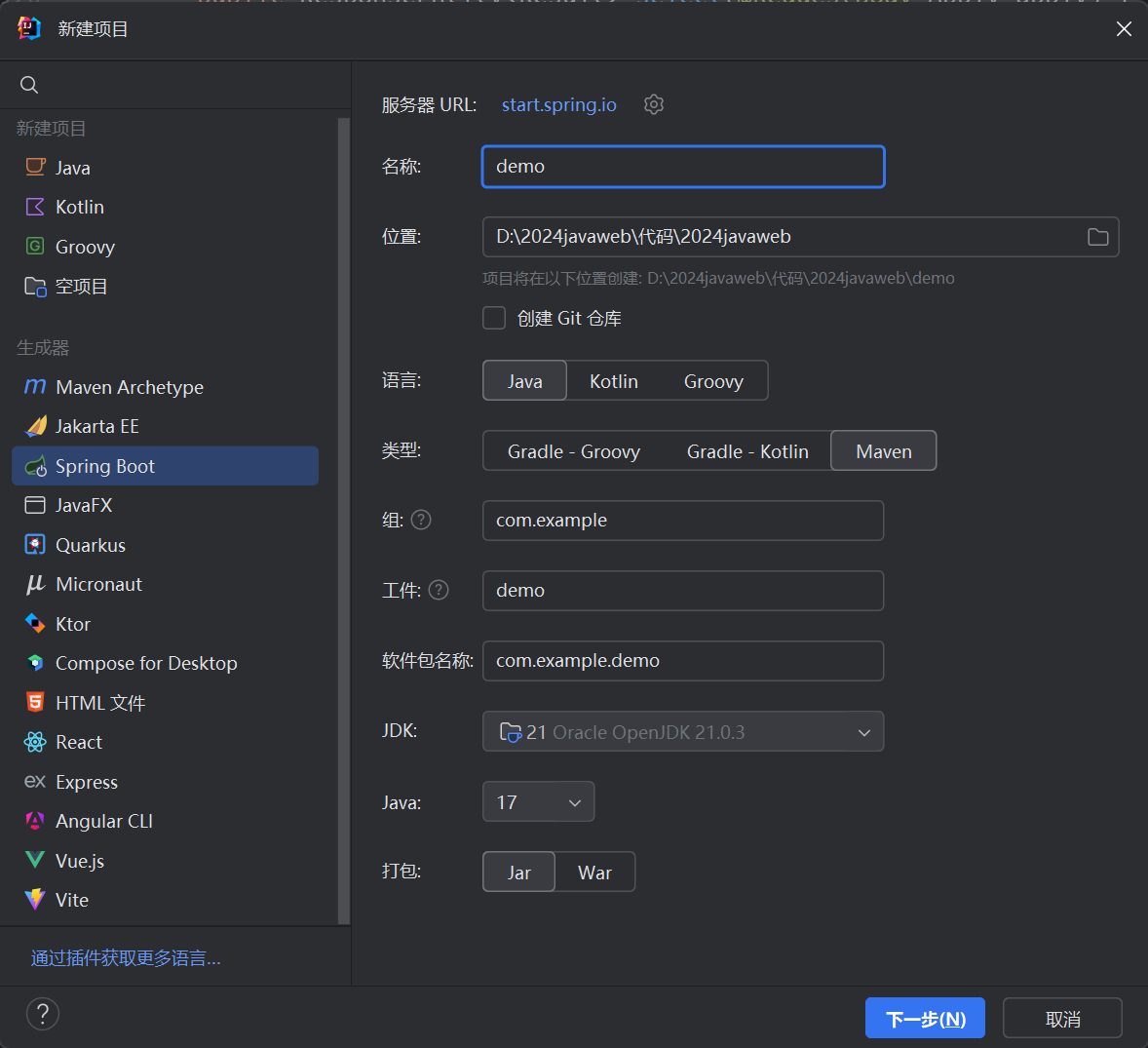
创建springboot项目
配置pom.xml
<?xml version="1.0" encoding="UTF-8"?>
<project xmlns="http://maven.apache.org/POM/4.0.0" xmlns:xsi="http://www.w3.org/2001/XMLSchema-instance"
		 xsi:schemaLocation="http://maven.apache.org/POM/4.0.0 https://maven.apache.org/xsd/maven-4.0.0.xsd">
	<modelVersion>4.0.0</modelVersion>
	<parent>
		<groupId>org.springframework.boot</groupId>
		<artifactId>spring-boot-starter-parent</artifactId>
		<version>3.3.5</version>
		<relativePath/> <!-- lookup parent from repository -->
	</parent>

	<groupId>com.example</groupId>
	<artifactId>day1125demo</artifactId>
	<version>0.0.1-SNAPSHOT</version>
	<name>day1125demo</name>
	<description>day1125demo</description>
	<url/>
	<licenses>
		<license/>
	</licenses>
	<developers>
		<developer/>
	</developers>
	<scm>
		<connection/>
		<developerConnection/>
		<tag/>
		<url/>
	</scm>
	<properties>
		<java.version>17</java.version>
	</properties>

	<dependencies>
		<dependency>
			<groupId>org.springframework.boot</groupId>
			<artifactId>spring-boot-starter-thymeleaf</artifactId>
		</dependency>
		<dependency>
			<groupId>org.springframework.boot</groupId>
			<artifactId>spring-boot-starter-web</artifactId>
		</dependency>

		<dependency>
			<groupId>com.microsoft.sqlserver</groupId>
			<artifactId>mssql-jdbc</artifactId>
			<scope>runtime</scope>
		</dependency>
		<dependency>
			<groupId>com.mysql</groupId>
			<artifactId>mysql-connector-j</artifactId>
			<scope>runtime</scope>
		</dependency>
		<dependency>
			<groupId>org.projectlombok</groupId>
			<artifactId>lombok</artifactId>
			<optional>true</optional>
		</dependency>
		<dependency>
			<groupId>org.springframework.boot</groupId>
			<artifactId>spring-boot-starter-test</artifactId>
			<scope>test</scope>
		</dependency>
		<dependency>
			<groupId>org.mybatis.spring.boot</groupId>
			<artifactId>mybatis-spring-boot-starter</artifactId>
			<version>3.0.3</version>
		</dependency>
		<dependency>
			<groupId>mysql</groupId>
			<artifactId>mysql-connector-java</artifactId>
			<version>8.0.33</version>
		</dependency>

	</dependencies>


	<build>
		<plugins>
			<plugin>
				<groupId>org.springframework.boot</groupId>
				<artifactId>spring-boot-maven-plugin</artifactId>
				<configuration>
					<excludes>
						<exclude>
							<groupId>org.projectlombok</groupId>
							<artifactId>lombok</artifactId>
						</exclude>
					</excludes>
				</configuration>
			</plugin>
		</plugins>
	</build>


</project>
配置application.properties
spring.application.name=day1223

server.port=9090

spring.datasource.url=jdbc:mysql://localhost:3306/employer

spring.datasource.username=root

spring.datasource.password=123456

spring.datasource.driver-class-name=com.mysql.cj.jdbc.Driver

mybatis.configuration.log-impl=org.apache.ibatis.logging.stdout.StdOutImpl

mybatis.mapper-locations=classpath:mybatis/mappers/*.xml

#??mybatis???????????
mybatis.configuration.map-underscore-to-camel-case=true

#spring.datasource.type=com.alibaba.druid.pool.DruidDataSource
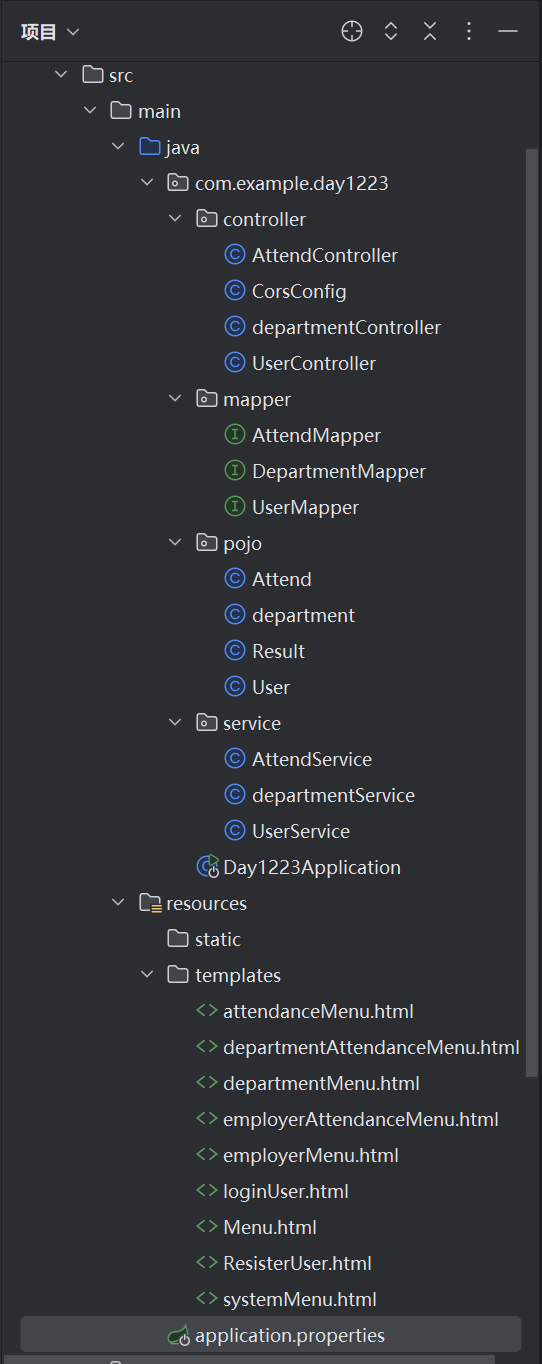
后端项目结构如下
数据库建表语句
create table users
(
    userId     varchar(255) not null
        primary key,
    userName   varchar(255) not null,
    department varchar(255) null,
    role       varchar(255) null,
    password   varchar(255) not null
);
drop table department ;
create table department
(
    departmentId varchar(255)
        primary key ,
    departmentName varchar(255)
);
create table attend
(
    Id  varchar(255) not null
        primary key ,
    attendanceTime varchar(255) not null,
    JobId varchar(255) not null,
    Name varchar(255) not null,
    sex varchar(255) not null,
    birthday varchar(255) not null,
    department varchar(255) not null,
    attendanceType varchar(255) not null
);
统一响应结果封装类
package com.example.day1223.pojo;


/**
 * 统一响应结果封装类
 */
public class Result {
    private static Integer code;//0失败,1成功
    private String message;//提示错误信息
    private Object data;//数据

    //方便创建Result对象
    //创建一个表示成功的Result对象,并传入具体数据
    public static Result success(Object data) {
        return new Result(1, "success", data);
    }

    //创建一个表示成功但没有具体数据的Result对象
    public static Result success() {
        return new Result(1, "success", null);
    }

    //创建一个表示失败的Result对象,并传入错误提示信息
    public static Result error(String message) {
        return new Result(code, message, null);
    }

    //无参构造和有参构造函数
    public Result() {
    }

    public Result(Integer code, String message, Object data) {
        this.code = code;
        this.message = message;
        this.data = data;
    }

    //重写Obiect类的toString()方法
    // 以自定义的格式返回Result对象的字符串表示
    // 方便在调试或输出时查看对象的内容
    @Override
    public String toString() {
        return "Result [code=" + code + ", message=" + message + ", data=" + data + "]";
    }

    public Integer getCode() {
        return code;
    }

    public void setCode(Integer code) {
        this.code = code;
    }

    public String getMessage() {
        return message;
    }

    public void setMessage(String message) {
        this.message = message;
    }

    public Object getData() {
        return data;
    }

    public void setData(Object data) {
        this.data = data;
    }
}
后端代码(实体类)
Attend.java
package com.example.day1223.pojo;

import lombok.Data;

@Data
public class Attend {
    private String attendId;
    private String attendanceTime;
    private String jobId;
    private String userName;
    private String sex;
    private String birthday;
    private String department;
    private String attendanceType;
}
department.java
package com.example.day1223.pojo;

import lombok.Data;

@Data
public class department {
    private String departmentId;
    private String departmentName;
}
User.java
package com.example.day1223.pojo;

import lombok.Data;


@Data
public class User {
    private String jobId;
    private String userName;
    private String sex;
    private String birthday;
    private String department;
    private String role;
    private String password;

}
后端代码(controller层)
AttendController.java
package com.example.day1223.controller;

import com.example.day1223.pojo.Attend;
import com.example.day1223.pojo.Result;
import com.example.day1223.service.AttendService;
import org.apache.ibatis.annotations.Delete;
import org.apache.ibatis.annotations.Select;
import org.springframework.beans.factory.annotation.Autowired;
import org.springframework.web.bind.annotation.*;

import java.util.List;

@CrossOrigin
@RestController
@RequestMapping("/attend")
public class AttendController {
    @Autowired
    private AttendService attendService;
    @PostMapping("/add")
    public Result add(@RequestBody Attend attend) {
        attendService.insertAttend(attend);
        return Result.success(attend);
    }
    @PutMapping("/update")
    public Result update(@RequestBody Attend attend) {
        attendService.updateAttend(attend);
        return Result.success(attend);
    }
    @DeleteMapping("/delete")
    public Result delete(@RequestBody Attend attend) {
        attendService.deleteAttend(attend);
        return Result.success(attend);
    }
    @PostMapping("/selectAll")
    public Result selectAll() {
        List<Attend> attendList =attendService.selectAll();
        System.out.println(attendList);
        return Result.success(attendList);
    }
    @PostMapping("/select")
    public Result select(@RequestBody Attend attend) {
        String attendId = attend.getAttendId();
        Attend attends = attendService.select(attendId);
        return Result.success(attends);
    }


}
departmentController.java
package com.example.day1223.controller;

import com.example.day1223.pojo.User;
import com.example.day1223.pojo.department;
import com.example.day1223.pojo.Result;
import org.springframework.beans.factory.annotation.Autowired;
import org.springframework.web.bind.annotation.*;

@CrossOrigin
@RestController
@RequestMapping("/department")
public class departmentController {
    @Autowired
    private com.example.day1223.service.departmentService departmentService;
    @PostMapping("/add")
    public Result add(@RequestBody department department) {
        departmentService.insert(department);
        return Result.success(department);
    }
    @PutMapping("/update")
    public Result update(@RequestBody department department) {
        System.out.println(department);
        departmentService.update(department);
        return Result.success(department);
    }
    @DeleteMapping("/delete")
    public Result delete(@RequestBody department department) {
        departmentService.delete(department);
        return Result.success(department);
    }
    @PostMapping("/select")
    public Result selectById(@RequestBody department department) {
        String departmentId = department.getDepartmentId();

        department departments = departmentService.select(departmentId);
        if(departments!=null){
            return Result.success(departments);
        }else{
            return Result.error("查询失败");
        }
    }

    @GetMapping("/selectAll")
    public Result selectAll() {
        departmentService.selectAll();
        return Result.success(departmentService.selectAll());
    }
}
UserController.java
package com.example.day1223.controller;

import com.example.day1223.mapper.UserMapper;
import com.example.day1223.pojo.Attend;
import com.example.day1223.pojo.Result;
import com.example.day1223.pojo.User;
import com.example.day1223.service.UserService;
import org.apache.ibatis.annotations.Delete;
import org.springframework.beans.factory.annotation.Autowired;
import org.springframework.web.bind.annotation.*;

@CrossOrigin(origins = "http://localhost:63342")
@RestController
@RequestMapping("/user")
public class UserController {
    @Autowired
    UserService userService;
    @PostMapping("/add")
    public Result add(@RequestBody User user) {
        userService.insertUser(user);
        System.out.println("插入成功");
        return Result.success(user);
    }
    @PutMapping("/update")
    public Result update(@RequestBody User user) {
        userService.updateUser(user);
        return Result.success(user);
    }
    @DeleteMapping("/delete")
    public Result delete(@RequestBody User user) {
        userService.delete(user);
        return Result.success(user);
    }
    @GetMapping("/getAll")
    public Result getAll() {
        userService.findAll();
        return Result.success(userService.findAll());
    }
    @PostMapping("/get")
    public Result get(@RequestBody User user) {
        String jobId = user.getJobId();
        User users = userService.findById(jobId);
        if(users!=null){
            return Result.success(users);
        }else{
            return Result.error("查询失败");
        }
    }
    @PutMapping("/updateRole")
    public Result updateRole(@RequestBody User user) {
        User users = userService.updateRole(user);
        return Result.success(users);
    }
    @PostMapping("/login")
    public Result login(@RequestBody User user) {
        String jobId = user.getJobId();
        String password = user.getPassword();
        User users = userService.login(jobId ,password);
        if(users!=null){
            return Result.success(users);
        }else{
            return Result.error("用户名或者密码错误");
        }
    }
    @PostMapping("/updatePassword")
    public Result updatePassword(@RequestBody User user) {
        User users = userService.updatePassword(user);
        return Result.success(users);
    }


}
后端代码(mapper层)
AttendMapper
package com.example.day1223.mapper;

import com.example.day1223.pojo.Attend;
import org.apache.ibatis.annotations.*;

import java.util.List;

@Mapper
public interface AttendMapper {
    @Insert("INSERT INTO attend (attendId, attendanceTime, jobId, userName, sex, birthday, department, attendanceType) " +
            "VALUES (#{attendId},#{attendanceTime},#{jobId},#{userName},#{sex},#{birthday},#{department},#{attendanceType} )")
    void insertAttend(Attend attend);

    @Update("update attend set attendId = #{attendId},attendanceTime = #{attendanceTime},jobId = #{jobId},userName = #{userName},sex = #{sex},birthday = #{birthday},department = #{department},attendanceType= #{attendanceType} where attendId=#{attendId}")
    void updateAttend(Attend attend);

    @Delete("delete from attend where attendId = #{attendId}")
    void deleteAttend(Attend attend);

    @Select("select * from attend where attendId = #{attendId}")
    Attend selectAttend(String attendId);

    @Select("select * from attend")
    List<Attend> selectAllAttend();
}
DepartmentMapper
package com.example.day1223.mapper;

import com.example.day1223.pojo.User;
import com.example.day1223.pojo.department;
import org.apache.ibatis.annotations.*;

import java.util.List;

@Mapper
public interface DepartmentMapper {
    @Insert("INSERT INTO department (departmentId, departmentName)  " +
            "VALUES (#{departmentId},#{departmentName} )")
    void insert(department department);

    @Update("update department set departmentName = #{departmentName} where departmentId = #{departmentId}")
    void update(department department);

    @Delete("delete  from department where departmentId = #{departmentId}")
    void delete(department department);

    @Select("select * from department")
    List <department> selectAll();

    @Select("select * from department where departmentId = #{departmentId}")
    department selectById(String departmentId);


}
UserMapper
package com.example.day1223.mapper;

import com.example.day1223.pojo.User;
import org.apache.ibatis.annotations.*;

import java.util.List;

@Mapper
public interface UserMapper {
    @Insert("insert INTO users(jobId, userName, sex, birthday, department, role, password) " +
            "VALUES (#{jobId},#{userName},#{sex},#{birthday},#{department},#{role},#{password})")
    void insert(User user);

    @Update("update users set userName = #{userName},sex = #{sex}, birthday = #{birthday}, department = #{department},role = #{role},password = #{password} where jobId = #{jobId}")
    void update(User user);

    @Delete("delete from users where jobId = #{jobId}")
    void delete(User user);

    @Select("select * from users")
    List<User> findAll();

    @Select("select * from users where jobId = #{jobId}")
    User findById(String userId);

    @Select("select jobId, userName, sex, birthday, department, role, password FROM users WHERE jobId = #{jobId} AND password = #{password}")
    User login(String jobId, String password);

    @Update("update users set role = #{role} where jobId =#{jobId}")
    void updateRole(User user);

    @Update("update users set password = #{password} where jobId = #{jobId}")
    void updatePassword(User user);
}
后端代码(service层)
AttendService
package com.example.day1223.service;

import com.example.day1223.mapper.AttendMapper;
import com.example.day1223.pojo.Attend;
import org.springframework.beans.factory.annotation.Autowired;
import org.springframework.stereotype.Service;

import java.util.List;

@Service
public class AttendService {
    @Autowired
    private AttendMapper AttendMapper;
    public void insertAttend(Attend attend) {
        AttendMapper.insertAttend(attend);
    }
    public void updateAttend(Attend attend) {
        AttendMapper.updateAttend(attend);
    }

    public void deleteAttend(Attend attend) {
        AttendMapper.deleteAttend(attend);
    }

    public List <Attend> selectAll() {
        return AttendMapper.selectAllAttend();
    }

    public Attend select(String attendId) {
        return AttendMapper.selectAttend(attendId);
    }
}
departmentService
package com.example.day1223.service;

import com.example.day1223.mapper.DepartmentMapper;
import com.example.day1223.pojo.User;
import com.example.day1223.pojo.department;
import org.springframework.beans.factory.annotation.Autowired;
import org.springframework.stereotype.Service;

import java.util.List;

@Service
public class departmentService {
    @Autowired
    private DepartmentMapper departmentMapper;
    public void insert(department department) {
        departmentMapper.insert(department);
    }

    public void update(department department) {
        departmentMapper.update(department);
    }

    public void delete(department department) {
        departmentMapper.delete(department);
    }

    public department select(String departmentId) {
        return departmentMapper.selectById(departmentId);
    }


    public List <department> selectAll() {
        departmentMapper.selectAll();
        return departmentMapper.selectAll();
    }
}
UserService
package com.example.day1223.service;

import com.example.day1223.mapper.UserMapper;
import com.example.day1223.pojo.User;
import org.springframework.beans.factory.annotation.Autowired;
import org.springframework.stereotype.Service;

import java.util.List;

@Service
public class UserService {
    @Autowired
    private UserMapper userMapper;
    public void insertUser(User user) {
        userMapper.insert(user);
    }
    public void updateUser(User user) {
        userMapper.update(user);
    }
    public void delete(User user) {
        userMapper.delete(user);
    }
    public List<User> findAll() {
        return userMapper.findAll();
    }
    public User findById(String jobId) {
        return userMapper.findById(jobId);
    }

    public User login(String jobId, String password) {
        userMapper.login(jobId,password);
        return userMapper.login(jobId,password);
    }

    public User updateRole(User user) {
        userMapper.updateRole(user);
        return user;
    }

    public User updatePassword(User user) {
        userMapper.updatePassword(user);
        return user;
    }
}
以上是后端全部增删改查和登录代码,能够实现全部功能。

 浙公网安备 33010602011771号