
解析Json脚本
主要内容:1、插入插件。 2、解析Json脚本。 3、附Json文件内容及C#解析脚本
一、安装插件(百度云链接)

链接:https://pan.baidu.com/s/1JfOqRTDJtYusWiRhOlmtbg
提取码:Json
复制这段内容后打开百度网盘手机App,操作更方便哦
二、解析Json的思维导图:
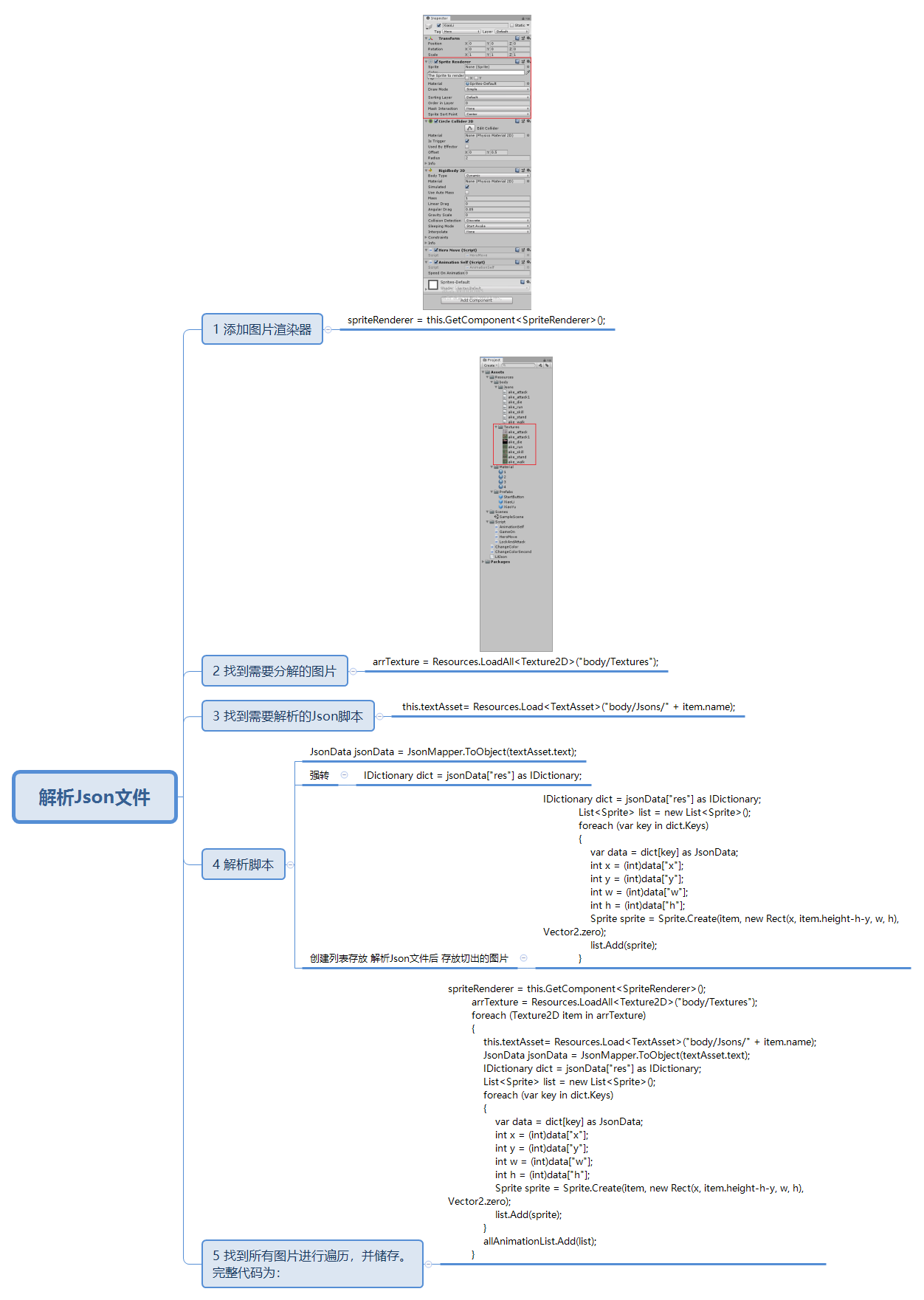
三、附Json文件内容及C#解析脚本
Json文件需要解析的内容
{
    "mc": {
        "ake_attack": {
            "frameRate": 12,
            "frames": [
                {
                    "res": "0001",
                    "x": -40,
                    "y": -107
                },
                {
                    "res": "0002",
                    "x": -38,
                    "y": -103
                },
                {
                    "res": "0003",
                    "x": -39,
                    "y": -101
                },
                {
                    "res": "0004",
                    "x": -39,
                    "y": -100
                },
                {
                    "res": "0005",
                    "x": -40,
                    "y": -99
                },
                {
                    "res": "0006",
                    "x": -17,
                    "y": -91
                },
                {
                    "res": "0007",
                    "x": -33,
                    "y": -95
                },
                {
                    "res": "0008",
                    "x": -40,
                    "y": -93
                },
                {
                    "res": "0009",
                    "x": -32,
                    "y": -93
                },
                {
                    "res": "0010",
                    "x": -30,
                    "y": -97
                },
                {
                    "res": "0011",
                    "x": -40,
                    "y": -107
                }
            ]
        }
    },
    "res": {
        "0001": {
            "h": 120,
            "w": 70,
            "x": 308,
            "y": 230
        },
        "0002": {
            "h": 126,
            "w": 70,
            "x": 2,
            "y": 230
        },
        "0003": {
            "h": 114,
            "w": 82,
            "x": 154,
            "y": 216
        },
        "0004": {
            "h": 122,
            "w": 80,
            "x": 73,
            "y": 230
        },
        "0005": {
            "h": 112,
            "w": 84,
            "x": 284,
            "y": 2
        },
        "0006": {
            "h": 104,
            "w": 120,
            "x": 139,
            "y": 111
        },
        "0007": {
            "h": 108,
            "w": 136,
            "x": 147,
            "y": 2
        },
        "0008": {
            "h": 106,
            "w": 144,
            "x": 2,
            "y": 2
        },
        "0009": {
            "h": 106,
            "w": 136,
            "x": 2,
            "y": 109
        },
        "0010": {
            "h": 114,
            "w": 96,
            "x": 260,
            "y": 115
        },
        "0011": {
            "h": 120,
            "w": 70,
            "x": 237,
            "y": 230
        }
    }
}
解析代码:
spriteRenderer = this.GetComponent<SpriteRenderer>();
        arrTexture = Resources.LoadAll<Texture2D>("body/Textures");
        foreach (Texture2D item in arrTexture)
        {
            this.textAsset= Resources.Load<TextAsset>("body/Jsons/" + item.name);
            JsonData jsonData = JsonMapper.ToObject(textAsset.text);
            IDictionary dict = jsonData["res"] as IDictionary;
            List<Sprite> list = new List<Sprite>();
            foreach (var key in dict.Keys)
            {
                var data = dict[key] as JsonData;
                int x = (int)data["x"];
                int y = (int)data["y"];
                int w = (int)data["w"];
                int h = (int)data["h"];
                Sprite sprite = Sprite.Create(item, new Rect(x, item.height-h-y, w, h), Vector2.zero);
                list.Add(sprite);
            }
            allAnimationList.Add(list);
        }

 浙公网安备 33010602011771号