
下拉式菜单、动画播放
主要内容:1、下拉式菜单增加选项并播放动画。 2、按下键盘按键播放动画
正文:
一、下拉式菜单增加选项并播放动画
1.代码分析图
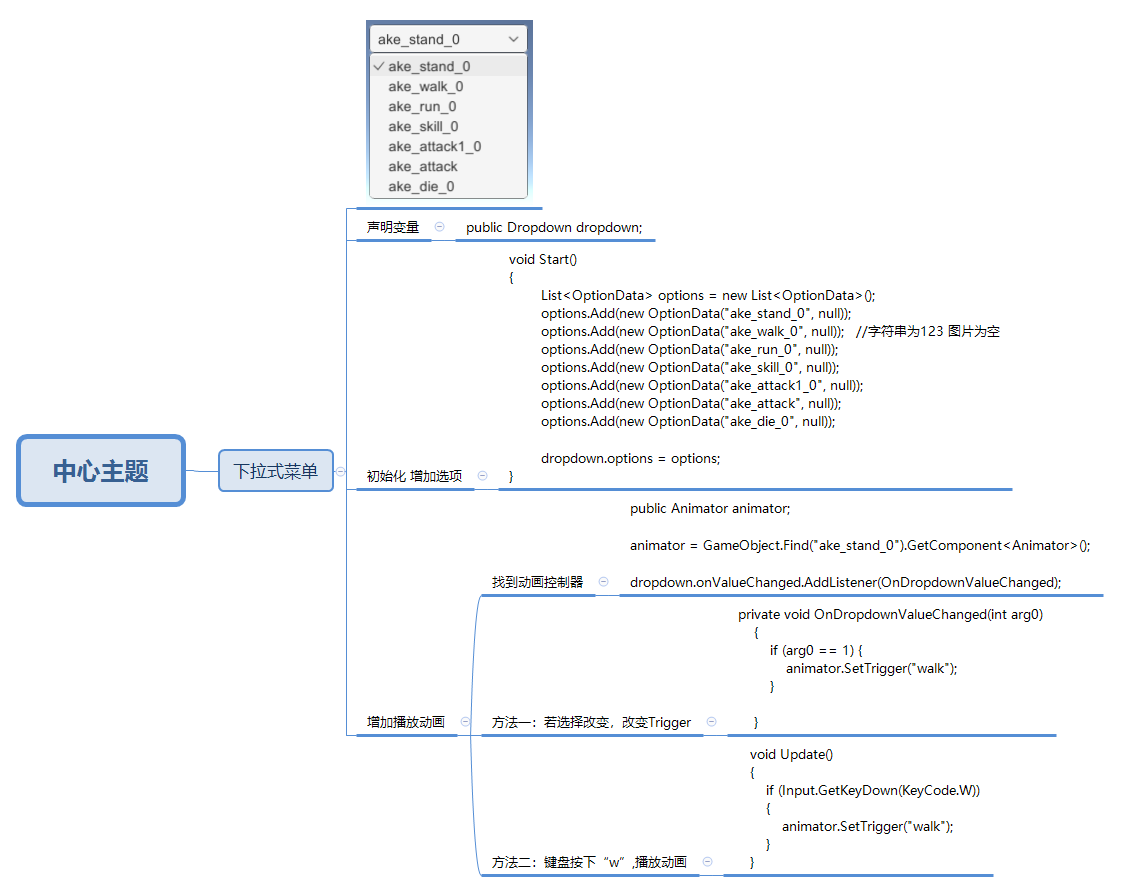
2.代码
using System;
using System.Collections;
using System.Collections.Generic;
using UnityEngine;
using UnityEngine.UI;
using static UnityEngine.UI.Dropdown;

public class LearnDropDown : MonoBehaviour
{

    public Dropdown dropdown;
    public Animator animator;

    // Start is called before the first frame update
    void Start()
    {
        animator = GameObject.Find("ake_stand_0").GetComponent<Animator>();

        List<OptionData> options = new List<OptionData>();
        options.Add(new OptionData("ake_stand_0", null));
        options.Add(new OptionData("ake_walk_0", null));                    //字符串, 图片为空
        options.Add(new OptionData("ake_run_0", null));
        options.Add(new OptionData("ake_skill_0", null));
        options.Add(new OptionData("ake_attack1_0", null));
        options.Add(new OptionData("ake_attack", null));
        options.Add(new OptionData("ake_die_0", null));

        dropdown.onValueChanged.AddListener(OnDropdownValueChanged);

        dropdown.options = options;

    }

    private void OnDropdownValueChanged(int arg0)
    {
        if (arg0 == 0) {
            animator.SetTrigger("stand");
        }
        if (arg0 == 1)
        {
            animator.SetTrigger("walk");
        }
        if (arg0 == 2)
        {
            animator.SetTrigger("run");
        }
        if (arg0 == 3)
        {
            animator.SetTrigger("skill");
        }
        if (arg0 == 4)
        {
            animator.SetTrigger("attack1");
        }
        if (arg0 == 5)
        {
            animator.SetTrigger("attack");
        }
        if (arg0 == 6)
        {
            animator.SetTrigger("die");
        }
    }

    // Update is called once per frame
    void Update()
    {
        if (Input.GetKeyDown(KeyCode.W))
        {
            animator.SetTrigger("walk");
        }
        if (Input.GetKeyDown(KeyCode.R))
        {
            animator.SetTrigger("run");
        }
        if (Input.GetKeyDown(KeyCode.S))
        {
            animator.SetTrigger("stand");
        }
        if (Input.GetKeyDown(KeyCode.K))
        {
            animator.SetTrigger("skill");
        }
        if (Input.GetKeyDown(KeyCode.A))
        {
            animator.SetTrigger("attack");
        }
        if (Input.GetKeyDown(KeyCode.T))
        {
            animator.SetTrigger("attack1");
        }
        if (Input.GetKeyDown(KeyCode.D))
        {
            animator.SetTrigger("die");
        }
    }
}

 浙公网安备 33010602011771号