
python控制浏览器上传文件
自动化爬虫方法和库很多,难点大多数在登录。可以大致分为:普通验证码,扫码登录,QQ一键登录,拖动验证,无痕验证,人工识别(比如12306登录)
万能大法可以破解一切以上需求,自动控制浏览器行为

参考文献:
https://www.jianshu.com/p/1531e12f8852
https://blog.csdn.net/sinat_41774836/article/details/88965281
直接贴上我的代码
from selenium import webdriver
from selenium.webdriver.support.ui import WebDriverWait
from selenium.webdriver.support import expected_conditions as EC
from selenium.webdriver.support.wait import WebDriverWait
from selenium.webdriver.common.by import By
import time
import os

class upload(object):
    #打开浏览器
    def __init__(self):
        self.videopwd = 'F:\\脚本\\douyin\\douyindata2'
        self.videolist = os.listdir(self.videopwd)
        self.driver = webdriver.Chrome()
        self.driver.get("https://不告诉你.com")
        #等待10秒,微信扫码登录后继续操作
        time.sleep(10)

    #执行上传
    def uploadbtn(self,file):
        #定位上传按钮,添加本地文件
        wait_find_element=WebDriverWait(self.driver,8).until(EC.presence_of_element_located((By.CLASS_NAME, "file-input")))
        wait_find_element.send_keys(file)
        time.sleep(8)
        #点击一键发布
        wait_find_element=WebDriverWait(self.driver, 15).until(EC.presence_of_element_located((By.CLASS_NAME, "btn-right")))
        wait_find_element.click()
        print('上传',file,'结束')

    #重命名
    def renamefile(self,file):
        newvideo = video.replace('@', '')
        newvideo = newvideo.replace('#我的观影报告', '')
        newvideo = newvideo.replace('#', '')
        newvideo = newvideo.replace('抖音', '')
        newvideo = newvideo.replace('小助手', '')
        newvideo = newvideo.replace('😂😂😂', '')
        newvideo = newvideo.replace(' ', '')
        srcfile = os.path.join(self.videopwd, video)
        dstfile = os.path.join(self.videopwd, newvideo)
        try:
            os.rename(srcfile, dstfile)
            return (dstfile)
        except:
            print(srcfile,'文件重命名失败')

    #删除文件
    def delfile(self,file):
        if os.path.exists(file):
            os.remove(file)
        if os.path.exists(file):
            print('删除',file,'失败')
        else:
            print('删除',file,'成功')

if __name__=='__main__':
    pq=upload()
    for video in pq.videolist:
        if 'mp4' in video:
            #重命名
            file=pq.renamefile(video)
            #执行上传
            pq.uploadbtn(file)
            #删除视频
            pq.delfile(file)
            time.sleep(5)
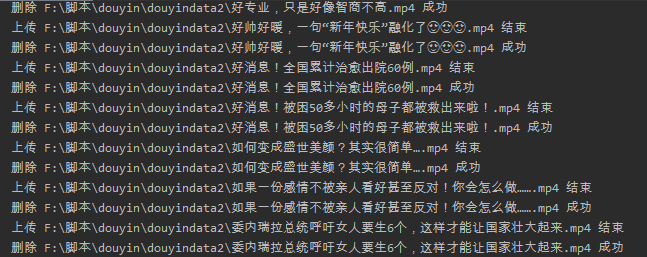
最后成功:

 浙公网安备 33010602011771号