
unity3d与android开发真实手柄连接
尝试过AS转写手柄监听、incontrol插件,最终没能实现。手柄型号:SP3/PC。
经过一夜奋战,通过https://blog.csdn.net/lengyoumo/article/details/91386404文章指示,
在edit ->projectsettings->input->axes中设定
type 选择joystick axis
axis 选择 x axis 和 y axis 。分别对应 horizontal 和 vertical。
如果手柄有多个摇杆,需要修改name和 axis。
(附:Unity Input的手柄映射)
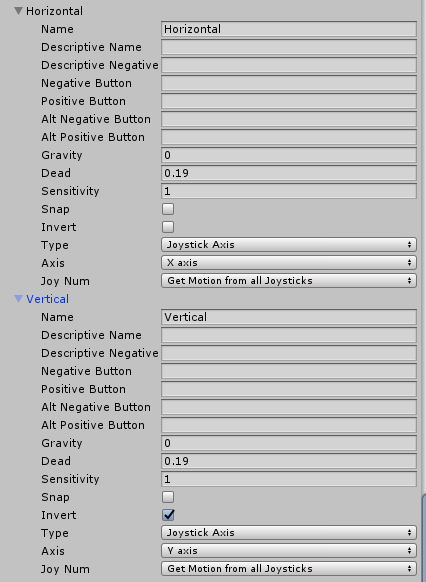
修改了Dead、Sensitivity的值,不然转的头晕,速度太快,而且人物不停的朝一个方向转。。。把Vertical做了镜像(invert),好像这个轴跟U3d的3rdCControler方向是反的。Horizontal就不用了。
通过https://blog.csdn.net/cordova/article/details/51036547的方法进行了测试,目前代码如下:
public class TVInput : MonoBehaviour {

    public Text KeyCodeText;               //显示按键状态的text文本
    public Text KeyCodeText1;


    private bool isOk;                     //确定键按下状态


    // 初始化
    void Start()
    {
        isOk = false;
    }

    // 按帧刷新检测
    void Update()
    {

        //监听按键事件:
        //*** 按下 ***//
        //左
        if (Input.GetKeyDown(KeyCode.LeftArrow))
        {
            isLeft = true;
            KeyCodeText.text = "左键按下";
        }
        //右
        if (Input.GetKeyDown(KeyCode.RightArrow))
        {
            isRight = true;
            KeyCodeText.text = "右键按下";
        }

        //上
        if (Input.GetKeyDown(KeyCode.UpArrow))
        {
            isUp = true;
            KeyCodeText.text = "上键按下";
        }

        //下
        if (Input.GetKeyDown(KeyCode.DownArrow))
        {
            isDown = true;
            KeyCodeText.text = "下键按下";
        }

        //返回
        if (Input.GetKeyDown(KeyCode.Escape))
        {
            isBack = true;
            KeyCodeText.text = "返回键按下";
        }

        //回车
        if (Input.GetKeyDown(KeyCode.JoystickButton0))    //A
        {
            isOk = true;
            KeyCodeText.text = "JoystickButton0按下";
        }
        if (Input.GetKeyDown(KeyCode.JoystickButton1))    //B
        {
            isOk = true;
            KeyCodeText.text = "JoystickButton1按下";
        }
        if (Input.GetKeyDown(KeyCode.JoystickButton2))     //X
        {
            isOk = true;
            KeyCodeText.text = "JoystickButton2按下";
        }
        if (Input.GetKeyDown(KeyCode.JoystickButton3))    //Y
        {
            isOk = true;
            KeyCodeText.text = "JoystickButton3按下";
        }
        if (Input.GetKeyDown(KeyCode.JoystickButton4))   //L1
        {
            isOk = true;
            KeyCodeText.text = "JoystickButton4按下";
        }
        if (Input.GetKeyDown(KeyCode.JoystickButton5))   //R1
        {
            isOk = true;
            KeyCodeText.text = "JoystickButton5按下";
        }
        if (Input.GetKeyDown(KeyCode.JoystickButton6))   //L2
        {
            isOk = true;
            KeyCodeText.text = "JoystickButton6按下";
        }
        if (Input.GetKeyDown(KeyCode.JoystickButton7))    //R2
        {
            isOk = true;
            KeyCodeText.text = "JoystickButton7按下";
        }
        if (Input.GetKeyDown(KeyCode.JoystickButton8))    //左摇杆
        {
            isOk = true;
            KeyCodeText.text = "JoystickButton8按下";
        }

        if (Input.GetKeyDown(KeyCode.JoystickButton9))   //右摇杆
        {
            isOk = true;
            KeyCodeText.text = "JoystickButton9按下";
        }
        if (Input.GetKeyDown(KeyCode.JoystickButton10))   //START
        {
            isOk = true;
            KeyCodeText.text = "JoystickButton10按下";
        }
        if (Input.GetKeyDown(KeyCode.JoystickButton11))  //SELECT
        {
            isOk = true;
            KeyCodeText.text = "JoystickButton11按下";
        }

    }
}
在电视端测试通过。
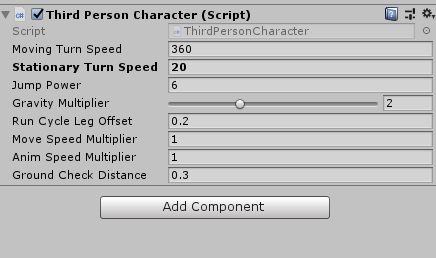
Stationary Turn Speed 减到20,这转速还是太快。
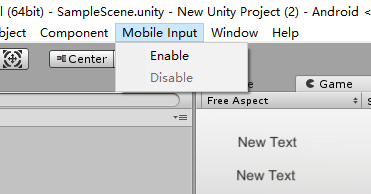
注意:发布前将mobile input屏蔽掉,否则可能会引起真实手柄失效。
关于GetAxis函数调用如下参考:
using System;
using System.Collections;
using System.Collections.Generic;
using UnityEngine;
using UnityEngine.UI;

public class Menu : MonoBehaviour {
    public GameObject menuList;
    public GameObject charCtr;
    bool IsMenu;
    bool menuCanMove;
    int MenuIndex;
    int SndIndex;
    public Image[] Img;
    public Material matOutline;
    public AudioSource snd;
    public AudioClip[] audioClips;
    public GameObject CamSnd;
    // Use this for initialization
    void Start () {
        IsMenu = false;
        menuCanMove = true;
        MenuIndex = 0;
        SndIndex = 0;
    }

    // Update is called once per frame
    void Update () {
        if (Input.GetKeyUp(KeyCode.JoystickButton11))  //SELECT
        {
            if (menuList.activeSelf == false)
            {
                menuList.SetActive(true);
                IsMenu = true;
                charCtr.SetActive(false);
            }
            else
            {
                menuList.SetActive(false);
                IsMenu = false;
                charCtr.SetActive(true);
            }

        }
        if (IsMenu)
        {
            MenuSetFocus();
            MenuSelect();
            ChangeSnd();
        }
    }

    private void ChangeSnd()
    {
        if (Input.GetAxis("Vertical") < -0.3)
        {
            if (menuCanMove)
            {
                if (SndIndex > 0)
                {
                    SndIndex = SndIndex - 1;
                }
                else
                {
                    SndIndex = 2;
                }
                snd.Stop();
                snd.clip = audioClips[SndIndex];
                menuCanMove = false;
            }

        }
        if (Input.GetAxis("Vertical") == 0)
        {
            menuCanMove = true;
        }
        if (Input.GetAxis("Vertical") > 0.3)
        {

            if (menuCanMove)
            {
                if (SndIndex<2)
                {
                    SndIndex = SndIndex + 1;
                }
                else
                {
                    SndIndex = 0;
                }
                snd.Stop();
                snd.clip = audioClips[SndIndex];
                menuCanMove = false;
            }
        }
    }

    private void MenuSelect()
    {
        if (Input.GetKeyUp(KeyCode.JoystickButton0))
        {
            if (MenuIndex == 0)
            {
                snd.Play();
                snd.loop = true;
                CamSnd.SetActive(true);
            }
            if (MenuIndex == 1)
            {
                snd.Stop();
                snd.loop = false;
                CamSnd.SetActive(false);
            }
        }
    }

    void MenuSetFocus()
    {
        if (Input.GetAxis("Horizontal") < -0.3)
        {
            if (menuCanMove)
            {
                MenuMoveBack();
                menuCanMove = false;
            }

        }
        if (Input.GetAxis("Horizontal") ==0)
        {
            menuCanMove = true;
        }
        if (Input.GetAxis("Horizontal") > 0.3)
        {

            if (menuCanMove)
            {
                MenuMoveNext();
                menuCanMove = false;
            }
        }
        for (int i = 0; i < 2; i++)
        {
            Img[i].material = null;
        }
        Img[MenuIndex].material = matOutline;

    }
    void MenuMoveBack()
    {
        int ImgN;
        ImgN =1;
        if (MenuIndex == 0)
        {
            MenuIndex = ImgN;
        }
        else
        {
            MenuIndex = MenuIndex - 1;
        }
    }
    void MenuMoveNext()
    {
        int ImgN =1;
        if (MenuIndex == ImgN)
        {
            MenuIndex = 0;
        }
        else
        {
            MenuIndex = MenuIndex + 1;
        }
    }
}
雁过留声,人死留名。人生仿若风拂沙漠,未留下痕迹……但愿你我之汗水,来得及有所传承……

 浙公网安备 33010602011771号