

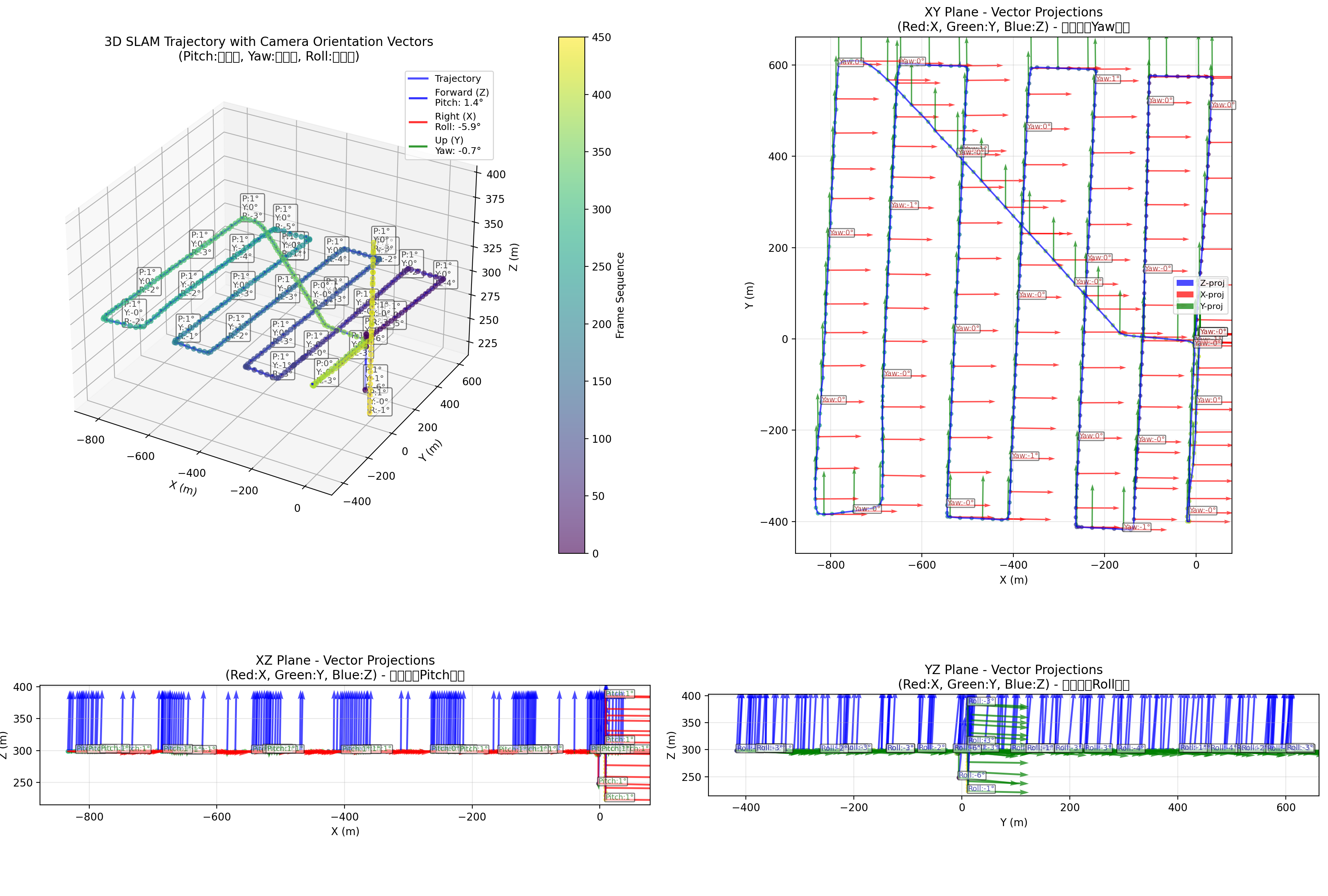
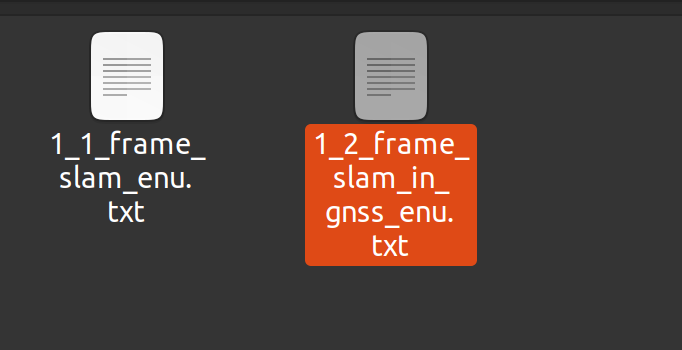
数据格式
名字 位移 四元数
DJI_0004.JPG -2.37741281 -6.19963198 248.278836 0.998595199 -0.0512734054 0.0117946896 -0.00628908729
DJI_0010.JPG -2.45427362 -5.88529261 292.870321 0.999918745 -0.00109888998 0.011512375 -0.00536295244
DJI_0011.JPG -1.43944546 -7.71958098 292.438011 0.99944091 -0.030903986 0.00953700235 -0.00847682591
DJI_0012.JPG -1.98761639 -7.61452423 296.857543 0.999072811 -0.0410232501 0.0102957152 -0.00803797691
DJI_0013.JPG -1.92906222 -8.09665682 305.51838 0.999054902 -0.0414503943 0.00999650388 -0.00844022832
DJI_0014.JPG -2.07826083 -7.57746179 304.540909 0.999041713 -0.0418568415 0.00989608494 -0.0081073026
DJI_0015.JPG -1.96854472 -7.47198092 302.289007 0.99890921 -0.0450732506 0.00924253877 -0.00796044695
DJI_0016.JPG -2.03264579 -7.58901779 299.285379 0.999004689 -0.0428638059 0.00927430802 -0.00814332051
DJI_0017.JPG -1.93430134 -7.46199335 298.6258 0.999221874 -0.0374756479 0.00936322992 -0.00797201434
import os
from typing import Dict, Tuple
import matplotlib.pyplot as plt
from mpl_toolkits.mplot3d import Axes3D
import numpy as np
from scipy.spatial.transform import Rotation as R

def read_slam_data(file_path: str) -> Dict[str, Tuple[list, list]]:
    """
    从SLAM数据文件中读取数据并构建字典
    """
    slam_data = {}

    try:
        with open(file_path, 'r', encoding='utf-8') as file:
            for line_num, line in enumerate(file, 1):
                line = line.strip()
                if not line:
                    continue

                parts = line.split()

                if len(parts) < 8:
                    print(f"警告: 第{line_num}行数据格式不正确,跳过: {line}")
                    continue

                try:
                    photo_name = parts[0]
                    t_displacement = [float(x) for x in parts[1:4]]
                    q_quaternion = [float(x) for x in parts[4:8]]

                    slam_data[photo_name] = (t_displacement, q_quaternion)

                except ValueError as e:
                    print(f"错误: 第{line_num}行数据转换失败: {line}")
                    continue

    except FileNotFoundError:
        print(f"错误: 文件 {file_path} 不存在")
        return {}
    except Exception as e:
        print(f"错误: 读取文件时发生异常: {e}")
        return {}

    return slam_data

def get_camera_orientation_vectors(q_w, q_x, q_y, q_z, vector_scale=1.0):
    """
    获取相机的三个方向向量(前向、右向、上向)

    Returns:
        forward_vector: 前向向量 (Z轴)
        right_vector: 右向向量 (X轴)
        up_vector: 上向向量 (Y轴)
    """
    # 将四元数转换为旋转矩阵[2,3](@ref)
    rotation = R.from_quat([q_x, q_y, q_z, q_w])
    rot_mat = rotation.as_matrix()

    # 相机坐标系标准方向[4](@ref)
    forward_vector = rot_mat[:, 2] * vector_scale  # Z轴前向
    right_vector = rot_mat[:, 0] * vector_scale   # X轴右向
    up_vector = rot_mat[:, 1] * vector_scale      # Y轴上向

    return forward_vector, right_vector, up_vector

def quaternion_to_euler(q_w, q_x, q_y, q_z):
    """
    将四元数转换为欧拉角(Pitch, Yaw, Roll)[2](@ref)
    """
    rotation = R.from_quat([q_x, q_y, q_z, q_w])
    euler_angles = rotation.as_euler('zyx', degrees=True)
    return euler_angles[1], euler_angles[0], euler_angles[2]

def calculate_adaptive_vector_scale(positions, base_scale=0.5):
    """
    根据轨迹范围自适应计算向量缩放比例
    """
    x_range = positions[:, 0].max() - positions[:, 0].min()
    y_range = positions[:, 1].max() - positions[:, 1].min()
    z_range = positions[:, 2].max() - positions[:, 2].min()

    avg_range = (x_range + y_range + z_range) / 3.0

    if avg_range == 0:
        return base_scale

    # 根据轨迹范围调整向量大小
    adaptive_scale = base_scale * (avg_range / 3.0)
    return max(0.3, min(2.0, adaptive_scale))  # 限制在合理范围内

def visualize_trajectory_with_3d_vectors(poses_dict, stride=3, vector_scale_factor=0.8):
    """
    完整的SLAM轨迹可视化:3D轨迹 + 三个带3D向量的侧视图
    """
    # 创建2x2的子图布局
    fig = plt.figure(figsize=(18, 14))

    # 主3D视图
    ax_3d = fig.add_subplot(221, projection='3d')

    # 三个侧视图
    ax_xy = fig.add_subplot(222)  # XY平面视图
    ax_xz = fig.add_subplot(223)  # XZ平面视图
    ax_yz = fig.add_subplot(224)  # YZ平面视图

    # 提取所有位姿数据
    positions = np.array([pose[0] for pose in poses_dict.values()])

    # 自适应计算向量缩放比例
    adaptive_vector_scale = calculate_adaptive_vector_scale(positions, vector_scale_factor)
    print(f"自适应向量缩放比例: {adaptive_vector_scale:.3f}")

    # 1. 绘制3D主视图
    plot_3d_main_view(ax_3d, positions, poses_dict, stride, adaptive_vector_scale)

    # 2. 绘制三个带3D向量的侧视图
    plot_2d_views_with_3d_vectors(ax_xy, ax_xz, ax_yz, positions, poses_dict,
                                stride, adaptive_vector_scale)

    plt.tight_layout()
    plt.show()

def plot_3d_main_view(ax, positions, poses_dict, stride, vector_scale):
    """
    绘制3D主视图,包含轨迹、三个方向的向量和欧拉角显示
    """
    # 绘制轨迹线
    ax.plot(positions[:, 0], positions[:, 1], positions[:, 2], 'b-',
            alpha=0.7, linewidth=2, label='Trajectory')

    # 轨迹点(颜色表示序列)
    scatter = ax.scatter(positions[:, 0], positions[:, 1], positions[:, 2],
                        c=range(len(positions)), cmap='viridis', s=20, alpha=0.6)

    # 添加颜色条
    cbar = plt.colorbar(scatter, ax=ax, pad=0.1)
    cbar.set_label('Frame Sequence')

    # 存储向量的标签,避免重复
    forward_label_added = False
    right_label_added = False
    up_label_added = False
    euler_label_added = False

    # 绘制三个方向的向量(前向、右向、上向)
    for i, (photo_name, (t, q)) in enumerate(poses_dict.items()):
        if i % stride == 0:
            # 获取三个方向向量
            forward_vec, right_vec, up_vec = get_camera_orientation_vectors(
                q[0], q[1], q[2], q[3], vector_scale)

            # 计算欧拉角
            pitch, yaw, roll = quaternion_to_euler(q[0], q[1], q[2], q[3])

            # 绘制前向向量(Z轴,蓝色)
            if not forward_label_added:
                ax.quiver(t[0], t[1], t[2],
                         forward_vec[0], forward_vec[1], forward_vec[2],
                         color='blue', alpha=0.8, linewidth=2, label=f'Forward (Z)\nPitch: {pitch:.1f}°')
                forward_label_added = True
            else:
                ax.quiver(t[0], t[1], t[2],
                         forward_vec[0], forward_vec[1], forward_vec[2],
                         color='blue', alpha=0.8, linewidth=2)

            # 绘制右向向量(X轴,红色)
            if not right_label_added:
                ax.quiver(t[0], t[1], t[2],
                         right_vec[0], right_vec[1], right_vec[2],
                         color='red', alpha=0.8, linewidth=2, label=f'Right (X)\nRoll: {roll:.1f}°')
                right_label_added = True
            else:
                ax.quiver(t[0], t[1], t[2],
                         right_vec[0], right_vec[1], right_vec[2],
                         color='red', alpha=0.8, linewidth=2)

            # 绘制上向向量(Y轴,绿色)
            if not up_label_added:
                ax.quiver(t[0], t[1], t[2],
                         up_vec[0], up_vec[1], up_vec[2],
                         color='green', alpha=0.8, linewidth=2, label=f'Up (Y)\nYaw: {yaw:.1f}°')
                up_label_added = True
            else:
                ax.quiver(t[0], t[1], t[2],
                         up_vec[0], up_vec[1], up_vec[2],
                         color='green', alpha=0.8, linewidth=2)

            # 在关键帧位置添加欧拉角文本标签
            if i % (stride * 5) == 0:  # 每隔5个向量添加一次角度文本
                angle_text = f'P:{pitch:.0f}°\nY:{yaw:.0f}°\nR:{roll:.0f}°'
                ax.text(t[0], t[1], t[2], angle_text,
                       fontsize=8, color='black', alpha=0.7,
                       bbox=dict(boxstyle="round,pad=0.2", facecolor='white', alpha=0.5))

    ax.set_xlabel('X (m)')
    ax.set_ylabel('Y (m)')
    ax.set_zlabel('Z (m)')
    ax.set_title('3D SLAM Trajectory with Camera Orientation Vectors\n(Pitch:俯仰角, Yaw:偏航角, Roll:翻滚角)')
    ax.legend(loc='upper right', fontsize=9)
    ax.grid(True, alpha=0.3)


# 修改侧视图函数,也添加角度信息
def plot_2d_views_with_3d_vectors(ax_xy, ax_xz, ax_yz, positions, poses_dict, stride, vector_scale):
    """
    绘制三个带3D向量投影的侧视图,包含角度信息
    """
    # 设置颜色映射
    colors = ['red', 'green', 'blue']  # X, Y, Z轴颜色

    # XY平面视图(俯视图)
    ax_xy.plot(positions[:, 0], positions[:, 1], 'b-', alpha=0.7, linewidth=1.5)
    scatter_xy = ax_xy.scatter(positions[:, 0], positions[:, 1], c=range(len(positions)),
                 cmap='viridis', s=10, alpha=0.6)

    # XZ平面视图(前视图)
    ax_xz.plot(positions[:, 0], positions[:, 2], 'r-', alpha=0.7, linewidth=1.5)
    ax_xz.scatter(positions[:, 0], positions[:, 2], c=range(len(positions)),
                 cmap='viridis', s=10, alpha=0.6)

    # YZ平面视图(侧视图)
    ax_yz.plot(positions[:, 1], positions[:, 2], 'g-', alpha=0.7, linewidth=1.5)
    ax_yz.scatter(positions[:, 1], positions[:, 2], c=range(len(positions)),
                 cmap='viridis', s=10, alpha=0.6)

    # 在每个侧视图中绘制3D向量的投影
    for i, (photo_name, (t, q)) in enumerate(poses_dict.items()):
        if i % stride == 0:
            # 获取三个方向向量
            forward_vec, right_vec, up_vec = get_camera_orientation_vectors(
                q[0], q[1], q[2], q[3], vector_scale)

            # 计算欧拉角用于显示
            pitch, yaw, roll = quaternion_to_euler(q[0], q[1], q[2], q[3])

            # 在特定位置显示角度
            if i % (stride * 5) == 0:
                # XY平面添加角度文本
                ax_xy.text(t[0], t[1], f'Yaw:{yaw:.0f}°',
                          fontsize=7, color='darkred', alpha=0.7,
                          bbox=dict(boxstyle="round,pad=0.1", facecolor='white', alpha=0.5))

                # XZ平面添加角度文本
                ax_xz.text(t[0], t[2], f'Pitch:{pitch:.0f}°',
                          fontsize=7, color='darkgreen', alpha=0.7,
                          bbox=dict(boxstyle="round,pad=0.1", facecolor='white', alpha=0.5))

                # YZ平面添加角度文本
                ax_yz.text(t[1], t[2], f'Roll:{roll:.0f}°',
                          fontsize=7, color='darkblue', alpha=0.7,
                          bbox=dict(boxstyle="round,pad=0.1", facecolor='white', alpha=0.5))

            # XY平面:显示X和Y方向的投影
            # 前向向量在XY平面的投影(Z方向)
            ax_xy.quiver(t[0], t[1],
                        forward_vec[0], forward_vec[1],
                        color=colors[2], alpha=0.7, scale=20, width=0.003,
                        label='Z-proj' if i == 0 else "")
            # 右向向量在XY平面的投影(X方向)
            ax_xy.quiver(t[0], t[1],
                        right_vec[0], right_vec[1],
                        color=colors[0], alpha=0.7, scale=20, width=0.003,
                        label='X-proj' if i == 0 else "")
            # 上向向量在XY平面的投影(Y方向)
            ax_xy.quiver(t[0], t[1],
                        up_vec[0], up_vec[1],
                        color=colors[1], alpha=0.7, scale=20, width=0.003,
                        label='Y-proj' if i == 0 else "")

            # XZ平面:显示X和Z方向的投影
            ax_xz.quiver(t[0], t[2],
                        forward_vec[0], forward_vec[2],
                        color=colors[2], alpha=0.7, scale=20, width=0.003)
            ax_xz.quiver(t[0], t[2],
                        right_vec[0], right_vec[2],
                        color=colors[0], alpha=0.7, scale=20, width=0.003)
            ax_xz.quiver(t[0], t[2],
                        up_vec[0], up_vec[2],
                        color=colors[1], alpha=0.7, scale=20, width=0.003)

            # YZ平面:显示Y和Z方向的投影
            ax_yz.quiver(t[1], t[2],
                        forward_vec[1], forward_vec[2],
                        color=colors[2], alpha=0.7, scale=20, width=0.003)
            ax_yz.quiver(t[1], t[2],
                        right_vec[1], right_vec[2],
                        color=colors[0], alpha=0.7, scale=20, width=0.003)
            ax_yz.quiver(t[1], t[2],
                        up_vec[1], up_vec[2],
                        color=colors[1], alpha=0.7, scale=20, width=0.003)

    # 设置侧视图标签和标题
    ax_xy.set_xlabel('X (m)')
    ax_xy.set_ylabel('Y (m)')
    ax_xy.set_title('XY Plane - Vector Projections\n(Red:X, Green:Y, Blue:Z) - 主要显示Yaw角度')
    ax_xy.grid(True, alpha=0.3)
    ax_xy.legend(fontsize=8)
    ax_xy.set_aspect('equal')

    ax_xz.set_xlabel('X (m)')
    ax_xz.set_ylabel('Z (m)')
    ax_xz.set_title('XZ Plane - Vector Projections\n(Red:X, Green:Y, Blue:Z) - 主要显示Pitch角度')
    ax_xz.grid(True, alpha=0.3)
    ax_xz.set_aspect('equal')

    ax_yz.set_xlabel('Y (m)')
    ax_yz.set_ylabel('Z (m)')
    ax_yz.set_title('YZ Plane - Vector Projections\n(Red:X, Green:Y, Blue:Z) - 主要显示Roll角度')
    ax_yz.grid(True, alpha=0.3)
    ax_yz.set_aspect('equal')


# 主程序
if __name__ == "__main__":
    data_path = '/media/r9000k/DD_XS/2数据/2RTK/data_1_nwpuUp/data3_1130_13pm/300_map_12pm/slam_out/建图/'
    file_path = data_path + "1_2_frame_slam_in_gnss_enu.txt" #1_2_frame_slam_in_gnss_enu  1_1_frame_slam_enu

    # 读取数据
    slam_data = read_slam_data(file_path)

    if not slam_data:
        print("未读取到有效数据,程序退出。")
        exit()

    print(f"成功读取 {len(slam_data)} 条SLAM数据")
    print("=" * 60)


    #positions = np.array([pose[0] for pose in slam_data.values()])

    for photo_name, pose in slam_data.items():
        t_displacement, q_quaternion = pose # 直接解包元组
        print(f"照片 {photo_name}: 位移 {t_displacement}, 四元数 {q_quaternion}")


    stride_val = 3
    vector_scale_val = 1.2

    # 执行完整可视化
    visualize_trajectory_with_3d_vectors(
        slam_data,
        stride=stride_val,
        vector_scale_factor=vector_scale_val
    )

 浙公网安备 33010602011771号