
MASt3R (2)安装和测试
模型下载位置


例子1 单独的匹配


from mast3r.model import AsymmetricMASt3R
from mast3r.fast_nn import fast_reciprocal_NNs
import mast3r.utils.path_to_dust3r
from dust3r.inference import inference
from dust3r.utils.image import load_images
import cv2
import numpy as np
import torch
import time

class FeatureMatcher_Mast3r:
    def __init__(self, model_path, device='cuda'):
        """
        初始化特征匹配器
        Args:
            model_path: MASt3R模型路径
            device: 运行设备
        """
        self.device = device
        self.model = self.load_mast3r_model(model_path)

    def load_mast3r_model(self, model_path):
        """加载MASt3R模型"""
        print("开始加载MASt3R模型")
        model = AsymmetricMASt3R.from_pretrained(model_path).to(self.device)
        print("MASt3R模型加载完成")
        return model

    def load_and_preprocess_images(self, image_paths, size=512):
        """
        加载并预处理图像
        Args:
            image_paths: 图像路径列表
            size: 图像尺寸
        Returns:
           预处理后的图像数据
        """
        images = load_images(image_paths, size=size)

        # 图像标准化
        image_mean = torch.as_tensor([0.5, 0.5, 0.5], device='cpu').reshape(1, 3, 1, 1)
        image_std = torch.as_tensor([0.5, 0.5, 0.5], device='cpu').reshape(1, 3, 1, 1)

        viz_imgs = []
        for i, view in enumerate([images[0], images[1]]):
            rgb_tensor = view['img'] * image_std + image_mean
            viz_img = rgb_tensor.squeeze(0).permute(1, 2, 0).cpu().numpy()
            viz_imgs.append(viz_img)

        # 转换为OpenCV格式
        img0_bgr = (viz_imgs[0][:, :, ::-1] * 255).astype(np.uint8)
        img1_bgr = (viz_imgs[1][:, :, ::-1] * 255).astype(np.uint8)

        return images, img0_bgr, img1_bgr

    def mast3r_feature_matching(self, images):
        """
        MASt3R特征匹配
        Args:
            images: 输入图像
        Returns:
           匹配结果、关键点坐标和耗时
        """
        start_time = time.time()

        # 执行推理
        output = inference([tuple(images)], self.model, self.device, batch_size=1, verbose=False)

        view1, pred1 = output['view1'], output['pred1']
        view2, pred2 = output['view2'], output['pred2']
        desc1, desc2 = pred1['desc'].squeeze(0).detach(), pred2['desc'].squeeze(0).detach()

        # 快速互最近邻匹配
        matches_im0, matches_im1 = fast_reciprocal_NNs(desc1, desc2, subsample_or_initxy1=8,
                                                       device=self.device, dist='dot', block_size=2**13)

        # 有效点筛选
        H0, W0 = view1['true_shape'][0]
        valid_matches_im0 = (matches_im0[:, 0] >= 3) & (matches_im0[:, 0] < int(W0) - 3) & (
            matches_im0[:, 1] >= 3) & (matches_im0[:, 1] < int(H0) - 3)

        H1, W1 = view2['true_shape'][0]
        valid_matches_im1 = (matches_im1[:, 0] >= 3) & (matches_im1[:, 0] < int(W1) - 3) & (
            matches_im1[:, 1] >= 3) & (matches_im1[:, 1] < int(H1) - 3)

        valid_matches = valid_matches_im0 & valid_matches_im1
        matches_im0, matches_im1 = matches_im0[valid_matches], matches_im1[valid_matches]

        end_time = time.time()
        total_time = end_time - start_time

        return matches_im0, matches_im1, total_time

    def estimate_pose(self, src_pts, dst_pts, method='homography'):
        """
        估计位姿变换(旋转矩阵R和平移向量t)
        Args:
            src_pts: 源点
            dst_pts: 目标点
            method: 估计方法
        Returns:
            R, t, 内点数量
        """
        if len(src_pts) < 4:
            print("匹配点数量不足,无法计算位姿")
            return None, None, 0

        if method == 'homography':
            # 使用单应性矩阵估计
            H, mask = cv2.findHomography(src_pts, dst_pts, cv2.RANSAC, 5.0)
            if H is not None:
                num_inliers = np.sum(mask)
                return H, None, num_inliers
            else:
                return None, None, 0

        elif method == 'essential':
            # 使用本质矩阵估计(需要相机内参)
            camera_matrix = np.array([[1000, 0, 512],
                                      [0, 1000, 512],
                                      [0, 0, 1]])

            E, mask = cv2.findEssentialMat(src_pts, dst_pts, camera_matrix, cv2.RANSAC, 0.999, 1.0)
            if E is not None:
                points, R, t, mask = cv2.recoverPose(E, src_pts, dst_pts, camera_matrix)
                num_inliers = np.sum(mask)
                return R, t, num_inliers
            else:
                return None, None, 0

        return None, None, 0

    def visualize_results(self, mast3r_matches_im0, mast3r_matches_im1, img0_bgr, img1_bgr, n_viz=100):
        """
        可视化MASt3R匹配结果
        """
        h0, w0 = img0_bgr.shape[:2]
        h1, w1 = img1_bgr.shape[:2]
        max_height = max(h0, h1)

        # 创建结果图像
        result_img = np.zeros((max_height, w0 + w1, 3), dtype=np.uint8)

        # 放置原始图像
        result_img[:h0, :w0] = img0_bgr
        result_img[:h1, w0:w0+w1] = img1_bgr

        # 绘制MASt3R匹配点
        colors = [
            (255, 0, 0), (0, 255, 0), (0, 0, 255), (255, 255, 0), (255, 0, 255)
        ]

        n_viz_actual = min(n_viz, mast3r_matches_im0.shape[0])
        indices = np.round(np.linspace(0, mast3r_matches_im0.shape[0] - 1, n_viz_actual)).astype(int)

        for i, idx in enumerate(indices):
            color = colors[i % len(colors)]
            pt1 = mast3r_matches_im0[idx]
            pt2 = mast3r_matches_im1[idx]

            x1, y1 = int(pt1[0]), int(pt1[1])
            x2, y2 = int(pt2[0]) + w0, int(pt2[1])

            cv2.line(result_img, (x1, y1), (x2, y2), color, 1, cv2.LINE_AA)
            cv2.circle(result_img, (x1, y1), 3, color, -1)
            cv2.circle(result_img, (x2, y2), 3, color, -1)

        # 添加标签
        cv2.putText(result_img, "MASt3R Feature Matching", (10, 30),
                    cv2.FONT_HERSHEY_SIMPLEX, 0.7, (255, 255, 255), 2)

        return result_img

def main():
    """主函数"""
    # 初始化参数
    model_path = "checkpoints/MASt3R_ViTLarge_BaseDecoder_512_catmlpdpt_metric.pth"
    image_paths = [
        '/media/r9000k/DD_XS/2数据/2_1精灵4无rtk/2圆楼_滨湖_白天_原图/DJI_0516.JPG',
        '/media/r9000k/DD_XS/2数据/2_1精灵4无rtk/v4_2圆楼_滨湖_拍照模式测曝光/DJI_0146.JPG'
    ]

    # 创建特征匹配器实例
    matcher_Mast3r = FeatureMatcher_Mast3r(model_path)

    # 加载图像
    images, img0_bgr, img1_bgr = matcher_Mast3r.load_and_preprocess_images(image_paths)

    # MASt3R特征匹配
    mast3r_pts1, mast3r_pts2, mast3r_time = matcher_Mast3r.mast3r_feature_matching(images)

    # 位姿估计
    print("\n=== MASt3R位姿估计结果 ===")
    R_mast3r, t_mast3r, mast3r_inliers = matcher_Mast3r.estimate_pose(mast3r_pts1, mast3r_pts2)
    print(f"MASt3R内点数量: {mast3r_inliers}")
    print(f"MASt3R算法耗时: {mast3r_time:.4f} 秒")
    print(f"匹配点数量: {mast3r_pts1.shape[0]}")

    # 可视化结果
    result_img = matcher_Mast3r.visualize_results(mast3r_pts1, mast3r_pts2, img0_bgr, img1_bgr, n_viz=20)

    # 显示结果
    cv2.namedWindow('MASt3R Feature Matching Results', cv2.WINDOW_NORMAL)
    cv2.imshow('MASt3R Feature Matching Results', result_img)
    cv2.waitKey(0)
    cv2.destroyAllWindows()

if __name__ == '__main__':
    main()

效果对比


原始版本
https://github.com/naver/mast3r
加速版本 必须cuda12.1 装不上
peedy MASt3R 在不影响准确率的情况下,将推理时间缩短了 54%(每对图像从 198 毫秒缩短至 91 毫秒)。这一改进实现实时 3D 理解,助力MR导航和大规模 3D 场景重建等应用。
- 克隆 MASt3R。
git clone --recursive https://github.com/naver/mast3r
cd mast3r
git submodule update --init --recursive
- 创建环境,这里我们以 conda 为例进行说明。 注意适配自己的环境
conda create -n mast3r python=3.11 cmake=3.14.0
conda activate mast3r
conda install pytorch=2.7 torchvision pytorch-cuda=11.8 -c pytorch -c nvidia  # use the correct version of cuda for your system
pip install -r requirements.txt
pip install -r dust3r/requirements.txt
# Optional: you can also install additional packages to:
# - add support for HEIC images
# - add required packages for visloc.py
pip install -r dust3r/requirements_optional.txt
- 编译并安装 ASMK
pip install cython

git clone https://github.com/jenicek/asmk
cd asmk/cython/
cythonize *.pyx
cd ..
pip install backports.tarfile
conda update setuptools pip backports
conda install -c conda-forge libgcc-ng libstdcxx-ng
sudo apt-get update
sudo apt-get install libc6-dev
python3 setup.py build_ext --inplace
或者

pip install .
cd ..
1报错libpthread找不到
查找系统库文件位置:首先需要确认您系统的 libpthread.so.0文件在哪里。
sudo find / -name libpthread.so.0 2>/dev/null
/home/r9000k/anaconda3/pkgs/sysroot_linux-64-2.17-h0157908_18/x86_64-conda-linux-gnu/sysroot/lib64/libpthread.so.0
/home/r9000k/anaconda3/envs/pyslam/x86_64-conda-linux-gnu/sysroot/lib64/libpthread.so.0
/usr/lib/i386-linux-gnu/libpthread.so.0
/usr/lib/x86_64-linux-gnu/libpthread.so.0
/usr/lib32/libpthread.so.0
/opt/deepinwine/runtime-i386/lib/i386-linux-gnu/libpthread.so.0
/opt/deepinwine/runtime-i386/lib/x86_64-linux-gnu/libpthread.so.0
/snap/snapd/25202/usr/lib/x86_64-linux-gnu/libpthread.so.0
/snap/snapd/25577/usr/lib/x86_64-linux-gnu/libpthread.so.0
/snap/core20/2686/usr/lib/i386-linux-gnu/libpthread.so.0
/snap/core20/2686/usr/lib/x86_64-linux-gnu/libpthread.so.0
/snap/core20/2682/usr/lib/i386-linux-gnu/libpthread.so.0
/snap/core20/2682/usr/lib/x86_64-linux-gnu/libpthread.so.0
/snap/core22/2163/usr/lib/i386-linux-gnu/libpthread.so.0
/snap/core22/2163/usr/lib/x86_64-linux-gnu/libpthread.so.0
/snap/core22/2193/usr/lib/i386-linux-gnu/libpthread.so.0
/snap/core22/2193/usr/lib/x86_64-linux-gnu/libpthread.so.0
/snap/core18/2976/lib/i386-linux-gnu/libpthread.so.0
/snap/core18/2976/lib/x86_64-linux-gnu/libpthread.so.0
/snap/core18/2959/lib/i386-linux-gnu/libpthread.so.0
/snap/core18/2959/lib/x86_64-linux-gnu/libpthread.so.0
/snap/core24/1237/usr/lib/i386-linux-gnu/libpthread.so.0
/snap/core24/1237/usr/lib/x86_64-linux-gnu/libpthread.so.0
/snap/core24/1243/usr/lib/i386-linux-gnu/libpthread.so.0
/snap/core24/1243/usr/lib/x86_64-linux-gnu/libpthread.so.0
查找你的Conda环境中的系统库路径。通常它在 $CONDA_PREFIX/x86_64-conda-linux-gnu/sysroot/下。你可以使用以下命令查找:
find $CONDA_PREFIX -name "libpthread.so.0" 2>/dev/null

假设找到了相关文件,使用 cp -inr命令将Conda环境中的库文件复制到系统库目录(注意:使用 -n参数避免覆盖已有文件)
sudo cp -inr $CONDA_PREFIX/x86_64-conda-linux-gnu/sysroot/lib64/* /lib64/
sudo cp -inr $CONDA_PREFIX/x86_64-conda-linux-gnu/sysroot/usr/lib64/* /usr/lib64/
成功新安装看起来你的编译过程已经成功了!
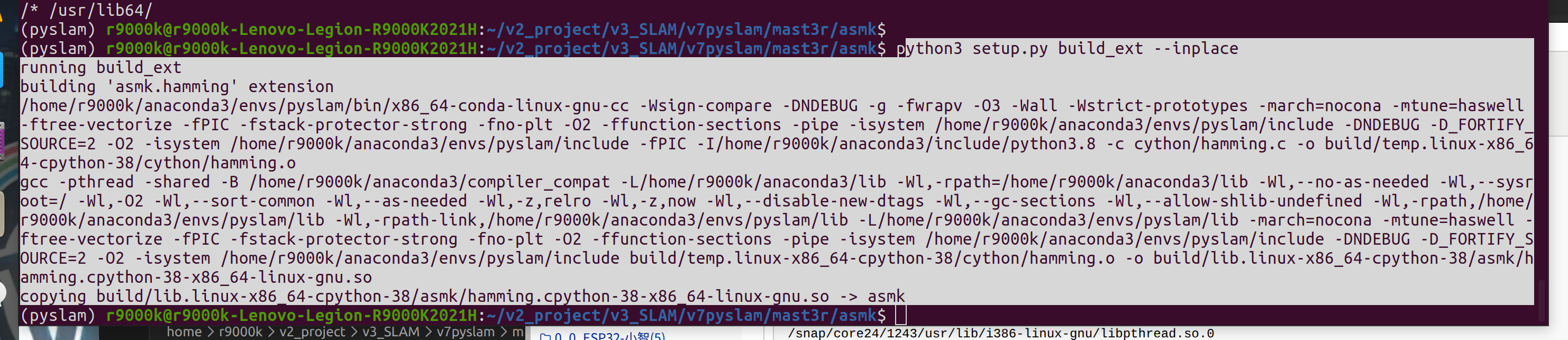
报错2
(可选)编译 RoPE 的 cuda 内核(如 CroCo v2 中那样)先跳过
这个错误是因为你的 CUDA 11.8 与当前使用的 GCC 编译器版本不兼容。错误信息明确提示:unsupported GNU version! gcc versions later than 11 are not supported!。这意味着 CUDA 11.8 不支持版本高于 11 的 GCC 编译器。
conda install -c conda-forge gxx_linux-64=11.*
下载权重
mkdir -p checkpoints/
wget https://download.europe.naverlabs.com/ComputerVision/MASt3R/MASt3R_ViTLarge_BaseDecoder_512_catmlpdpt_metric.pth -P checkpoints/

选择是否用cpu或者cuda
选择模型是在线读取还是离线文件
    #device = 'cpu'
    device = 'cuda'
    #model_name = "naver/MASt3R_ViTLarge_BaseDecoder_512_catmlpdpt_metric"
    model_name = "checkpoints/MASt3R_ViTLarge_BaseDecoder_512_catmlpdpt_metric.pth"


    print("开始加载MASt3R模型")
    model = AsymmetricMASt3R.from_pretrained(model_name).to(device)
    print("加载模型完毕,加载图")
测试代码1 双图匹配matplotlib显示
自动下载全红和数据
from mast3r.model import AsymmetricMASt3R
from mast3r.fast_nn import fast_reciprocal_NNs

import mast3r.utils.path_to_dust3r
from dust3r.inference import inference
from dust3r.utils.image import load_images

if __name__ == '__main__':
    device = 'cuda'
    model_name = "naver/MASt3R_ViTLarge_BaseDecoder_512_catmlpdpt_metric"
    # you can put the path to a local checkpoint in model_name if needed
    model = AsymmetricMASt3R.from_pretrained(model_name).to(device)
    images = load_images(['dust3r/croco/assets/Chateau1.png', 'dust3r/croco/assets/Chateau2.png'], size=512)
    output = inference([tuple(images)], model, device, batch_size=1, verbose=False)

    # at this stage, you have the raw dust3r predictions
    view1, pred1 = output['view1'], output['pred1']
    view2, pred2 = output['view2'], output['pred2']

    desc1, desc2 = pred1['desc'].squeeze(0).detach(), pred2['desc'].squeeze(0).detach()

    # find 2D-2D matches between the two images
    matches_im0, matches_im1 = fast_reciprocal_NNs(desc1, desc2, subsample_or_initxy1=8,
                                                   device=device, dist='dot', block_size=2**13)

    # ignore small border around the edge
    H0, W0 = view1['true_shape'][0]
    valid_matches_im0 = (matches_im0[:, 0] >= 3) & (matches_im0[:, 0] < int(W0) - 3) & (
        matches_im0[:, 1] >= 3) & (matches_im0[:, 1] < int(H0) - 3)

    H1, W1 = view2['true_shape'][0]
    valid_matches_im1 = (matches_im1[:, 0] >= 3) & (matches_im1[:, 0] < int(W1) - 3) & (
        matches_im1[:, 1] >= 3) & (matches_im1[:, 1] < int(H1) - 3)

    valid_matches = valid_matches_im0 & valid_matches_im1
    matches_im0, matches_im1 = matches_im0[valid_matches], matches_im1[valid_matches]

    # visualize a few matches
    import numpy as np
    import torch
    import torchvision.transforms.functional
    from matplotlib import pyplot as pl

    n_viz = 20
    num_matches = matches_im0.shape[0]
    match_idx_to_viz = np.round(np.linspace(0, num_matches - 1, n_viz)).astype(int)
    viz_matches_im0, viz_matches_im1 = matches_im0[match_idx_to_viz], matches_im1[match_idx_to_viz]

    image_mean = torch.as_tensor([0.5, 0.5, 0.5], device='cpu').reshape(1, 3, 1, 1)
    image_std = torch.as_tensor([0.5, 0.5, 0.5], device='cpu').reshape(1, 3, 1, 1)

    viz_imgs = []
    for i, view in enumerate([view1, view2]):
        rgb_tensor = view['img'] * image_std + image_mean
        viz_imgs.append(rgb_tensor.squeeze(0).permute(1, 2, 0).cpu().numpy())

    H0, W0, H1, W1 = *viz_imgs[0].shape[:2], *viz_imgs[1].shape[:2]
    img0 = np.pad(viz_imgs[0], ((0, max(H1 - H0, 0)), (0, 0), (0, 0)), 'constant', constant_values=0)
    img1 = np.pad(viz_imgs[1], ((0, max(H0 - H1, 0)), (0, 0), (0, 0)), 'constant', constant_values=0)
    img = np.concatenate((img0, img1), axis=1)
    pl.figure()
    pl.imshow(img)
    cmap = pl.get_cmap('jet')
    for i in range(n_viz):
        (x0, y0), (x1, y1) = viz_matches_im0[i].T, viz_matches_im1[i].T
        pl.plot([x0, x1 + W0], [y0, y1], '-+', color=cmap(i / (n_viz - 1)), scalex=False, scaley=False)
    pl.show(block=True)
报错
问题分析
-
RoPE2D CUDA 内核编译失败:
Warning, cannot find cuda-compiled version of RoPE2D, using a slow pytorch version instead -
Qt 图形界面库加载失败:导致程序崩溃
pip install "numpy<2"
测试代码2 纯opencv显示


默认从云端加载权重
    print("开始加载模型")
    model = AsymmetricMASt3R.from_pretrained(model_name).to(device)
    #model_path = "./checkpoints/MASt3R_ViTLarge_BaseDecoder_512_catmlpdpt_metric"
    #model = AsymmetricMASt3R.from_pretrained(model_name).to(device)
from mast3r.model import AsymmetricMASt3R
from mast3r.fast_nn import fast_reciprocal_NNs
import mast3r.utils.path_to_dust3r
from dust3r.inference import inference
from dust3r.utils.image import load_images
import cv2
import numpy as np
import torch

if __name__ == '__main__':
    device = 'cuda'
    model_name = "naver/MASt3R_ViTLarge_BaseDecoder_512_catmlpdpt_metric"
    print("开始加载模型")
    model = AsymmetricMASt3R.from_pretrained(model_name).to(device)
    #model_path = "./checkpoints/MASt3R_ViTLarge_BaseDecoder_512_catmlpdpt_metric"
    #model = AsymmetricMASt3R.from_pretrained(model_name).to(device)
    print("加载模型完毕,加载图")
    images = load_images(['dust3r/croco/assets/Chateau1.png', 'dust3r/croco/assets/Chateau2.png'], size=512)
    output = inference([tuple(images)], model, device, batch_size=1, verbose=False)

    view1, pred1 = output['view1'], output['pred1']
    view2, pred2 = output['view2'], output['pred2']
    desc1, desc2 = pred1['desc'].squeeze(0).detach(), pred2['desc'].squeeze(0).detach()

    matches_im0, matches_im1 = fast_reciprocal_NNs(desc1, desc2, subsample_or_initxy1=8,
                                                   device=device, dist='dot', block_size=2**13)
    print("匹配结束么,开始挑选有效点")
    H0, W0 = view1['true_shape'][0]
    valid_matches_im0 = (matches_im0[:, 0] >= 3) & (matches_im0[:, 0] < int(W0) - 3) & (
        matches_im0[:, 1] >= 3) & (matches_im0[:, 1] < int(H0) - 3)

    H1, W1 = view2['true_shape'][0]
    valid_matches_im1 = (matches_im1[:, 0] >= 3) & (matches_im1[:, 0] < int(W1) - 3) & (
        matches_im1[:, 1] >= 3) & (matches_im1[:, 1] < int(H1) - 3)

    valid_matches = valid_matches_im0 & valid_matches_im1
    matches_im0, matches_im1 = matches_im0[valid_matches], matches_im1[valid_matches]

    # 可视化部分 - 使用OpenCV替代Matplotlib
    n_viz = 20
    num_matches = matches_im0.shape[0]
    match_idx_to_viz = np.round(np.linspace(0, num_matches - 1, n_viz)).astype(int)
    viz_matches_im0, viz_matches_im1 = matches_im0[match_idx_to_viz], matches_im1[match_idx_to_viz]

    image_mean = torch.as_tensor([0.5, 0.5, 0.5], device='cpu').reshape(1, 3, 1, 1)
    image_std = torch.as_tensor([0.5, 0.5, 0.5], device='cpu').reshape(1, 3, 1, 1)

    viz_imgs = []
    for i, view in enumerate([view1, view2]):
        rgb_tensor = view['img'] * image_std + image_mean
        viz_imgs.append(rgb_tensor.squeeze(0).permute(1, 2, 0).cpu().numpy())

    # OpenCV可视化代码
    print('OpenCV可视化代码')
    img0_bgr = (viz_imgs[0][:, :, ::-1] * 255).astype(np.uint8)
    img1_bgr = (viz_imgs[1][:, :, ::-1] * 255).astype(np.uint8)

    h0, w0 = img0_bgr.shape[:2]
    h1, w1 = img1_bgr.shape[:2]
    max_height = max(h0, h1)
    concatenated_img = np.zeros((max_height, w0 + w1, 3), dtype=np.uint8)
    concatenated_img[:h0, :w0] = img0_bgr
    concatenated_img[:h1, w0:w0+w1] = img1_bgr

    colors = [
        (255, 0, 0), (0, 255, 0), (0, 0, 255), (255, 255, 0), (255, 0, 255),
        (0, 255, 255), (128, 0, 0), (0, 128, 0), (0, 0, 128), (128, 128, 0),
        (128, 0, 128), (0, 128, 128), (192, 192, 192), (255, 165, 0), (255, 192, 203),
        (138, 43, 226), (165, 42, 42), (188, 143, 143), (95, 158, 160), (100, 149, 237)
    ]

    for i, (pt0, pt1) in enumerate(zip(viz_matches_im0, viz_matches_im1)):
        color = colors[i % len(colors)]
        x0, y0 = int(pt0[0]), int(pt0[1])
        x1, y1 = int(pt1[0]), int(pt1[1])

        cv2.line(concatenated_img, (x0, y0), (x1 + w0, y1), color, 2, cv2.LINE_AA)
        cv2.circle(concatenated_img, (x0, y0), 5, color, -1)
        cv2.circle(concatenated_img, (x1 + w0, y1), 5, color, -1)

    cv2.imshow('Feature Matches', concatenated_img)
    cv2.waitKey(0)
    cv2.destroyAllWindows()
测试3 对比orb 效果

cpu模式

gpu模式 占用3.6G
开始以前

结束以后

优化代码


======================
错误匹配
先放一个正确的


正确匹配
同高度不同时间 不同高度


不同高度


白天和夜晚
120米 光圈2.8 曝光时间1/30秒 增益1600 对比3200


120米 光圈2.8 曝光时间1/30秒 增益3200


120米 光圈2.8 曝光时间1/30秒 增益1600


120米 光圈2.8 曝光时间1/30秒 增益3200
import cv2
import numpy as np

import random

draw_num=20 # 画出来前多少个点

line_thickness_set=4
font_scale = 2.5
color_title = (255, 255, 255)  # 蓝 绿 红
thickness = 6


colors_Line = [
    (255, 0, 0), (0, 255, 0), (0, 0, 255), (255, 255, 0), (255, 0, 255),(0, 255, 255),(0, 100, 255),(0, 255, 100)
]

def generate_pastel_color():
    """生成柔和的随机颜色"""
    r = random.randint(30, 255)  # 限制在较亮的范围
    g = random.randint(30, 255)
    b = random.randint(30, 255)
    return (r, g, b)

def draw_ORB_matches(img1, kp1, img2, kp2, top_n_matches, line_thickness=line_thickness_set):
    """
    根据匹配质量(distance)动态分配颜色:高质量→绿蓝色,低质量→橘红色
    修改版本:直接接受已筛选的top_n_matches列表

    参数:
        img1: 第一张图像
        kp1: 第一张图像的关键点
        img2: 第二张图像
        kp2: 第二张图像的关键点
        top_n_matches: 已经筛选好的匹配列表(通常是按距离排序后的前N个)
        line_thickness: 连线粗细
    """
    # 获取图像尺寸
    h1, w1 = img1.shape[:2]
    h2, w2 = img2.shape[:2]

    # 创建拼接图像
    new_width = w1 + w2
    new_height = max(h1, h2)
    result = np.zeros((new_height, new_width, 3), dtype=np.uint8)
    result[0:h1, 0:w1] = img1
    result[0:h2, w1:w1+w2] = img2

    # 检查匹配列表是否为空
    if len(top_n_matches) == 0:
        print("警告:匹配列表为空")
        return result

    # 获取所有匹配的距离值
    distances = [m.distance for m in top_n_matches]
    min_dist = min(distances)
    max_dist = max(distances)

    print(f"绘制 {len(top_n_matches)} 个匹配点")
    print(f"最小距离: {min_dist:.2f}, 最大距离: {max_dist:.2f}")

    # 绘制每个匹配对
    for i, match in enumerate(top_n_matches):
    #     # 获取关键点坐标
        pt1 = (int(kp1[match.queryIdx].pt[0]), int(kp1[match.queryIdx].pt[1]))
        pt2 = (int(kp2[match.trainIdx].pt[0] + w1), int(kp2[match.trainIdx].pt[1]))

        # # 根据匹配质量计算颜色
        # # 归一化距离 (0-1范围,0表示最好,1表示最差)


        # # # 根据匹配质量计算颜色(距离越小,匹配质量越高)
        # norm_dist = (match.distance - min_dist) / (max_dist - min_dist + 1e-5)

        # # 颜色映射:高质量→绿色,中等质量→黄色,低质量→红色
        # if norm_dist < 0.33:  # 最好的33% - 绿色系
        #     blue = 0
        #     green = 255
        #     red = int(255 * (norm_dist / 0.33))
        # elif norm_dist < 0.66:  # 中间33% - 黄色到橙色
        #     blue = 0
        #     green = int(255 * (1 - (norm_dist - 0.33) / 0.33))
        #     red = 255
        # else:  # 最差的33% - 橙色到红色
        #     blue = 0
        #     green = int(128 * (1 - (norm_dist - 0.66) / 0.34))
        #     red = 255

        color = colors_Line[i % len(colors_Line)]

        #color=generate_pastel_color()
        # 绘制连线
        cv2.line(result, pt1, pt2, color, line_thickness)

        # # 可选:在关键点旁边显示匹配质量和序号
        # if line_thickness > 1:  # 只在连线较粗时显示文本,避免过于拥挤
        #     cv2.putText(result, f"{i}", (pt1[0]+5, pt1[1]),
        #                cv2.FONT_HERSHEY_SIMPLEX, 0.4, (255, 255, 255), 1)
        #     cv2.putText(result, f"{match.distance:.1f}", (pt2[0]+5, pt2[1]),
        #                cv2.FONT_HERSHEY_SIMPLEX, 0.4, (255, 255, 255), 1)

    return result

# 使用示例
def Orb_Match(image_paths):


    img1 = cv2.imread(image_paths[0])
    img2 = cv2.imread(image_paths[1])

    # 初始化ORB检测器
    orb = cv2.ORB_create()
    start_time = time.time()
    # 检测关键点并计算描述子
    kp1, des1 = orb.detectAndCompute(img1, None)
    kp2, des2 = orb.detectAndCompute(img2, None)

    # 创建BFMatcher并进行匹配
    bf = cv2.BFMatcher(cv2.NORM_HAMMING, crossCheck=True)
    matches = bf.match(des1, des2)

    # 计算绘制时间
    pipei_time = time.time() - start_time
    pipei_time=round(pipei_time,3)


    # 按距离排序并选择前N个最佳匹配
    matches_sorted = sorted(matches, key=lambda x: x.distance)
    top_n_matches = matches_sorted[:draw_num]  # 选择前30个最佳匹配

    # 使用修改后的函数绘制匹配结果
    result_img = draw_ORB_matches(img1, kp1, img2, kp2, top_n_matches)

    cv2.putText(result_img, "ORB-time:"+str(pipei_time), (30, 90),  cv2.FONT_HERSHEY_SIMPLEX, font_scale, color_title, thickness)
    return result_img


def sift_feature_matching(image_paths, top_n=30, match_ratio=0.7):
    """
    使用SIFT算法进行图像特征匹配

    参数:
        image_paths: 包含两个图像路径的列表
        top_n: 选择最佳匹配的数量
        match_ratio: 比率测试的阈值(用于FLANN匹配器)

    返回:
        result_img: 绘制匹配结果的图像
        match_count: 成功匹配的数量
        avg_distance: 平均匹配距离
    """
    # 读取图像
    img1 = cv2.imread(image_paths[0])
    img2 = cv2.imread(image_paths[1])

    if img1 is None or img2 is None:
        print("错误:无法读取图像文件")
        return None, 0, 0

    # 转换为灰度图
    gray1 = cv2.cvtColor(img1, cv2.COLOR_BGR2GRAY)
    gray2 = cv2.cvtColor(img2, cv2.COLOR_BGR2GRAY)

    # 创建SIFT特征检测器
    sift = cv2.SIFT_create(
        nfeatures=2000,           # 保留的最佳特征点数量(0表示保留所有)
        nOctaveLayers=3,       # 每个八度空间的层数
        contrastThreshold=0.04, # 对比度阈值
        edgeThreshold=10,      # 边缘阈值
        sigma=1.6              # 高斯滤波器参数
    )

    start_time = time.time()

    # 检测关键点并计算描述符
    kp1, des1 = sift.detectAndCompute(gray1, None)
    kp2, des2 = sift.detectAndCompute(gray2, None)

    print(f"图像1检测到 {len(kp1)} 个关键点")
    print(f"图像2检测到 {len(kp2)} 个关键点")

    if des1 is None or des2 is None:
        print("错误:无法计算特征描述符")
        return None, 0, 0

    # 创建FLANN匹配器
    index_params = dict(algorithm=1, trees=5)  # KD树算法
    search_params = dict(checks=50)             # 搜索次数
    flann = cv2.FlannBasedMatcher(index_params, search_params)

    # 使用kNN匹配,k=2
    matches = flann.knnMatch(des1, des2, k=2)

    # 计算绘制时间
    pipei_time = time.time() - start_time
    pipei_time=round(pipei_time,3)


    # 应用比率测试筛选优质匹配
    good_matches = []
    for m, n in matches:
        if m.distance < match_ratio * n.distance:
            good_matches.append(m)

    print(f"原始匹配数量: {len(matches)}")
    print(f"经过比率测试后的优质匹配数量: {len(good_matches)}")

    # 按匹配距离排序并选择前N个最佳匹配
    good_matches_sorted = sorted(good_matches, key=lambda x: x.distance)
    top_matches = good_matches_sorted[:top_n]

    # 计算匹配质量指标
    if len(top_matches) > 0:
        avg_distance = sum(m.distance for m in top_matches) / len(top_matches)
        min_distance = min(m.distance for m in top_matches)
        max_distance = max(m.distance for m in top_matches)

        print(f"最佳匹配距离: {min_distance:.2f}")
        print(f"最差匹配距离: {max_distance:.2f}")
        print(f"平均匹配距离: {avg_distance:.2f}")
    else:
        avg_distance = 0
        print("警告:没有找到足够的优质匹配")

    # 绘制匹配结果
    result_img = draw_sift_matches(img1, kp1, img2, kp2, top_matches)
    cv2.putText(result_img, "SIFT-time:"+str(pipei_time), (30, 90),  cv2.FONT_HERSHEY_SIMPLEX, font_scale, color_title, thickness)
    return result_img, len(top_matches), avg_distance

def draw_sift_matches(img1, kp1, img2, kp2, matches, line_thickness=line_thickness_set):
    """
    绘制SIFT匹配结果,根据匹配质量使用渐变色

    参数:
        img1, img2: 输入图像
        kp1, kp2: 关键点列表
        matches: 匹配结果
        line_thickness: 连线粗细

    返回:
        绘制匹配结果的图像
    """
    # 获取图像尺寸
    h1, w1 = img1.shape[:2]
    h2, w2 = img2.shape[:2]

    # 创建拼接图像
    new_width = w1 + w2
    new_height = max(h1, h2)
    result = np.zeros((new_height, new_width, 3), dtype=np.uint8)
    result[0:h1, 0:w1] = img1
    result[0:h2, w1:w1+w2] = img2

    if len(matches) == 0:
        print("警告:匹配列表为空")
        return result

    # 获取所有匹配的距离值用于颜色映射
    distances = [m.distance for m in matches]
    min_dist = min(distances)
    max_dist = max(distances)

    print(f"绘制 {len(matches)} 个匹配点")

    # 绘制每个匹配对
    for i, match in enumerate(matches):
        # 获取关键点坐标
        pt1 = (int(kp1[match.queryIdx].pt[0]), int(kp1[match.queryIdx].pt[1]))
        pt2 = (int(kp2[match.trainIdx].pt[0] + w1), int(kp2[match.trainIdx].pt[1]))

        # # # 根据匹配质量计算颜色(距离越小,匹配质量越高)
        # norm_dist = (match.distance - min_dist) / (max_dist - min_dist + 1e-5)

        # # 颜色映射:高质量→绿色,中等质量→黄色,低质量→红色
        # if norm_dist < 0.33:  # 最好的33% - 绿色系
        #     blue = 0
        #     green = 255
        #     red = int(255 * (norm_dist / 0.33))
        # elif norm_dist < 0.66:  # 中间33% - 黄色到橙色
        #     blue = 0
        #     green = int(255 * (1 - (norm_dist - 0.33) / 0.33))
        #     red = 255
        # else:  # 最差的33% - 橙色到红色
        #     blue = 0
        #     green = int(128 * (1 - (norm_dist - 0.66) / 0.34))
        #     red = 255
        color = colors_Line[i % len(colors_Line)]
        #color = (blue, green, red)
        #color=generate_pastel_color()
        # 绘制连线
        cv2.line(result, pt1, pt2, color, line_thickness)

        # 绘制关键点
        cv2.circle(result, pt1, 5, color, -1)
        cv2.circle(result, pt2, 5, color, -1)

        # 显示匹配序号和距离
        if line_thickness > 1 and len(matches) <= 50:  # 避免文本过于拥挤
            cv2.putText(result, f"{i}", (pt1[0]+5, pt1[1]),
                       cv2.FONT_HERSHEY_SIMPLEX, 0.4, (255, 255, 255), 1)
            cv2.putText(result, f"{match.distance:.1f}", (pt2[0]+5, pt2[1]),
                       cv2.FONT_HERSHEY_SIMPLEX, 0.4, (255, 255, 255), 1)


    return result


from mast3r.model import AsymmetricMASt3R
from mast3r.fast_nn import fast_reciprocal_NNs
import mast3r.utils.path_to_dust3r
from dust3r.inference import inference
from dust3r.utils.image import load_images
import cv2
import numpy as np
import torch
import time


class FeatureMatcher_Mast3r:
    def __init__(self, model_path, device='cuda'):
        """
        初始化特征匹配器
        Args:
            model_path: MASt3R模型路径
            device: 运行设备
        """
        self.device = device
        self.model = self.load_mast3r_model(model_path)

    def load_mast3r_model(self, model_path):
        """加载MASt3R模型"""
        print("开始加载MASt3R模型")
        model = AsymmetricMASt3R.from_pretrained(model_path).to(self.device)
        print("MASt3R模型加载完成")
        return model

    def load_and_preprocess_images(self, image_paths, size=512):
        """
        加载并预处理图像
        Args:
            image_paths: 图像路径列表
            size: 图像尺寸
        Returns:
           预处理后的图像数据
        """
        images = load_images(image_paths, size=size)

        # 图像标准化
        image_mean = torch.as_tensor([0.5, 0.5, 0.5], device='cpu').reshape(1, 3, 1, 1)
        image_std = torch.as_tensor([0.5, 0.5, 0.5], device='cpu').reshape(1, 3, 1, 1)

        viz_imgs = []
        for i, view in enumerate([images[0], images[1]]):
            rgb_tensor = view['img'] * image_std + image_mean
            viz_img = rgb_tensor.squeeze(0).permute(1, 2, 0).cpu().numpy()
            viz_imgs.append(viz_img)

        # 转换为OpenCV格式
        img0_bgr = (viz_imgs[0][:, :, ::-1] * 255).astype(np.uint8)
        img1_bgr = (viz_imgs[1][:, :, ::-1] * 255).astype(np.uint8)

        return images, img0_bgr, img1_bgr

    def mast3r_feature_matching(self, images):
        """
        MASt3R特征匹配
        Args:
            images: 输入图像
        Returns:
           匹配结果、关键点坐标和耗时
        """
        start_time = time.time()

        # 执行推理
        output = inference([tuple(images)], self.model, self.device, batch_size=1, verbose=False)

        view1, pred1 = output['view1'], output['pred1']
        view2, pred2 = output['view2'], output['pred2']
        desc1, desc2 = pred1['desc'].squeeze(0).detach(), pred2['desc'].squeeze(0).detach()

        # 快速互最近邻匹配
        matches_im0, matches_im1 = fast_reciprocal_NNs(desc1, desc2, subsample_or_initxy1=8,
                                                       device=self.device, dist='dot', block_size=2**13)

        # 有效点筛选
        H0, W0 = view1['true_shape'][0]
        valid_matches_im0 = (matches_im0[:, 0] >= 3) & (matches_im0[:, 0] < int(W0) - 3) & (
            matches_im0[:, 1] >= 3) & (matches_im0[:, 1] < int(H0) - 3)

        H1, W1 = view2['true_shape'][0]
        valid_matches_im1 = (matches_im1[:, 0] >= 3) & (matches_im1[:, 0] < int(W1) - 3) & (
            matches_im1[:, 1] >= 3) & (matches_im1[:, 1] < int(H1) - 3)

        valid_matches = valid_matches_im0 & valid_matches_im1
        matches_im0, matches_im1 = matches_im0[valid_matches], matches_im1[valid_matches]

        end_time = time.time()
        total_time = end_time - start_time
        print("Mast3R 耗费时间:",total_time)

        return matches_im0, matches_im1, total_time


    def visualize_results(self, mast3r_matches_im0, mast3r_matches_im1, img0_bgr, img1_bgr, n_viz=100):
        """
        可视化MASt3R匹配结果
        """
        h0, w0 = img0_bgr.shape[:2]
        h1, w1 = img1_bgr.shape[:2]
        max_height = max(h0, h1)

        # 创建结果图像
        result_img = np.zeros((max_height, w0 + w1, 3), dtype=np.uint8)

        # 放置原始图像
        result_img[:h0, :w0] = img0_bgr
        result_img[:h1, w0:w0+w1] = img1_bgr

        # 绘制MASt3R匹配点
        colors = [
            (255, 0, 0), (0, 255, 0), (0, 0, 255), (255, 255, 0), (255, 0, 255),(0, 255, 255),(0, 100, 255),(0, 255, 100)
        ]
        print('总点数',mast3r_matches_im0.shape[0])
        n_viz_actual = min(n_viz, mast3r_matches_im0.shape[0])
        indices = np.round(np.linspace(0, mast3r_matches_im0.shape[0] - 1, n_viz_actual)).astype(int)

        for i, idx in enumerate(indices):
            color = colors[i % len(colors)]
            pt1 = mast3r_matches_im0[idx]
            pt2 = mast3r_matches_im1[idx]

            x1, y1 = int(pt1[0]), int(pt1[1])
            x2, y2 = int(pt2[0]) + w0, int(pt2[1])

            cv2.line(result_img, (x1, y1), (x2, y2), color, 1, cv2.LINE_AA)
            cv2.circle(result_img, (x1, y1), 3, color, -1)
            cv2.circle(result_img, (x2, y2), 3, color, -1)

        # # 添加标签
        # cv2.putText(result_img, "MASt3R-Time:"+str(), (30, 200),
        #             cv2.FONT_HERSHEY_SIMPLEX, 0.7, color, 2)

        return result_img


if __name__ == "__main__":

    # =============================1 执行ORB匹配
    # 读取图像
    image_paths = [
        '/media/r9000k/DD_XS/2数据/2_1精灵4无rtk/2圆楼_滨湖_白天_resize/DJI_0516.JPG',
        '/media/r9000k/DD_XS/2数据/2_1精灵4无rtk/v4_2圆楼_滨湖_拍照模式测曝光_resize/DJI_0146.JPG'
    ]
    orb_result_img = Orb_Match(image_paths)


    # 显示结果
    # cv2.namedWindow('orb', cv2.WINDOW_NORMAL)
    # cv2.imshow('orb', orb_result_img)
    # cv2.waitKey(0)
    # cv2.destroyAllWindows()


    # =============================2 执行SIFT匹配
    sift_result_img, match_count, avg_distance = sift_feature_matching(
        image_paths,
        top_n=draw_num,      # 显示前30个最佳匹配
        match_ratio=0.7 # 比率测试阈值
    )

    # 显示结果
    # cv2.namedWindow('SIFT Feature Matching', cv2.WINDOW_NORMAL)
    # cv2.imshow('SIFT Feature Matching', sift_result_img)
    # cv2.waitKey(0)
    # cv2.destroyAllWindows()


    # =============================3 执行Mast3r匹配
    # 创建特征匹配器实例
    Mast3r_model_path = "checkpoints/MASt3R_ViTLarge_BaseDecoder_512_catmlpdpt_metric.pth"
    matcher_Mast3r = FeatureMatcher_Mast3r(Mast3r_model_path)

    # 加载图像
    images, img0_bgr, img1_bgr = matcher_Mast3r.load_and_preprocess_images(image_paths)

    # MASt3R特征匹配
    mast3r_pts1, mast3r_pts2, mast3r_time = matcher_Mast3r.mast3r_feature_matching(images)

    # 可视化结果
    mast3r_result_img = matcher_Mast3r.visualize_results(mast3r_pts1, mast3r_pts2, img0_bgr, img1_bgr, n_viz=draw_num)

        # 添加标签
    cv2.putText(mast3r_result_img, "MASt3R-Time:"+str(round(mast3r_time,3)), (10, 30),
                    cv2.FONT_HERSHEY_SIMPLEX, 0.7, color_title, 2)


    # 显示结果
    # cv2.namedWindow('MASt3R Feature Matching Results', cv2.WINDOW_NORMAL)
    # cv2.imshow('MASt3R Feature Matching Results', mast3r_result_img)
    # cv2.waitKey(0)
    # cv2.destroyAllWindows()


    # =============================4 可视化对比图
    # 如果使用 PyQt5
    from PyQt5.QtCore import QLibraryInfo
    import os
    os.environ["QT_QPA_PLATFORM_PLUGIN_PATH"] = QLibraryInfo.location(QLibraryInfo.PluginsPath)


    import matplotlib.pyplot as plt
    import matplotlib.image as mpimg
    # 将三张图片存入列表方便处理
    images = [orb_result_img, sift_result_img, mast3r_result_img]
    titles = ['ORB', 'SIFT', 'Mast3R']  # 可自定义每个子图的标题

    # 2. 创建子图布局:3行1列
    fig, axs = plt.subplots(3, 1, figsize=(20, 20))  # figsize可调整整个窗口大小

    # 3. 在每个子图中显示图片
    for i, ax in enumerate(axs):
        result_img_rgb = images[i][:, :, ::-1]  # BGR转RGB OpenCV 的 BGR 格式与 matplotlib 的 RGB 格式
        ax.imshow(result_img_rgb)  # 显示图片
        ax.set_title(titles[i])  # 设置标题
        ax.axis('off')  # 关闭坐标轴,让图片更清爽


    # 4. 调整布局并显示
    plt.tight_layout()
    plt.show()

 浙公网安备 33010602011771号