

编译

脚本
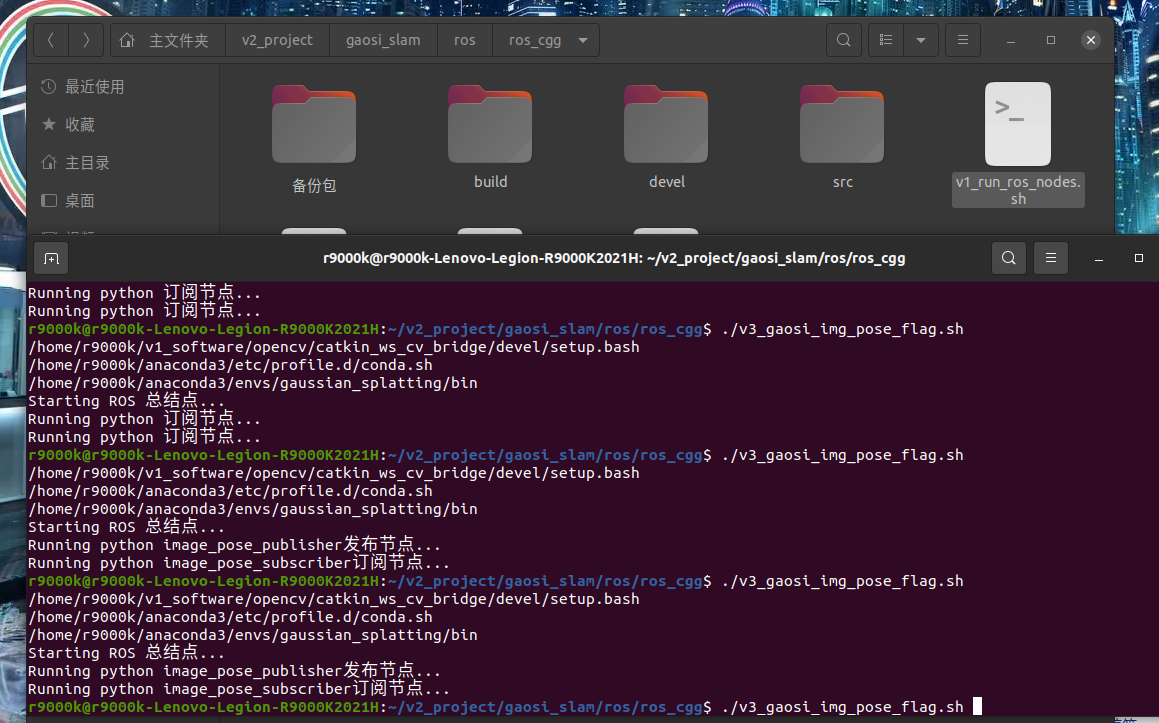
v3_gaosi_img_pose_flag.sh
#!/bin/bash
#外部给与执行权限
#sudo chmod +x run_ros_nodes.sh
# 定义 ROS 安装路径  #安装时候添加到系统路径了 不需要每次都source
ROS_SETUP="/opt/ros/noetic/setup.bash"
# 定义工作目录路径  自己的工程没有加到系统路径,每次需要source
WORKSPACE_DIR="/home/r9000k/v2_project/gaosi_slam/ros/ros_cgg"


conda_envs="/home/r9000k/anaconda3" # 修改2-1 自己的conda 安装路径
#ROS_cv_briage_dir="/home/r9000k/v1_software/opencv/catkin_ws_cv_bridge/devel/setup.bash" # 修改2-2 自己编译的cv_briage包节点,貌似不用也行 制定了依赖opencv3.4.9 而非自带4.2
#echo $ROS_cv_briage_dir
conda_envs_int=$conda_envs"/etc/profile.d/conda.sh" # 不用改 conda自带初始化文件
echo $conda_envs_int
conda_envs_bin=$conda_envs"/envs/gaussian_splatting/bin" # 不用改 conda自带python安装位置 脚本中需要指定是conda特定的环境python而不是系统默认的
echo $conda_envs_bin
ROS_SETUP="/opt/ros/noetic/setup.bash" #不用改  安装时候添加到系统路径了 不需要每次都source 这里留着


#指定目录

# 启动 ROS Master
echo "Starting ROS 总结点..."
gnome-terminal -- bash -c "\
cd $WORKSPACE_DIR; source devel/setup.bash; \
roscore; \
exec bash"

# 等待 ROS Master 启动
sleep 3

# 运行 C++ 发布节点
# echo "Running C++ 发布节点..."
# gnome-terminal -- bash -c "\
# cd $WORKSPACE_DIR; source devel/setup.bash; \
# rosrun gaosi_img_pose_flag image_pose_flag_publisher; \
# exec bash"

# echo "Running C++ 订阅节点..."
# gnome-terminal -- bash -c "\
# cd $WORKSPACE_DIR; source devel/setup.bash; \
# rosrun gaosi_img_pose_flag image_pose_flag_subscriber; \
# exec bash"


# 运行python节点
python_DIR="${WORKSPACE_DIR}/src/gaosi_img_pose_flag/src"

echo "Running python image_pose_publisher发布节点..."
gnome-terminal -- bash -c " \
cd $WORKSPACE_DIR; source devel/setup.bash; \
source $conda_envs_int; \
conda activate gaussian_splatting ; \
cd $python_DIR; \
/usr/bin/python3 image_pose_publisher.py; \
exec bash"


# 运行python节点

echo "Running python image_pose_subscriber订阅节点..."
gnome-terminal -- bash -c " \
cd $WORKSPACE_DIR; source devel/setup.bash; \
source $conda_envs_int; \
conda activate gaussian_splatting ; \
cd $python_DIR; \
/usr/bin/python3 image_pose_subscriber.py; \
exec bash"
包

1 创建自定义消息
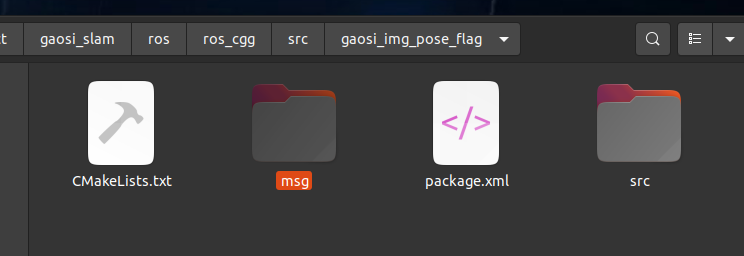
ImagePose.msg
# ImagePose.msg
sensor_msgs/Image image
std_msgs/Float64 flag
geometry_msgs/Pose pose

CMakeLists.txt
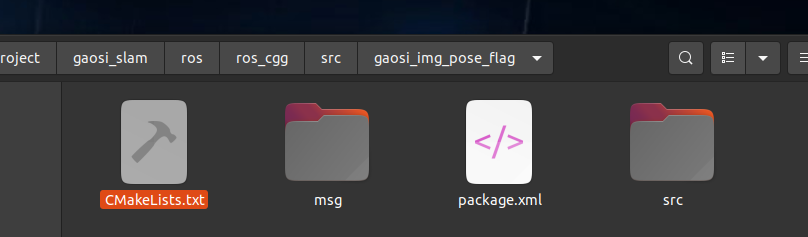
cmake_minimum_required(VERSION 3.0.2)
project(gaosi_img_pose_flag)

find_package(catkin REQUIRED COMPONENTS
  roscpp
  geometry_msgs
  sensor_msgs
  cv_bridge
  message_filters # 消息同步
  image_transport
  std_msgs # 自定义消息
  message_generation # 自定义消息
)

# 自定义消息
add_message_files(
  FILES
  ImagePose.msg
)

# 自定义消息
generate_messages(
  DEPENDENCIES
  std_msgs
  sensor_msgs
  geometry_msgs
)

find_package(OpenCV REQUIRED)
find_package(Boost REQUIRED COMPONENTS filesystem)
find_package(Eigen3 REQUIRED)

catkin_package(
  CATKIN_DEPENDS roscpp geometry_msgs sensor_msgs cv_bridge std_msgs message_runtime
  DEPENDS Boost
)

include_directories(
  ${catkin_INCLUDE_DIRS}
  ${OpenCV_INCLUDE_DIRS}
  ${Boost_INCLUDE_DIRS}
  "/usr/local/include/eigen3"
)


# 编译发布节点
add_executable(image_pose_flag_publisher src/image_pose_flag_publisher.cpp)
# 自定义消息引用
add_dependencies(image_pose_flag_publisher ${${PROJECT_NAME}_EXPORTED_TARGETS} ${catkin_EXPORTED_TARGETS})
target_link_libraries(image_pose_flag_publisher
  ${catkin_LIBRARIES}
  ${OpenCV_LIBRARIES}
  ${Boost_LIBRARIES}
)

add_executable(image_pose_flag_subscriber src/image_pose_flag_subscriber.cpp)
add_dependencies(image_pose_flag_subscriber ${${PROJECT_NAME}_EXPORTED_TARGETS} ${catkin_EXPORTED_TARGETS})
target_link_libraries(image_pose_flag_subscriber ${catkin_LIBRARIES} ${OpenCV_LIBRARIES})

package.xml
<?xml version="1.0"?>
<package format="2">
  <name>gaosi_img_pose_flag</name>
  <version>0.0.1</version>
  <description>
    A package to publish and subscribe to images and GPS data using ROS.
  </description>

  <!-- Maintainer of the package -->
  <maintainer email="your_email@example.com">Your Name</maintainer>

  <!-- License of the package -->
  <license>MIT</license>

  <!-- Build tool required to build this package -->
  <buildtool_depend>catkin</buildtool_depend>

  <!-- Dependencies of the package during build and runtime -->
  <build_depend>roscpp</build_depend>
  <build_depend>sensor_msgs</build_depend>
  <build_depend>cv_bridge</build_depend>
  <build_depend>eigen</build_depend>
  <build_depend>geometry_msgs</build_depend>
  <build_depend>message_filters</build_depend>
  <build_depend>image_transport</build_depend>
  <!--自定义消息 -->
  <build_depend>message_generation</build_depend>
  <build_depend>message_runtime</build_depend>
  <build_depend>std_msgs</build_depend>


  <exec_depend>roscpp</exec_depend>
  <exec_depend>sensor_msgs</exec_depend>
  <exec_depend>cv_bridge</exec_depend>
  <exec_depend>eigen</exec_depend>
  <exec_depend>geometry_msgs</exec_depend>
  <exec_depend>message_filters</exec_depend>
  <exec_depend>image_transport</exec_depend>
  <!--自定义消息 -->
  <exec_depend>message_generation</exec_depend>
  <exec_depend>message_runtime</exec_depend>
  <exec_depend>std_msgs</exec_depend>

  <!-- Declare additional dependencies required for building this package -->
  <build_export_depend>roscpp</build_export_depend>
  <build_export_depend>sensor_msgs</build_export_depend>
  <build_export_depend>cv_bridge</build_export_depend>
  <build_export_depend>eigen</build_export_depend>
  <build_export_depend>geometry_msgs</build_export_depend>
  <build_export_depend>message_filters</build_export_depend>
  <build_export_depend>image_transport</build_export_depend>
    <!--自定义消息 -->
  <build_export_depend>message_generation</build_export_depend>
  <build_export_depend>message_runtime</build_export_depend>
  <build_export_depend>std_msgs</build_export_depend>

  <!-- Export information, can be used by other packages -->
  <export>
    <!-- Export any specific information here -->
  </export>
</package>


image_pose_publisher.py
#!/usr/bin/env python

import rospy
from sensor_msgs.msg import Image
from std_msgs.msg import Float64
from geometry_msgs.msg import Pose
from gaosi_img_pose_flag.msg import ImagePose  # 更换为你包的名字
from cv_bridge import CvBridge
import numpy as np
import cv2

class ImagePosePublisher:
    def __init__(self):
        # Initialize node
        rospy.init_node('image_pose_publisher', anonymous=True)

        # Initialize publishers
        self.pub = rospy.Publisher('image_pose_topic', ImagePose, queue_size=10)

        # Create a bridge between OpenCV and ROS
        self.bridge = CvBridge()

        # Create or load a sample image
        self.image = np.zeros((480, 640, 3), dtype=np.uint8)  # Black image

        # Set flag
        self.flag = Float64()
        self.flag.data = 1.23  # Example double value

        # Set pose
        self.pose = Pose()
        self.pose.position.x = 1.0
        self.pose.position.y = 2.0
        self.pose.position.z = 3.0
        self.pose.orientation.x = 0.0
        self.pose.orientation.y = 0.0
        self.pose.orientation.z = 0.0
        self.pose.orientation.w = 1.0

        # Set publish rate
        self.rate = rospy.Rate(10)  # 10 Hz

        self.publish()

    def publish(self):
        while not rospy.is_shutdown():
            msg = ImagePose()

            # Convert OpenCV image to ROS image message
            msg.image = self.bridge.cv2_to_imgmsg(self.image, encoding="bgr8")
            msg.flag = self.flag
            msg.pose = self.pose

            # Publish message
            self.pub.publish(msg)

            self.rate.sleep()

if __name__ == '__main__':
    try:
        ImagePosePublisher()
    except rospy.ROSInterruptException:
        pass
image_pose_subscriber.py

image_pose_subscriber.py 例子0 工程多线程加速版本
#include <ros/ros.h>
#include <gaosi_img_pose_flag/ImagePose.h> // 更换为你包的名字
#include <queue>
#include <mutex>
#include <thread>
#include <iostream>

// Global variables
std::queue<gaosi_img_pose_flag::ImagePose::ConstPtr> data_queue;
std::mutex queue_mutex;

// Callback function to handle incoming messages
void callback(const gaosi_img_pose_flag::ImagePose::ConstPtr& msg)
{
    std::lock_guard<std::mutex> lock(queue_mutex);
    data_queue.push(msg);
}

// Thread function to process the queue
void processQueue()
{
    while (ros::ok())
    {
        std::queue<gaosi_img_pose_flag::ImagePose::ConstPtr> local_queue;

        {
            std::lock_guard<std::mutex> lock(queue_mutex);
            std::swap(local_queue, data_queue); // Safely access the queue
        }

        while (!local_queue.empty())
        {
            auto msg = local_queue.front();
            local_queue.pop();

            // Process the message
            ROS_INFO("Processing flag: %.2f", msg->flag.data);
            ROS_INFO("Processing pose: Position(%.2f, %.2f, %.2f), Orientation(%.2f, %.2f, %.2f, %.2f)",
                     msg->pose.position.x, msg->pose.position.y, msg->pose.position.z,
                     msg->pose.orientation.x, msg->pose.orientation.y, msg->pose.orientation.z, msg->pose.orientation.w);
        }

        // Optional: Sleep to avoid busy waiting
        std::this_thread::sleep_for(std::chrono::milliseconds(100));
    }
}

void spinThread()
{
    ros::spin();// 处理回调函数积累消息
}


int main(int argc, char** argv)
{
    ros::init(argc, argv, "image_pose_processor");
    ros::NodeHandle nh;

    // Initialize the subscriber
    ros::Subscriber sub = nh.subscribe("image_pose_topic", 10, callback);

    // Create a thread to process the queue
    std::thread processing_thread(processQueue);

    // Start a thread to run ros::spin()
    std::thread spin_thread(spinThread);


    ros::Rate rate(1);// Hz 频率
    while (ros::ok())
    {
        // Call ros::spinOnce() to process callbacks
        ros::spinOnce();

        // Process the queue
        //processQueue();

        // Sleep for the rest of the loop period
        rate.sleep();
    }
    //ros::spin();


    // Join the processing thread before exiting
    if (processing_thread.joinable())
    {
        processing_thread.join();
    }

    // Join the spin thread before exiting
    if (spin_thread.joinable())
    {
        spin_thread.join();
    }


    return 0;
}
image_pose_subscriber.py 例子1 简单版本
#!/usr/bin/env python

import rospy
from sensor_msgs.msg import Image
from std_msgs.msg import Float64
from geometry_msgs.msg import Pose
from gaosi_img_pose_flag.msg import ImagePose  # 更换为你包的名字
from cv_bridge import CvBridge
import cv2

class ImagePoseSubscriber:
    def __init__(self):
        # Initialize node
        rospy.init_node('image_pose_subscriber', anonymous=True)

        # Initialize subscriber
        self.sub = rospy.Subscriber('image_pose_topic', ImagePose, self.callback)

        # Create a bridge between OpenCV and ROS
        self.bridge = CvBridge()

        # Create an OpenCV window
        cv2.namedWindow("Received Image")

    def callback(self, msg):
        try:
            # Convert ROS image message to OpenCV image
            cv_image = self.bridge.imgmsg_to_cv2(msg.image, desired_encoding="bgr8")
            cv2.imshow("Received Image", cv_image)
            cv2.waitKey(30)
        except Exception as e:
            rospy.logerr("Failed to convert image: %s", str(e))

        rospy.loginfo("Received flag: %.2f", msg.flag.data)
        rospy.loginfo("Received pose: Position(%.2f, %.2f, %.2f), Orientation(%.2f, %.2f, %.2f, %.2f)",
                      msg.pose.position.x, msg.pose.position.y, msg.pose.position.z,
                      msg.pose.orientation.x, msg.pose.orientation.y, msg.pose.orientation.z, msg.pose.orientation.w)

    def run(self):
        rospy.spin()

if __name__ == '__main__':
    try:
        subscriber = ImagePoseSubscriber()
        subscriber.run()
    except rospy.ROSInterruptException:
        pass
image_pose_subscriber.py 例子2 类内部单独线程处理版本
#include <ros/ros.h>
#include <sensor_msgs/Image.h>
#include <std_msgs/Float64.h>
#include <geometry_msgs/Pose.h>
#include <cv_bridge/cv_bridge.h>
#include <opencv2/opencv.hpp>
#include <gaosi_img_pose_flag/ImagePose.h> // 更换为你包的名字
#include <queue>
#include <mutex>
#include <thread>


class ImagePoseSubscriber
{
public:
    ImagePoseSubscriber()
    {
        // Initialize subscriber
        sub_ = nh_.subscribe("image_pose_topic", 10, &ImagePoseSubscriber::callback, this);

        // Start processing thread
        processing_thread_ = std::thread(&ImagePoseSubscriber::processQueue, this);
    }

    ~ImagePoseSubscriber()
    {
        // Join the thread before destruction
        if (processing_thread_.joinable())
        {
            processing_thread_.join();
        }
    }

private:
    ros::NodeHandle nh_;
    ros::Subscriber sub_;
    std::queue<gaosi_img_pose_flag::ImagePose::ConstPtr> data_queue_;
    std::mutex queue_mutex_;
    std::thread processing_thread_;
    bool stop_thread_ = false;

    void callback(const gaosi_img_pose_flag::ImagePose::ConstPtr& msg)
    {
        std::lock_guard<std::mutex> lock(queue_mutex_);
        data_queue_.push(msg);
    }

    void clearQueue()
    {
        std::lock_guard<std::mutex> lock(queue_mutex_);
        std::queue<gaosi_img_pose_flag::ImagePose::ConstPtr> empty;
        std::swap(data_queue_, empty);
    }

    void processQueue()
    {
        while (!stop_thread_)
        {
            std::this_thread::sleep_for(std::chrono::milliseconds(100)); // Adjust as needed

            std::queue<gaosi_img_pose_flag::ImagePose::ConstPtr> local_queue;
            {
                std::lock_guard<std::mutex> lock(queue_mutex_);
                // 通过交换对象内部的数据成员来完成操作。这个过程不涉及对数据的实际拷贝。
                std::swap(local_queue, data_queue_);
            }

            while (!local_queue.empty())
            {
                auto msg = local_queue.front();//它返回队列中第一个元素的引用,但不移除它。
                local_queue.pop();//移除队列中第一个元素

                try
                {
                    // Convert ROS image message to OpenCV image
                    cv::Mat cv_image = cv_bridge::toCvCopy(msg->image, "bgr8")->image;
                    cv::imshow("Received Image", cv_image);
                    cv::waitKey(30);
                }
                catch (cv_bridge::Exception& e)
                {
                    ROS_ERROR("cv_bridge exception: %s", e.what());
                }

                ROS_INFO("Received flag: %.2f", msg->flag.data);
                ROS_INFO("Received pose: Position(%.2f, %.2f, %.2f), Orientation(%.2f, %.2f, %.2f, %.2f)",
                         msg->pose.position.x, msg->pose.position.y, msg->pose.position.z,
                         msg->pose.orientation.x, msg->pose.orientation.y, msg->pose.orientation.z, msg->pose.orientation.w);
            }
        }
    }
};

int main(int argc, char** argv)
{
    ros::init(argc, argv, "image_pose_subscriber");
    ImagePoseSubscriber image_pose_subscriber;
    ros::spin();
    return 0;
}
image_pose_subscriber.py 例子3-1 类外部(主线程)单独线程处理版本
#include <ros/ros.h>
#include <gaosi_img_pose_flag/ImagePose.h> // 更换为你包的名字
#include <queue>
#include <mutex>
#include <thread>

class ImagePoseSubscriber
{
public:
    ImagePoseSubscriber()
    {
        // Initialize subscriber
        sub_ = nh_.subscribe("image_pose_topic", 10, &ImagePoseSubscriber::callback, this);
    }

    // Function to access the queue from outside
    std::queue<gaosi_img_pose_flag::ImagePose::ConstPtr> getQueueSnapshot()
    {
        std::lock_guard<std::mutex> lock(queue_mutex_);
        return data_queue_; // Return a copy of the queue
    }

    // Optionally, you can also provide a function to clear the queue
    void clearQueue()
    {
        std::lock_guard<std::mutex> lock(queue_mutex_);
        std::queue<gaosi_img_pose_flag::ImagePose::ConstPtr> empty;
        std::swap(data_queue_, empty);
    }

private:
    ros::NodeHandle nh_;
    ros::Subscriber sub_;
    std::queue<gaosi_img_pose_flag::ImagePose::ConstPtr> data_queue_;
    std::mutex queue_mutex_;

    void callback(const gaosi_img_pose_flag::ImagePose::ConstPtr& msg)
    {
        std::lock_guard<std::mutex> lock(queue_mutex_);
        data_queue_.push(msg);
    }
};


void processQueue(ImagePoseSubscriber& subscriber)
{
    while (ros::ok())
    {
        std::queue<gaosi_img_pose_flag::ImagePose::ConstPtr> queue_snapshot = subscriber.getQueueSnapshot();

        while (!queue_snapshot.empty())
        {
            auto msg = queue_snapshot.front();
            queue_snapshot.pop();

            // Process the message (e.g., display image or log pose data)
            // This is just an example of processing
            ROS_INFO("Processing flag: %.2f", msg->flag.data);
            ROS_INFO("Processing pose: Position(%.2f, %.2f, %.2f), Orientation(%.2f, %.2f, %.2f, %.2f)",
                     msg->pose.position.x, msg->pose.position.y, msg->pose.position.z,
                     msg->pose.orientation.x, msg->pose.orientation.y, msg->pose.orientation.z, msg->pose.orientation.w);
        }

        // Optionally, add a sleep to prevent busy waiting
        std::this_thread::sleep_for(std::chrono::milliseconds(100));
    }
}

int main(int argc, char** argv)
{
    ros::init(argc, argv, "image_pose_processor");

    // Initialize ImagePoseSubscriber
    ImagePoseSubscriber image_pose_subscriber;

    // Create a thread to process the queue
    std::thread processing_thread(processQueue, std::ref(image_pose_subscriber));

    // Spin ROS
    ros::spin();

    // Join the processing thread before exiting
    if (processing_thread.joinable())
    {
        processing_thread.join();
    }

    return 0;
}
image_pose_subscriber.py 例子3-2 非类外部(主线程)单独线程处理版本
#include <ros/ros.h>
#include <gaosi_img_pose_flag/ImagePose.h> // 更换为你包的名字
#include <queue>
#include <mutex>
#include <thread>
#include <iostream>

// Global variables
std::queue<gaosi_img_pose_flag::ImagePose::ConstPtr> data_queue;
std::mutex queue_mutex;

// Callback function to handle incoming messages
void callback(const gaosi_img_pose_flag::ImagePose::ConstPtr& msg)
{
    std::lock_guard<std::mutex> lock(queue_mutex);
    data_queue.push(msg);
}

// Thread function to process the queue
void processQueue()
{
    while (ros::ok())
    {
        std::queue<gaosi_img_pose_flag::ImagePose::ConstPtr> local_queue;

        {
            std::lock_guard<std::mutex> lock(queue_mutex);
            std::swap(local_queue, data_queue); // Safely access the queue
        }

        while (!local_queue.empty())
        {
            auto msg = local_queue.front();
            local_queue.pop();

            // Process the message
            ROS_INFO("Processing flag: %.2f", msg->flag.data);
            ROS_INFO("Processing pose: Position(%.2f, %.2f, %.2f), Orientation(%.2f, %.2f, %.2f, %.2f)",
                     msg->pose.position.x, msg->pose.position.y, msg->pose.position.z,
                     msg->pose.orientation.x, msg->pose.orientation.y, msg->pose.orientation.z, msg->pose.orientation.w);
        }

        // Optional: Sleep to avoid busy waiting
        std::this_thread::sleep_for(std::chrono::milliseconds(100));
    }
}

int main(int argc, char** argv)
{
    ros::init(argc, argv, "image_pose_processor");
    ros::NodeHandle nh;

    // Initialize the subscriber
    ros::Subscriber sub = nh.subscribe("image_pose_topic", 10, callback);

    // Create a thread to process the queue
    std::thread processing_thread(processQueue);

    // Spin ROS
    ros::spin();

    // Join the processing thread before exiting
    if (processing_thread.joinable())
    {
        processing_thread.join();
    }

    return 0;
}

image_pose_flag_publisher.cpp
#include <ros/ros.h>
#include <sensor_msgs/Image.h>
#include <std_msgs/Float64.h>
#include <geometry_msgs/Pose.h>
#include <cv_bridge/cv_bridge.h>
#include <opencv2/opencv.hpp>
#include <gaosi_img_pose_flag/ImagePose.h> // 更换为你包的名字

class ImagePosePublisher
{
public:
    ImagePosePublisher()
    {
        // Initialize publisher
        pub_ = nh_.advertise<gaosi_img_pose_flag::ImagePose>("image_pose_topic", 10);

        // Load or create a sample image
        image_ = cv::Mat::zeros(480, 640, CV_8UC3); // Black image

        // Set flag
        flag_.data = 1.23; // Example double value

        // Set pose
        pose_.position.x = 1.0;
        pose_.position.y = 2.0;
        pose_.position.z = 3.0;
        pose_.orientation.x = 0.0;
        pose_.orientation.y = 0.0;
        pose_.orientation.z = 0.0;
        pose_.orientation.w = 1.0;

        // Set publish rate
        ros::Rate loop_rate(10); // 10 Hz

        while (ros::ok())
        {
            gaosi_img_pose_flag::ImagePose msg;

            // Convert OpenCV image to ROS image message
            msg.image = *cv_bridge::CvImage(std_msgs::Header(), "bgr8", image_).toImageMsg();
            msg.flag = flag_;
            msg.pose = pose_;

            // Publish message
            pub_.publish(msg);

            ros::spinOnce();
            loop_rate.sleep();
        }
    }

private:
    ros::NodeHandle nh_;
    ros::Publisher pub_;

    cv::Mat image_;
    std_msgs::Float64 flag_;
    geometry_msgs::Pose pose_;
};

int main(int argc, char** argv)
{
    ros::init(argc, argv, "image_pose_publisher");
    ImagePosePublisher image_pose_publisher;
    return 0;
}
image_pose_flag_subscriber.cpp
#include <ros/ros.h>
#include <sensor_msgs/Image.h>
#include <std_msgs/Float64.h>
#include <geometry_msgs/Pose.h>
#include <cv_bridge/cv_bridge.h>
#include <opencv2/opencv.hpp>
#include <gaosi_img_pose_flag/ImagePose.h> // 更换为你包的名字

class ImagePoseSubscriber
{
public:
    ImagePoseSubscriber()
    {
        // Initialize subscriber
        sub_ = nh_.subscribe("image_pose_topic", 10, &ImagePoseSubscriber::callback, this);
    }

private:
    ros::NodeHandle nh_;
    ros::Subscriber sub_;

    void callback(const gaosi_img_pose_flag::ImagePose::ConstPtr& msg)
    {
        try
        {
            // Convert ROS image message to OpenCV image
            cv::Mat cv_image = cv_bridge::toCvCopy(msg->image, "bgr8")->image;
            cv::imshow("Received Image", cv_image);
            cv::waitKey(30);
        }
        catch (cv_bridge::Exception& e)
        {
            ROS_ERROR("cv_bridge exception: %s", e.what());
        }

        ROS_INFO("Received flag: %.2f", msg->flag.data);
        ROS_INFO("Received pose: Position(%.2f, %.2f, %.2f), Orientation(%.2f, %.2f, %.2f, %.2f)",
                 msg->pose.position.x, msg->pose.position.y, msg->pose.position.z,
                 msg->pose.orientation.x, msg->pose.orientation.y, msg->pose.orientation.z, msg->pose.orientation.w);
    }
};

int main(int argc, char** argv)
{
    ros::init(argc, argv, "image_pose_subscriber");
    ImagePoseSubscriber image_pose_subscriber;
    ros::spin();
    return 0;
}

 浙公网安备 33010602011771号