

node0_image_gps_publisher.py
#!/bin/bash

#外部给与执行权限
#sudo chmod +x run_ros_nodes.sh
# conda activate gaussian_splatting

WORKSPACE_DIR="/home/r9000k/v2_project/gaosi_slam/GNSS_openvslam/ros" # 修改1-1 自己创建的ros节点工程catkin_make根目录
python_DIR="/home/r9000k/v2_project/gaosi_slam/GNSS_openvslam/ros/src/gaosi_img_pose_flag/src" # 修改1-2 自己创建的python脚本位置

data_dir="/home/r9000k/v2_project/data/NWPU"

conda_envs="/home/r9000k/anaconda3" # 修改2-1 自己的conda 安装路径
#ROS_cv_briage_dir = "/home/r9000k/v1_software/opencv/catkin_ws_cv_bridge/devel/setup.bash" # 修改2-2 自己编译的cv_briage包节点,貌似不用也行 制定了依赖opencv3.4.9 而非自带4.2
#echo $ROS_cv_briage_dir
conda_envs_int=$conda_envs"/etc/profile.d/conda.sh" # 不用改 conda自带初始化文件
echo $conda_envs_int
conda_envs_bin=$conda_envs"/envs/gaussian_splatting/bin" # 不用改 conda自带python安装位置 脚本中需要指定是conda特定的环境python而不是系统默认的
echo $conda_envs_bin
ROS_SETUP="/opt/ros/noetic/setup.bash" #不用改  安装时候添加到系统路径了 不需要每次都source 这里留着
#指定目录

# 启动 ROS Master 不用改
echo "Starting ROS 总结点..."
gnome-terminal -- bash -c "\
cd $WORKSPACE_DIR; source devel/setup.bash; \
roscore; \
exec bash"

# 等待 ROS Master 启动
sleep 3


# 运行 python 原始数据数据发布节点
echo "Running python 数据发布节点..."
echo "1 激活conda本身(脚本执行需要) 2 激活conda环境  3运行python 节点 并跟上输入参数['-g', '--gps_file' '-i', '--image_folder' ]"
gnome-terminal -- bash -c "\
source $conda_envs_int; \
cd $WORKSPACE_DIR; source devel/setup.bash; \
conda activate gaussian_splatting ; \
cd $python_DIR; \
python3 node0_image_gps_publisher.py \
-i $data_dir/images \
-g $data_dir/FHY_config/FHY_gps.txt \
;\
exec bash"
#!/usr/bin/env python

import rospy
import cv2
from cv_bridge import CvBridge
from sensor_msgs.msg import Image, NavSatFix
import os
import argparse

class ImageGPSReader:
    def __init__(self, gps_file, img_folder):
        # Initialize ROS node
        rospy.init_node('image_gps_publisher', anonymous=True)

        self.img_folder=img_folder
        self.gps_file=gps_file

        # Initialize publishers
        self.image_pub = rospy.Publisher('/camera/image_raw', Image, queue_size=10)
        self.gps_pub = rospy.Publisher('/gps/fix', NavSatFix, queue_size=10)

        # Initialize CvBridge
        self.bridge = CvBridge()

        # Load GPS and image data
        self.gps_data = self.load_gps_data(gps_file)
        self.image_files = self.load_image_filenames(img_folder)

    def load_gps_data(self, gps_file):
        gps_data = {}
        try:
            with open(gps_file, 'r') as f:
                for line in f:
                    parts = line.strip().split()
                    if len(parts) < 4:
                        continue
                    timestamp = parts[0]
                    lat, lon, alt = map(float, parts[1:])
                    gps_data[timestamp] = (lat, lon, alt)
        except Exception as e:
            rospy.logerr(f"Error loading GPS data: {e}")
        return gps_data

    def load_image_filenames(self, img_folder):
        try:
            image_files = [f for f in os.listdir(img_folder) if f.endswith('.jpg')]
            image_files.sort()
            return image_files
        except Exception as e:
            rospy.logerr(f"Error loading image files: {e}")
            return []

    def publish_data(self):
        rate = rospy.Rate(1)  # 10 Hz

        for img_file in self.image_files:
            timestamp = img_file.split('.')[0]+ "."+ img_file.split('.')[1]
            rospy.loginfo(f"Processing timestamp: {timestamp}")

            if timestamp in self.gps_data:
                img_path = os.path.join(self.img_folder, img_file)
                cv_image = cv2.imread(img_path)

                if cv_image is not None:
                    img_msg = self.bridge.cv2_to_imgmsg(cv_image, "bgr8")
                    img_msg.header.stamp = rospy.Time.from_sec(float(timestamp))
                    self.image_pub.publish(img_msg)

                    lat, lon, alt = self.gps_data[timestamp]
                    gps_msg = NavSatFix()
                    gps_msg.header.stamp = rospy.Time.from_sec(float(timestamp))
                    gps_msg.latitude = lat
                    gps_msg.longitude = lon
                    gps_msg.altitude = alt
                    self.gps_pub.publish(gps_msg)

                    rospy.loginfo(f"Published image: {img_file} and GPS data")
                else:
                    rospy.logwarn(f"Could not read image: {img_path}")
            else:
                rospy.logwarn(f"No GPS data for timestamp: {timestamp}")

            rate.sleep()  # Sleep to maintain the loop rate

#rosrun your_package image_gps_publisher.py -g /path/to/gps.txt -i /path/to/image_folder

if __name__ == '__main__':
    parser = argparse.ArgumentParser(description='Publish images and GPS data to ROS topics.')
    parser.add_argument('-g', '--gps_file', required=True, help='Path to the GPS data file')
    parser.add_argument('-i', '--image_folder', required=True, help='Path to the image folder')

    args = parser.parse_args()

    try:
        reader = ImageGPSReader(args.gps_file, args.image_folder)
        reader.publish_data()
    except rospy.ROSInterruptException:
        pass
image_gps_publisher.py
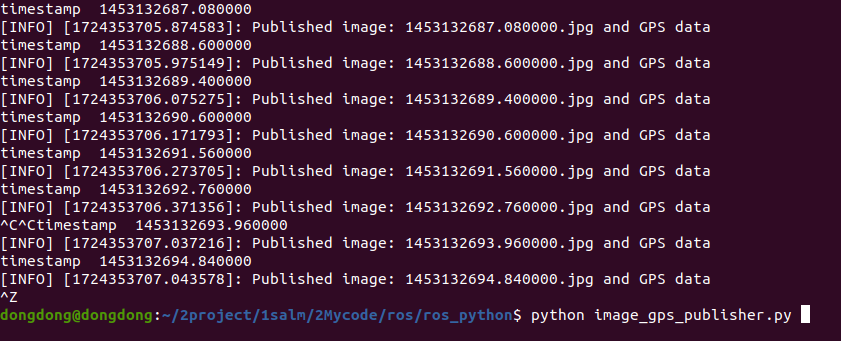
#!/usr/bin/env python

import rospy
import cv2
from cv_bridge import CvBridge
from sensor_msgs.msg import Image, NavSatFix
import os

class ImageGPSReader:
    def __init__(self):
        # Initialize ROS node
        rospy.init_node('image_gps_publisher', anonymous=True)

        # Initialize publishers
        self.image_pub = rospy.Publisher('/camera/image_raw', Image, queue_size=10)
        self.gps_pub = rospy.Publisher('/gps/fix', NavSatFix, queue_size=10)

        # Initialize CvBridge
        self.bridge = CvBridge()

        # Load GPS and image data
        self.gps_data = self.load_gps_data("/home/dongdong/2project/0data/NWPU/config/gps.txt")
        self.image_files = self.load_image_filenames("/home/dongdong/2project/0data/NWPU/img")

    def load_gps_data(self, gps_file):
        gps_data = {}
        with open(gps_file, 'r') as f:
            for line in f:
                parts = line.strip().split()
                timestamp = parts[0]
                lat, lon, alt = map(float, parts[1:])
                gps_data[timestamp] = (lat, lon, alt)
        return gps_data

    def load_image_filenames(self, img_folder):
        image_files = [f for f in os.listdir(img_folder) if f.endswith('.jpg')]
        image_files.sort()  # Ensure consistent ordering
        return image_files

    def publish_data(self):
        rate = rospy.Rate(10)  # 10 Hz

        for img_file in self.image_files:
            timestamp = img_file.split('.')[0]+ "."+ img_file.split('.')[1]  # Assuming timestamp is in the filename
            print("timestamp ",timestamp)

            if timestamp in self.gps_data:
                img_path = os.path.join("/home/dongdong/2project/0data/NWPU/img", img_file)
                cv_image = cv2.imread(img_path)

                if cv_image is not None:
                    # Publish image
                    img_msg = self.bridge.cv2_to_imgmsg(cv_image, "bgr8")
                    img_msg.header.stamp = rospy.Time.from_sec(float(timestamp))
                    self.image_pub.publish(img_msg)

                    # Publish GPS data
                    lat, lon, alt = self.gps_data[timestamp]
                    gps_msg = NavSatFix()
                    gps_msg.header.stamp = rospy.Time.from_sec(float(timestamp))
                    gps_msg.latitude = lat
                    gps_msg.longitude = lon
                    gps_msg.altitude = alt
                    self.gps_pub.publish(gps_msg)

                    rospy.loginfo(f"Published image: {img_file} and GPS data")

            rate.sleep()  # Sleep to maintain the loop rate


if __name__ == '__main__':
    try:
        reader = ImageGPSReader()
        reader.publish_data()
    except rospy.ROSInterruptException:
        pass
image_listener.py
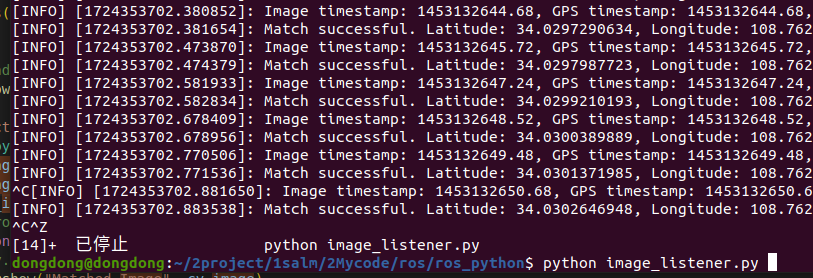
#!/usr/bin/env python

import rospy
import cv2
from cv_bridge import CvBridge, CvBridgeError
from sensor_msgs.msg import Image, NavSatFix
from collections import deque
import threading
import queue
import time


# Initialize queues and locks
image_queue = queue.Queue()  # Thread-safe queue for images
gps_queue = deque()  # Queue for GPS messages
gps_queue_lock = threading.Lock()  # Lock for GPS queue

# Initialize CvBridge
bridge = CvBridge()

def gps_callback(gps_msg):
    """Callback function for GPS messages."""
    global gps_queue
    with gps_queue_lock:
        gps_queue.append(gps_msg)  # Add GPS message to the right end of the queue

def image_callback(image_msg):
    """Callback function for image messages."""
    global image_queue, gps_queue

    # Convert ROS image message to OpenCV image
    try:
        cv_image = bridge.imgmsg_to_cv2(image_msg, "bgr8")
    except CvBridgeError as e:
        rospy.logerr("CvBridge Error: %s", e)
        return

    # Get the timestamp of the image
    image_timestamp = image_msg.header.stamp.to_sec()

    # Store image and timestamp in the queue
    image_queue.put((cv_image, image_timestamp))

    with gps_queue_lock:
        while len(gps_queue) != 0:
            gps_msg = gps_queue.popleft()  # Remove GPS message from the left end
            gps_timestamp = gps_msg.header.stamp.to_sec()

            time_difference = image_timestamp - gps_timestamp
            rospy.loginfo(f"Image timestamp: {image_timestamp}, GPS timestamp: {gps_timestamp}, Time difference: {time_difference}")

            if abs(time_difference) <= 0.01:  # Match if time difference is within 10ms
                latitude = gps_msg.latitude
                longitude = gps_msg.longitude
                altitude = gps_msg.altitude

                rospy.loginfo(f"Match successful. Latitude: {latitude}, Longitude: {longitude}, Altitude: {altitude}")

                # Data is used, discard this GPS message
                break
            elif gps_timestamp < image_timestamp - 0.01:
                # Data too old, discard this GPS message
                rospy.loginfo("GPS data too old, discarding.")
                pass
            elif gps_timestamp > image_timestamp + 0.01:
                # Data too new, put it back for later use
                gps_queue.appendleft(gps_msg)  # Add to the left end for later processing
                rospy.loginfo("GPS data too new, putting back for later use.")
                break

def display_images():


    # Create a window to show matched images
    cv2.namedWindow("Matched Image", cv2.WINDOW_AUTOSIZE)

    """Thread function to display images."""
    while not rospy.is_shutdown():
        if not image_queue.empty():
            cv_image, image_timestamp = image_queue.get()
            if cv_image is None:
                #rospy.logwarn("Received empty image.")
                continue
            #rospy.loginfo("Displaying image...")
            cv2.imshow("Matched Image", cv_image)
            cv2.waitKey(1)  # Refresh the window
        else:
            cv2.waitKey(1) # 不能空转 会出问题


def main():
    """Main function to initialize ROS node and subscribers."""
    rospy.init_node('image_gps_matcher', anonymous=True)

    # Subscribe to image and GPS topics
    rospy.Subscriber('/camera/image_raw', Image, image_callback)
    rospy.Subscriber('/gps/fix', NavSatFix, gps_callback)


    # Start the display thread
    display_thread = threading.Thread(target=display_images)
    display_thread.daemon = True  # Daemonize thread
    display_thread.start()

    try:
        rospy.spin()
    except rospy.ROSInterruptException:
        pass
    finally:
        cv2.destroyAllWindows()

if __name__ == '__main__':
    main()

 浙公网安备 33010602011771号