


运行指令
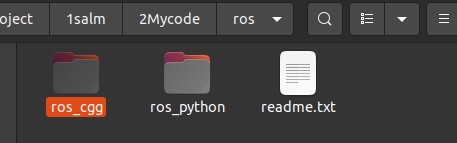
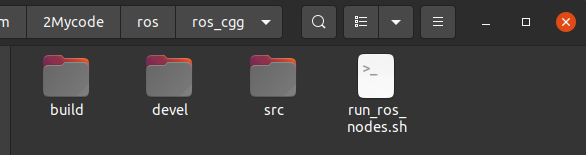
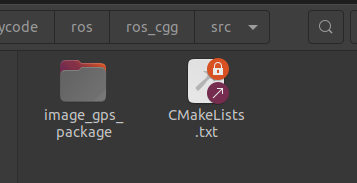
#=============文件结构
ros_cgg/
├── build
├── devel
└── src
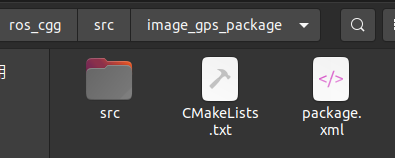
    └── image_gps_package
        ├── CMakeLists.txt
        ├── package.xml
        └── src
            ├── image_gps_publisher.cpp
            └── image_gps_subscriber.cpp

#==============编译
cd ~/ros_cgg
catkin_make
source devel/setup.bash


#==============手动运行
#0开启source确保找到
cd ~/ros_cgg
source devel/setup.bash
# 手动开启三个窗口
#1启动ROS Master:
roscore
#2运行你的C++发布节点:
rosrun image_gps_package image_gps_publisher
#3运行c++接受节点
rosrun image_gps_package image_gps_subscriber


#============ 脚本运行
sudo chmod +x run_ros_nodes.sh
运行脚本
run_ros_nodes.sh
#!/bin/bash

#外部给与执行权限
#sudo chmod +x run_ros_nodes.sh

# 定义 ROS 安装路径  #安装时候添加到系统路径了 不需要每次都source
ROS_SETUP="/opt/ros/noetic/setup.bash"
# 定义工作目录路径  自己的工程没有加到系统路径,每次需要source
WORKSPACE_DIR="/home/dongdong/2project/1salm/2Mycode/ros/ros_cgg"


#指定目录

# 启动 ROS Master
echo "Starting ROS 总结点..."
gnome-terminal -- bash -c "\
cd $WORKSPACE_DIR; source devel/setup.bash; \
roscore; \
exec bash"

# 等待 ROS Master 启动
sleep 5

# 运行 C++ 发布节点
echo "Running C++ 发布节点..."
gnome-terminal -- bash -c "\
cd $WORKSPACE_DIR; source devel/setup.bash; \
rosrun image_gps_package image_gps_publisher; \
exec bash"

# 运行 C++ 接受节点
echo "Running C++ 订阅节点..."
gnome-terminal -- bash -c "\
cd $WORKSPACE_DIR; source devel/setup.bash; \
rosrun image_gps_package image_gps_subscriber; \
exec bash"
1创建工程
CMakeLists.txt
cmake_minimum_required(VERSION 3.0.2)
project(image_gps_package)

find_package(catkin REQUIRED COMPONENTS
  roscpp
  sensor_msgs
  cv_bridge
)

find_package(OpenCV REQUIRED)
find_package(Boost REQUIRED COMPONENTS filesystem)

catkin_package(
  CATKIN_DEPENDS roscpp sensor_msgs cv_bridge
  DEPENDS Boost
)

include_directories(
  ${catkin_INCLUDE_DIRS}
  ${OpenCV_INCLUDE_DIRS}
  ${Boost_INCLUDE_DIRS}
)

# 编译发布节点
add_executable(image_gps_publisher src/image_gps_publisher.cpp)
target_link_libraries(image_gps_publisher
  ${catkin_LIBRARIES}
  ${OpenCV_LIBRARIES}
  ${Boost_LIBRARIES}
)

# 编译接受节点
add_executable(image_gps_subscriber src/image_gps_subscriber.cpp)
target_link_libraries(image_gps_subscriber
  ${catkin_LIBRARIES}
  ${OpenCV_LIBRARIES}
  ${Boost_LIBRARIES}
)
package.xml
<?xml version="1.0"?>
<package format="2">
  <name>image_gps_package</name>
  <version>0.0.1</version>
  <description>
    A package to publish and subscribe to images and GPS data using ROS.
  </description>

  <!-- Maintainer of the package -->
  <maintainer email="your_email@example.com">Your Name</maintainer>

  <!-- License of the package -->
  <license>MIT</license>

  <!-- Build tool required to build this package -->
  <buildtool_depend>catkin</buildtool_depend>

  <!-- Dependencies of the package during build and runtime -->
  <build_depend>roscpp</build_depend>
  <build_depend>sensor_msgs</build_depend>
  <build_depend>cv_bridge</build_depend>

  <exec_depend>roscpp</exec_depend>
  <exec_depend>sensor_msgs</exec_depend>
  <exec_depend>cv_bridge</exec_depend>

  <!-- Declare additional dependencies required for building this package -->
  <build_export_depend>roscpp</build_export_depend>
  <build_export_depend>sensor_msgs</build_export_depend>
  <build_export_depend>cv_bridge</build_export_depend>

  <!-- Export information, can be used by other packages -->
  <export>
    <!-- Export any specific information here -->
  </export>
</package>
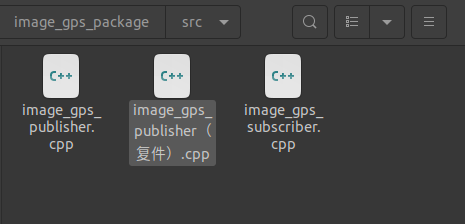
image_gps_publisher(复件).cpp
单线程发布
image_gps_publisher.cpp
#include <ros/ros.h>
#include <sensor_msgs/Image.h>
#include <sensor_msgs/NavSatFix.h>
#include <cv_bridge/cv_bridge.h>
#include <opencv2/opencv.hpp>
#include <opencv2/highgui/highgui.hpp>
#include <boost/filesystem.hpp>
#include <fstream>
#include <sstream>
#include <iostream>

class ImageGPS_Reader {


public:

    std::vector<boost::filesystem::path> image_files_;
    struct GPSData {
        std::string timestamp;
        double lat, lon, alt;
    };
    std::map<std::string, GPSData> gps_data_;


    ImageGPS_Reader() {
        std::string data_dir="/home/dongdong/2project/0data/NWPU/";
        std::string gps_dir=data_dir+"/config/gps.txt";
        std::string img_dir=data_dir+"img";
        // Load GPS data
        loadGPSData(gps_dir);

        // Load image filenames
        loadImageFilenames(img_dir);
    }

    void loadGPSData(const std::string& gps_file) {
        std::ifstream file(gps_file);
        if (!file.is_open()) {
            ROS_ERROR("Failed to open GPS file: %s", gps_file.c_str());
            return;
        }

        std::string line;
        while (std::getline(file, line)) {
            std::istringstream iss(line);
            std::string timestamp;
            double lat, lon, alt;
            if (!(iss >> timestamp >> lat >> lon >> alt)) { break; }
            gps_data_[timestamp] = {timestamp,lat, lon, alt};
        }
        file.close();
    }

    void loadImageFilenames(const std::string& img_folder) {
        namespace fs = boost::filesystem;
        fs::directory_iterator end_itr;
        for (fs::directory_iterator itr(img_folder); itr != end_itr; ++itr) {
            if (fs::is_regular_file(itr->status()) && itr->path().extension() == ".jpg") {
                image_files_.push_back(itr->path());
            }
        }
    }


};

int main(int argc, char** argv) {
    ros::init(argc, argv, "image_gps_publisher");

    ImageGPS_Reader reader;

    // Initialize ROS node handle
    ros::NodeHandle nh;
    // Create publishers
    ros::Publisher image_pub_ = nh.advertise<sensor_msgs::Image>("/camera/image_raw", 10);
    ros::Publisher gps_pub_ = nh.advertise<sensor_msgs::NavSatFix>("/gps/fix", 10);


    ros::Rate rate(10);  // 10 Hz

    while (ros::ok()) {
        if (!reader.image_files_.empty() && !reader.gps_data_.empty()) {
            for (const auto& img_file : reader.image_files_) {
                std::string timestamp = img_file.stem().string();  // Extract timestamp from filename

                if (reader.gps_data_.find(timestamp) != reader.gps_data_.end()) {// 确保GNSS对应图像存在
                    std::string img_path = img_file.string();
                    cv::Mat cv_image = cv::imread(img_path, cv::IMREAD_COLOR);
                    if (!cv_image.empty()) {
                        // 发布图像

                        sensor_msgs::ImagePtr msg = cv_bridge::CvImage(std_msgs::Header(), "bgr8", cv_image).toImageMsg();
                        msg->header.stamp = ros::Time(std::stod(timestamp));
                        image_pub_.publish(msg);

                        // 发布GNSS信息
                        auto gps = reader.gps_data_[timestamp];
                        sensor_msgs::NavSatFix gps_msg;
                        gps_msg.header.stamp = ros::Time(std::stod(timestamp));
                        gps_msg.latitude = gps.lat;
                        gps_msg.longitude = gps.lon;
                        gps_msg.altitude = gps.alt;
                        gps_pub_.publish(gps_msg);

                        ROS_INFO("Published image: %s and GPS data", img_file.filename().string().c_str());
                        rate.sleep(); // 按照设定的频率休眠
                    }
                }
            }
        }
        //处理一次所有的回调函数。这个调用会处理所有的回调并清空消息队列。对于消息处理来说,它确保了消息的及时处理。
        ros::spinOnce();
    }//while

    return 0;
}
多线程发布
如果用的时间是发布当前时间还可以对齐,但是时间是历史时间而非系统时间,对齐有问题
#include <ros/ros.h>
#include <sensor_msgs/Image.h>
#include <sensor_msgs/NavSatFix.h>
#include <cv_bridge/cv_bridge.h>
#include <opencv2/opencv.hpp>
#include <opencv2/highgui/highgui.hpp>
#include <boost/filesystem.hpp>
#include <fstream>
#include <sstream>
#include <iostream>
#include <thread>
#include <mutex>

class ImageGPS_Reader {
public:
    std::vector<boost::filesystem::path> image_files_;
    struct GPSData {
        std::string timestamp;
        double lat, lon, alt;
    };
    std::map<std::string, GPSData> gps_data_;

    ImageGPS_Reader() {
        std::string data_dir = "/home/dongdong/2project/0data/NWPU/";
        std::string gps_dir = data_dir + "/config/gps.txt";
        std::string img_dir = data_dir + "img";
        // Load GPS data
        loadGPSData(gps_dir);

        // Load image filenames
        loadImageFilenames(img_dir);
    }

    void loadGPSData(const std::string& gps_file) {
        std::ifstream file(gps_file);
        if (!file.is_open()) {
            ROS_ERROR("Failed to open GPS file: %s", gps_file.c_str());
            return;
        }

        std::string line;
        while (std::getline(file, line)) {
            std::istringstream iss(line);
            std::string timestamp;
            double lat, lon, alt;
            if (!(iss >> timestamp >> lat >> lon >> alt)) { break; }
            gps_data_[timestamp] = {timestamp, lat, lon, alt};
        }
        file.close();
    }

    void loadImageFilenames(const std::string& img_folder) {
        namespace fs = boost::filesystem;
        fs::directory_iterator end_itr;
        for (fs::directory_iterator itr(img_folder); itr != end_itr; ++itr) {
            if (fs::is_regular_file(itr->status()) && itr->path().extension() == ".jpg") {
                image_files_.push_back(itr->path());
            }
        }
    }
};

// Global variables for shared state and mutex
ImageGPS_Reader reader;
ros::Publisher image_pub_;
ros::Publisher gps_pub_;
std::mutex mtx;

void publishImages() {

    std::vector<boost::filesystem::path> image_files_copy;
    {
        std::lock_guard<std::mutex> lock(mtx);
        image_files_copy = reader.image_files_;
    }

    ros::Rate rate(10);  // 10 Hz
    while (ros::ok()) {
        for (const auto& img_file : image_files_copy) {
            std::string timestamp = img_file.stem().string();  // Extract timestamp from filename

            cv::Mat cv_image = cv::imread(img_file.string(), cv::IMREAD_COLOR);
            if (!cv_image.empty()) {
                // 发布图像
                sensor_msgs::ImagePtr msg = cv_bridge::CvImage(std_msgs::Header(), "bgr8", cv_image).toImageMsg();
                msg->header.stamp = ros::Time(std::stod(timestamp));
                image_pub_.publish(msg);
                ROS_INFO("Published image: %s", img_file.filename().string().c_str());
            }
            rate.sleep();
        }
    }
}

void publishGPSData() {

    std::map<std::string, ImageGPS_Reader::GPSData> gps_data_copy;
    {
        std::lock_guard<std::mutex> lock(mtx);
        gps_data_copy = reader.gps_data_;
    }

    ros::Rate rate(10);  // 10 Hz
    while (ros::ok()) {

        for (const auto& entry : gps_data_copy) {
            const auto& timestamp = entry.first;
            const auto& gps = entry.second;

            // 发布GNSS信息
            sensor_msgs::NavSatFix gps_msg;
            gps_msg.header.stamp = ros::Time(std::stod(timestamp));
            gps_msg.latitude = gps.lat;
            gps_msg.longitude = gps.lon;
            gps_msg.altitude = gps.alt;
            gps_pub_.publish(gps_msg);
            ROS_INFO("Published GPS data for timestamp: %s", timestamp.c_str());
            rate.sleep();
        }
    }
}

int main(int argc, char** argv) {
    ros::init(argc, argv, "image_gps_publisher");
    ros::NodeHandle nh;

    // Create publishers
    image_pub_ = nh.advertise<sensor_msgs::Image>("/camera/image_raw", 10);
    gps_pub_ = nh.advertise<sensor_msgs::NavSatFix>("/gps/fix", 10);

    // Start threads for publishing images and GPS data
    std::thread image_thread(publishImages);
    std::thread gps_thread(publishGPSData);

    // Wait for threads to finish (they run indefinitely in this example)
    image_thread.join();
    gps_thread.join();

    return 0;
}
订阅节点
image_gps_subscriber.cpp
#include <ros/ros.h>
#include <sensor_msgs/Image.h>
#include <sensor_msgs/NavSatFix.h>
#include <cv_bridge/cv_bridge.h>
#include <opencv2/opencv.hpp>
#include <deque>
#include <utility>

std::deque<std::pair<cv::Mat, ros::Time>> image_queue;
std::queue<sensor_msgs::NavSatFixConstPtr> gpsQueue;
std::mutex gpsQueue_Lock;// 队列锁

void gpsCallback(const sensor_msgs::NavSatFixConstPtr& gps_msg) {
    gpsQueue_Lock.lock();
    gpsQueue.push(gps_msg);
    gpsQueue_Lock.unlock();
}


void imageCallback(const sensor_msgs::ImageConstPtr& image_msg) {
    // Convert ROS image message to OpenCV image
    cv_bridge::CvImagePtr cv_image;
    try {
        cv_image = cv_bridge::toCvCopy(image_msg, sensor_msgs::image_encodings::BGR8);
    } catch (cv_bridge::Exception& e) {
        ROS_ERROR("cv_bridge exception: %s", e.what());
        return;
    }

    // Get the timestamp of the image
    double image_timestamp = image_msg->header.stamp.toSec();

    // Store image and timestamp in the queue
    image_queue.emplace_back(cv_image->image, image_timestamp);


    gpsQueue_Lock.lock();

    while(!gpsQueue.empty()){

        sensor_msgs::NavSatFixConstPtr GPS_msg = gpsQueue.front();
        double gps_timestamp = GPS_msg->header.stamp.toSec();
        double time_diffrence = image_timestamp - gps_timestamp;
        printf("img t: %f, gps t: %f , time_diffrence: %f \n", image_timestamp, gps_timestamp,time_diffrence);


        if(abs(image_timestamp - gps_timestamp)<=0.01){// 图像和gps时间差在0.01s=10ms内的算匹配成功 vins-fusion参考值
            // 在线阶段,假设图像20帧/S 相邻帧间隔50ms 中间值间隔25ms算阈值考虑。
            // 离线阶段,一般会提前手动处理图像和GPS时间戳对齐,图像名字以时间戳保存,GNSS的第一列也是一样的时间戳。

            // 经纬度、海拔
            double latitude = GPS_msg->latitude;
            double longitude = GPS_msg->longitude;
            double altitude = GPS_msg->altitude;
            gpsQueue.pop();// 使用完毕 丢弃

            std::cout << std::fixed << std::setprecision(9)
            << "图像和GNSS匹配成功"
            <<" 经度: "<<latitude
            <<" 纬度: "<<longitude
            <<" 高度: "<<altitude
            <<std::endl;

            // 送入 位姿估计线程

            cv::imshow("Matched Image", cv_image->image);
            cv::waitKey(1);
            break;


        }
        else if(gps_timestamp < image_timestamp - 0.01)// GPS先开始采集,图像滞后,比图像早期的GPS丢弃
        {
             gpsQueue.pop();
             //break;
        }
        else if(gps_timestamp > image_timestamp + 0.01)// GPS采集快,图像处理慢,比图像快的GPS保留,等待后续图像来匹配
        {
            break;
        }

    }


    gpsQueue_Lock.unlock();// gps
}


int main(int argc, char** argv) {
    // Initialize ROS
    ros::init(argc, argv, "image_gps_matcher");
    ros::NodeHandle nh;

    // Subscribe to image and GPS topics
    ros::Subscriber image_sub = nh.subscribe("/camera/image_raw", 10, imageCallback);
    ros::Subscriber gps_sub = nh.subscribe("/gps/fix", 10, gpsCallback);
    cv::namedWindow("Matched Image", cv::WINDOW_AUTOSIZE);

    // 使用 MultiThreadedSpinner,指定线程数为 4
    //ros::MultiThreadedSpinner spinner(4);
    // 调用 spinner 来处理回调函数
    //spinner.spin();


    /*
        阻塞调用,处理回调函数
        ros::spin() 使节点进入一个循环,不断处理所有回调函数,直到节点被关闭或中断。
        适用于那些只依赖于回调函数的节点,例如只处理订阅消息和服务请求的节点。
        它会阻塞当前线程,使得节点在处理回调函数时不会执行其他代码。
        如果你的节点没有其他需要执行的任务,使用 ros::spin() 可以保持节点活跃,确保所有回调函数得到处理。
    */
    ros::spin();
     /*
        非阻塞调用
        处理所有到达的回调函数一次,然后返回。
        它是非阻塞的,允许主循环继续执行其他代码。
        当你需要在节点中执行除回调处理之外的其他逻辑时,例如定时任务、计算或其他非 ROS 相关的操作。
        你可以在主循环中调用 ros::spinOnce(),使其在处理回调函数的同时执行其他任务。
     */

    //ros::spinOnce();

    return 0;
}

 浙公网安备 33010602011771号