
UE_CPP学习
虚幻编辑器设置


案例1——控制物体的移动
创建一个蓝图

创建一个C++ Class

把脚本挂到蓝图中,并在脚本下面挂上一个静态的Mesh
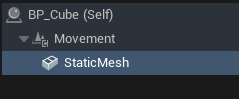
进IDE编写代码
NewMovement.h
// Fill out your copyright notice in the Description page of Project Settings.

#pragma once

#include "CoreMinimal.h"
#include "Components/SceneComponent.h"
#include "NewMovement.generated.h"


UCLASS( ClassGroup=(Custom), meta=(BlueprintSpawnableComponent) )
class MYPROJECT_API UNewMovement : public USceneComponent
{
	GENERATED_BODY()

public:
	// Sets default values for this component's properties
	UNewMovement();

protected:
	// Called when the game starts
	virtual void BeginPlay() override;

public:
	// Called every frame
	virtual void TickComponent(float DeltaTime, ELevelTick TickType, FActorComponentTickFunction* ThisTickFunction) override;
	// 成员变量
	UPROPERTY(EditAnywhere, Category = "Movement")
	FVector MoveOffset;  // 移动偏移

	UPROPERTY(EditAnywhere, Category = "Movement")
	float Speed = 100.0f;  // 移动速度

	FVector StartLocation;  // 初始位置
	FVector MoveOffsetNormal;   // 归一化后的移动偏移
	float EndDistance;      // 总移动距离
	float CurrentDistance = 0.0f;  // 当前移动的距离
	int32 DirectionMove = 1;

};
NewMovement.cpp
// Fill out your copyright notice in the Description page of Project Settings.


#include "NewMovement.h"

// Sets default values for this component's properties
UNewMovement::UNewMovement()
{
// Set this component to be initialized when the game starts, and to be ticked every frame.  You can turn these features
    // off to improve performance if you don't need them.
PrimaryComponentTick.bCanEverTick = true;

// ...
}


// Called when the game starts
void UNewMovement::BeginPlay()
{
Super::BeginPlay();
StartLocation = this->GetRelativeLocation();
EndDistance = MoveOffset.Length();
//归一化
MoveOffset.Normalize();
MoveOffsetNormal = MoveOffset;

}


// Called every frame
void UNewMovement::TickComponent(float DeltaTime, ELevelTick TickType, FActorComponentTickFunction* ThisTickFunction)
{
Super::TickComponent(DeltaTime, TickType, ThisTickFunction);
//设置物体的相对位置
SetRelativeLocation(StartLocation + CurrentDistance * MoveOffsetNormal);
//更新当前的移动距离
CurrentDistance += DeltaTime * Speed * DirectionMove;
//方向反转
if (CurrentDistance >= EndDistance || CurrentDistance <= 0.0f)
    {
DirectionMove *= -1;
    }
}
效果:

Unreal C++基础
01创建和设置Class
案例2——StackOBot
初始化
新建C++类,继承于Character


打开IDE

AstroBot.h
// Fill out your copyright notice in the Description page of Project Settings.

#pragma once

#include "CoreMinimal.h"
#include "GameFramework/Character.h"
#include "GameFramework/SpringArmComponent.h"
#include "AstroBot.generated.h"

UCLASS()
class ASTROBOT_WITH_CPP_API AAstroBot : public ACharacter
{
	GENERATED_BODY()

public:
	void Init();
	// Sets default values for this character's properties
	AAstroBot();

	// Called every frame
	virtual void Tick(float DeltaTime) override;

	// Called to bind functionality to input
	virtual void SetupPlayerInputComponent(class UInputComponent* PlayerInputComponent) override;

protected:
	// Called when the game starts or when spawned
	virtual void BeginPlay() override;


private:
	UPROPERTY(VisibleAnywhere)
	USpringArmComponent* SpringArm;
};
AstroBot.cpp
// Fill out your copyright notice in the Description page of Project Settings.


#include "AstroBot.h"

void AAstroBot::Init()
{
	SpringArm = CreateDefaultSubobject<USpringArmComponent>(TEXT("CameraSpringArm"));
	SpringArm->SetupAttachment(GetRootComponent());
}
// Sets default values
AAstroBot::AAstroBot()
{
 	// Set this character to call Tick() every frame.  You can turn this off to improve performance if you don't need it.
	PrimaryActorTick.bCanEverTick = true;

	Init();
}

// Called when the game starts or when spawned
void AAstroBot::BeginPlay()
{
	Super::BeginPlay();

}

// Called every frame
void AAstroBot::Tick(float DeltaTime)
{
	Super::Tick(DeltaTime);

}

// Called to bind functionality to input
void AAstroBot::SetupPlayerInputComponent(UInputComponent* PlayerInputComponent)
{
	Super::SetupPlayerInputComponent(PlayerInputComponent);

}
新建蓝图继承于上面的BP_AstroBot,在这个蓝图中不需要编辑任何东西,只是用于可视化CPP中的操作

可以看到SpringArm已经正常初始化
括号内是TEXT命名

新建BP_GameMode

Pawn设置为BP_AstroBot

继续初始化相机
AstroBot.h
UPROPERTY(VisibleAnywhere)
UCameraComponent* Camera;
AstroBot.cpp
Camera = CreateDefaultSubobject<UCameraComponent>(TEXT("MyCamera"));
Camera->SetupAttachment(SpringArm);

另一种附加组件到父级的方法:动态创建、自定义规则
Camera->AttachToComponent(SpringArm,FAttachmentTransformRules::KeepRelativeTransform);
剩余初始化
AstroBot.cpp
void AAstroBot::Init()
{
SpringArm = CreateDefaultSubobject<USpringArmComponent>(TEXT("MySpringArm"));
SpringArm->SetupAttachment(GetRootComponent());
Camera = CreateDefaultSubobject<UCameraComponent>(TEXT("MyCamera"));
Camera->AttachToComponent(SpringArm,FAttachmentTransformRules::KeepRelativeTransform);

SpringArm->TargetArmLength = 300;
SpringArm->SocketOffset = FVector(100, 100, 50);
SpringArm->bUsePawnControlRotation = true;

bUseControllerRotationPitch = false;
bUseControllerRotationYaw = false;
bUseControllerRotationRoll = false;

GetCharacterMovement()->MaxWalkSpeed = 500;
GetCharacterMovement()->bOrientRotationToMovement = true;
}
增强输入
蓝图参考:

C++:
AstroBot.cpp
void AAstroBot::BeginPlay()
{
	Super::BeginPlay();
	APlayerController* AstroBotController = Cast<APlayerController>(GetController());
	if (AstroBotController)
	{
		UEnhancedInputLocalPlayerSubsystem* Subsystem = ULocalPlayer::GetSubsystem<UEnhancedInputLocalPlayerSubsystem>(AstroBotController->GetLocalPlayer());
		if (Subsystem)
		{
			Subsystem->ClearAllMappings();
			Subsystem->AddMappingContext(IMC_AstroBot,0);
		}
	}

}
AstroBot.h
protected:

	UPROPERTY(EditAnywhere, BlueprintReadOnly, Category = MyInput)
	TObjectPtr<UInputMappingContext> IMC_AstroBot;
.h中长期存在的指针,用安全指针TObjectPtr<>声明
.cpp中的函数临时变量直接用裸指针
回到蓝图BP_AstroBot

Move
蓝图:

C++:
AstroBot.h
protected:

UPROPERTY(EditAnywhere, BlueprintReadOnly, Category = MyInput)
TObjectPtr<UInputAction> IA_Move;

void Move(const FInputActionValue& ActionValue);
AstroBot.cpp
// Called to bind functionality to input
void AAstroBot::SetupPlayerInputComponent(UInputComponent* PlayerInputComponent)
{
	Super::SetupPlayerInputComponent(PlayerInputComponent);
	TObjectPtr<UEnhancedInputComponent> EnhancedInputComponent = Cast<UEnhancedInputComponent>(PlayerInputComponent);
	if (EnhancedInputComponent)
	{
		EnhancedInputComponent->BindAction(IA_Move,ETriggerEvent::Triggered,this,&AAstroBot::Move);
	}
}
void AAstroBot::Move(const FInputActionValue& InputValue)
{
const FVector2D MoveAxis2D = InputValue.Get<FVector2D>();
FRotator ControlRotation = GetControlRotation();
//前
FVector ForwardVector = FRotationMatrix(FRotator(0,ControlRotation.Yaw,0)).GetUnitAxis(EAxis::X);
AddMovementInput(ForwardVector,MoveAxis2D.Y);
//右
FVector RightVector = FRotationMatrix(FRotator(0,ControlRotation.Yaw,ControlRotation.Roll)).GetUnitAxis(EAxis::Y);
AddMovementInput(RightVector,MoveAxis2D.X);
}
Level中的Forward是x轴,Right是y轴
因此蓝图中
GetForwardVector对应FRotationMatrix().GetUnitAxis(EAxis::X)
GetRightVector对应FRotationMatrix().GetUnitAxis(EAxis::Y)
另外要注意FRotator()的参数顺序,在IDE中会提示:

Look
蓝图:

C++:
AstroBot.h
UPROPERTY(EditAnywhere, BlueprintReadOnly, Category = MyInput)
TObjectPtr<UInputAction> IA_Look;

void Look(const FInputActionValue& ActionValue);
AstroBot.cpp
EnhancedInputComponent->BindAction(IA_Look,ETriggerEvent::Triggered,this,&AAstroBot::Look);
void AAstroBot::Look(const FInputActionValue& InputValue)
{
	const FVector2D InputVector2D = InputValue.Get<FVector2D>();
	AddControllerYawInput(InputVector2D.X);
	AddControllerPitchInput(InputVector2D.Y);
}
Jump
蓝图:

C++
AstroBot.h
	UPROPERTY(EditAnywhere, BlueprintReadOnly, Category = MyInput)
	TObjectPtr<UInputAction> IA_Jump;
AstroBot.cpp
		EnhancedInputComponent->BindAction(IA_Jump,ETriggerEvent::Started,this,&ACharacter::Jump);
		EnhancedInputComponent->BindAction(IA_Jump,ETriggerEvent::Completed,this,&ACharacter::StopJumping);
动画状态机
蓝图:

其他ABP就是Lyra那套分层管理
案例3——蓝图到C++
对象类型对应


UPROPERTY标识符
- 作用 :修饰成员变量,控制它们如何在编辑器显示、如何参与序列化、GC管理、以及蓝图访问权。
- 常用标识符 :
EditAnywhere:变量在编辑器中可编辑(关卡、蓝图均可)。BlueprintReadWrite:蓝图中可读写访问。BlueprintReadOnly:蓝图中只读。VisibleAnywhere:仅可见,不可编辑。Transient:不参与保存与序列化。Replicated:变量用于网络复制。Config:变量值可保存在.config文件中。
- 元数据(Meta)标识符 :
DisplayName:编辑器显示名。EditCondition:定义此属性是否可编辑的条件。ClampMin/ClampMax:限定数值范围。- 复杂条件控制编辑状态也支持逻辑表达式(如
EditCondition = "bIsEnabled && Health > 0")。
示例:
UPROPERTY(EditAnywhere, BlueprintReadWrite, Category="Character Stats")
float Health;

UPROPERTY(VisibleAnywhere, BlueprintReadOnly, Category="Weapon")
int32 AmmoCount;

UPROPERTY(EditAnywhere, BlueprintReadWrite, Category="Settings", meta = (ClampMin="0", ClampMax="100"))
int32 Volume;
UFUNCTION标识符
- 作用 :修饰C++函数,使其能被蓝图调用或重写,支持特定的调用约定、权限和扩展功能。
- 常用标识符 :
BlueprintCallable:蓝图中可调用的普通函数。BlueprintPure:无副作用函数,蓝图调用时无执行引脚。——对应蓝图中就是Pure函数BlueprintImplementableEvent:声明一个函数接口,蓝图可实现。BlueprintNativeEvent:C++有默认实现,蓝图可覆盖。Exec:可以在控制台执行的函数。Server、Client、NetMulticast:网络RPC相关。Reliable:保证RPC可靠传输。
- 元数据 :
DisplayName:蓝图节点显示名。Keywords:用于搜索蓝图节点的关键词。AdvancedDisplay:隐藏参数,放在展开面板。
UFUNCTION(BlueprintCallable, Category="Weapon")
void Fire();

UFUNCTION(BlueprintPure, Category="Utilities")
float GetHealthPercent() const;

UFUNCTION(BlueprintImplementableEvent, Category="Events")
void OnEliminated();

UFUNCTION(Server, Reliable)
void ServerEliminate();
蓝图可实现节点——BlueprintCallable,BlueprintPure
怎么根据蓝图中的节点找到在C++中应该调用的函数API

可以看到时SceneComponent中的函数,因此可以在源码中找到SceneComponent.h,直接搜索即可找到蓝图封装的函数对应C++中的API

点进API,查看C++中应该调用的函数名


这个就是我们需要的函数名
如果找到的函数名是
说明可以直接点出

蓝图自定义函数用C++实现

对于有返回值函数


在头文件中Include

因为返回值是一个object,因此返回类型是指针,并且不需要改变他的值,用const

对于GetComponent(),返回类型是UActorComponent*,因此需要一个能够自动转换返回类型的函数——FindComponentByClass <T>()

最终的函数

蓝图可实现事件 ——BlueprintCallable,BlueprintImplementableEvent
只是在c++中声明,但是实现必须放在蓝图中
适用:需要被override的事件
把事件的声明放到C++中

实现部分仍然在蓝图中


蓝图本地事件——BlueprintCallable,BlueprintNativeEvent
声明和默认实现都在c++中,相当于是虚函数,蓝图中可以调用并Override他的默认实现

声明:

引用传递参数 :HitActor 和 HitComponent 用了 *& 引用指针,意味着函数可以直接修改外部变量,将命中结果 “带出去”,无需额外的返回值。
相当于out参数

引用传递参数:让输入的参数能够被修改——UPARAM(ref) 参数类型&

默认实现需要在函数名后 _Implementation:

在蓝图中就可以Override这个函数了

可以把大部分逻辑放在C++中默认实现
应当优先在 C++ 中定义的
- 结构体
- 枚举
- 需要在蓝图和C++中访问的变量
在C++声明结构体

新建C++类,继承自Object

然后改写为结构体,不需要继承自任何类
结构体需要在第一行调用 GENERATED_BODY()宏,并且成员变量用 UPROPERTY()声明


在C++中声明枚举类
建议使用枚举类而不是枚举,这会避免类型转换错误

结构体/枚举——与其他类定义在同一个.h文件中
// Fill out your copyright notice in the Description page of Project Settings.

#pragma once

#include "CoreMinimal.h"
#include "GameFramework/Actor.h"
#include "Item.generated.h"

UENUM(BlueprintType)
enum class EItemType : uint8
{
	Health,
	Shield,
	PistolClip,
	RifleClip
};

USTRUCT(BlueprintType)
struct FItemData : public FTableRowBase
{
	GENERATED_BODY()

	UPROPERTY(EditAnywhere, BlueprintReadWrite, Category="Item Data")
	FName Name;

	UPROPERTY(EditAnywhere, BlueprintReadWrite, Category="Item Data")
	EItemType ItemType;

	UPROPERTY(EditAnywhere, BlueprintReadWrite, Category="Item Data")
	int32 Amount;
};

UCLASS()
class LYRAALS_API AItem : public AActor
{
	GENERATED_BODY()

public:
	UPROPERTY(EditAnywhere, BlueprintReadWrite,Category = Items)
	TObjectPtr<UDataTable> DT_Items;


protected:
	// Called when the game starts or when spawned
	virtual void BeginPlay() override;

public:
	// Sets default values for this actor's properties
	AItem();
	// Called every frame
	virtual void Tick(float DeltaTime) override;

};
在C++中访问数据表等资产
在头文件中声明数据表的引用,之后就可以在.cpp中访问这个数据表了
// .h 文件
#include "CoreMinimal.h"
#include "Engine/DataTable.h"
#include "工程名.h"
#include "该数据表的结构体头文件.h"

UCLASS()
class 工程名_API AYourActor : public AActor
{
    GENERATED_BODY()

public:
    // 在蓝图中指定数据表资产
    UPROPERTY(EditAnywhere, BlueprintReadWrite, Category = "DataTable")
    TObjectPtr<UDataTable> DT_WeaponGates;
};

 浙公网安备 33010602011771号