
CSharp入门系列练手项目_控制台游戏
 只是一个控制台小项目
2025-03-31 10:47
只是一个控制台小项目
2025-03-31 10:47
前置知识:CSharp入门
补充知识如下
输入输出
#region 输入输出
// 输出
Console.WriteLine("自动换行");
Console.Write("不换行");
Console.WriteLine("");
// 输入
string str1 = Console.ReadLine();
//ReadKey()默认false,会显示输入的字符,如果参数是true则不会显示
char c1 = Console.ReadKey().KeyChar;
Console.WriteLine("\n"+str1+c1);
#endregiond
控制台相关
            #region 控制台的其他方法
            //清空
            Console.Clear();
            /*
             * 注意:
             * 必须先设置控制台的大小,再设置缓冲区大小
             * 缓冲区大小不能超过控制台大小
             * 窗口大小不能大于控制台的最大尺寸
             */

            //1.设置控制台大小
            //窗口大小
            Console.SetWindowSize(100, 50);
            //缓冲区大小(可打印内容区域的宽高)
            Console.SetBufferSize(1000, 1000);

            //2.设置光标的位置
            //控制台左上角对应坐标系原点0,右侧是x轴正方向,下侧是y轴正方向
            /*
             * 注意:
             * 边界问题
             * 横纵距离单位不同 1y=2x,要做到视觉上相同,则需要使x=2y
            */
            Console.SetCursorPosition(10, 5); //设置光标位置xy
            Console.WriteLine("Hello, World!");

            //3.设置控制台颜色
            /*
             * 注意:
             * 这些设置只对改变后的输出有效,之前的输出不会改变
             */
            //文字颜色设置
            //相当于就是前景颜色
            Console.ForegroundColor = ConsoleColor.Red;
            Console.WriteLine("这里是红色字体");

            Console.ForegroundColor = ConsoleColor.Green;
            Console.WriteLine("这里是绿色字体");

            //背景颜色设置
            Console.BackgroundColor = ConsoleColor.White;
            //重置背景颜色后,需要Clear才会改变整个控制台的背景颜色
            Console.Clear();

            //4.光标显隐
            Console.CursorVisible = false; //隐藏光标

            //5.关闭控制台
            //只会在执行exe文件时关闭控制台,不会在调试时关闭
            Environment.Exit(0);
            #endregion
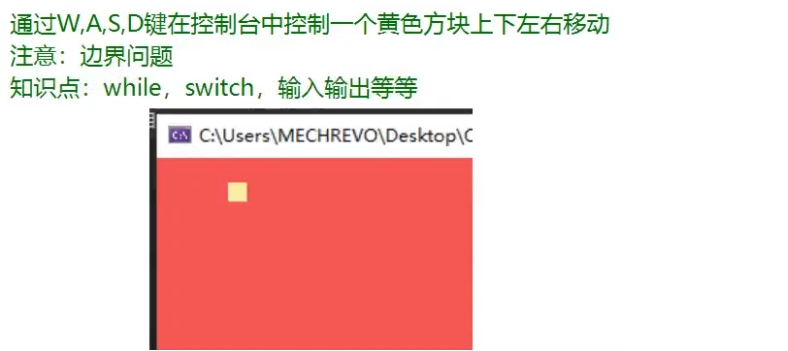
习题:移动方块
            #region 练习题————移动方块

            Console.BackgroundColor = ConsoleColor.Red;
            Console.Clear();
            Console.ForegroundColor = ConsoleColor.Yellow;
            Console.CursorVisible = false;

            //坐标
            int x = 0, y = 0;

            //控制
            while (true)
            {
               //第一种更新方块显示的方式
               //Console.Clear();
               //缺点:这种方式当要控制的方块有多个时就不好使了,而且每次移动会闪烁

               Console.SetCursorPosition(x, y);
               Console.Write("■");

               //获取玩家输入的按键
               //这一步会阻塞线程,直到有输入
               char c = Console.ReadKey(true).KeyChar;

               //第二种更新方块显示的方式
               //就是在这里直接更新光标位置再打印2个空格,因为■占2个字符
               /*打断点,看运行过程
                * 上面的按键获取到之后,这里先在原来位置打印2个空格,就相当于擦除方块
                * 然后进入switch语句判断,再回到循环体的开头更新xy的坐标位置,重新打印方块
                * 这样就实现了方块的更新
               */
               Console.SetCursorPosition(x, y);
               Console.Write("  ");

               switch (c)
               {
                   case 'w':
                   case 'W':
                       //横纵距离单位不同 1y=2x,要做到视觉上相同,则需要使每次移动x=2y
                       y-=1;
                       //考虑边界问题
                       if(y<0) y=0;
                       break;
                   case 'a':
                   case 'A':
                       x-=2;
                       if(x<0) x=0;
                       break;
                   case's':
                   case 'S':
                       y+=1;
                       //因为是光标的位置,所以要减1
                       if(y>=Console.BufferHeight-1) y=Console.BufferHeight - 1;
                       break;
                   case 'd':
                   case 'D':
                       x+=2;
                       //■占2个字符,所以要减2
                       if (x>=Console.BufferWidth-2) x=Console.BufferWidth - 2;
                       break;
               }
            }

            #endregion
从这一题可以知道,终端更新显示的三段式:
- 先获取键盘输入
- 更新光标的起始位置
- 用空格擦去旧文本,几个字符就用几个空格
随机数
            #region 随机数
            // 产生随机数对象
            //Random 变量名 = new Random();
            Random r = new Random();

            // 生成随机数
            // 生成一个非负的随机数,括号里的参数,左包含右不包含
            // 只填一个参数,则默认该参数是右边界
            int i1 = r.Next(1,2);
            Console.WriteLine(i1);
            #endregion
习题:打怪兽

            #region 随机数练习题————打怪兽
            Console.CursorVisible = false;

            Random r = new Random();
            int player_attackPower = 0;
            int monster_defence = 10;
            int monster_HP = 20;
            int delHP = 0;

            while (true)
            {
               Console.SetCursorPosition(0, 0);
               Console.WriteLine("怪兽的血量:" + monster_HP);

               //更新
               char c = Console.ReadKey(true).KeyChar;
               Console.SetCursorPosition(0, 0);
               Console.WriteLine("怪兽的血量:" + "  ");

               //控制
               if (c == 'j' || c == 'J')
               {
                   player_attackPower = r.Next(8, 13);
               }

               //怪兽掉血逻辑
               if (player_attackPower <= monster_defence)
               {
                   Console.WriteLine("伤害太低了,不掉血                        ");
               }
               else if (player_attackPower - monster_defence > monster_HP || monster_HP <= 0)
               {
                   monster_HP = 0;
                   Console.WriteLine("怪兽已经死了,别打了                      ");
                   break;
               }
               else
               {
                   delHP = player_attackPower - monster_defence;
                   monster_HP -= delHP;
                   Console.WriteLine("你这回合攻击力是{0},怪兽掉了{1}点血", player_attackPower, delHP);
               }


            }
            #endregion
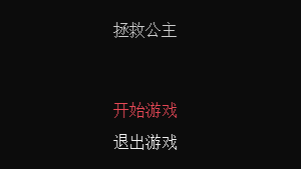
控制台小游戏——拯救公主
居中显示
跳出某个内层循环的标志位
切换场景用状态机
切换选项的高亮显示逻辑、switch切换逻辑
namespace 控制台小游戏_拯救公主
{
internal class Program
{
static void Main(string[] args)
{
#region 1 控制台设置
//隐藏光标
Console.CursorVisible = false;
const int width = 50;
const int height = 30;
Console.SetWindowSize(width, height);
Console.SetBufferSize(width, height);
#endregion
#region 2 多场景
//场景编号
//不要把变量写在while里面,否则会一直初始化为1
int nowScenceID = 2;
bool isSuccess = false;
while (true)
{
//场景切换
switch (nowScenceID)
{
//开始场景
case 1:
Console.Clear();
#region 3 开始场景逻辑
//居中显示标题
//减4是因为要打印的字符宽度为8
Console.SetCursorPosition(width/2 - 4, 8);
Console.Write("拯救公主");
//开始界面的选项的编号
int nowIndexID = 0;
//选择选项
while (true)
{
//是否退出该层while循环的标志位
bool isQuit = false;
//居中显示
Console.SetCursorPosition(width / 2 - 4, 13);
//选中选项时高亮显示
Console.ForegroundColor = (nowIndexID == 0)? ConsoleColor.Red : ConsoleColor.White;
Console.Write("开始游戏");
Console.SetCursorPosition(width / 2 - 4, 15);
Console.ForegroundColor = (nowIndexID == 1) ? ConsoleColor.Red : ConsoleColor.White;
Console.Write("退出游戏");
//选择选项的控制逻辑
char input = Console.ReadKey(true).KeyChar;
switch (input)
{
case 'w':
case 'W':
nowIndexID--;
//越界判断
if (nowIndexID < 0) nowIndexID = 0;
break;
case's':
case 'S':
nowIndexID++;
if (nowIndexID > 1) nowIndexID = 1;
break;
//确认选择
case 'j':
case 'J':
// 开始游戏->场景2 游戏场景
if (nowIndexID == 0) nowScenceID = 2;
// 退出游戏->退出控制台程序
if (nowIndexID == 1) Environment.Exit(0);
isQuit = true;
break;
}
//退出开始场景的内层while循环
if (isQuit) break;
}
#endregion
break;
//游戏场景
case 2:
Console.Clear();
#region 4.1 不变的红墙
//红色字体
Console.ForegroundColor = ConsoleColor.Red;
//墙 ■
//■占用2个字符宽度,上限是width-2,更新步长是2
//x方向的墙
for (int i = 0; i <= width - 2; i+=2)
{
Console.SetCursorPosition(i, 0);
Console.Write("■");
Console.SetCursorPosition(i, height - 8);
Console.Write("■");
Console.SetCursorPosition(i, height - 1);
Console.Write("■");
}
//y方向的墙
for (int j = 0; j <= height - 1; j++)
{
Console.SetCursorPosition(width - 2, j);
Console.Write("■");
Console.SetCursorPosition(0, j);
Console.Write("■");
}
#endregion
#region boss属性
int bossX = 24;
int bossY = 10;
int bossHP = 100;
int bossAttackMin = 10;
int bossAttackMax = 15;
string bossIcon = "■";
//用结构体ConsoleColor声明颜色变量
ConsoleColor bossColor = ConsoleColor.Green;
#endregion
#region 4.2 player属性
int playerX = 4;
int playerY = 4;
int playerHP = 100;
int playerAttackMin = 8;
int playerAttackMax = 17;
string playerIcon = "●";
ConsoleColor playerColor = ConsoleColor.Yellow;
#endregion
#region 公主属性
int princeX = 26;
int princeY = 5;
string princeIcon = "▲";
ConsoleColor princeColor = ConsoleColor.Blue;
#endregion
#region 4.3GamePlay逻辑
char playerInput;
bool isAttacking = false;
bool isOver = false;
while (true)
{
#region 绘制boss和player
if (bossHP > 0)
{
//绘制boss
Console.SetCursorPosition(bossX, bossY);
Console.ForegroundColor = bossColor;
Console.Write(bossIcon);
}
if (playerHP > 0)
{
//绘制player
Console.SetCursorPosition(playerX, playerY);
Console.ForegroundColor = playerColor;
Console.Write(playerIcon);
}
#endregion
//检测输入
playerInput = Console.ReadKey(true).KeyChar;
//处于战斗状态时,player不能移动
if (isAttacking)
{
#region 战斗逻辑
if (playerInput == 'j' || playerInput == 'J')
{
if (playerHP <= 0)
{
isSuccess = false;
//跳转到结束场景
nowScenceID = 3;
//退出当前界面游戏场景的while循环
break;
}
else if (bossHP <= 0)
{
isSuccess = true;
//去救公主
//擦除boss
Console.SetCursorPosition(bossX, bossY);
Console.Write(" ");
isAttacking = false;
//绘制公主
Console.SetCursorPosition(princeX, princeY);
Console.ForegroundColor = princeColor;
Console.Write(princeIcon);
}
#region 互相攻击逻辑
Random r = new Random();
//player攻击boss
if (playerHP > 0)
{
Console.ForegroundColor = ConsoleColor.Green;
if (bossHP > 0)
{
int playerAttack = r.Next(playerAttackMin, playerAttackMax);
if (bossHP - playerAttack < 0) bossHP = 0;
else bossHP -= playerAttack;
Console.SetCursorPosition(2, height - 8 + 5);
Console.Write(" ");
Console.SetCursorPosition(2, height - 8 + 5);
Console.WriteLine("你这回合对boss造成了{0}点伤害", playerAttack);
}
else
{
Console.SetCursorPosition(2, height - 8 + 5);
Console.Write(" ");
}
}
else
{
playerHP = 0;
Console.ForegroundColor = ConsoleColor.Red;
Console.SetCursorPosition(2, height - 8 + 5);
Console.Write(" ");
Console.SetCursorPosition(2, height - 8 + 5);
Console.WriteLine("你已死亡");
}
//boss攻击player
if(bossHP > 0)
{
Console.ForegroundColor = ConsoleColor.Yellow;
if (playerHP > 0)
{
int bossAttack = r.Next(bossAttackMin, bossAttackMax);
if(playerHP- bossAttack < 0) playerHP = 0;
else playerHP -= bossAttack;
Console.SetCursorPosition(2, height - 8 + 4);
Console.Write(" ");
Console.SetCursorPosition(2, height - 8 + 4);
Console.WriteLine("boss这回合对你造成了{0}点伤害", bossAttack);
}
else
{
Console.SetCursorPosition(2, height - 8 + 4);
Console.Write(" ");
}
}
else
{
bossHP = 0;
Console.ForegroundColor = ConsoleColor.Yellow;
Console.SetCursorPosition(2, height - 8 + 4);
Console.Write(" ");
Console.SetCursorPosition(2, height - 8 + 4);
Console.Write("已战胜boss,快去救公主吧");
Console.SetCursorPosition(2, height - 8 + 5);
Console.Write("前往公主身边按J键继续 ");
}
//更新血量显示
Console.ForegroundColor = ConsoleColor.White;
Console.SetCursorPosition(2, height - 8 + 2);
Console.Write(" ");
Console.SetCursorPosition(2, height - 8 + 2);
Console.Write("当前player血量为:" + playerHP);
Console.SetCursorPosition(2, height - 8 + 3);
Console.Write(" ");
Console.SetCursorPosition(2, height - 8 + 3);
Console.Write("当前boss血量为:" + bossHP);
}
#endregion
#endregion
}
//非战斗状态时,player可以移动
else
{
#region player移动逻辑
//更新玩家位置——擦除原位置置
Console.SetCursorPosition(playerX, playerY);
Console.Write(" ");
switch (playerInput)
{
case 'w':
case 'W':
playerY--;
if (playerY < 1) playerY = 1;
//如果player和boss位置重合且boss还存活,就拉回player的位置
else if (playerY == bossY && playerX == bossX && bossHP > 0) playerY++;
//如果player和公主位置重合,就拉回player的位置
else if (playerY == princeY && playerX == princeX) playerY++;
break;
case 'a':
case 'A':
playerX -= 2;
if (playerX < 2) playerX = 2;
//如果player和boss位置重合且boss还存活,就拉回player的位置
else if (playerY == bossY && playerX == bossX && bossHP > 0) playerX += 2;
else if (playerY == princeY && playerX == princeX) playerX += 2;
break;
case 's':
case 'S':
playerY++;
if (playerY > height - 8 - 1) playerY = height - 8 - 1;//控制台y轴是下正上负
//如果player和boss位置重合且boss还存活,就拉回player的位置
else if (playerY == bossY && playerX == bossX && bossHP > 0) playerY--;
else if (playerY == princeY && playerX == princeX) playerY--;
break;
case 'd':
case 'D':
playerX += 2;
if (playerX > width - 2 - 2) playerX = width - 2 - 2;//控制台x轴是右正左负
//如果player和boss位置重合且boss还存活,就拉回player的位置
else if (playerY == bossY && playerX == bossX && bossHP > 0) playerX -= 2;
else if (playerY == princeY && playerX == princeX) playerX -= 2;
break;
//player攻击boss
case 'j':
case 'J':
if ((playerY == bossY && Math.Abs(playerX - bossX) == 2)
||(playerX == bossX && Math.Abs(playerY - bossY) == 1) && bossHP > 0)
{
Console.SetCursorPosition(2, height - 8 + 1);
Console.ForegroundColor = ConsoleColor.White;
Console.Write("开始和boss战斗,按J键继续攻击!");
isAttacking = true;
}
else if ( (playerY == princeY && Math.Abs(playerX - princeX) == 2)
|| (playerX == princeX && Math.Abs(playerY - princeY) == 1) )
{
Console.SetCursorPosition(2, height - 8 + 5);
Console.Write(" ");
Console.SetCursorPosition(2, height - 8 + 5);
Console.ForegroundColor = ConsoleColor.Blue;
Console.Write("已经成功拯救公主");
nowScenceID = 3;
isOver = true;
break;
}
break;
}
#endregion
}
//退出游戏场景的while
if (isOver) break;
}
#endregion
break;
//结束场景
case 3:
Console.Clear();
#region 3 开始场景逻辑
//居中显示标题
//减5是因为要打印的字符宽度为10
Console.SetCursorPosition(width / 2 - 5, 8);
Console.ForegroundColor = ConsoleColor.White;
Console.Write("GAME OVER");
Console.SetCursorPosition(width / 2 - 4, 9);
if (isSuccess == true)
{
Console.ForegroundColor = ConsoleColor.Green;
Console.Write("英雄救美");
}
else
{
Console.ForegroundColor = ConsoleColor.Red;
Console.Write("菜就多练");
}
//结束界面的选项的编号
int indexID = 0;
//选择选项
while (true)
{
//是否退出该层while循环的标志位
bool isQuit = false;
//居中显示
Console.SetCursorPosition(width / 2 - 6, 13);
//选中选项时高亮显示
Console.ForegroundColor = (indexID == 0) ? ConsoleColor.Red : ConsoleColor.White;
Console.Write("回到开始界面");
Console.SetCursorPosition(width / 2 - 4, 15);
Console.ForegroundColor = (indexID == 1) ? ConsoleColor.Red : ConsoleColor.White;
Console.Write("退出游戏");
//选择选项的控制逻辑
char input = Console.ReadKey(true).KeyChar;
switch (input)
{
case 'w':
case 'W':
indexID--;
//越界判断
if (indexID < 0) indexID = 0;
break;
case 's':
case 'S':
indexID++;
if (indexID > 1) indexID = 1;
break;
//确认选择
case 'j':
case 'J':
// 开始游戏->场景2 游戏场景
if (indexID == 0) nowScenceID = 1;
// 退出游戏->退出控制台程序
if (indexID == 1) Environment.Exit(0);
isQuit = true;
break;
}
//退出开始场景的内层while循环
if (isQuit) break;
}
#endregion
break;
}
}
#endregion
}
}
}

 浙公网安备 33010602011771号