

计算机视觉--图像检索之Bag of features
Bag of features算法原理
Bag of features(Bof)一种是用于图像和视频检索的算法。此算法对于不同角度,光照的图像,基本都能在图像库中正确检索。图像检索,就是要在不同的图像间进行比对,为了提高效率,可以对图片进行提炼,将图片中的特征提取出来生成图片的”身份证“,对“身份证”进行比对。
Bag of features 算法流程
1.特征提取(使用sift算法)
2.学习“视觉词典” (通过K-means算法找到聚类中心)
K-meas算法的基本流程
1.初始化K个聚类中心
2.重复下述步骤直至算法收敛:
2.1. 对应每个特征,根据距离关键赋值给某个中心/类别
2.1. 对每个类别,根据其对应的特征集重新计算聚类中心
3.针对输入特征集,根据视觉词典进行量化
对于输入特征,量化的过程是将该特征映射到距离其最接近的codevector,并实现计数。
要注意选择码本的规模。若码本太少:视觉单词无法覆盖所有可能出现的情况;若太多了:计算量过大,并且容易过拟合。
4、把输入图像转化成视觉单词(visual words)的频率直方图

5、图像检索
对于给定图像的直方图,在数据库查找k个最近的图像。
对于图像分类的问题,可以根据这k个临近图像的分类标签投票获得分类结果。
当训练数据足以表述所有图像的时候,检索或者分类的效果会比较好。
6、倒排表(Inverted file)
前面的方法是根据每张图像和码本的匹配程度来构建每张图的直方图,而倒排表存储的是符合各个视觉单词的图像集。这样数据库中的图片可以通过比较重叠部分来判断它和哪些图片存在关联。
实验代码
1.sift特征提取并建立视觉词典
# -*- coding: utf-8 -*-
import pickle
from PCV.imagesearch import vocabulary
from PCV.tools.imtools import get_imlist
#from PCV.localdescriptors import sift
import sift

#获取图像列表
#imlist = get_imlist('E:/Python37_course/test7/first1000/')
imlist = get_imlist('D:/360MoveData/Users/18965/Desktop/计算机视觉/full1/')
nbr_images = len(imlist)
#获取特征列表
featlist = [imlist[i][:-3]+'sift' for i in range(nbr_images)]

#提取文件夹下图像的sift特征
for i in range(nbr_images):
    sift.process_image(imlist[i], featlist[i])

#生成词汇
#voc = vocabulary.Vocabulary('ukbenchtest')
#voc.train(featlist, 1000, 10)
voc = vocabulary.Vocabulary('test77_test')
voc.train(featlist, 122, 10)

#保存词汇
# saving vocabulary
'''with open('E:/Python37_course/test7/first1000/vocabulary.pkl', 'wb') as f:
    pickle.dump(voc, f)'''
with open('D:/360MoveData/Users/18965/Desktop/计算机视觉/MyBag/BOW/vocabulary.pkl', 'wb') as f:
    pickle.dump(voc, f)
print ('vocabulary is:', voc.name, voc.nbr_words)
2.遍历所有的图像,将它们的特征投影到词汇并提交到数据库
import pickle
from PCV.imagesearch import vocabulary
from PCV.tools.imtools import get_imlist
from PCV.localdescriptors import sift
from PCV.imagesearch import imagesearch
from PCV.geometry import homography
from sqlite3 import dbapi2 as sqlite # 使用sqlite作为数据库


#获取图像列表
imlist = get_imlist('D:/360MoveData/Users/18965/Desktop/计算机视觉/full1/')
nbr_images = len(imlist)
#获取特征列表
featlist = [imlist[i][:-3]+'sift' for i in range(nbr_images)]

# load vocabulary
#载入词汇
with open('D:/360MoveData/Users/18965/Desktop/计算机视觉/MyBag/BOW/vocabulary.pkl', 'rb') as f:
    voc = pickle.load(f)
#创建索引
indx = imagesearch.Indexer('testImaAdd.db',voc) # 在Indexer这个类中创建表、索引,将图像数据写入数据库
indx.create_tables() # 创建表
# go through all images, project features on vocabulary and insert
#遍历所有的图像,并将它们的特征投影到词汇上
for i in range(nbr_images)[:888]:
    locs,descr = sift.read_features_from_file(featlist[i])
    indx.add_to_index(imlist[i],descr) # 使用add_to_index获取带有特征描述子的图像,投影到词汇上
                                       # 将图像的单词直方图编码存储
# commit to database
#提交到数据库
indx.db_commit()

con = sqlite.connect('testImaAdd.db')
print (con.execute('select count (filename) from imlist').fetchone())
print (con.execute('select * from imlist').fetchone())
3.进行查询测试
# -*- coding: utf-8 -*-
#使用视觉单词表示图像时不包含图像特征的位置信息
import pickle
from PCV.localdescriptors import sift
from PCV.imagesearch import imagesearch
from PCV.geometry import homography
from PCV.tools.imtools import get_imlist

# load image list and vocabulary
#载入图像列表
#imlist = get_imlist('E:/Python37_course/test7/first1000/')
imlist = get_imlist('D:/360MoveData/Users/18965/Desktop/计算机视觉/full1/')
nbr_images = len(imlist)
#载入特征列表
featlist = [imlist[i][:-3]+'sift' for i in range(nbr_images)]

#载入词汇
'''with open('E:/Python37_course/test7/first1000/vocabulary.pkl', 'rb') as f:
    voc = pickle.load(f)'''
with open('D:/360MoveData/Users/18965/Desktop/计算机视觉/MyBag/BOW/vocabulary.pkl', 'rb') as f:
    voc = pickle.load(f)

src = imagesearch.Searcher('testImaAdd.db',voc)# Searcher类读入图像的单词直方图执行查询

# index of query image and number of results to return
#查询图像索引和查询返回的图像数
q_ind = 1
nbr_results = 20

# regular query
# 常规查询(按欧式距离对结果排序)
res_reg = [w[1] for w in src.query(imlist[q_ind])[:nbr_results]] # 查询的结果
print ('top matches (regular):', res_reg)

# load image features for query image
#载入查询图像特征进行匹配
q_locs,q_descr = sift.read_features_from_file(featlist[q_ind])
fp = homography.make_homog(q_locs[:,:2].T)

# RANSAC model for homography fitting
#用单应性进行拟合建立RANSAC模型
model = homography.RansacModel()
rank = {}
# load image features for result
#载入候选图像的特征
for ndx in res_reg[1:]:
    locs,descr = sift.read_features_from_file(featlist[ndx])  # because 'ndx' is a rowid of the DB that starts at 1
    # get matches
    matches = sift.match(q_descr,descr)
    ind = matches.nonzero()[0]
    ind2 = matches[ind]
    tp = homography.make_homog(locs[:,:2].T)
    # compute homography, count inliers. if not enough matches return empty list
    # 计算单应性矩阵
    try:
        H,inliers = homography.H_from_ransac(fp[:,ind],tp[:,ind2],model,match_theshold=4)
    except:
        inliers = []
    # store inlier count
    rank[ndx] = len(inliers)

# sort dictionary to get the most inliers first
# 对字典进行排序,可以得到重排之后的查询结果
sorted_rank = sorted(rank.items(), key=lambda t: t[1], reverse=True)
res_geom = [res_reg[0]]+[s[0] for s in sorted_rank]
print ('top matches (homography):', res_geom)

# 显示查询结果
imagesearch.plot_results(src,res_reg[:6]) #常规查询
imagesearch.plot_results(src,res_geom[:6]) #重排后的结果
实验结果
选取图片:

查询结果

疑惑:
感觉后两个与查询的并不是同一个物体,具体原因也不是很清楚
参考博客:
https://blog.csdn.net/buaixvexi/article/details/106312022
https://blog.csdn.net/WeskerXR/article/details/106272060
遇到的问题及解决
1.因为需要使用数据库,所以需要安装pysqlite,但是用pip一直出现各种问题,不论是直接pip install还是下载.whl文件来安装均报错,后来查找资料发现在python2.5版本这后,其pysqlite已经被包括在标准库内。所以修改代码如下:

2.使用sift.exe文件的sift算法时,还要记得放入vl.dll文件,否则不会生成.sift文件
3.python3下sort函数里没有cmp参数问题

改成:

4.python3中没有cmp函数,报错如下
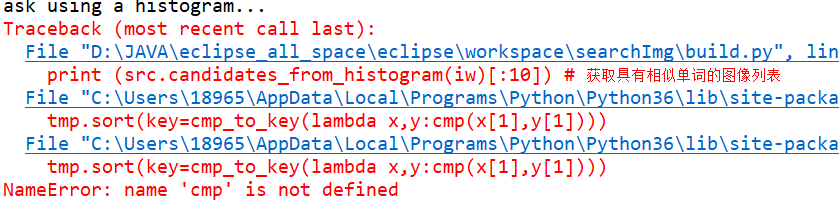
我说为什么cmp不是自带的函数吗?!!!!!!好累哦
5.cmp在python3中也不能用

import operator 来代替,我是自己用operator 写了个cmp函数
参考博客:https://blog.csdn.net/lovelygirlyuzhu/article/details/101449780

 浙公网安备 33010602011771号