

shell$bash复习一
bash基本使用:
vim test.sh →i→esc→:wq
chmod +x ./test.sh # 使脚本具有权限
./test.sh # 执行脚本
/bin/sh test.sh 执行脚本
LInux基本使用:
ssh -p22 username@host 服务器链接,22默认端口,可不写
$ 普通用户
#管理员用户
操作命令:
--help:例 ls --help
man:例如 man ls
文件管理:
查看文件 ls -l,ls -a ,la -al
切换目录 :cd .. 返回上级目录,cd ../../ 返回上上级目录,cd ../one切换至上一级目录的one目录下
创建目录:mkdir 目录,mkdir 目录/目录/目录 -p
删除目录:rm -r 目录,rm -rf 目录 (慎用),rm -ri 目录(会要要求确认)
创建空文件:tocuh xx.txt
copy文件:cp -a ./a ../one/ copy到目录,copy x ../one copy x 文件到one目录
重命名文件:mv 原文件名 新文件名
移动文件:mv 文件名 目录
移动文件同时命名文件:mv 文件名 目录/新文件名- mv 1 2/3
建立链接文件:ln -s ./aone/a . 当前目录创建了一个链接指向了aone文件下的a目录
查找文件:find ./ -name x.txt find ../aone -name '*.txt' 查找当前/文件下的文件
文本查看命令:
cat xx.txt查看文件,
less xx.txt查看内容较多的文件→(q退出)
more xx.txt查看文件,可以有百分比显示
head xx.txt 查看,默认前10行,head -n 3 xx.txt
tail xx.txt 查看 默认后10行 ,tail -n 3 xx.txt 查看后3行
压缩:
压缩文件tar -zcvf 压缩名字.tar.gz 1xx.txt 2xx.txt
接压缩文件tar -xf 压缩名字.tar.gz
解压缩至 tar -xf 压缩名字.tar.gz -C ./aone (./aone为当前目录下的aone文件下)
输出重定向:
echo 内容 > xx.txt
文件属性:
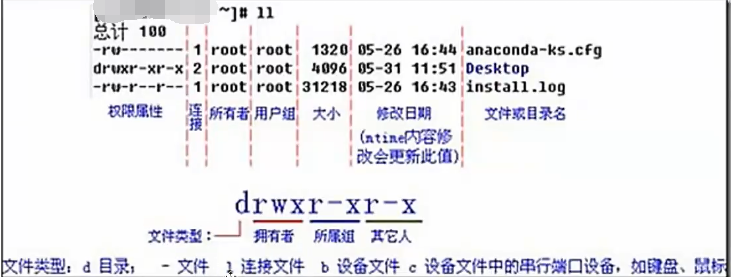
r-4,w-2,x-1,--0
chmod xxx 文件 ,xx为rwx的和
网络ping:
ping -c 次数 -t 时间(秒) ip
网络信息:
netstat -tnp
退出linux:exit


11111@33333 home]$ cd 11111
[11111@33333 ~]$ ls
1  aone  hogwarts  mulu
[11111@33333 ~]$ cd hogwarts
[11111@33333 hogwarts]$ cd ../../
[11111@33333 home]$ cd 11111
[11111@33333 ~]$ ls
1  aone  hogwarts  mulu
[11111@33333 ~]$ cd hogwarts
[11111@33333 hogwarts]$ ls
1  1.txt  a
[11111@33333 hogwarts]$ pwd
/home/11111/hogwarts
[11111@33333 hogwarts]$ cp 1.txt ../aone
[11111@33333 hogwarts]$ cd ../aone
[11111@33333 aone]$ ls
1  1.txt  a
[11111@33333 aone]$ touch 2.txt
[11111@33333 aone]$ ls
1  1.txt  2.txt  a
[11111@33333 aone]$ cp t.txt ../hogwarts
cp: cannot stat ‘t.txt’: No such file or directory
[11111@33333 aone]$ cp 2.txt ../hogwarts
[11111@33333 aone]$ cd ../hogwarts
[11111@33333 hogwarts]$ ls
1  1.txt  2.txt  a
[11111@33333 hogwarts]$ ls
1  1.txt  2.txt  a
[11111@33333 hogwarts]$ mv 1 5
[11111@33333 hogwarts]$ ls
1.txt  2.txt  5  a
[11111@33333 hogwarts]$ mv 5 ../aone
[11111@33333 hogwarts]$ cd ../aone
[11111@33333 aone]$ ;s
-bash: syntax error near unexpected token `;'
[11111@33333 aone]$ ls
1  1.txt  2.txt  5  a
[11111@33333 aone]$ cd ..
[11111@33333 ~]$ ls
1  aone  hogwarts  mulu
[11111@33333 ~]$ ln -s ./aone/1 .
ln: failed to create symbolic link ‘./1’: File exists
[11111@33333 ~]$ ln -s ./aone/a .
[11111@33333 ~]$ ls
1  a  aone  hogwarts  mulu
[11111@33333 ~]$ ls
1  a  aone  hogwarts  mulu
[11111@33333 ~]$ ll
total 12
-rw-rw-r-- 1 11111 11111    0 Aug 21 13:14 1
lrwxrwxrwx 1 11111 11111    8 Aug 21 18:43 a -> ./aone/a
drwxrwxr-x 4 11111 11111 4096 Aug 21 18:38 aone
drwxrwxr-x 3 11111 11111 4096 Aug 21 18:38 hogwarts
drwxrwxr-x 2 11111 11111 4096 Aug 21 18:23 mulu
[11111@33333 ~]$ cd aone
[11111@33333 aone]$ ls
1  1.txt  2.txt  5  a
[11111@33333 aone]$ rm -r a
[11111@33333 aone]$ ls
1  1.txt  2.txt  5
[11111@33333 aone]$ cd ..
[11111@33333 ~]$ ls
1  a  aone  hogwarts  mulu
[11111@33333 ~]$ ll
total 12
-rw-rw-r-- 1 11111 11111    0 Aug 21 13:14 1
lrwxrwxrwx 1 11111 11111    8 Aug 21 18:43 a -> ./aone/a
drwxrwxr-x 3 11111 11111 4096 Aug 21 18:57 aone
drwxrwxr-x 3 11111 11111 4096 Aug 21 18:38 hogwarts
drwxrwxr-x 2 11111 11111 4096 Aug 21 18:23 mulu
[11111@33333 ~]$ cat a
cat: a: No such file or directory
[11111@33333 ~]$ rm a
[11111@33333 ~]$ ls
1  aone  hogwarts  mulu
[11111@33333 ~]$ cd aone
[11111@33333 aone]$ ls
1  1.txt  2.txt  5
[11111@33333 aone]$ mkdir a
[11111@33333 aone]$ ls
1  1.txt  2.txt  5  a
[11111@33333 aone]$ cd ..
[11111@33333 ~]$ ls
1  aone  hogwarts  mulu
[11111@33333 ~]$ ln -s ./aone/a
[11111@33333 ~]$ ;s
-bash: syntax error near unexpected token `;'
[11111@33333 ~]$ ls
1  a  aone  hogwarts  mulu
[11111@33333 ~]$ cat
cat
cat
cat a
cat a
vim^[:
vim
[11111@33333 ~]$ cat a
cat: a: Is a directory
[11111@33333 ~]$ cd a
[11111@33333 a]$ pwd
/home/11111/a
[11111@33333 a]$ ls
[11111@33333 a]$ cd aone
-bash: cd: aone: No such file or directory
[11111@33333 a]$ cd ..
[11111@33333 ~]$ ls
1  a  aone  hogwarts  mulu
[11111@33333 ~]$ cd aone
[11111@33333 aone]$ ls
1  1.txt  2.txt  5  a
[11111@33333 aone]$ cd a
[11111@33333 a]$ touch aone.txt
[11111@33333 a]$ ls
aone.txt
[11111@33333 a]$ cd ../
[11111@33333 aone]$ cd ../
[11111@33333 ~]$ ;s
-bash: syntax error near unexpected token `;'
[11111@33333 ~]$ ls
1  a  aone  hogwarts  mulu
[11111@33333 ~]$ cd a
[11111@33333 a]$ ;s
-bash: syntax error near unexpected token `;'
[11111@33333 a]$ ls
aone.txt
[11111@33333 a]$ ls
aone.txt
[11111@33333 a]$ cd ../
[11111@33333 ~]$ ls
1  a  aone  hogwarts  mulu
[11111@33333 ~]$ touch 9.txt
[11111@33333 ~]$ touch 8.txt
[11111@33333 ~]$ ls
1  8.txt  9.txt  a  aone  hogwarts  mulu
[11111@33333 ~]$ find ./ -name 9.txt
./9.txt
[11111@33333 ~]$ find ./ -name '*.txt'
./hogwarts/1.txt
./hogwarts/2.txt
./aone/a/aone.txt
./aone/1.txt
./aone/2.txt
./9.txt
./8.txt
[11111@33333 ~]$ find ./hogwarts -name '*‘
> -bash: unexpected EOF while looking for matching `''
-bash: syntax error: unexpected end of file
[11111@33333 ~]$ find ./hogwarts -name '*'
./hogwarts
./hogwarts/a
./hogwarts/1.txt
./hogwarts/2.txt
[11111@33333 ~]$ cd hogwarts
[11111@33333 hogwarts]$ ls
1.txt  2.txt  a
[11111@33333 hogwarts]$ cat 2.txt
[11111@33333 hogwarts]$ vm 2.txt
-bash: vm: command not found
[11111@33333 hogwarts]$ vim 2.txt
[11111@33333 hogwarts]$ cat 2.txt
这是1.txt的文件
测试
[11111@33333 hogwarts]$ vim 2.txt
[11111@33333 hogwarts]$ cat 2.txt
这是2.txt的文件
测试
[11111@33333 hogwarts]$ ls
1.txt  2.txt  a
[11111@33333 hogwarts]$ vim 2.txt
[11111@33333 hogwarts]$ cat w.txt
cat: w.txt: No such file or directory
[11111@33333 hogwarts]$ cat 2.txt
这是2.txt的文件
测试
23


af
af
a
f
[11111@33333 hogwarts]$ less 2.txt
[11111@33333 hogwarts]$ more 2.txt
这是2.txt的文件
测试
23

23
2
3
23

af
a
f
[11111@33333 hogwarts]$
[11111@33333 hogwarts]$
[11111@33333 hogwarts]$
[11111@33333 hogwarts]$
[11111@33333 hogwarts]$
[11111@33333 hogwarts]$ head 2.txt
这是2.txt的文件
测试
23

23
2

2
32
[11111@33333 hogwarts]$ head -n 3 2.txt
这是2.txt的文件
测试
23
[11111@33333 hogwarts]$ head -n 50 2.txt
这是2.txt的文件
测试
23

f
[11111@33333 hogwarts]$ tail -n 2.txt
tail: 2.txt: invalid number of lines
[11111@33333 hogwarts]$ tail -n 2 2.txt
a
f
[11111@33333 hogwarts]$ cd ..
[11111@33333 ~]$ ls
1  8.txt  9.txt  a  aone  hogwarts  mulu
[11111@33333 ~]$ tar -zcvf yasuo.tar.gz 8.txt 9.txt
8.txt
9.txt
[11111@33333 ~]$ ls
1  8.txt  9.txt  a  aone  hogwarts  mulu  yasuo.tar.gz
[11111@33333 ~]$ rm 8.txt 9.txt
[11111@33333 ~]$ tar -xf yasuo.tar.gz
[11111@33333 ~]$ ls
1  8.txt  9.txt  a  aone  hogwarts  mulu  yasuo.tar.gz
[11111@33333 ~]$ tar -xf yasuo.tar.gz -C ./aone
[11111@33333 ~]$ cd aone
[11111@33333 aone]$ ls
1  1.txt  2.txt  5  8.txt  9.txt  a
[11111@33333 aone]$

 浙公网安备 33010602011771号