Flask框架的基本梳理
介绍:
常用方法:
1.指定前端文件路径以及静态文件路径
from flask import Flask,Blueprint
#普通指定
app = Flask(__name__,template_folder='../xxxx',static_folder="../xxxx")
#通过蓝图指定
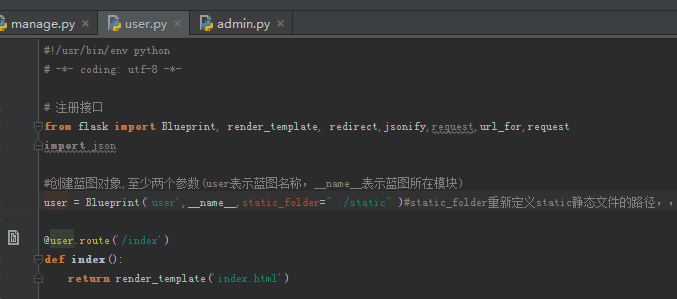
user = Blueprint('user',__name__,static_folder="../static" )#static_folder重新定义static静态文件的路径,,template_folder重新定义前端文件的目录
2.创建蓝图
步骤:1.需要在目录模块先创建蓝图对象
2.在主文件注册蓝图即可

3.常用函数:
#加载html文件
render_template('dalan_test1.html')
render_template('index.html',error='用户名或密码填写错误!')#加载文件并返回error信息(前端需要渲染才能显示 ),前端需要{{ error }}来显示

#返回json数据
jsonify({'code':'500','smg':'服务器未知异常'})

#重定向(一般配合url_for()使用)
redirect('html文件地址')
#根据路由来重定向
redirect(url_for('路由地址'))

#返回html代码 -浏览器可识别
response = make_response('<h2>羞羞哒</h2>')
return response, 404
#返回页面 -需要通过render_template创建对象(不能直接返回)
temp = render_template('hello.html')
response = make_response(temp)
return response
https://blog.csdn.net/hhufeiji/article/details/86560656 ..........redirect与render_template的区别
https://blog.csdn.net/weixin_41665106/article/details/105599235 ......................make_response()方法
4.cookie和session
 #添加cookie有效时间为300秒
 resp.set_cookie('key','dalan_test456',max_age=300)
 #获取cooke(cooke是从浏览器转过来的)
 cooke_name=request.cookies.get("key")
 #删除cooke
 resp.delete_cookie("key")
Session和Cookie的区别?
1、数据存储位置:cookie数据存放在客户的浏览器上,session数据放在服务器上。
2、安全性:cookie不是很安全,别人可以分析存放在本地的cookie并进行cookie欺骗,考虑到安全应当使用session。
3、服务器性能:session会在一定时间内保存在服务器上。当访问增多,会比较占用你服务器的性能,考虑到减轻服务器性能方面,应当使用cookie。
4、数据大小:单个cookie保存的数据不能超过4K,很多浏览器都限制一个站点最多保存20个cookie。
5、信息重要程度:可以考虑将登陆信息等重要信息存放为session,其他信息如果需要保留,可以放在cookie中。
6.1 什么是session信息:
    服务端缓存
6.2 session的作用:
    Session 对象存储特定用户会话所需的属性及配置信息。这样,当用户在应用程序的 Web 页之间跳转时,
    存储在 Session 对象中的变量将不会丢失,而是在整个用户会话中一直存在下去。当用户请求来自应用程序的
    Web 页时,如果该用户还没有会话,则 Web 服务器将自动创建一个 Session 对象。当会话过期或被放弃后,
    服务器将终止该会话。Session 对象最常见的一个用法就是存储用户的首选项。
6.3 session值的设置、获取及删除:
    session['name'] = 'hello world'
    session.get('name')
    session.pop('name')

6.4 判断用户是否登陆成功:
    from _curses import flash
    from functools import wraps
    from flask import session, redirect, url_for

    def is_login(f):
        """用来判断用户是否登录成功"""
        @wraps(f)
        def wrapper(*args, **kwargs):
            # 判断session对象中是否有seesion['user'],
            # 如果包含信息, 则登录成功, 可以访问主页;
            # 如果不包含信息, 则未登录成功, 跳转到登录界面;;
            if session.get('user', None):
                return f(*args, **kwargs)
            else:
                flash("用户必须登录才能访问%s" % (f.__name__))
                return redirect(url_for('login'))

        return wrapper

6.5 判断用户是否为管理员:
    from _curses import flash
    from functools import wraps
    from flask import session, redirect, url_for

    def is_admin(f):
        """用来判断用户是否登录成功"""
        @wraps(f)
        def wrapper(*args, **kwargs):
            # 判断session对象中是否有seesion['user']等于root,
            # 如果等于, 则为管理员, 可以访问;
            # 如果不等于, 则不是管理员, 跳转到登录界面;;
            if session.get('user', None) == 'root':
                return f(*args, **kwargs)
            else:
                flash("只有管理员root才能访问%s" % (f.__name__))
                return redirect(url_for('login'))

        return wrapper
案例:
#!/usr/bin/env python
# encoding: utf-8
import flask,json
from flask import Blueprint, render_template, redirect,jsonify,request,url_for,request,session,make_response,Response

server = flask.Flask(__name__)  # 把这个python文件当做一个web服务

@server.route('/index')
def index():
    '''网站首页'''
    #判断cooke是否失效
    if request.cookies.get("key") !=None:
        return render_template('home.html')#回到首页
    #判断session是否失效
    elif session.get('user_info') !=None:
        return render_template('home.html')#回到首页
    else:
        #cooke已失效需要重新登录
        return render_template('index.html')#回到登录页


@server.route('/user_login',methods=['post','get'])
def user_login():
    '''登录:表单提交处理—POST方法'''
    try:
        #正常场景:通过index.html提交post请求
        if  request.method=='POST':
            user = request.values.get('username')
            pwd =  request.values.get('password')
            print(user,pwd)
            print('获取session',session.get('user_info'))
            if user == 'root' and  pwd== '432705':
                #设置session
                session['user_info'] = user
                print('获取表单全部请求参数转字典:{}'.format((request.form).to_dict()))
                resp=make_response(render_template('home.html',dalan_user=session['user_info']))#把session一起返回前端
                session.permanent = True#开启设置有效期,默认为31天后过期(具体时间需要在应用入口配置: app.permanent_session_lifetime = timedelta(minutes=300))
                #添加cookie有效时间为3600秒
                resp.set_cookie('key','dalan_test123456789',max_age=3600)
                return resp
            else:
                return render_template('index.html',error='用户名或密码填写错误!')#提交错误后返回当前页面+错误信息(需要前端渲染)

        #直接通过url提交请求_并没有参数,,这时需要判断sossion是否有效
        elif  request.method=='GET':
            print('获取session的值',session.get('user_info'))
            print('获取cooke的值',request.cookies.get("key"))
            #判断session是否为None
            if session.get('user_info') !=None:
                return render_template('home.html')
            else:
                return render_template('index.html')
    except:
        return jsonify({'code':'500','smg':'服务器未知异常'})

    '''
    通过session或cooke都可以,但是cooke容易暴露,对重要信息可以使用session
    '''
5.Flask中集成邮件发送
from flask_mail import Mail, Message
from flask import Flask, render_template
app = Flask(__name__)

# 配置发送邮件的相关信息;
# 指定邮件服务器的域名或者IP
app.config['MAIL_SERVER'] = '邮件服务器域名或IP'
# 指定端口, 默认25, 但qq邮箱默认端口号为465或587;
app.config['MAIL_PORT'] = 465
app.config['MAIL_USE_SSL'] = True
app.config['MAIL_USERNAME'] = '发送者邮箱名称(QQ邮箱为QQ号)'


# 此处的密码并非邮箱登录密码, 而是开启pop3
app.config['MAIL_PASSWORD'] = "个人密码"


def send_mail(to, subject, info):
    mail = Mail(app)
    msg = Message(subject=subject,
                  sender='976131979@qq.com',
                  recipients=to,
                  body=info
                  )
    with app.app_context():
        mail.send(msg)

send_mail(to=['976131979@qq.com', '2287236639@qq.com'], subject="邮件主题",
          info="邮件正文")

if __name__ == '__main__':
    app.run()
6.消息闪现
备注:消息闪现是向用户反馈信。 例如,桌面应用程序使用对话框或消息框,JavaScript使用 alert() 函数用于类似的目的。
from flask import Flask, flash, redirect, render_template, request, url_for
app = Flask(__name__)
app.secret_key = 'random string'
@app.route('/')
def index():
    return render_template('index.html')


@app.route('/login', methods = ['GET', 'POST'])
def login():
    error = None #定义闪现消息


    if request.method == 'POST':
        if request.form['username'] != 'admin' or request.form['password'] != 'admin':
            error = 'Invalid username or password. Please try again!' #赋值给error变量
        else:
            flash('You were successfully logged in')#已登录成功跳转到index页面
            return redirect(url_for('index'))

    return render_template('login.html', error = error)


if __name__ == '__main__':

    app.run(debug=True)
前端登录页:


<!--------------https://www.w3cschool.cn/flask/flask_message_flashing.html------->
<!DOCTYPE html>
<html lang="en">
<head>
    <meta charset="UTF-8">
    <title>Login</title>
</head>
<body>
    <form method = "post" action = "http://localhost:5000/login">
        <table>
            <tr>
                <td>Username</td>
                <td><input type = 'username' name = 'username'></td>
            </tr>
            <tr>
                <td>Password</td>
                <td><input type = 'password' name = 'password'></td>
            </tr>
            <tr>
                <td><input type = "submit" value = "Submit"></td>
            </tr>
        </table>
    </form>
    {% if error %}
        <p><strong>Error</strong>: {{ error }}</p>
    {% endif %}
</body>
</html>
相关链接:
https://blog.csdn.net/bbright3493/article/details/90768183 .............flask的路由管理
https://www.cnblogs.com/kai-/p/13356928.html .................................flask 指定前端文件路径以及静态文件路径(也可在蓝图上使用,方法一样的)
https://blog.csdn.net/luhuibo318/article/details/102688154 ..............flask部署方式


 浙公网安备 33010602011771号