
zephyr学习:LVGL+LCD显示触摸
参考:ESP32移植Zephyr RTOS(二)-----使用LVGL_esp32 zephyr-CSDN博客
立创实战派开发板(esp32-s3)
注:代码已上传github cc1234github/lichuang_shizhanpai_zephyr: use lichuang shizhan board study zephyr
1. 硬件结构

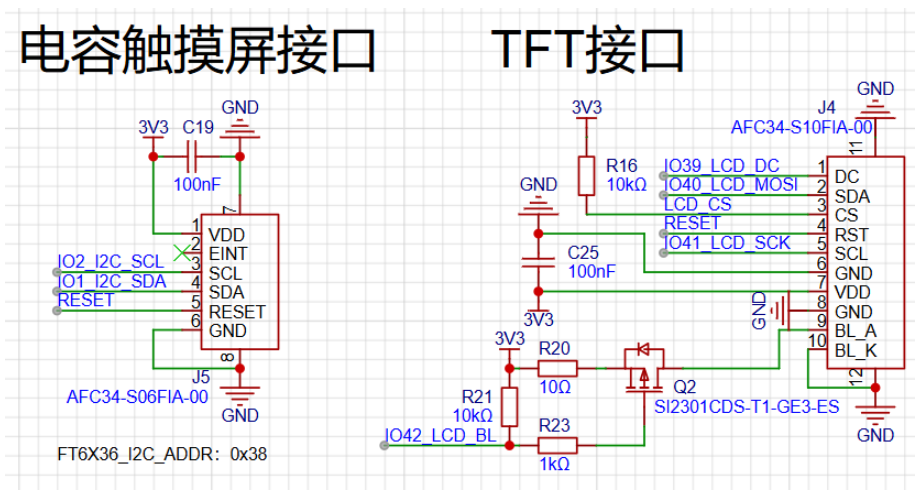
触摸屏是I2C接口,TFT是SPI接口(LCD_CS比较特殊,是由PCA9557扩展出来的)
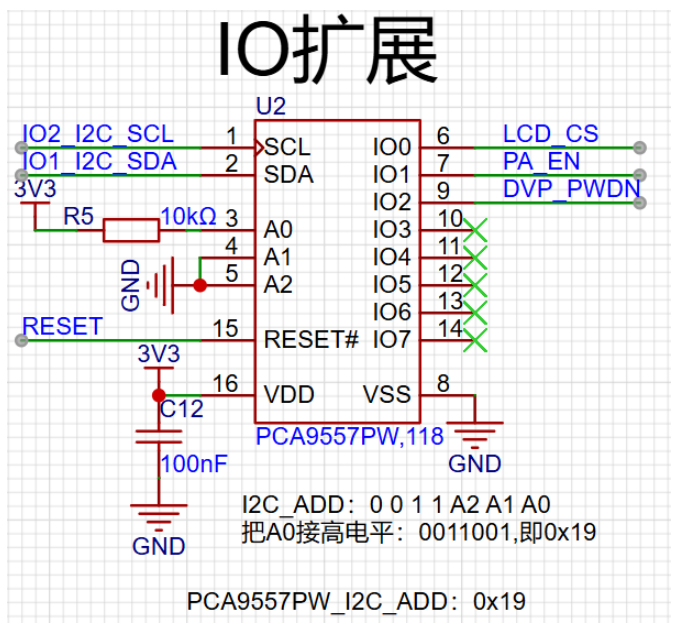
IO扩展是由I2C驱动的
2. 配置LCD的设备树
2.1 配置SPI引脚复用( lc_shizhanpai-pinctrl.dtsi )
- SCLK:GPIO41
- MOSI:GPIO40
- 使用SPI3/SPI2, SPI1已经被外部Flash使用了
- 这里先不配置LCD_CS引脚,因为LCD_CS引脚不是MCU上的引脚。
spim3_default: spim3_default {
		group1 {
			pinmux = <SPIM3_SCLK_GPIO41>;
		};
		group2 {
			pinmux = <SPIM3_MOSI_GPIO40>;
			output-low;
		};
	};
2.2 配置mipi_dbi
参考esp32的板子可以知道在驱动lcd时用了mipi_dbi的接口,对应zephyr,mipi-dbi-spi的驱动;
LCD驱动芯片是st7789,使用了兼容的sitronix,st7789v驱动。
- 配置DC引脚:GPIO39
- 宽,高对应320*240,同时需要修改mdac = <0xA0>; (Memory Data Access Control)参数,相当于旋转一下屏幕
st7789v: st7789v@0 {
			compatible = "sitronix,st7789v";
			mipi-max-frequency = <80000000>;
			reg = <0>;
			width = <320>;
			height = <240>;
			x-offset = <0>;
			y-offset = <0>;
			vcom = <0x19>;
			gctrl = <0x35>;
			vrhs = <0x12>;
			vdvs = <0x20>;
			mdac = <0xA0>;
			gamma = <0x01>;
			colmod = <0x55>;
			lcm = <0x2c>;
			porch-param = [0c 0c 00 33 33];
			cmd2en-param = [5a 69 02 01];
			pwctrl1-param = [a4 a1];
			pvgam-param = [D0 04 0D 11 13 2B 3F 54 4C 18 0D 0B 1F 23];
			nvgam-param = [D0 04 0C 11 13 2C 3F 44 51 2F 1F 1F 20 23];
			ram-param = [00 F0];
			rgb-param = [CD 08 14];
			mipi-mode = "MIPI_DBI_MODE_SPI_4WIRE";
		};
2.3 配置I2C0
配置pca9557IO扩展芯片和ft6336触摸屏,参照yaml和其他例子写就可以了。
- 两者共用I2C0
- pca9557兼容nxp,pca9554
- ft6336兼容focaltech,ft5336
&i2c0 {
    status = "okay";
    clock-frequency = <I2C_BITRATE_STANDARD>;
    pinctrl-0 = <&i2c0_default>;
    pinctrl-names = "default";

    pca9557_io_expander: pca9554@19 {
        compatible = "nxp,pca9554";
		label = "PCA9557";
		status = "okay";
		reg = <0x19>;

		gpio-controller;
		#gpio-cells = <2>;
		ngpios = <8>;
    };

    ft6336_touch: ft5336@38 {
		status = "okay";
		compatible = "focaltech,ft5336";
		reg = <0x38>;
	};
};
2.4 配置spi3
- 关键在于要把LCD_CS脚配置成 cs-gpios
- 由于这里的spi cs引脚依赖于 pca9557_io_expander,所以在工程prj.conf里面需要降低SPI的初始化优先级和pca9557_io_expander初始化优先级会冲突
- 我们需要找到两个初始化的宏,然后重新指定优先级,pca9554 的在驱动里面找 gpio_pca_series.c
- 在文件最底下可以通过宏函数 DEVICE_DT_INST_DEFINE 找到初始化优先级的宏是 CONFIG_GPIO_PCA_SERIES_INIT_PRIORITY
- 在工程prj.conf中配置
CONFIG_GPIO_PCA_SERIES_INIT_PRIORITY=55CONFIG_SPI_INIT_PRIORITY=56
&spi3 {
	status = "okay";
	#address-cells = <1>;
	#size-cells = <0>;
	pinctrl-0 = <&spim3_default>;
	pinctrl-names = "default";
	cs-gpios = <&pca9557_io_expander 0 GPIO_ACTIVE_LOW>;
};
2.5 配置 chosen
zephyr,display = &st7789v;
zephyr,touch = &ft6336_touch;
2.6 配置背光引脚和 lvgl
- 背光引脚使用gpio-leds驱动
- 把触摸屏信号配置成lvgl的输入接口
leds {
    compatible = "gpio-leds";
    tft_backlight: led_0 {
        gpios = <&gpio1 42 GPIO_ACTIVE_LOW>;
        label = "TFT LCD Backlight";
    };
};

lvgl_pointer {
    input = <&ft6336_touch>;
    compatible = "zephyr,lvgl-pointer-input";
};
完整propu_dts: 点击查看代码
/*
 * Copyright (c) 2022 Espressif Systems (Shanghai) Co., Ltd.
 *
 * SPDX-License-Identifier: Apache-2.0
 */
/dts-v1/;


#include <espressif/esp32s3/esp32s3_wroom_n16r8.dtsi>
#include <zephyr/dt-bindings/input/input-event-codes.h>
#include <zephyr/dt-bindings/input/esp32-touch-sensor-input.h>
#include <espressif/partitions_0x0_amp.dtsi>
#include "lc_shizhanpai-pinctrl.dtsi"

/ {
	model = "lc_shizhanpai PROCPU";
	compatible = "espressif,esp32s3";

	aliases {
		i2c0 = &i2c0;
		watchdog0 = &wdt0;
		sw2 = &button0;
		backlight = &tft_backlight;
	};

	chosen {
		zephyr,sram = &sram1;
		zephyr,console = &uart0;
		zephyr,shell-uart = &uart0;
		zephyr,flash = &flash0;
		zephyr,code-partition = &slot0_partition;
		zephyr,bt-hci = &esp32_bt_hci;
		zephyr,display = &st7789v;
		zephyr,touch = &ft6336_touch;
		// zephyr,camera = &lcd_cam;
	};

	buttons {
		compatible = "gpio-keys";
		button0: button_0 {
			gpios = <&gpio0 0 (GPIO_PULL_UP | GPIO_ACTIVE_HIGH)>;
			label = "BOOT Button";
			zephyr,code = <INPUT_KEY_0>;
		};
	};

	mipi_dbi {
		compatible = "zephyr,mipi-dbi-spi";
		dc-gpios = <&gpio1 39 GPIO_ACTIVE_HIGH>;
		spi-dev = <&spi3>;
		write-only;
		#address-cells = <1>;
		#size-cells = <0>;

		st7789v: st7789v@0 {
			compatible = "sitronix,st7789v";
			mipi-max-frequency = <80000000>;
			reg = <0>;
			width = <320>;
			height = <240>;
			x-offset = <0>;
			y-offset = <0>;
			vcom = <0x19>;
			gctrl = <0x35>;
			vrhs = <0x12>;
			vdvs = <0x20>;
			mdac = <0xA0>;
			gamma = <0x01>;
			colmod = <0x55>;
			lcm = <0x2c>;
			porch-param = [0c 0c 00 33 33];
			cmd2en-param = [5a 69 02 01];
			pwctrl1-param = [a4 a1];
			pvgam-param = [D0 04 0D 11 13 2B 3F 54 4C 18 0D 0B 1F 23];
			nvgam-param = [D0 04 0C 11 13 2C 3F 44 51 2F 1F 1F 20 23];
			ram-param = [00 F0];
			rgb-param = [CD 08 14];
			mipi-mode = "MIPI_DBI_MODE_SPI_4WIRE";
		};
	};

	leds {
		compatible = "gpio-leds";
		tft_backlight: led_0 {
			gpios = <&gpio1 42 GPIO_ACTIVE_LOW>;
			label = "TFT LCD Backlight";
		};
	};

	lvgl_pointer {
		input = <&ft6336_touch>;
		compatible = "zephyr,lvgl-pointer-input";
	};

};


&i2c0 {
    status = "okay";
    clock-frequency = <I2C_BITRATE_STANDARD>;
    pinctrl-0 = <&i2c0_default>;
    pinctrl-names = "default";

    pca9557_io_expander: pca9554@19 {
        compatible = "nxp,pca9554";
		label = "PCA9557";
		status = "okay";
		reg = <0x19>;

		gpio-controller;
		#gpio-cells = <2>;
		ngpios = <8>;
    };

    ft6336_touch: ft5336@38 {
		status = "okay";
		compatible = "focaltech,ft5336";
		reg = <0x38>;
	};
};


&dma {
	status = "okay";
};

&uart0 {
	status = "okay";
	current-speed = <115200>;
	pinctrl-0 = <&uart0_default>;
	pinctrl-names = "default";
};

&spi3 {
	status = "okay";
	#address-cells = <1>;
	#size-cells = <0>;
	pinctrl-0 = <&spim3_default>;
	pinctrl-names = "default";
	cs-gpios = <&pca9557_io_expander 0 GPIO_ACTIVE_LOW>;
};

&gpio0 {
	status = "okay";
};

&gpio1 {
	status = "okay";
};

&i2s0 {
	pinctrl-0 = <&i2s0_default>;
	pinctrl-names = "default";
	status = "disabled";
};

&timer0 {
	status = "disabled";
};

&timer1 {
	status = "disabled";
};

&timer2 {
	status = "disabled";
};

&timer3 {
	status = "disabled";
};

&wdt0 {
	status = "okay";
};

&trng0 {
	status = "okay";
};

&usb_serial {
	status = "disabled";
};

&esp32_bt_hci {
	status = "okay";
};

&wifi {
	status = "okay";
};
3. app程序
3.1 获取背光引脚的信息
在适当时机打开背光。
static const struct gpio_dt_spec backlight = GPIO_DT_SPEC_GET(DT_ALIAS(backlight), gpios);

gpio_pin_configure_dt(&backlight, GPIO_OUTPUT);
gpio_pin_set(backlight.port, backlight.pin, 1);
3.2 创建界面
- 创建按钮,绑定按键click事件回调,填充文本
- 创建计数文本
static char count_str[11] = {0};
const struct device *display_dev;
lv_obj_t *hello_world_label;
lv_obj_t *count_label;

lv_obj_t *hello_world_button;
hello_world_button = lv_button_create(lv_screen_active());
lv_obj_align(hello_world_button, LV_ALIGN_CENTER, 0, -15);
lv_obj_add_event_cb(hello_world_button, lv_btn_click_callback, LV_EVENT_CLICKED,
                    NULL);
hello_world_label = lv_label_create(hello_world_button);
lv_label_set_text(hello_world_label, "Hello world!");
lv_obj_align(hello_world_label, LV_ALIGN_CENTER, 0, 0);

count_label = lv_label_create(lv_screen_active());
lv_obj_align(count_label, LV_ALIGN_BOTTOM_MID, 0, 0);
3.3 屏幕刷新
display_blanking_off(display_dev);
    lv_timer_handler();

	while (1) {
		if ((count % 100) == 0U) {
			sprintf(count_str, "%d", count/100U);
			lv_label_set_text(count_label, count_str);
		}
		lv_timer_handler();
		++count;
		k_sleep(K_MSEC(10));
	}
3.4 prj.conf配置
# General Config
CONFIG_MAIN_STACK_SIZE=10240
CONFIG_CONSOLE=y
CONFIG_LOG=y
CONFIG_SHELL=y

# Device Config
CONFIG_GPIO=y
CONFIG_I2C=y
CONFIG_SPI=y
CONFIG_INPUT=y
CONFIG_DMA=y

# SPI CS delay depends on PCA9557 IO
CONFIG_GPIO_PCA_SERIES_INIT_PRIORITY=55
CONFIG_SPI_INIT_PRIORITY=56

# Display Config
CONFIG_DISPLAY=y
CONFIG_DISPLAY_LOG_LEVEL_ERR=y

# LVGL Config
# 16KB
CONFIG_LV_Z_MEM_POOL_SIZE=16384
CONFIG_LV_Z_POINTER_INPUT=y
CONFIG_LV_Z_SHELL=y
CONFIG_LVGL=y
CONFIG_LV_USE_LOG=y
CONFIG_LV_USE_LABEL=y
CONFIG_LV_USE_ARC=y
CONFIG_LV_USE_MONKEY=y
CONFIG_LV_FONT_MONTSERRAT_14=y
# 16-bit color depth RGB565
CONFIG_LV_COLOR_DEPTH_16=y
CONFIG_LV_COLOR_16_SWAP=y
CONFIG_LV_USE_SYSMON=y
CONFIG_LV_USE_PERF_MONITOR=y
主程序:点击查看代码
/*
 * Copyright (c) 2018 Jan Van Winkel <jan.van_winkel@dxplore.eu>
 *
 * SPDX-License-Identifier: Apache-2.0
 */

#include <zephyr/device.h>
#include <zephyr/devicetree.h>
#include <zephyr/drivers/display.h>
#include <zephyr/drivers/gpio.h>
#include <lvgl.h>
#include <stdio.h>
#include <string.h>
#include <zephyr/kernel.h>
#include <lvgl_input_device.h>

#define LOG_LEVEL CONFIG_LOG_DEFAULT_LEVEL
#include <zephyr/logging/log.h>
LOG_MODULE_REGISTER(app);

static uint32_t count;
static const struct gpio_dt_spec backlight = GPIO_DT_SPEC_GET(DT_ALIAS(backlight), gpios);

#ifdef CONFIG_GPIO
static struct gpio_dt_spec button_gpio = GPIO_DT_SPEC_GET_OR(DT_ALIAS(sw0), gpios, {0});
static struct gpio_callback button_callback;
static void button_isr_callback(const struct device *port, struct gpio_callback *cb, uint32_t pins)
{
	ARG_UNUSED(port);
	ARG_UNUSED(cb);
	ARG_UNUSED(pins);
	count = 0;
}
#endif /* CONFIG_GPIO */

#ifdef CONFIG_LV_Z_ENCODER_INPUT
static const struct device *lvgl_encoder =
	DEVICE_DT_GET(DT_COMPAT_GET_ANY_STATUS_OKAY(zephyr_lvgl_encoder_input));
#endif /* CONFIG_LV_Z_ENCODER_INPUT */

#ifdef CONFIG_LV_Z_KEYPAD_INPUT
static const struct device *lvgl_keypad =
	DEVICE_DT_GET(DT_COMPAT_GET_ANY_STATUS_OKAY(zephyr_lvgl_keypad_input));
#endif /* CONFIG_LV_Z_KEYPAD_INPUT */

static void lv_btn_click_callback(lv_event_t *e)
{
	ARG_UNUSED(e);
	count = 0;
}

int main(void)
{
	static char count_str[11] = {0};
	const struct device *display_dev;
	lv_obj_t *hello_world_label;
	lv_obj_t *count_label;

	display_dev = DEVICE_DT_GET(DT_CHOSEN(zephyr_display));
	if (!device_is_ready(display_dev)) {
		LOG_ERR("Device not ready, aborting test");
		return 0;
	}

	lv_obj_t *hello_world_button;
	hello_world_button = lv_button_create(lv_screen_active());
	lv_obj_align(hello_world_button, LV_ALIGN_CENTER, 0, -15);
	lv_obj_add_event_cb(hello_world_button, lv_btn_click_callback, LV_EVENT_CLICKED,
				NULL);
	hello_world_label = lv_label_create(hello_world_button);
	lv_label_set_text(hello_world_label, "Hello world!");
	lv_obj_align(hello_world_label, LV_ALIGN_CENTER, 0, 0);

	count_label = lv_label_create(lv_screen_active());
	lv_obj_align(count_label, LV_ALIGN_BOTTOM_MID, 0, 0);

    gpio_pin_configure_dt(&backlight, GPIO_OUTPUT);
	gpio_pin_set(backlight.port, backlight.pin, 1);

	display_blanking_off(display_dev);
    lv_timer_handler();

	while (1) {
		if ((count % 100) == 0U) {
			sprintf(count_str, "%d", count/100U);
			lv_label_set_text(count_label, count_str);
		}
		lv_timer_handler();
		++count;
		k_sleep(K_MSEC(10));
	}
}
4. 最终结果
- 编译: west build -p always -b lc_shizhanpai/esp32s3/procpu app
- 烧录:west flash
- 打开串口:west espressif monitor
- 查看初始化顺序: west build -t initlevels


 浙公网安备 33010602011771号