
爬虫-urllib
Urllib实战
匹配标题
res = urllib.request.Request("http://www.tipdm.com/gsxw/index.jhtml")
res2 = urllib.request.urlopen(res)
content = res2.read().decode("utf-8")
pat = "
.*>(.+?)
"l = re.compile(pat).findall(content)
print(l)
基本函数
urllib.request.Request(url,headers=,method=)
headers: 请求头
method: 请求方法 POST..
urllib.request.Request是一个类,实例化Request得到Request对象。
Request类常被用来包装HTTP请求,一般Request()之后,再用urlopen()获取页面。
这个函数的作用是对url请求进行一层封装
file = urllib.request.urlopen(requset,timeout=)
request: url 或者 Request
timeout: 超时设置 超时会报错的
创建一个远程URL的类文件对象,
然后像本地文件一样操作这个类文件对象来获取远程网页数据
对url发起请求
urllib.request.urlretrieve(url,filename=)
filename: 本地地址
将url的内容下载到本地 保存为文件
urllib.request.urlretrieve("http://www.tipdm.com/gsxw/index.jhtml",filename="./the_html.txt")
urllib.request.urlcleanup()
清理缓存 我们使用以上函数 会产生缓存 使用该函数可以清除缓存
file.info()
显示当前环境的信息
file.geturl()
获得当前网页的url 因为当我们爬取的时候 并不知道当前爬取到哪个网页了
使用这个函数 可以观察当前所在网页的url
file.getcode()
可以返回当前访问网页的状态码
file = urllib.request.urlopen("http://www.tipdm.com/gsxw/index.jhtml")
print(file.info())
print(file.getcode())
print(file.geturl())
打印结果:
Server: nginx
Date: Sun, 09 Oct 2022 10:45:40 GMT
Content-Type: text/html;charset=UTF-8
Transfer-Encoding: chunked
Connection: close
Vary: Accept-Encoding
Set-Cookie: _site_id_cookie=3; Path=/
Set-Cookie: JSESSIONID=B1C892872AAA6B95931D602665E34BA4; Path=/; HttpOnly
Set-Cookie: clientlanguage=zh_CN; Path=/
Content-Language: zh-CN
200
http://www.tipdm.com/gsxw/index.jhtml
file.read()
获得网页内容
自动模拟http请求
客户端如果想和服务端进行通信 就必须要通过http请求的
形式进行 http请求有很多种
"https://www.google.com.hk/search?q=" + "北京"
req = urllib.request.Request(url)
将url转换为 url请求
file = urllib.request.urlopen(req)
将网页以请求的方式获取
POST请求:
模拟网页对 服务器进行请求 获得下一步网页
url = "https://www.iqianyue.com/mypost"
req = urllib.request.Request(url,urllib.parse.urlencode({
"name": "1",
"pass": "123"
}).encode("utf-8"))
res = urllib.request.urlopen(req).read()
print(res)
自动填写表单 并按提交按钮 爬取到的是返还的页面
异常处理
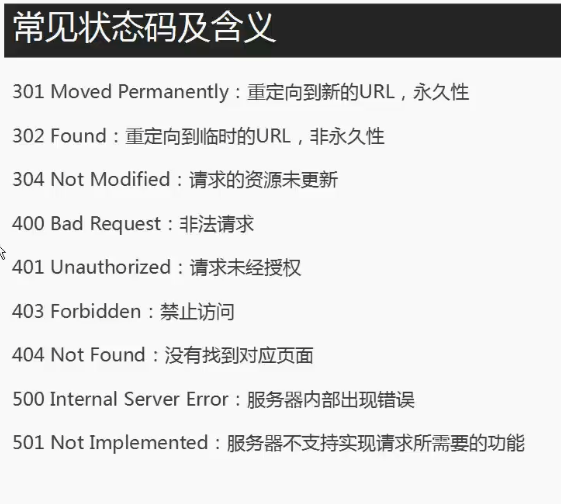
URLError:
1. 连不上服务器
2. 远程url不存在
3. 本地无网络
4. 触发HTTPError(URLError的子类)
urlerror和httperror不太一样 里面的属性不一样
try:
# url = "https://blog.csdn.net/"
req = urllib.request.Request("https://www.blog.csdn.net/")
res = urllib.request.urlopen(req)
print(res.read())
except urllib.error.URLError as e:
# urlerror里面不一定有这些属性 但是httperror内有
if hasattr(e,"code"):
print(e.code)
if hasattr(e,"reason"):
print(e.reason)
浏览器伪装技术
当我们爬取一些博客的时候 会返回403的状态码 因为对方服务器会对我们的爬虫进行屏蔽
隐此我们需要将自己的爬虫伪装为浏览器才可以
而浏览器伪装 一般通过报头实现
通过 报头内的 User-Agent字段来识别是否为浏览器
header = ("User-Agent","Mozilla/5.0 (Windows NT 10.0; Win64; x64) AppleWebKit/537.36 (KHTML, like Gecko) Chrome/106.0.0.0 Safari/537.36")
req = urllib.request.Request("https://3gmfw.cn/article/html2/2022/09/11/623404_9.html")
req.add_header(header[0],header[1])
res = urllib.request.urlopen(req)
url = "https://3gmfw.cn/article/html2/2022/09/11/623404_9.html"
opener = urllib.request.build_opener()
# 创建一个 opener对象
opener.addheaders = [header]
# 给opener对象添加头
res2 = opener.open(url).read()
# 利用opener打开网页
with open("./file.html","wb") as f:
f.write(res2)
1. 对于request 添加header key value的形式
2. 对于创建 opener 添加header 以列表形式
防屏蔽爬虫
如果一个IP一直频繁访问一个服务器 就可能导致
该IP被服务器禁止 所以采用代理服务器来进行网页爬取
myIP -> 网页服务器
myIP -> 代理服务器 -> 网页服务器
通过代理服务器 每次都是不同的ip
使用代理服务器 创建opener
def use_proxy2(url,proxy_addr):
proxy = urllib.request.ProxyHandler({"http":proxy_addr})
opener = urllib.request.build_opener(proxy)
opener.addheaders = [("User-Agent","Mozilla/5.0 (Windows NT 10.0; Win64; x64) AppleWebKit/537.36 (KHTML, like Gecko) Chrome/106.0.0.0 Safari/537.36")]
urllib.request.install_opener(opener)
# 将opener安装 可以使用urlopen 而不是opener.open()
return urllib.request.urlopen(url).read()
res = use_proxy2("https://3gmfw.cn","180.119.93.220:8888")

 浙公网安备 33010602011771号