前端学习笔记---HTML介绍及基础语法2
HTML基础标签--2
接上回
6. a标签:
<a href="url" target="_self">描述信息</a>
(1).href 放入网址或者放其他标签的id值 若id值则加: #
(2).target 生产新页面或者当前页面
_self 当前页面(默认)
_target 新建页面跳转
a标签一般有两个作用:
1.点击跳入新网页 若放入的是网址则跳入新网址
2.点击跳到指定位置 若是id值则跳入id锚点位置
<a href="http://www.baidu.com" target="_self">点我进入百度</a>
效果1如下:

<a href="#xx" target="_self">点我进入底部</a>
<br><br><br><br><br><br><br><br><br><br><br><br><br><br><br><br><br><br><br><br><br><br><br><br>
<h1 id="xx">我是底部</h1>
效果2如下(点击则跳转到“我是底部”处):

ps:当未点击时,展示信息的是蓝色,点击后则变为紫色
id属性:类似于标签的身份证号 在同一个html页面上id值不能重复
class属性:该值类似于面向对象中类的继承,一个标签可以继承多个class值
标签内部可以自定义属性且不止一个
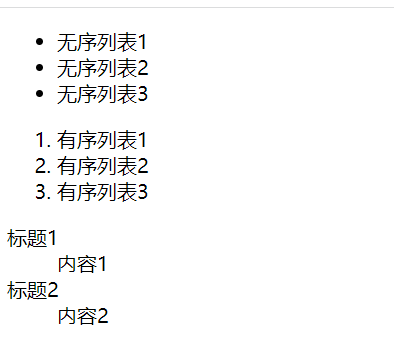
7. 列表标签(虽然很丑,但是修饰后就好看了)
无序列表
<ul type="xxx">
<li>无序列表1</li>
<li>无序列表2</li>
<li>无序列表3</li>
</ul>
有序列表
<ol>
<li>有序列表1</li>
<li>有序列表2</li>
<li>有序列表3</li>
</ol>
标题列表
<dl>
<dt>标题1</dt>
<dd>内容1</dd>
<dt>标题2</dt>
<dd>内容2</dd>
</dl>
效果如下:

8. 表格标签(只要展示数据都可以使用表格标签)
<table>
<thead>
<tr>
<th>username</th>
<th>password</th>
<th>hobby</th>
</tr>
</thead>
<tbody>
<tr>
<td>cc</td>
<td>123</td>
<td>study</td>
</tr>
<tr>
<td>ccc</td>
<td>234</td>
<td>learn</td>
</tr>
</tbody>
</table>
(1). <tr></tr> 在一个tr内的是一行数据
(2). <th></th> 在th内的是加粗文本
(3). <td></td> 在td内的是普通文本
(4). <thead></thead> 表头
(5). <tbody></tbody> 数据
效果如下:

ps: 一些表格标签属性效果:
<td rowspan=“2”>cc</td>
<td colspan=“2”>123</td>
<table border="1" cellpadding="5" cellspacing="5">
rowspan:竖占位数
colspan:横占位数
border:边框效果
cellpadding:内边框与文字距离
cellspacing:内外边框距离
9. 表单标签(非常重要)
可以获得前端输入的数据,用户的输入,选择,上传
<form action="">这里的数据会被上传到action指定位置</form>
action:
1.什么都不写:
默认给当前页面所在的url提交数据
2.写全路径:
向路径处提交数据
3.仅写后缀'/index/' 自动识别当前服务端的ip和端口并拼接
label标签:
<label for="id">描述文字:</label>
<input type="text" id="id">
点击label标签的描述文字可以跳转到for所指向的id的输入框内

label标签是非必要
input标签(*重要*)
<input type="" value="" name="">
type决定了input的格式与内容
name类似于字典的key,上传数据是(name,data)格式
value是用户的输入或选择后返回的值
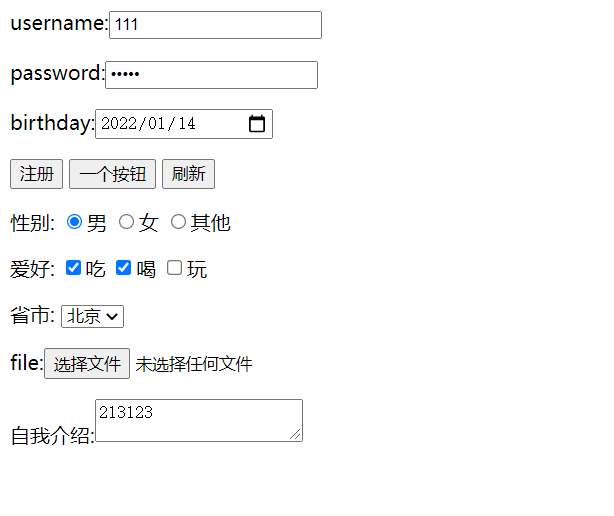
<form action="http://127.0.0.1:5000/index" method="post">
<p> <!--text文本是能输入任何文本的普通文本框-->
username:<input type="text" name="username">
</p>
<p> <!--password是密码文本框-->
password:<input type="password" name="password">
</p>
<p> <!--date是生日选择-->
birthday:<input type="date" name="birthday">
</p>
<p>
<!--submit是触发提交按键-->
<input type="submit" value="注册">
<!--button是仅仅是一个按钮,可以用来定制-->
<input type="button" value="一个按钮">
<!--reset是重置按键-->
<input type="reset" value="刷新">
</p>
以上三个按键标签的value仅为其在按键上的显示
<p>
性别:<!--radio是单选-->
<input type="radio" name="gender" value="boy">男
<input type="radio" name="gender" value="girl">女
<input type="radio" name="gender" value="other">其他
</p>
<p>
爱好:<!--checkbox是多选-->
<input type="checkbox" name="hobby" value="eat">吃
<input type="checkbox" name="hobby" value="drink">喝
<input type="checkbox" name="hobby" value="play">玩
</p>
<p>
省市:<!--下拉框不是input了 而是select-->
<select name="city" id="">
<option value="Beijing">北京</option>
<option value="Shanghai">上海</option>
<option value="Guangzhou">广州</option>
</select>
</p>
<p> <!--file是文件-->
file:<input type="file" name="file">
</p>
<p> <!--textarea是大文本框-->
自我介绍:<textarea name="textarea"></textarea>
</p>
</form>
效果如下:

ps:一些注意事项:
input和tabel都是行内标签
针对用户输入的标签 如果加了value值 那么改value值就是默认值
一些input标签内的其他属性:disable 禁用 readonly 只读 hideen 隐藏
对于form标签,若要上传数据则其methon应该被设为post

浙公网安备 33010602011771号