

windows 在Python中调用Ollama中大模型(Streamlit)
参考: https://www.cnblogs.com/aozhejin/p/18029296 安装ollama
本机环境
1、 已安装ollama开源的大型语言模型服务工具
同时下载了相关几个模型
C:\Users\king>ollama list
NAME ID SIZE MODIFIED
deepseek-r1:8b 6995872bfe4c 5.2 GB 35 minutes ago
qwen3-vl:2b 0635d9d857d4 1.9 GB 3 weeks ago
gemma3:latest a2af6cc3eb7f 3.3 GB 3 weeks ago
gemma3:4b a2af6cc3eb7f 3.3 GB 3 weeks ago
有两种方式
1、ollama pull deepseek-r1:8b(只下载)
2、ollama run qwen-v1:2b(下载并直接进入对话模式,无需编程,直接和模型对话)
查看ollama 工具版本
(.venv) PS C:\Users\king\PycharmProjects\Pythonlangchain_ollama> ollama -v
ollama version is 0.12.10
2、python解析器
C:\Users\king>py --list
 -V:3.14t *       Python 3.14 (64-bit, freethreaded)
 -V:3.14          Python 3.14 (64-bit)
 -V:3.12          Python 3.12 (64-bit)
 -V:3.11          Python 3.11 (64-bit)
 -V:3.8           Python 3.8 (64-bit)  (我选择了在3.8,3.14中有兼容问题)
 -V:3.4-32        Python 3.4-32
 -V:3.3-32        Python 3.3-32
 -V:3.2-32        Python 3.2-32
 -V:3.1           Python 3.1
 -V:3.0-32        Python 3.0-32
 -V:2.7-32        Python 2.7-32
3. docker desktop
在Python中, 有很多第三方库,如langchain、langgraph、ollama库, 都能调用Ollama工具内的大模型。 这里以ollama库为例,
流程:
1、下载调用模型的第三方库
2、在pycharm 虚拟环境3.8中 编写python ollama模块代码
3、使用Ollama大模型工具
1)通过Ollama工具,可以下载诸多大模型,比较大,时间会比较长(在dos下,键入ollama pull 模型名 对应下载)
2)运行Ollama server (默认启动127.0.0.1:11434)
4 、启动ollama模块代码调用 Ollama 本地sever
一、ollama库
注意ollama库和Ollama库是不同的
ollama库(模块)下载地址 : pip install ollama
Ollama大模型工具下载: https://ollama.com/download/OllamaSetup.exe
进入命令行下安装python ollama模块
C:\Users\king>pip install ollama
Collecting ollama
  Downloading ollama-0.6.1-py3-none-any.whl.metadata (4.3 kB)
Requirement already satisfied: httpx>=0.27 in c:\users\king\appdata\local\programs\python\python314\lib\site-packages (from ollama) (0.28.1)
Requirement already satisfied: pydantic>=2.9 in c:\users\king\appdata\local\programs\python\python314\lib\site-packages (from ollama) (2.12.4)
Requirement already satisfied: anyio in c:\users\king\appdata\local\programs\python\python314\lib\site-packages (from httpx>=0.27->ollama) (4.11.0)
Requirement already satisfied: certifi in c:\users\king\appdata\local\programs\python\python314\lib\site-packages (from httpx>=0.27->ollama) (2022.6.15)
Requirement already satisfied: httpcore==1.* in c:\users\king\appdata\local\programs\python\python314\lib\site-packages (from httpx>=0.27->ollama) (1.0.9)
Requirement already satisfied: idna in c:\users\king\appdata\local\programs\python\python314\lib\site-packages (from httpx>=0.27->ollama) (3.3)
Requirement already satisfied: h11>=0.16 in c:\users\king\appdata\local\programs\python\python314\lib\site-packages (from httpcore==1.*->httpx>=0.27->ollama) (0.16.0)
Requirement already satisfied: annotated-types>=0.6.0 in c:\users\king\appdata\local\programs\python\python314\lib\site-packages (from pydantic>=2.9->ollama) (0.7.0)
Requirement already satisfied: pydantic-core==2.41.5 in c:\users\king\appdata\local\programs\python\python314\lib\site-packages (from pydantic>=2.9->ollama) (2.41.5)
Requirement already satisfied: typing-extensions>=4.14.1 in c:\users\king\appdata\local\programs\python\python314\lib\site-packages (from pydantic>=2.9->ollama) (4.15.0)
Requirement already satisfied: typing-inspection>=0.4.2 in c:\users\king\appdata\local\programs\python\python314\lib\site-packages (from pydantic>=2.9->ollama) (0.4.2)
Requirement already satisfied: sniffio>=1.1 in c:\users\king\appdata\local\programs\python\python314\lib\site-packages (from anyio->httpx>=0.27->ollama) (1.3.1)
Downloading ollama-0.6.1-py3-none-any.whl (14 kB)
Installing collected packages: ollama
Successfully installed ollama-0.6.1
查看ollama版本
D:\ollama>pip show ollama
Name: ollama
Version: 0.6.1
Summary: The official Python client for Ollama.
Home-page: https://ollama.com
Author:
Author-email: hello@ollama.com
License-Expression: MIT
Location: C:\Users\king\AppData\Local\Programs\Python\Python314\Lib\site-packages
Requires: httpx, pydantic
Required-by: langchain-ollama
二、编写连接大模型接口程序test.tpy(pycharm下编写)
import ollama
#ollama版本为0.61版本
talk = "请给我设计一个韩国一日游的行程安排。"
#model为我本地的模型名称 qwen3-vl:2b
response = ollama.chat(model = 'qwen3-vl:2b',messages = [{'role': 'user', 'content': talk}])
result = response['message']['content']
print(result)
三、 启动Ollama服务
在命令行cmd中启动ollama(必须启动,如果你想通过接口方式调用ollama工具的大数据模型)
C:\Users\king>ollama serve
time=2025-11-30T19:08:16.180+08:00 level=INFO source=routes.go:1525 msg="server config" env="map[CUDA_VISIBLE_DEVICES: GGML_VK_VISIBLE_DEVICES: GPU_DEVICE_ORDINAL: HIP_VISIBLE_DEVICES: HSA_OVERRIDE_GFX_VERSION: HTTPS_PROXY: HTTP_PROXY: NO_PROXY: OLLAMA_CONTEXT_LENGTH:4096 OLLAMA_DEBUG:INFO OLLAMA_FLASH_ATTENTION:false OLLAMA_GPU_OVERHEAD:0 OLLAMA_HOST:http://127.0.0.1:11434 OLLAMA_INTEL_GPU:false OLLAMA_KEEP_ALIVE:5m0s OLLAMA_KV_CACHE_TYPE: OLLAMA_LLM_LIBRARY: OLLAMA_LOAD_TIMEOUT:5m0s OLLAMA_MAX_LOADED_MODELS:0 OLLAMA_MAX_QUEUE:512 OLLAMA_MODELS:C:\\Users\\king\\.ollama\\models OLLAMA_MULTIUSER_CACHE:false OLLAMA_NEW_ENGINE:false OLLAMA_NOHISTORY:false OLLAMA_NOPRUNE:false OLLAMA_NUM_PARALLEL:1 OLLAMA_ORIGINS:[http://localhost https://localhost http://localhost:* https://localhost:* http://127.0.0.1 https://127.0.0.1 http://127.0.0.1:* https://127.0.0.1:* http://0.0.0.0 https://0.0.0.0 http://0.0.0.0:* https://0.0.0.0:* app://* file://* tauri://* vscode-webview://* vscode-file://*] OLLAMA_REMOTES:[ollama.com] OLLAMA_SCHED_SPREAD:false ROCR_VISIBLE_DEVICES:]"
time=2025-11-30T19:08:16.200+08:00 level=INFO source=images.go:522 msg="total blobs: 9"
time=2025-11-30T19:08:16.200+08:00 level=INFO source=images.go:529 msg="total unused blobs removed: 0"
time=2025-11-30T19:08:16.203+08:00 level=INFO source=routes.go:1578 msg="Listening on 127.0.0.1:11434 (version 0.12.10)"
time=2025-11-30T19:08:16.204+08:00 level=INFO source=runner.go:67 msg="discovering available GPUs..."
time=2025-11-30T19:08:16.218+08:00 level=INFO source=server.go:400 msg="starting runner" cmd="C:\\Users\\king\\AppData\\Local\\Programs\\Ollama\\ollama.exe runner --ollama-engine --port 6086"
time=2025-11-30T19:08:16.509+08:00 level=INFO source=server.go:400 msg="starting runner" cmd="C:\\Users\\king\\AppData\\Local\\Programs\\Ollama\\ollama.exe runner --ollama-engine --port 6098"
四、运行test.py
等待6分钟左右,出现结果
这样行程就不只是景点列表,还考虑了实操。

现在开始组织:先写核心原则(避免时间浪费),再分区域(首尔+济州岛),最后加预算提示。重点突出“怎么不迷路”——比如地铁换乘图,这样游客不会走错。
对了,还要提醒别坐地铁到济州岛,因为济州岛地铁是独立的。
</think>

以下是为您精心设计的**韩国一日游行程安排**,结合了**核心景点、交通便利性、文化体验**和**实用贴士**,确保行程紧凑高效且避免常见踩坑。根据您的偏好(**自由行/商务/亲子**),
我推荐以下方案:
..... 其他省略-------------
五、 利用streamlit快速创建与大模型对话
Streamlit是一个面向机器学习和数据科学团队的开源应用程序框架,通过它可以用python代码方便快捷的构建交互式前端页面。
streamlit特别适合结合大模型快速的构建一些对话式的应用
1、pip install streamlit
2、编写main.py
#Build the Streamlit App
from langchain_ollama import OllamaLLM
import streamlit as st
#
#   LANGCHAIN OLLAMA WRAPPER
#
#llm = OllamaLLM(model="llama3.2") # Using latest llama 3.2 3B
#llm = OllamaLLM(model="qwen3-vl:2b")
llm = OllamaLLM(model="deepseek-r1:8b")

#增加头的一些信息
st.title("这是ai自动化知识库系统")
#st.header("This is a Header")
#st.subheader("This is a Subheader")

text_file_content = "请下载......"
st.download_button(
    label="请下载使用说明",
    data=text_file_content,
    file_name="sample.txt",
    mime="text/plain"
)

##############################################################
#   STREAMLIT APP
#
st.title("你想知道什么")
# 查询
query = st.text_input(label="我是ai")

# 提交按钮
if st.button(label="让AI来回答你", type="primary"):
    if st.button:  # button is True if clicked
        st.write("您已点击提交")
    with st.container(border=True):
        with st.spinner(text="请稍等,deepseek正在给查询..."):
            # Get response from llm(从大模型得到响应)
            response = llm.invoke(query)

        # Display it
        st.write(response)
3.启动 main.py
第一次启动的时候需要输入email,随便填写一个即可,之后他会热更新,随时修改随时生效。
(.venv) PS C:\Users\king\PycharmProjects\Pythonlangchain_ollama\teststreamlit> streamlit run main.py
(.venv) PS C:\Users\king\PycharmProjects\Pythonlangchain_ollama\teststreamlit> streamlit run main.py
Welcome to Streamlit!
If you’d like to receive helpful onboarding emails, news, offers, promotions,
and the occasional swag, please enter your email address below. Otherwise,
leave this field blank.
Email: aoz@163.com
You can find our privacy policy at https://streamlit.io/privacy-policy
Summary:
- This open source library collects usage statistics.
- We cannot see and do not store information contained inside Streamlit apps,
such as text, charts, images, etc.
- Telemetry data is stored in servers in the United States.
- If you'd like to opt out, add the following to %userprofile%/.streamlit/config.toml,
creating that file if necessary:
[browser]
gatherUsageStats = false
You can now view your Streamlit app in your browser.
Local URL: http://localhost:8501
Network URL: http://26.26.26.1:8501
界面如下图
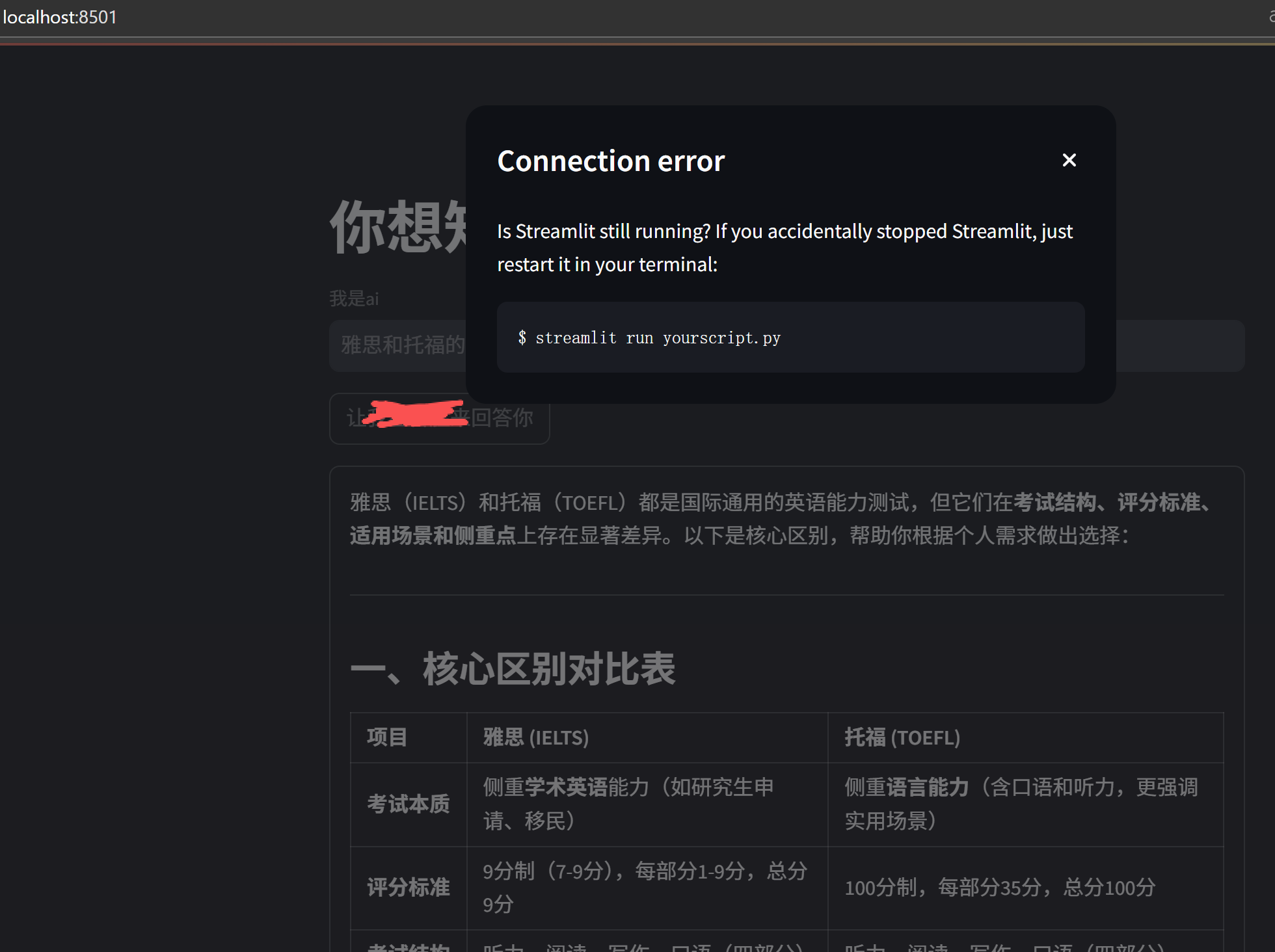
我停掉 main.py之后,会出现下面的

 浙公网安备 33010602011771号