
计算机视觉-匹配地理图像标记
1、提取特征
先对图像使用SIFT特征提取代码进行处理,并且将特征保存在和图像同名的文件路径下(文件名后缀是.sift,而不是.jpg)
 download_path = r"D:\LYF\Lecture02\image"
    path = r"D:\LYF\Lecture02\image"

    imlist = imtools.get_imlist(download_path)
    nbr_images = len(imlist)

    featlist = [imname[:-3] + 'sift' for imname in imlist]
    for i, imname in enumerate(imlist):
        sift.process_image(imname, featlist[i])
2、使用局部描述子匹配
我们可以对所有的组合图像进行逐个匹配,我们将每对图像间的匹配特征数保存在matchscores数组中
 matchscores = zeros((nbr_images, nbr_images))

    for i in range(nbr_images):
        for j in range(i, nbr_images):  # only compute upper triangle
            print('comparing ', imlist[i], imlist[j])
            l1, d1 = sift.read_features_from_file(featlist[i])
            l2, d2 = sift.read_features_from_file(featlist[j])
            matches = sift.match_twosided(d1, d2)
            nbr_matches = sum(matches > 0)
            print('number of matches = ', nbr_matches)
            matchscores[i, j] = nbr_matches

    # copy values
    for i in range(nbr_images):
        for j in range(i + 1, nbr_images):  # no need to copy diagonal
            matchscores[j, i] = matchscores[i, j]
3、可视化连接图像
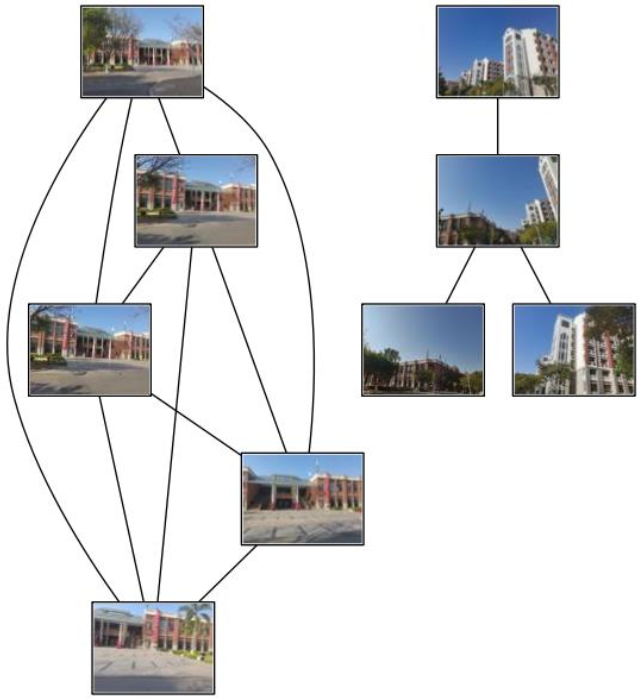
为了创建显示可能图像组的图,如果匹配的数目高于一个阈值,我们使用边来连接相应的图像节点。为了得到图中的图像,需要使用图像的全路径(使用path变量表示)
    # 可视化
    threshold = 2  # min number of matches needed to create link

    g = pydot.Dot(graph_type='graph')  # don't want the default directed graph

    for i in range(nbr_images):
        for j in range(i + 1, nbr_images):
            if matchscores[i, j] > threshold:
                # first image in pair
                im = Image.open(imlist[i])
                im.thumbnail((100, 100))
                filename = path + str(i) + '.jpg'
                im.save(filename)  # need temporary files of the right size
                g.add_node(pydot.Node(str(i), fontcolor='transparent', shape='rectangle', image=filename))

                # second image in pair
                im = Image.open(imlist[j])
                im.thumbnail((100, 100))
                filename = path + str(j) + '.jpg'
                im.save(filename)  # need temporary files of the right size
                g.add_node(pydot.Node(str(j), fontcolor='transparent', shape='rectangle', image=filename))

                g.add_edge(pydot.Edge(str(i), str(j)))
    g.write_jpg('1.jpg')
效果图:

 浙公网安备 33010602011771号