


windows作为跳板登录内网服务器
说明
windows作为跳板登录内网服务器,
分析
公网运行frps,win运行frpc,win运行openssh,可以从公网端口登录到win的openssh,然后通过win的cmd命令行,ssh登录到内网服务器。
win安装openssh:
https://www.cnblogs.com/allalonewithyou/p/19354306
步骤
正常两步登录
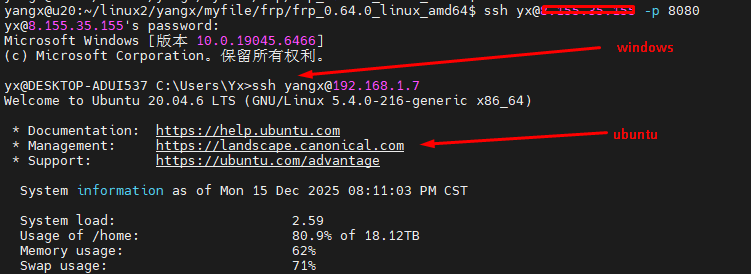
一条命令直接登录
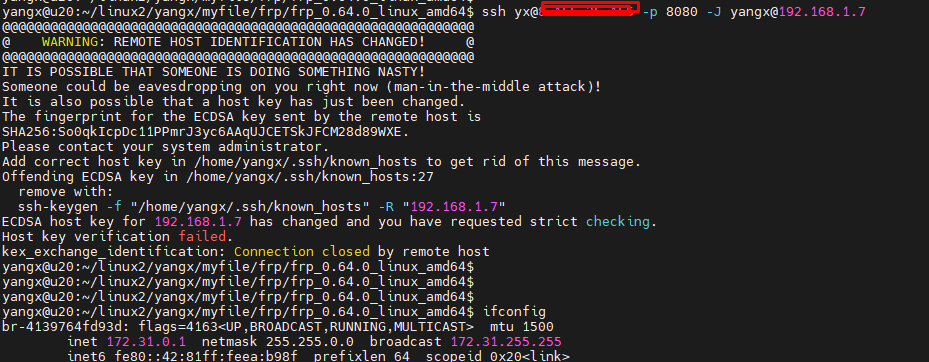
两次登录太麻烦了,直接一条命令直接登录。
ssh <jump-user>@<jump-host>:<port> -J <target-user>@<target-host>
<jump-user>:跳板机的用户名
<jump-host>:跳板机的地址(可以是域名或 IP)
<port>:跳板机的端口(默认是 22,可以根据实际情况修改)
<target-user>:目标服务器的用户名
<target-host>:目标服务器的地址(可以是域名或 IP)
参考:
https://www.cnblogs.com/deali/p/18678315
ssh yx@<公网IP> -p 8080 -J yangx@192.168.1.7
本文来自博客园,作者:杨旭0324,转载请注明原文链接:https://www.cnblogs.com/allalonewithyou/p/19354339,个人邮箱:yaonie4444@foxmail.com

 浙公网安备 33010602011771号