
imx93和imx91的CPU温度采集
说明
板子做高低温测试
步骤
把板子放进高低温箱之后的,运行以下脚本,采集CPU温度和频率。
while true
do
    timestamp=$(date '+%Y-%m-%d %H:%M:%S')
    cpu_temp=$(cat /sys/class/thermal/thermal_zone0/temp)
    cpu_temp=$(echo "$cpu_temp")
    cpu_freq=$(mhz)
    cpu_freq=$(echo "$cpu_freq")

    echo "[$timestamp] CPU Temp: $cpu_temp°C, CPU Freq: $cpu_freq MHz"

    echo "$timestamp, $cpu_temp °C, $cpu_freq MHz" >> IMX93_monitor.log

    sleep 5
done
调用流程
-
通过 cat
/sys/class/thermal/thermal_zone0/temp访问该节点. -
sysfs 接口处理:
系统调用temp_show函数(定义在 thermal_sysfs.c 中)
该函数通过to_thermal_zone(dev)获取对应的thermal_zone_device结构体
调用thermal_zone_get_temp(tz, &temperature)函数获取温度 -
温度获取核心函数:
thermal_zone_get_temp函数(定义在 thermal_helpers.c 中)
检查 tz 是否有效
获取互斥锁保护:mutex_lock(&tz->lock)
调用__thermal_zone_get_temp(tz, temp)获取实际温度
释放互斥锁:mutex_unlock(&tz->lock) -
实际温度读取:
__thermal_zone_get_temp函数调用具体硬件的温度读取回调:tz->ops->get_temp(tz, temp)
如果启用了温度模拟功能,会根据条件决定是否使用模拟温度 -
硬件驱动实现(以 IMX91 平台为例):
具体实现为imx91_tmu_get_temp函数(定义在 imx91_thermal.c 中)
轮询 STAT0 寄存器,等待温度数据准备就绪:readl_relaxed_poll_timeout(tmu->base + STAT0, val, val & STAT0_DRDY0_IF_MASK, 1000, 40000)
从 DATA0 寄存器读取温度原始数据:val = readl_relaxed(tmu->base + DATA0) & 0xffffU
将原始数据转换为实际温度值:*temp = (int)val * 1000LL / 64LL(转换为 m°C)
检查温度是否在有效范围内(-40°C 到 125°C) -
结果返回:
温度值逐层返回,最终由temp_show函数转换为字符串格式:sprintf(buf, "%d\n", temperature)
返回给用户空间显示
完整调用链: 用户读取操作 → sysfs temp_show → thermal_zone_get_temp → __thermal_zone_get_temp → tz->ops->get_temp(硬件特定实现,如 imx91_tmu_get_temp)。
函数分析
static int imx91_tmu_get_temp(struct thermal_zone_device *tz, int *temp)
{
	struct tmu_sensor *sensor = thermal_zone_device_priv(tz);
	struct imx91_tmu *tmu = sensor->priv;
	u32 val;
	int ret;
    // 轮询等待温度数据就绪
	ret = readl_relaxed_poll_timeout(tmu->base + STAT0, val,
					 val & STAT0_DRDY0_IF_MASK, 1000,
					 40000);
	if (ret)
		return -EAGAIN;
    // 读取温度原始数据
	val = readl_relaxed(tmu->base + DATA0) & 0xffffU;
	printk(KERN_INFO "IMX91 TMU: Raw sensor data: 0x%04x\n", val);
    // 转换为实际温度值
	*temp = (int)val * 1000LL / 64LL;
	if (*temp < TMU_TEMP_LOW_LIMIT || *temp > TMU_TEMP_HIGH_LIMIT)
		return -EAGAIN;
	printk("yx ------- temp: %d\n", *temp);
	return 0;
}
问题
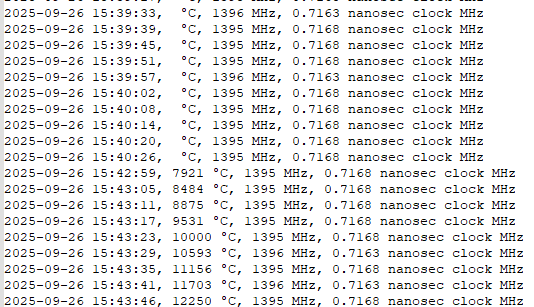
IMX91用上面的脚本高低温测试过程中,发现温度采集有问题,到零下就不显示了。
从高到低测试,温度采集正常,到零下就不显示了。
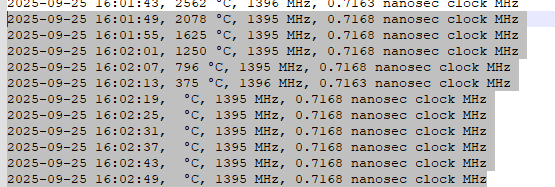
从低到高测试,零下不正常,零上温度采集正常。
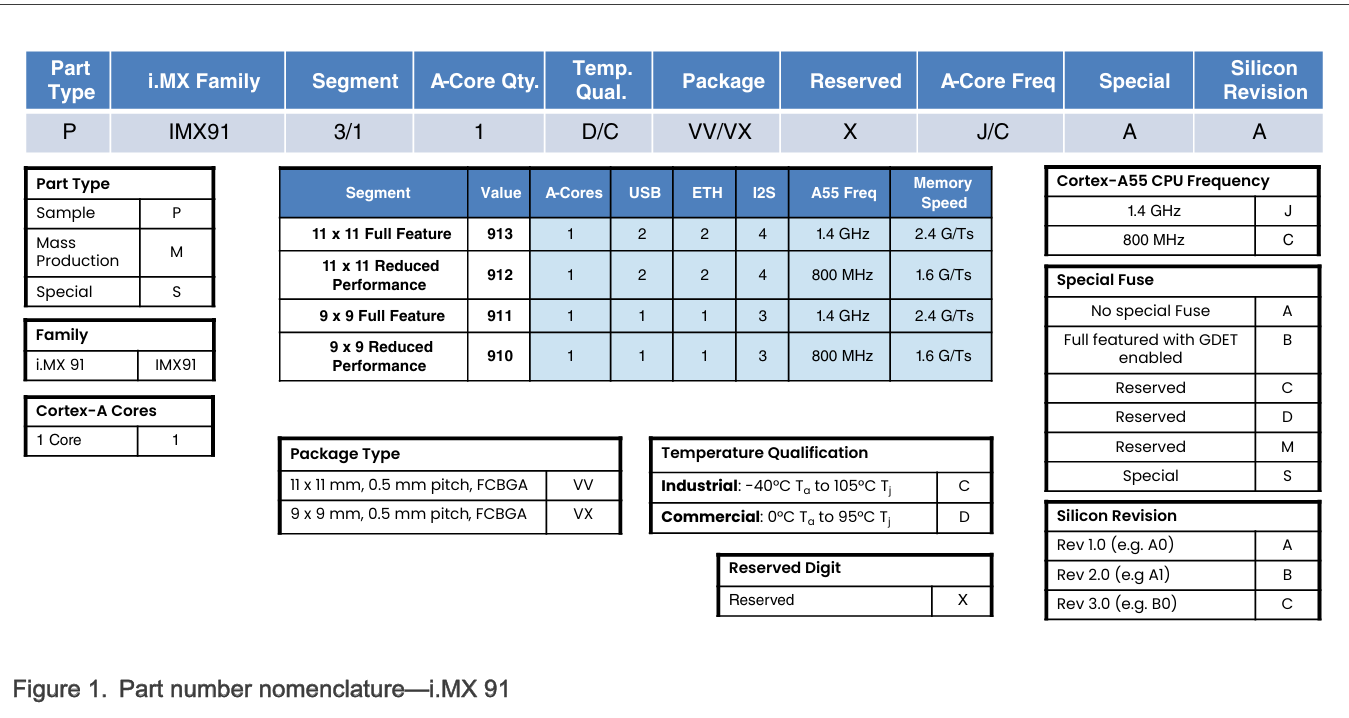
芯片型号是:PIMX9131CVVXJAA
里面的C应该是工业级的版本,支持-40°C到125°C的温度范围。
IMX93的零下测试是正常的,但是IMX91的不显示0°C以下的温度,很奇怪。
解决
是数据类型的问题
https://github.com/nxp-imx/linux-imx/commit/80fc5149ecab31ca7f7ec123443e19b652cfb75e
或者强制转换即可。
*temp = (int16_t)val * 1000LL / 64LL;
额外
uboot配置温度
/uboot/uboot$ git show 294263d694ddc4f856601275d029a5be50a31f55
commit 294263d694ddc4f856601275d029a5be50a31f55 (IAC-IMX93-MB)
Author: Yangx <@.com>
Date:   Tue May 20 13:57:41 2025 +0800

    QY: 修改uboot开机检测的温度为105度

diff --git a/arch/arm/dts/imx93.dtsi b/arch/arm/dts/imx93.dtsi
index 16d2c8c0ad..d31e7b00d1 100644
--- a/arch/arm/dts/imx93.dtsi
+++ b/arch/arm/dts/imx93.dtsi
@@ -150,13 +150,13 @@

                        trips {
                                cpu_alert: cpu-alert {
-                                       temperature = <80000>;
+                                       temperature = <100000>;
                                        hysteresis = <2000>;
                                        type = "passive";
                                };

                                cpu_crit: cpu-crit {
-                                       temperature = <90000>;
+                                       temperature = <105000>;
                                        hysteresis = <2000>;
                                        type = "critical";
                                };
/uboot/uboot$
/uboot/uboot$ git show 312df54b92637700d710c380d76e42eab28fcdf5
commit 312df54b92637700d710c380d76e42eab28fcdf5
Author: yangx <yangx@.com>
Date:   Tue Apr 22 17:49:03 2025 +0800

    QY: 修改高温限制为105度

diff --git a/arch/arm/mach-imx/imx9/native/soc.c b/arch/arm/mach-imx/imx9/native/soc.c
index 786acbac7b..db133e44dc 100644
--- a/arch/arm/mach-imx/imx9/native/soc.c
+++ b/arch/arm/mach-imx/imx9/native/soc.c
@@ -177,8 +177,8 @@ u32 get_cpu_temp_grade(int *minc, int *maxc)
                        *minc = -40;
                        *maxc = 125;
                } else if (val == TEMP_INDUSTRIAL) {
-                       *minc = -40;
-                       *maxc = 105;
+                       *minc = -30;
+                       *maxc = 110;
                } else if (val == TEMP_EXTCOMMERCIAL) {
                        if (is_imx93()) {
                                /* imx93 only has extended industrial*/
本文来自博客园,作者:杨旭0324,转载请注明原文链接:https://www.cnblogs.com/allalonewithyou/p/19335272,个人邮箱:yaonie4444@foxmail.com


 浙公网安备 33010602011771号