
IMX6D的LVDS调试
IMX6DxxYM:
https://www.nxp.com.cn/products/i.MX6D
LDB:LVDS Display Bridge
LCD (Parallel LCD Interface)
并行接口:RGB接口,多条数据线并行传输
信号线多:通常包含 RGB数据线(16/18/24位)、时钟、行同步、场同步等
直接驱动:直接连接到LCD面板的时序控制器
LDB (LVDS Display Bridge)
串行接口:LVDS(低压差分信号)接口
信号线少:差分对传输,抗干扰能力强,适合长距离传输
需要转换:将并行RGB数据转换为串行LVDS信号
LCD接口:                       LDB接口:
CPU --> RGB线 --> LCD面板       CPU --> LDB --> LVDS线 --> LCD面板
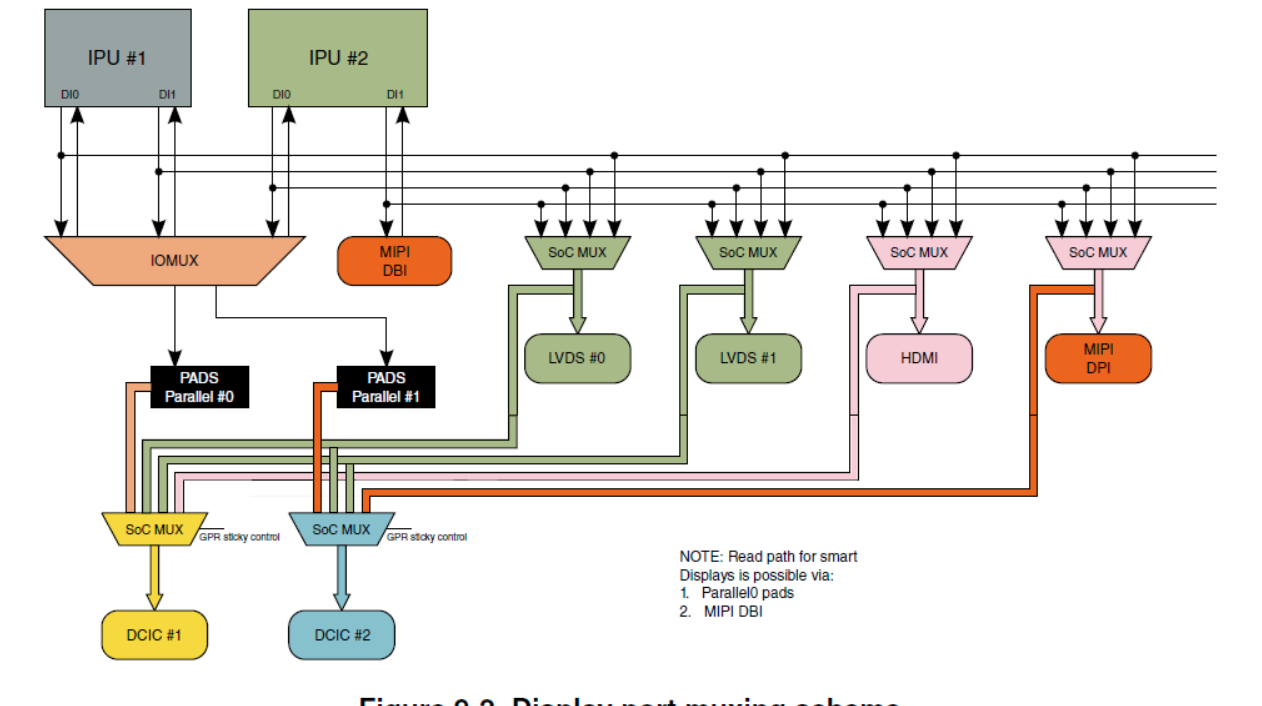
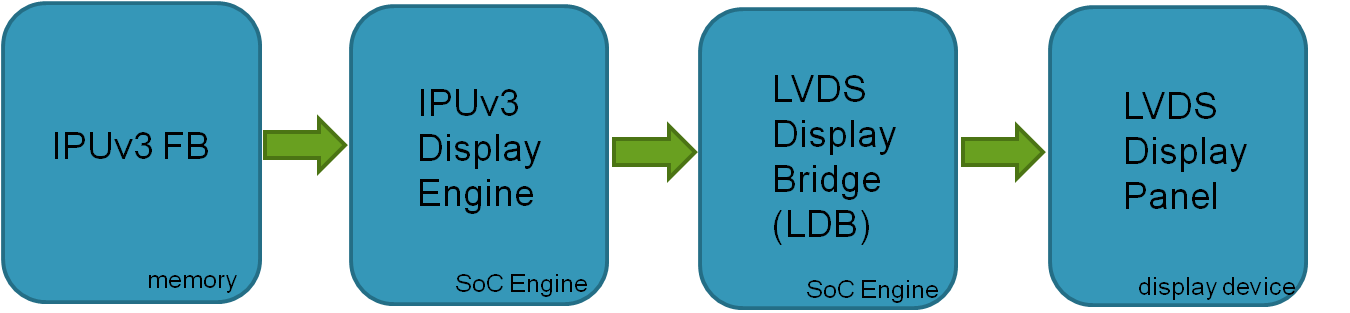
drivers/video/fbdev/mxc/mxc_ipuv3_fb.c
使用uboot的参数。mxcfb_option_setup函数。
这里面有个说错了,并不是色深越深越好。
屏幕手册:
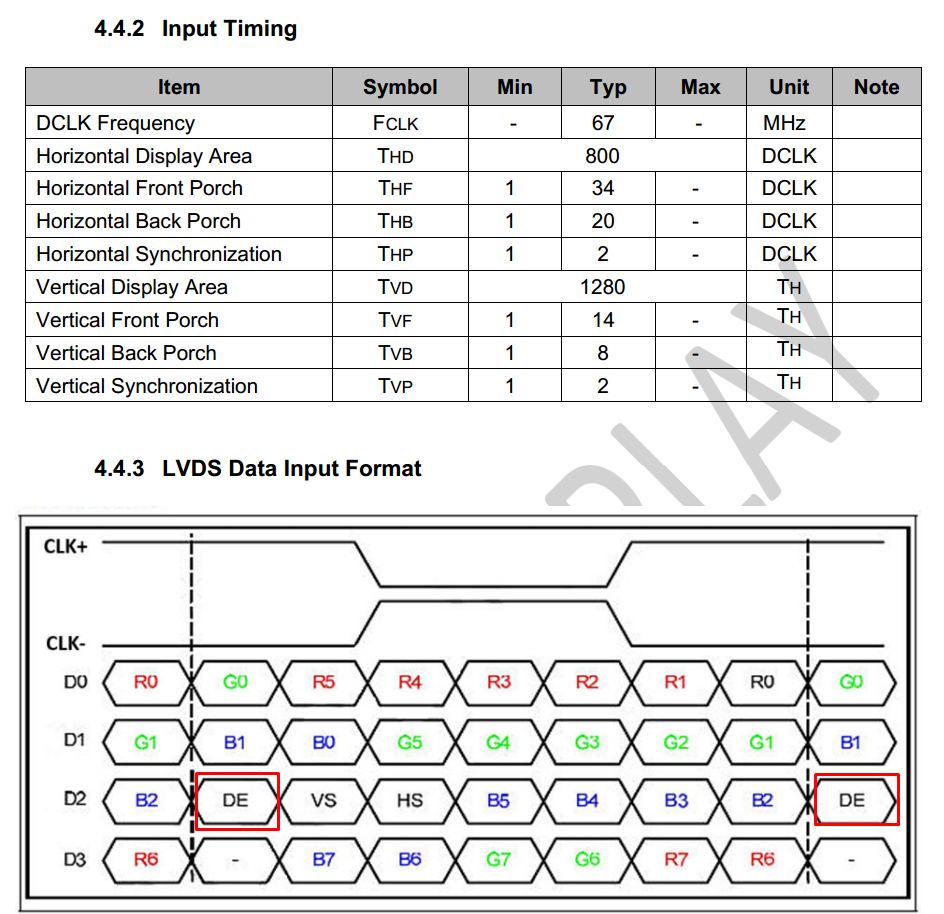
控制背光的,cabc。
	hannstar_cabc {
		compatible = "hannstar,cabc";
		lvds0 {
			gpios = <&gpio6 15 GPIO_ACTIVE_HIGH>;
		};
		lvds1 {
			gpios = <&gpio6 16 GPIO_ACTIVE_HIGH>;
		};
	};
# HDMI输入 -> 屏幕显示
视频源 --HDMI--> DCIC1 --IPU--> LDB --LVDS--> 显示屏

# LVDS输入 -> 屏幕显示
视频源 --LVDS1--> DCIC2 --IPU--> LDB --LVDS0--> 显示屏

&dcic1 {
	dcic_id = <0>;
	dcic_mux = "dcic-hdmi";
	status = "okay";
};

&dcic2 {
	dcic_id = <1>;
	dcic_mux = "dcic-lvds1";
	status = "okay";
};
drivers/video/fbdev/mxc/ldb.c
取uboot的参数。
/*
 *    "ldb=spl0/1"       --      split mode on DI0/1
 *    "ldb=dul0/1"       --      dual mode on DI0/1
 *    "ldb=sin0/1"       --      single mode on LVDS0/1
 *    "ldb=sep0/1" 	 --      separate mode begin from LVDS0/1
 *
 *    there are two LVDS channels(LVDS0 and LVDS1) which can transfer video
 *    datas, there two channels can be used as split/dual/single/separate mode.
 *
 *    split mode means display data from DI0 or DI1 will send to both channels
 *    LVDS0+LVDS1.
 *    dual mode means display data from DI0 or DI1 will be duplicated on LVDS0
 *    and LVDS1, it said, LVDS0 and LVDS1 has the same content.
 *    single mode means only work for DI0/DI1->LVDS0 or DI0/DI1->LVDS1.
 *    separate mode means you can make DI0/DI1->LVDS0 and DI0/DI1->LVDS1 work
 *    at the same time.
 */
static int __init ldb_parse_uboot_param(char *options)
{
	if (!strcmp(options, "spl0"))
		spl_mode = true;
	else if (!strcmp(options, "spl1"))
		spl_mode = true;
	else if (!strcmp(options, "dul0"))
		dual_mode = true;
	else if (!strcmp(options, "dul1"))
		dual_mode = true;
	//other is single or separate mode

	return 1;
}
__setup("ldb=", ldb_parse_uboot_param);
- Split Mode(分割模式)
ldb=spl0    # DI0显示数据分割到LVDS0+LVDS1
ldb=spl1    # DI1显示数据分割到LVDS0+LVDS1
# 单个显示接口的数据被分割到两个LVDS通道
- Dual Mode(双显示模式)
ldb=dul0    # DI0数据复制到LVDS0和LVDS1
ldb=dul1    # DI1数据复制到LVDS0和LVDS1
# 同内容复制到两个LVDS通道
- Single Mode(单通道模式)
# 默认为单通道模式:DI0/DI1 -> LVDS0 或 DI0/DI1 -> LVDS1
- Separate Mode(独立模式)
# 需要设备树配置:DI0->LVDS0 和 DI1->LVDS1 同时工作
boot参数:
setenv bootargs_mmc 'setenv bootargs console=${console},${baudrate} ${smp} root=${mmcroot} video=mxcfb0:dev=ldb,LDB-VGA,if=RGB24,fbpix=RGB24,int_clk,ldb=dul0'
root@qiyang:~# dmesg | grep ldb
[    0.000000] Kernel command line: console=ttymxc0,115200 root=/dev/mmcblk3p2 video=mxcfb0:dev=ldb,LDB-VGA,if=RGB24,fbpix=RGB24,int_clk,ldb=dul0
[    0.321007] mxc_sdc_fb fb@0: registered mxc display driver ldb
[    0.523546] mxc_sdc_fb fb@3: registered mxc display driver ldb
设备树:
&ldb {
	compatible = "fsl,imx6q-ldb", "fsl,imx53-ldb";

	clocks = <&clks IMX6QDL_CLK_LDB_DI0>, <&clks IMX6QDL_CLK_LDB_DI1>,
		 <&clks IMX6QDL_CLK_IPU1_DI0_SEL>, <&clks IMX6QDL_CLK_IPU1_DI1_SEL>,
		 <&clks IMX6QDL_CLK_IPU2_DI0_SEL>, <&clks IMX6QDL_CLK_IPU2_DI1_SEL>,
		 <&clks IMX6QDL_CLK_LDB_DI0_DIV_3_5>, <&clks IMX6QDL_CLK_LDB_DI1_DIV_3_5>,
		 <&clks IMX6QDL_CLK_LDB_DI0_DIV_7>, <&clks IMX6QDL_CLK_LDB_DI1_DIV_7>,
		 <&clks IMX6QDL_CLK_LDB_DI0_DIV_SEL>, <&clks IMX6QDL_CLK_LDB_DI1_DIV_SEL>;
	clock-names = "ldb_di0", "ldb_di1",
		      "di0_sel", "di1_sel",
		      "di2_sel", "di3_sel",
		      "ldb_di0_div_3_5", "ldb_di1_div_3_5",
		      "ldb_di0_div_7", "ldb_di1_div_7",
		      "ldb_di0_div_sel", "ldb_di1_div_sel";

};
sysfs
root@qiyang:/sys/class/graphics# ls -al
total 0
drwxr-xr-x  2 root root 0 Jan  1 00:00 .
drwxr-xr-x 56 root root 0 Jan  1 00:00 ..
lrwxrwxrwx  1 root root 0 Jan  1 00:00 fb0 -> ../../devices/soc0/fb@0/graphics/fb0
lrwxrwxrwx  1 root root 0 Jan  1 00:00 fb1 -> ../../devices/soc0/fb@0/graphics/fb1
lrwxrwxrwx  1 root root 0 Jan  1 00:00 fb2 -> ../../devices/soc0/fb@1/graphics/fb2
lrwxrwxrwx  1 root root 0 Jan  1 00:00 fb3 -> ../../devices/soc0/fb@1/graphics/fb3
lrwxrwxrwx  1 root root 0 Jan  1 00:00 fb4 -> ../../devices/soc0/fb@3/graphics/fb4
lrwxrwxrwx  1 root root 0 Jan  1 00:00 fbcon -> ../../devices/virtual/graphics/fbcon


/sys/bus/platform/drivers/ldb/               # LDB驱动
crtc
&ldb {
	lvds-channel@0 {
		crtc = "ipu-di0";
	};

	lvds-channel@1 {
		crtc = "ipu2-di1";
	};
};
# drivers/video/fbdev/mxc/ldb.c
static const char *ldb_crtc_mappings[] = {
	[CRTC_IPU_DI0] = "ipu-di0",
	[CRTC_IPU_DI1] = "ipu-di1",
	[CRTC_IPU1_DI0] = "ipu1-di0",
	[CRTC_IPU1_DI1] = "ipu1-di1",
	[CRTC_IPU2_DI0] = "ipu2-di0",
	[CRTC_IPU2_DI1] = "ipu2-di1",
	[CRTC_LCDIF] = "lcdif",
	[CRTC_LCDIF1] = "lcdif1",
	[CRTC_LCDIF2] = "lcdif2",
};
使用:
setenv bootargs_mmc 'setenv bootargs console=${console},${baudrate} ${smp} root=${mmcroot} video=mxcfb0:dev=ldb,LDB-WSVGA,if=RGB24,bpp=24,ldb=dul0'
日志:
mxc_sdc_fb fb@0: registered mxc display driver ldb
root@qiyang:~# fbset

mode "1280x800-62"
    # D: 67.912 MHz, H: 50.832 kHz, V: 61.689 Hz
    geometry 1280 800 1280 800 24
    timings 14725 20 34 8 14 2 2
    rgba 8/16,8/8,8/0,0/0
endmode

cat /sys/class/graphics/fb1/modes
本文来自博客园,作者:杨旭0324,转载请注明原文链接:https://www.cnblogs.com/allalonewithyou/p/19269741,个人邮箱:yaonie4444@foxmail.com


 浙公网安备 33010602011771号