前端html+css+js
之前只知道html和css,不知道可以用js设置事件监听,一些输入判断条件就不知道怎么写,上了web课程后有所了解
这是此次作业
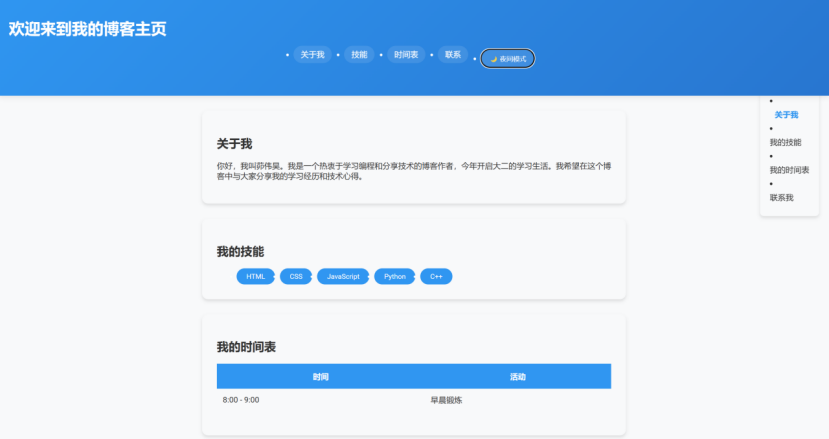
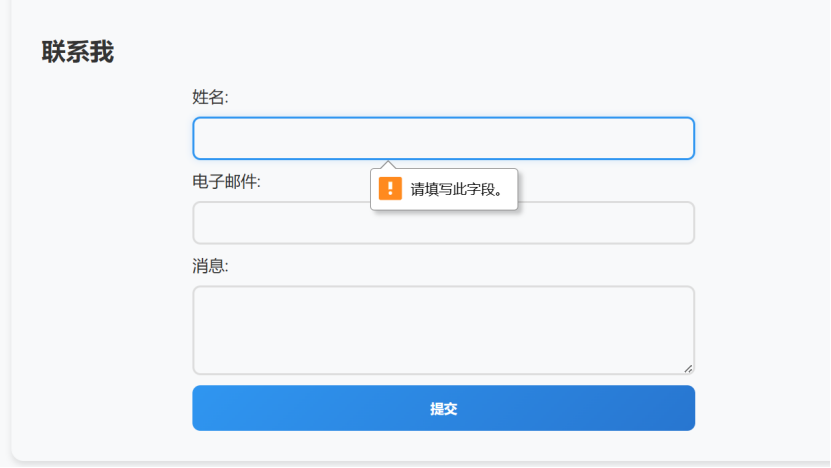
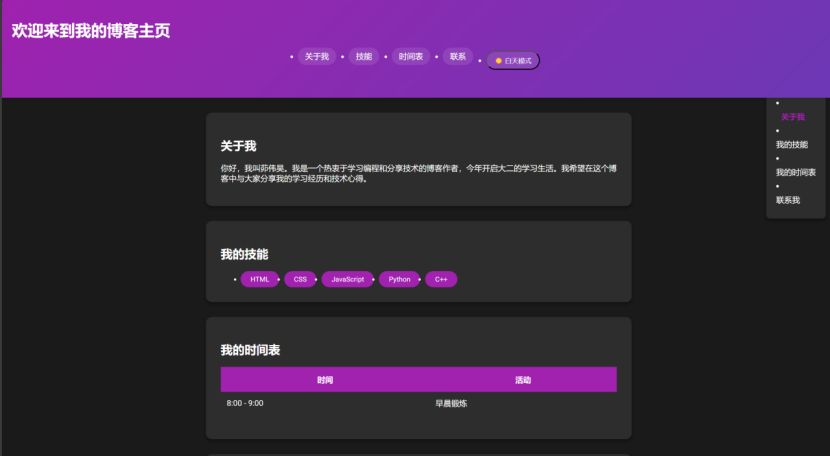
代码是ai生成的,不过可以凭自己大致看懂,加上ai的解释和课堂ppt有所收获
点击查看代码
<!DOCTYPE html>
<html lang="zh">
<head>
    <meta charset="UTF-8">
    <meta name="viewport" content="width=device-width, initial-scale=1.0">
    <title>我的博客主页</title>

    <link href="https://fonts.googleapis.com/css2?family=Roboto:wght@400;700&display=swap" rel="stylesheet">
    <style>
        :root {
            --primary-color: #2196F3;
            --secondary-color: #1976D2;
            --background-color: #f8f9fa;
            --text-color: #333;
            --card-shadow: 0 4px 6px rgba(0, 0, 0, 0.1);
            --header-height: 160px;
        }

        body {
            font-family: 'Roboto', Arial, sans-serif;
            margin: 0;
            padding: 0;
            background-color: var(--background-color);
            color: var(--text-color);
            transition: all 0.3s ease;
        }

        #progress-bar {
            position: fixed;
            top: var(--header-height);
            left: 0;
            height: 4px;
            background: linear-gradient(90deg, #2196F3, #9c27b0);
            z-index: 999;
            transition: width 0.3s ease;
        }

        header {
            background: linear-gradient(135deg, var(--primary-color), var(--secondary-color));
            color: white;
            padding: 20px;
            position: sticky;
            top: 0;
            height: var(--header-height);
            z-index: 1000;
            box-shadow: 0 2px 10px rgba(0, 0, 0, 0.1);
        }

        nav ul {
            display: flex;
            justify-content: center;
            gap: 25px;
            padding: 0;
            margin: 15px 0 0 0;
        }

        nav a, #theme-toggle {
            color: white;
            text-decoration: none;
            padding: 8px 15px;
            border-radius: 25px;
            transition: all 0.3s;
            background: rgba(255, 255, 255, 0.1);
        }

        nav a:hover, #theme-toggle:hover {
            background-color: rgba(255, 255, 255, 0.2);
            transform: translateY(-2px);
        }

        section {
            padding: 30px;
            margin: 30px auto;
            max-width: 800px;
            background: var(--card-bg);
            border-radius: 12px;
            box-shadow: var(--card-shadow);
            scroll-margin-top: calc(var(--header-height) + 20px);
        }

        .dark-theme {
            --primary-color: #9c27b0;
            --secondary-color: #673ab7;
            --background-color: #1a1a1a;
            --text-color: #fff;
            --card-shadow: 0 4px 6px rgba(0, 0, 0, 0.3);
            --card-bg: #2d2d2d;
        }

        /* 其他原有样式... */
        table {
            width: 100%;
            border-collapse: collapse;
            margin: 20px 0;
        }

        th {
            background-color: var(--primary-color);
            color: white;
            padding: 15px;
            font-weight: 700;
        }

        td {
            padding: 12px;
            border-bottom: 1px solid var(--card-bg);
        }

        tr:nth-child(even) {
            background-color: var(--card-bg);
        }

        #skills ul {
            display: flex;
            flex-wrap: wrap;
            gap: 10px;
            margin: 0;
        }

        #skills li {
            background-color: var(--primary-color);
            color: white;
            padding: 8px 20px;
            border-radius: 20px;
            font-size: 14px;
            transition: transform 0.2s;
        }

        #skills li:hover {
            transform: translateY(-3px);
        }

        form {
            display: flex;
            flex-direction: column;
            max-width: 500px;
            margin: 0 auto;
        }

        input, textarea {
            margin: 10px 0;
            padding: 12px;
            border: 2px solid #ddd;
            border-radius: 8px;
            transition: all 0.3s;
            background: var(--card-bg);
            color: var(--text-color);
        }

        input:focus, textarea:focus {
            border-color: var(--primary-color);
            outline: none;
            box-shadow: 0 0 8px rgba(33, 150, 243, 0.2);
        }

        button[type="submit"] {
            padding: 14px;
            background: linear-gradient(135deg, var(--primary-color), var(--secondary-color));
            color: white;
            border: none;
            border-radius: 8px;
            cursor: pointer;
            font-weight: bold;
            transition: all 0.3s;
        }

        button[type="submit"]:hover {
            transform: translateY(-2px);
            box-shadow: 0 5px 15px rgba(33, 150, 243, 0.4);
        }

        .error-message {
            color: #ff4444;
            font-size: 0.8em;
            margin-top: -8px;
            margin-bottom: 10px;
        }

        #toc {
            position: fixed;
            right: 20px;
            top: calc(var(--header-height) + 20px);
            background: var(--card-bg);
            padding: 20px;
            border-radius: 8px;
            box-shadow: var(--card-shadow);
            max-width: 250px;
        }

        .toc-link {
            display: block;
            color: var(--text-color);
            text-decoration: none;
            padding: 8px 0;
            transition: all 0.3s;
        }

        .toc-link.active {
            color: var(--primary-color);
            font-weight: bold;
            transform: translateX(10px);
        }

        @media (max-width: 768px) {
            section {
                margin: 15px;
                padding: 20px;
            }

            nav ul {
                flex-direction: column;
                gap: 10px;
            }

            nav a, #theme-toggle {
                display: block;
                text-align: center;
            }

            #skills ul {
                flex-direction: column;
            }

            #toc {
                display: none;
            }

            :root {
                --header-height: 200px;
            }
        }
    </style>
</head>
<body>

<div id="progress-bar"></div>

<header>
    <h1>欢迎来到我的博客主页</h1>
    <nav>
        <ul>
            <li><a href="#about">关于我</a></li>
            <li><a href="#skills">技能</a></li>
            <li><a href="#schedule">时间表</a></li>
            <li><a href="#contact">联系</a></li>
            <li><button id="theme-toggle">🌙 夜间模式</button></li>
        </ul>
    </nav>
</header>

<section id="about">
    <h2>关于我</h2>
    <p>你好,我叫茆伟昊。我是一个热衷于学习编程和分享技术的博客作者,今年开启大二的学习生活。我希望在这个博客中与大家分享我的学习经历和技术心得。</p>
</section>

<section id="skills">
    <h2>我的技能</h2>
    <ul>
        <li>HTML</li>
        <li>CSS</li>
        <li>JavaScript</li>
        <li>Python</li>
        <li>C++</li>
    </ul>
</section>

<section id="schedule">
    <h2>我的时间表</h2>
    <table>
        <tr>
            <th>时间</th>
            <th>活动</th>
        </tr>
        <tr>
            <td>8:00 - 9:00</td>
            <td>早晨锻炼</td>
        </tr>
        <!-- 其他表格行保持不变... -->
    </table>
</section>

<section id="contact">
    <h2>联系我</h2>
    <form action="#">
        <label for="name">姓名:</label>
        <input type="text" id="name" name="name" required>

        <label for="email">电子邮件:</label>
        <input type="email" id="email" name="email" required>

        <label for="message">消息:</label>
        <textarea id="message" name="message" rows="4" required></textarea>

        <button type="submit">提交</button>
    </form>
</section>

<script>
// 阅读进度条
window.addEventListener('scroll', () => {
  const totalHeight = document.documentElement.scrollHeight - window.innerHeight;
  const progress = (window.scrollY / totalHeight) * 100;
  document.getElementById('progress-bar').style.width = `${progress}%`;
});

// 主题切换
document.getElementById('theme-toggle').addEventListener('click', () => {
  document.body.classList.toggle('dark-theme');
  const isDark = document.body.classList.contains('dark-theme');
  document.getElementById('theme-toggle').textContent = isDark ? '☀️ 白天模式' : '🌙 夜间模式';
});

// 表单验证
document.querySelector('form').addEventListener('submit', (e) => {
  e.preventDefault();
  clearErrors();

  const validate = (element, condition, message) => {
    if (!condition) {
      showError(element, message);
      return false;
    }
    return true;
  };

  const nameValid = validate(
    document.getElementById('name'),
    document.getElementById('name').value.trim(),
    '姓名不能为空'
  );

  const emailValid = validate(
    document.getElementById('email'),
    /^\S+@\S+\.\S+$/.test(document.getElementById('email').value),
    '邮箱格式不正确'
  );

  const messageValid = validate(
    document.getElementById('message'),
    document.getElementById('message').value.trim().length >= 10,
    '评论至少需要10个字符'
  );

  if (nameValid && emailValid && messageValid) {
    alert('表单验证通过,已提交!');
    e.target.reset();
  }
});

function showError(input, message) {
  const error = document.createElement('div');
  error.className = 'error-message';
  error.textContent = message;
  input.parentNode.insertBefore(error, input.nextSibling);
}

function clearErrors() {
  document.querySelectorAll('.error-message').forEach(error => error.remove());
}

// 目录导航
const toc = document.createElement('aside');
toc.id = 'toc';
document.body.appendChild(toc);

const headings = document.querySelectorAll('h2');
const links = [];

headings.forEach((heading, index) => {
  const listItem = document.createElement('li');
  const anchor = document.createElement('a');
  anchor.href = `#${heading.id}`;
  anchor.textContent = heading.textContent;
  anchor.className = 'toc-link';

  listItem.appendChild(anchor);
  toc.appendChild(listItem);
  links.push(anchor);
});

window.addEventListener('scroll', () => {
  let currentIndex = -1;
  headings.forEach((heading, index) => {
    const rect = heading.getBoundingClientRect();
    if (rect.top <= window.innerHeight / 2) {
      currentIndex = index;
    }
  });

  links.forEach(link => link.classList.remove('active'));
  if (currentIndex >= 0) {
    links[currentIndex].classList.add('active');
  }
});

document.querySelectorAll('.toc-link').forEach(link => {
  link.addEventListener('click', (e) => {
    e.preventDefault();
    const target = document.getElementById(link.getAttribute('href').slice(1));
    const headerOffset = document.querySelector('header').offsetHeight;
    const elementPosition = target.offsetTop - headerOffset;

    window.scrollTo({
      top: elementPosition,
      behavior: 'smooth'
    });
  });
});
</script>

</body>
</html>
主题切换:
导航栏新增切换按钮
点击切换白天/黑夜模式
通过CSS变量实现全局配色切换
表单验证:
实时验证姓名、邮箱和评论内容
错误时显示红色提示信息
阻止无效表单提交
目录导航:
自动生成右侧目录导航
点击平滑滚动到对应章节
滚动时自动高亮当前章节
移动端自动隐藏
跳转:
点击最上方对应章节就跳转到对应章节

 浙公网安备 33010602011771号