

Unity Texture2D可读并裁剪
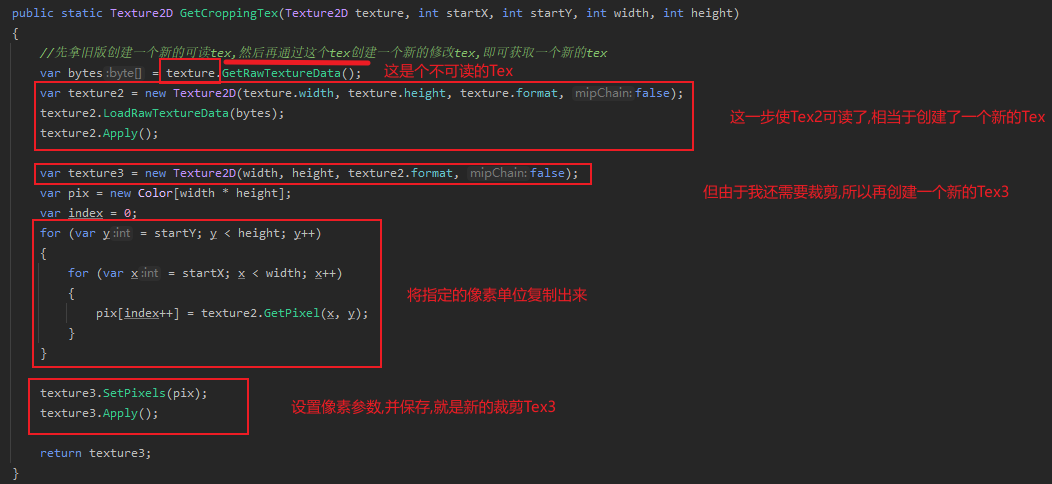
裁剪算法
    public const float phone_Head_Width = 500;
    public const float phone_Head_Height = 500;

    public const float phone_Bg_Width = 1000;
    public const float phone_Bg_Height = 1500;
        /// <summary>
        /// 计算裁剪的起始点以及宽高
        /// </summary>
        /// <param name="type">0 = 头像 | 1 = 背景图</param>
        /// <param name="texture">Tex</param>
        /// <param name="param">参数,如图片当前的本地X坐标或者Y坐标等</param>
        /// <returns></returns>
        public static CroppingInfo GetCroppingInfo(int type, Texture2D texture,float paramX, float paramY)
        {
            //参考
            //图片大小 1920 * 5157
            //新的分辨率 1920 * 3413
            //新裁剪框 1545.89 * 2318.6

            CroppingInfo cropping;

            if (texture.width > texture.height)
            {
                //取高度,只能左右滑
                //新的裁剪区域
                var croppingHeight = texture.height;
                var croppingWidth = croppingHeight * (GetWidth(type) / GetHeight(type));;

                //然后计算当前图片的高度换算
                var nowImgSize = GetPhoneSizeAdapter(texture, type == 0 ? phone_Head_Width : phone_Bg_Width,
                    type == 0 ? phone_Head_Height : phone_Bg_Height);

                var heightRota = croppingWidth / GetWidth(type);
                var newX = ((nowImgSize.Width - GetWidth(type)) / 2 - paramX) * heightRota;
                var newY = ((nowImgSize.Height - GetHeight(type)) / 2 - paramY) * heightRota;
                cropping = new CroppingInfo(Mathf.FloorToInt(newX), Mathf.FloorToInt(newY), Mathf.FloorToInt(croppingWidth), Mathf.FloorToInt(croppingHeight));
                return cropping;
            }
            else
            {
                //取宽度,只能上下滑
                //新的裁剪区域
                var croppingWidth = texture.width;
                var croppingHeight = croppingWidth * (GetHeight(type) / GetWidth(type));

                //然后计算当前图片的高度换算
                var nowImgSize = GetPhoneSizeAdapter(texture, type == 0 ? phone_Head_Width : phone_Bg_Width,
                    type == 0 ? phone_Head_Height : phone_Bg_Height);

                var heightRota = croppingHeight / GetHeight(type);
                var newX = ((nowImgSize.Width - GetWidth(type)) / 2 - paramX) * heightRota;
                var newY = ((nowImgSize.Height - GetHeight(type)) / 2 - paramY) * heightRota;
                cropping = new CroppingInfo(Mathf.FloorToInt(newX), Mathf.FloorToInt(newY), croppingWidth, Mathf.FloorToInt(croppingHeight));
                return cropping;
            }
        }

 浙公网安备 33010602011771号