
Windows 平台使用 VS2019 编译 Luabind 库小记
前言
本文旨在记录在较新版本的 Visual Studio(2019)中编译 Luabind 这个较为陈旧的 C++/Lua 绑定库时,所需进行的代码兼容性修改与完整流程。由于该库已停止维护,网上参考资料大多基于旧版开发环境,因此将实际可行的步骤整理如下,供参考。
请注意:
- Luabind 依赖大量 Boost 头文件,集成至项目时通常需要附带整个 Boost 库源码,且版本最好与编译 Luabind 时所使用的保持一致。
- 如果你不希望引入复杂的依赖关系,可以考虑使用更现代的替代方案,如 sol2 库。它是一个优秀的独立头文件库(stand-alone & header-only),对 C++ 新标准支持更好。
参考资料
环境与依赖准备
安装必要的 Visual Studio 2019 组件
确保在 Visual Studio Installer 中勾选安装:
- Desktop Development with C++
- C++ ATL for Latest v142 Build Tools (x86 & x64)
- C++ MFC for Latest v142 Build Tools (x86 & x64)
- Windows 10 SDK(建议选择 10.0.16299.0 或更高版本)
下载所需源代码
准备以下库的源代码并解压至本地目录:
- luabind-0.9 (从 GitHub 仓库获取)
- lua-5.3.6 (5.4.x 理论上也可用,但本文以 5.3.6 为例)
- boost_1_70_0 (其他版本亦可,但兼容性补丁可能需要调整)
详细编译步骤
步骤 1:创建 VS2019 静态库工程
- 打开 Visual Studio 2019,新建一个
Static Library项目。 - 在解决方案资源管理器中,将源代码文件虚拟地组织到项目中:
- 将
luabind-0.9/luabind/目录下的所有头文件(.hpp)添加到Header Files筛选器。 - 在
Header Files下创建子筛选器detail,并将luabind-0.9/luabind/detail/目录下的头文件添加进去。 - 将
luabind-0.9/src/目录下的所有源文件(.cpp)添加到Source Files筛选器。
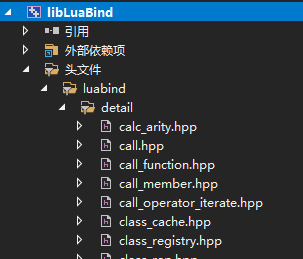
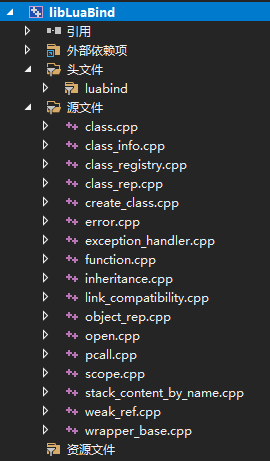
- 将
步骤 2:配置项目包含目录
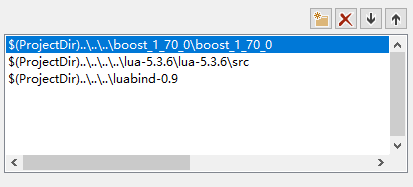
右键点击项目 -> 属性 -> 配置属性 -> C/C++ -> 常规 -> 附加包含目录,添加以下路径(请根据你的实际解压路径修改):
boost_1_70_0的根目录lua-5.3.6/srcluabind-0.9的根目录
配置完成后大致如下图所示:
步骤 3:添加兼容性补丁文件
由于 Luabind 和 Boost 版本较旧,需要手动添加兼容性代码来支持新编译器和 Lua 5.3。
- 在
luabind-0.9/luabind/目录下创建一个新文件,命名为luabind_compatibility.hpp。 - 将该文件添加到 VS 项目的
Header Files筛选器中。
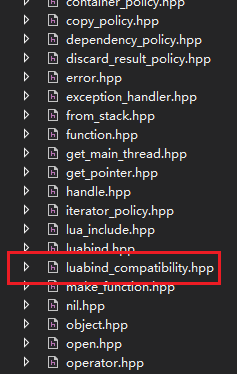
- 将以下代码复制到
luabind_compatibility.hpp文件中:
#pragma once

// lua_strlen() and lua_equal() are used in Luabind, but these have been removed in Lua 5.4.
// Still we can enable the compatible macros by defining LUA_COMPAT_5_3 before including "luaconf.h".

#include "lua.hpp"

#if (LUA_VERSION_NUM >= 502)
// Lua 5.1 compatible functions.
inline void lua_setfenv(lua_State* L, int idx) { lua_setuservalue(L, idx); }
inline void lua_getfenv(lua_State* L, int idx) { lua_getuservalue(L, idx); }
inline lua_State* lua_open() { return luaL_newstate(); }

#if (LUA_VERSION_NUM >= 504)
inline int lua_resume(lua_State* L, int nargs)
{
	int nresults = 0;
	return lua_resume(L, nullptr, nargs, &nresults);
}
#else
inline int lua_resume(lua_State* L, int nargs) { return lua_resume(L, nullptr, nargs); }
#endif

struct DummyClassForLegacyLuaGlobalsIndex {};
const DummyClassForLegacyLuaGlobalsIndex LUA_GLOBALSINDEX;
inline void lua_pushvalue(lua_State* L, const DummyClassForLegacyLuaGlobalsIndex&) { lua_pushglobaltable(L); }
inline void lua_settable(lua_State* L, const DummyClassForLegacyLuaGlobalsIndex&) { lua_settable(L, LUA_REGISTRYINDEX); }
inline void lua_gettable(lua_State* L, const DummyClassForLegacyLuaGlobalsIndex&) { lua_gettable(L, LUA_REGISTRYINDEX); }
#else
// Lua 5.2 compatible functions.
inline void lua_pushglobaltable(lua_State* L) { lua_pushvalue(L, LUA_GLOBALSINDEX); }
#endif

//In the C++17 standard, official support for std::auto_ptr was removed, so we had to implement them manually.
//Also, Boost turns off support for std::auto_ptr under C++17, and we need to patch them in manually as well.
#if ((defined(_MSVC_LANG) && _MSVC_LANG >= 201703L) || __cplusplus >= 201703L)
// Support for C++17
namespace std
{
    template <class _Ty>
    class auto_ptr;

    template <class _Ty>
    struct auto_ptr_ref { // proxy reference for auto_ptr copying
        explicit auto_ptr_ref(_Ty* _Right) : _Ref(_Right) {}

        _Ty* _Ref; // generic pointer to auto_ptr ptr
    };

    template <class _Ty>
    class auto_ptr { // wrap an object pointer to ensure destruction
    public:
        using element_type = _Ty;

        explicit auto_ptr(_Ty* _Ptr = nullptr) noexcept : _Myptr(_Ptr) {}

        auto_ptr(auto_ptr& _Right) noexcept : _Myptr(_Right.release()) {}

        auto_ptr(auto_ptr_ref<_Ty> _Right) noexcept {
            _Ty* _Ptr = _Right._Ref;
            _Right._Ref = nullptr; // release old
            _Myptr = _Ptr; // reset this
        }

        template <class _Other>
        operator auto_ptr<_Other>() noexcept { // convert to compatible auto_ptr
            return auto_ptr<_Other>(*this);
        }

        template <class _Other>
        operator auto_ptr_ref<_Other>() noexcept { // convert to compatible auto_ptr_ref
            _Other* _Cvtptr = _Myptr; // test implicit conversion
            auto_ptr_ref<_Other> _Ans(_Cvtptr);
            _Myptr = nullptr; // pass ownership to auto_ptr_ref
            return _Ans;
        }

        template <class _Other>
        auto_ptr& operator=(auto_ptr<_Other>& _Right) noexcept {
            reset(_Right.release());
            return *this;
        }

        template <class _Other>
        auto_ptr(auto_ptr<_Other>& _Right) noexcept : _Myptr(_Right.release()) {}

        auto_ptr& operator=(auto_ptr& _Right) noexcept {
            reset(_Right.release());
            return *this;
        }

        auto_ptr& operator=(auto_ptr_ref<_Ty> _Right) noexcept {
            _Ty* _Ptr = _Right._Ref;
            _Right._Ref = 0; // release old
            reset(_Ptr); // set new
            return *this;
        }

        ~auto_ptr() noexcept {
            delete _Myptr;
        }

        _NODISCARD _Ty& operator*() const noexcept {
            return *get();
        }

        _NODISCARD _Ty* operator->() const noexcept {
            return get();
        }

        _NODISCARD _Ty* get() const noexcept {
            return _Myptr;
        }

        _Ty* release() noexcept {
            _Ty* _Tmp = _Myptr;
            _Myptr = nullptr;
            return _Tmp;
        }

        void reset(_Ty* _Ptr = nullptr) noexcept { // destroy designated object and store new pointer
            if (_Ptr != _Myptr) {
                delete _Myptr;
            }

            _Myptr = _Ptr;
        }

    private:
        _Ty* _Myptr; // the wrapped object pointer
    };

    template <>
    class auto_ptr<void> {
    public:
        using element_type = void;
    };
}
namespace boost
{
    template<class T> T* get_pointer(std::auto_ptr<T> const& p)
    {
        return p.get();
    }
}
#endif

// Suppress automatic inclusion of <boost/bind/placeholders.hpp> in <boost/bind/bind.hpp> in order to avoid conflict between Boost and C++11 placeholders.
#define BOOST_BIND_NO_PLACEHOLDERS

// Luabind 0.9.1 uses "boost::operator" but it has been moved to "boost::iterators::operator" in Boost 1.57.0 or later.
// As a result, many compilation errors will occur at the macro "LUABIND_OPERATOR_ADL_WKND" in "luabind/object.hpp".
// One of the best and wisest solutions is to modify the source code of Luabind directly.
// As an alternative way, the following workaround can avoid modifying it but is unbeautiful and pollutes the namespace "boost".
#include <boost/version.hpp>
#if (defined(BOOST_VERSION) && BOOST_VERSION >= 105700)
#include <boost/iterator/iterator_facade.hpp>
namespace luabind
{
    namespace detail
    {
        // Forward declaration
        template<typename T> class basic_iterator;
    }
}
namespace boost
{
    template<typename T> bool operator ==(
        const luabind::detail::basic_iterator<T>& x,
        const luabind::detail::basic_iterator<T>& y)
    {
        return boost::iterators::operator ==(x, y);
    }

    template<typename T> bool operator !=(
        const luabind::detail::basic_iterator<T>& x,
        const luabind::detail::basic_iterator<T>& y)
    {
        return boost::iterators::operator !=(x, y);
    }
}
#endif
步骤 4:在 Luabind 关键头文件中引入补丁
为了使兼容性代码生效,需要在 Luabind 的两个核心配置文件中包含我们新建的头文件。
-
在
luabind-0.9/luabind/lua_include.hpp文件的开头部分(#include “lua.hpp”之后)添加:#include "luabind_compatibility.hpp"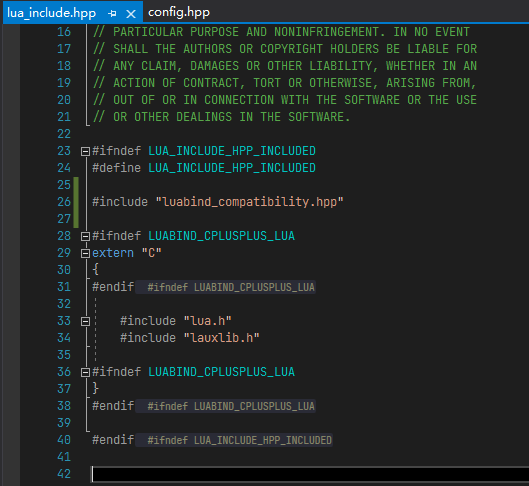
-
在
luabind-0.9/luabind/config.hpp文件的开头部分添加同一行代码:#include "luabind_compatibility.hpp"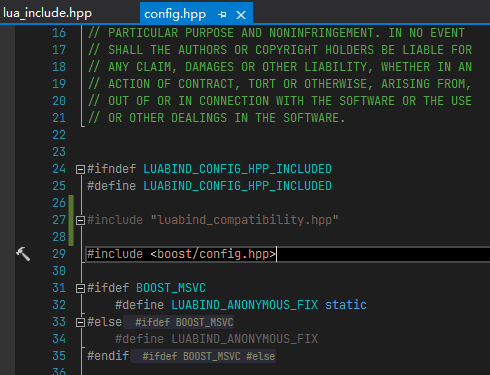
步骤 5:添加对 64 位整型的支持(针对 MSVC)
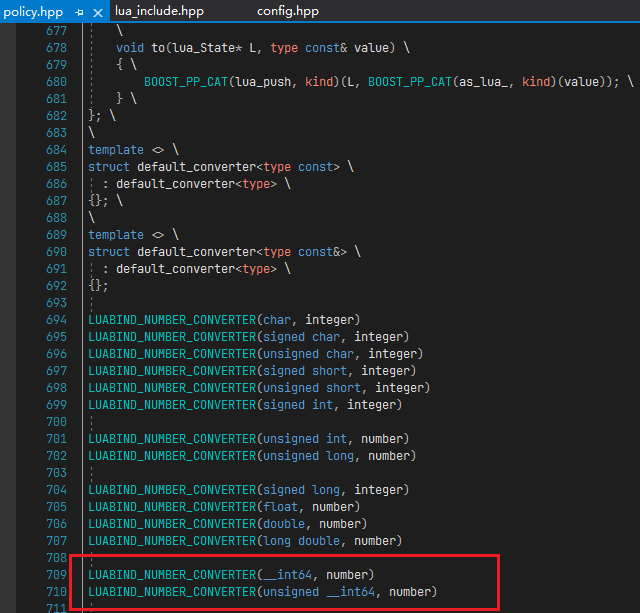
Luabind 原始代码可能未明确定义对 __int64 类型的绑定支持。在 luabind-0.9/luabind/policy.hpp 文件中,找到 LUABIND_NUMBER_CONVERTER 宏调用区域,添加以下两行:
LUABIND_NUMBER_CONVERTER(__int64, number)
LUABIND_NUMBER_CONVERTER(unsigned __int64, number)
添加位置可参考下图:
步骤 6:编译生成静态库
完成以上所有修改后,在 Visual Studio 2019 中选择合适的解决方案配置(如 Debug|x64, Release|x86 等),进行编译。成功后会生成 libLuaBind64d.lib、libLuaBind64.lib 等静态库文件。
在项目中使用编译好的 Luabind
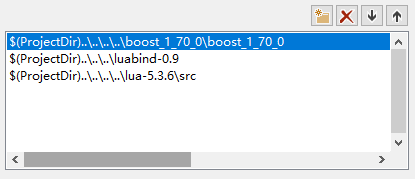
1. 配置项目包含目录
在你的主项目(如测试程序)属性中,添加以下包含目录:
boost_1_70_0根目录luabind-0.9根目录lua-5.3.6/src
2. 配置库目录和链接库
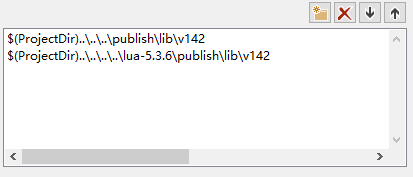
- 在
链接器->常规->附加库目录中,添加你编译好的 Lua 库和 Luabind 库所在的目录。
- 或者,直接在源代码中通过
#pragma comment(lib, ...)指令链接对应的库(如下方示例代码所示)。
3. 编写测试代码
创建一个简单的测试程序来验证 Luabind 是否正常工作。
#include <windows.h>
#include <iostream>

// 根据编译配置和平台链接对应的库
#ifdef _DEBUG
    #ifdef _WIN64
        #pragma comment(lib, "Lua53_64d.lib")
        #pragma comment(lib, "libLuaBind64d.lib")
    #else
        #pragma comment(lib, "Lua53_32d.lib")
        #pragma comment(lib, "libLuaBind32.lib")
    #endif
#else
    #ifdef _WIN64
        #pragma comment(lib, "Lua53_64.lib")
        #pragma comment(lib, "libLuaBind64.lib")
    #else
        #pragma comment(lib, "Lua53_32.lib")
        #pragma comment(lib, "libLuaBind32.lib")
    #endif
#endif

extern "C" {
    #include "lua.h"
    #include "lualib.h"
    #include "lauxlib.h"
}

#include "luabind/luabind.hpp"

// 一个简单的C++函数,准备暴露给Lua
void print_hello(int number) {
    std::cout << "hello world is " << number << std::endl;
}

int main(void) {
    // 创建Lua状态机
    lua_State *L = luaL_newstate();
    luaL_openlibs(L); // 打开标准库

    // 打开Luabind
    luabind::open(L);

    // 将C++函数暴露给Lua,命名为 `print_hello`
    luabind::module(L)[
        luabind::def("print_hello", print_hello)
    ];

    // 在Lua中调用该函数
    luaL_dostring(L, "print_hello(123)");

    // 清理
    lua_close(L);
    return 0;
}
4. 运行结果
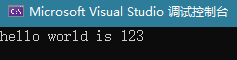
编译并运行测试程序,如果一切顺利,控制台将输出:
hello world is 123

 浙公网安备 33010602011771号