混合检索(Hybrid Search):多模态检索实战指南(第四章)
1. 从 Corrective RAG 到多模态检索
在第三章,我们学习了 Corrective RAG(CRAG),通过文档评分和托底机制来提升 RAG 系统的可靠性。CRAG 主要解决检索结果的质量验证问题,但在检索环节本身,传统 RAG 系统还存在一个根本性的问题:单一检索方式的盲区。
本章将解决这个问题:如何通过混合检索(Hybrid Search)结合多种检索方式,提升检索的召回率和精确度。
2. 为什么需要混合检索?
2.1 什么是混合检索?
混合检索(Hybrid Search)是一种结合向量检索、稀疏检索、全文检索三种模态,通过加权分数融合来提升检索效果的技术。它通过让不同检索方式互补,克服单一检索方式的盲区,从而提高召回率和精确度。
2.2 单一检索方式的问题
我们先来看看单靠一种检索方式会遇到什么问题。
向量检索的盲区:
向量检索擅长理解语义和概念,但它会遗漏精确的关键词。比如你搜索 “GAAP” 或 “Q3 2023” 这样的专有名词,向量检索可能会返回一些概念相似但实际不相关的结果。还有一个问题是过度泛化——它可能返回概念上相似,但实际上答非所问的文档。
关键词检索的盲区:
关键词检索擅长匹配精确的术语,但它不理解语义。比如你搜索 “machine learning”,它找不到包含 “AI” 的文档;你搜索 “revenue”,它找不到包含 “earnings” 或 “income” 的内容。这就是语义盲区的问题。
问题的本质在于:向量检索会遗漏关键词,关键词检索会遗漏语义——每种方法都有自己的盲区。
2.3 混合检索:融合三种模态
混合检索的思路是:既然单一方法都有盲区,那就把它们组合起来。具体来说,混合检索结合了三种互补的检索方式:
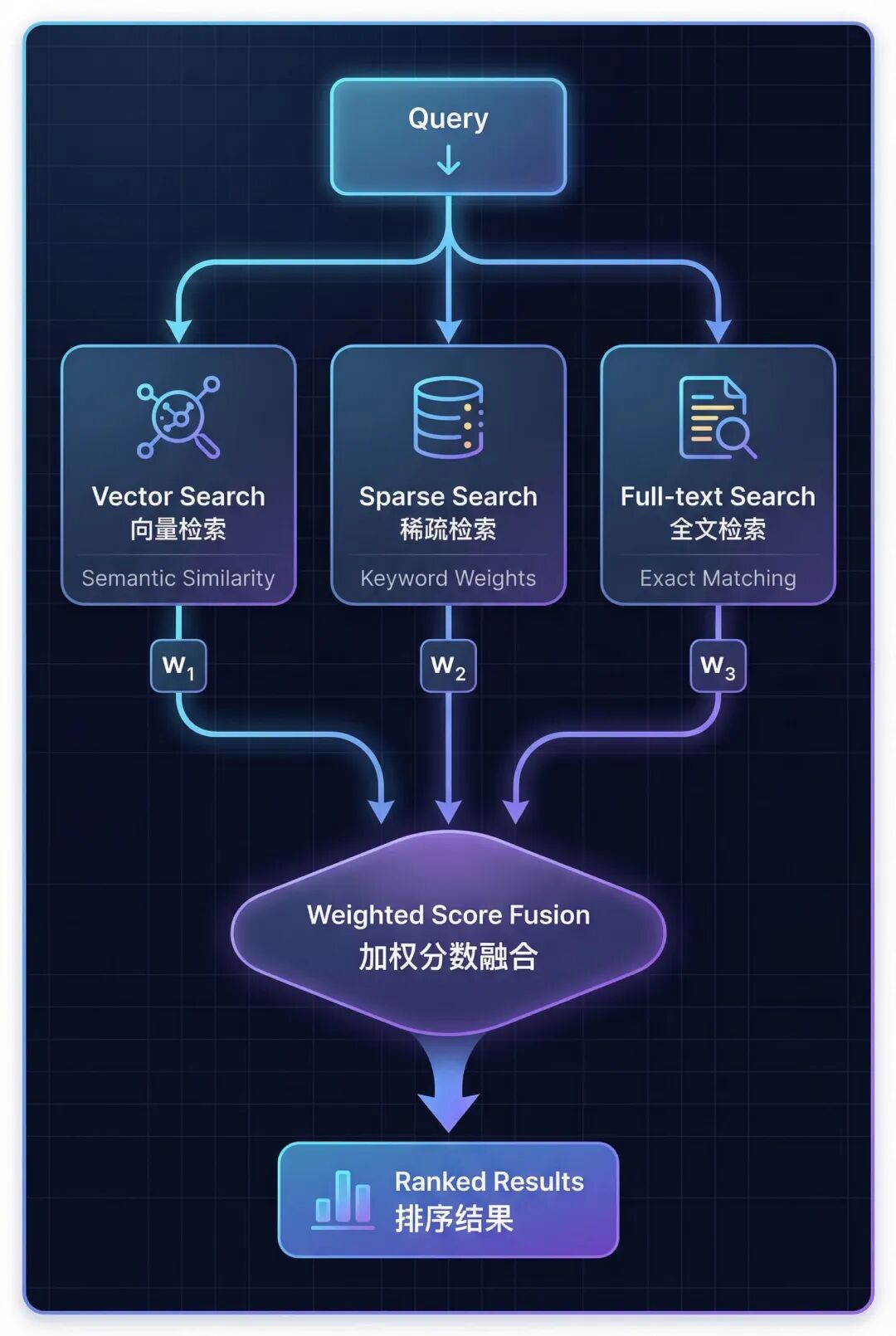
三种检索方式各有侧重:
- Vector Search(向量检索) → 理解语义相似度
- Sparse Search (稀疏检索) → 匹配关键词和同义词
- Full-text Search (全文检索) → 精确短语匹配
2.4 Hybrid RAG vs Corrective RAG
混合检索和纠错机制解决的是不同阶段的问题:
| 对比维度 | Hybrid RAG (本章) | Corrective RAG (第三章) |
|---|---|---|
| 核心目标 | Better Retrieval (更好的检索) | Better Validation (更好的验证) |
| 实现方式 | 结合 3 种检索模态 | 文档相关性评分 |
| 关键机制 | 加权分数融合 | 查询重写 + 托底机制 |
| 作用阶段 | 检索阶段 | 检索后验证阶段 |
| Agent 作用 | 选择检索策略 | 评估质量 + 触发托底 |
这两种技术可以完美配合:用混合检索提升检索质量,再用 Corrective RAG 进行质量验证。
3. 三种检索模态详解
理解了混合检索的必要性后,我们来深入了解构成混合检索的三种核心模态。
3.1 向量检索(Vector Search)
向量检索通过将文本转换为稠密向量(Dense Embeddings,通常 768-1536 维),然后使用余弦相似度测量向量之间的角度,返回语义上最相似的文档。
它的优势在于理解概念和语义关系,能够处理释义和同义表达。但它无法精确匹配特定术语,比如 “GAAP” 或 “SKU-12345” 这样的专有名词。
适用场景:概念性查询,比如 “What causes inflation?”
3.2 稀疏检索(Sparse Search)
稀疏检索使用 TF-IDF(词频-逆文档频率)提取关键词,可以在词汇表内扩展同义词,基于关键词权重进行匹配(不是精确字符串匹配)。
TF-IDF 的原理是:Term Frequency × Inverse Document Frequency——在整个文档集中越罕见的词获得越高的权重。
稀疏检索的优势是能够匹配相关术语,比如 revenue、earnings、income 这些同义词,而且不需要嵌入模型。但它受词汇表维度限制,难以处理稀有专有名词。
典型应用场景:工具选择(Tool Selection)
稀疏检索在混合检索中发挥关键词匹配作用,特别在工具选择、术语敏感查询(如专有名词、技术缩写)中表现优异。
3.3 全文检索(Full-text Search)
全文检索通过构建带分词的倒排索引(Inverted Index),应用 BM25 评分算法(改进的 TF-IDF,加入了文档长度归一化),返回精确短语匹配的结果。
BM25 是 TF-IDF 的改进版本,它加入了文档长度归一化,避免长文档获得不公平的高分。
全文检索的优势是能够精确匹配短语(如 “Item 1A Risk Factors”),处理稀有专有名词,支持精确章节定位。但它无法处理拼写错误或变体,也不理解语义关系。
适用场景:精确章节查找,比如 “查找第 10-K 报告的风险因素章节”
3.4 三种模态的选择
没有单一模态是最好的,关键是根据查询模式组合使用:
| 检索模态 | 最适合的查询类型 | 示例查询 | 核心优势 |
|---|---|---|---|
| 向量检索 | 概念性查询,需要语义理解 | “What are Nike’s financial risks?” | 语义理解 |
| 稀疏检索 | 同义词感知的关键词匹配 | “Nike earnings 2023” | 关键词泛化 |
| 全文检索 | 精确短语查询,章节名称 | “Item 1A Risk Factors” | 精确匹配 |
4. seekdb:AI 原生的搜索数据库
4.1 seekdb 是什么?
seekdb 是 OceanBase 推出的 AI 原生搜索数据库,它将向量存储、关系数据、全文搜索整合到一个统一的平台中。传统方案需要使用专门的向量数据库,会带来额外的运维成本和系统复杂度,seekdb 通过统一的多模型引擎解决了这个问题。
4.2 seekdb 的核心优势
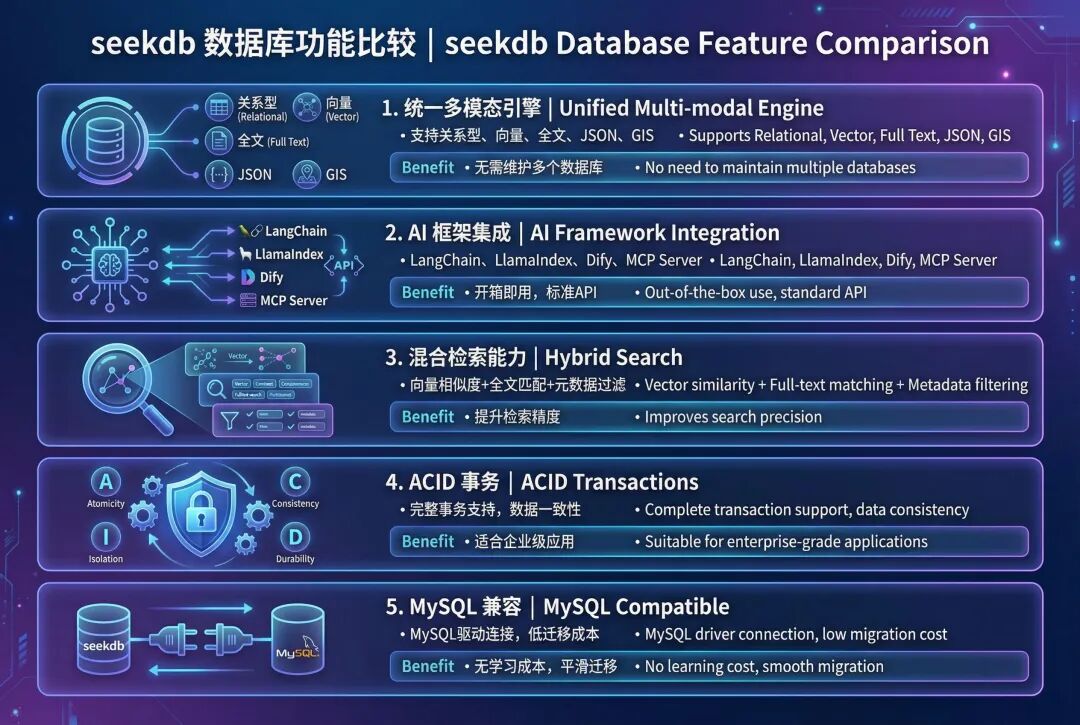
4.3 为什么选择 seekdb 实现混合检索?
- 单次查询就能调用 3 种模态,无需调用外部服务
- 原生加权融合,内置 RRF 和线性组合算法
- 自动索引同步,向量、稀疏、BM25 索引自动维护
- MySQL 协议,兼容现有工具和驱动
- 可以无缝迁移到 OceanBase 集群
5. 实战:实现混合检索
5.1 准备环境:
import os
from dotenv import load_dotenv


# Load environment variables
load_dotenv("../.env")


# Verify configuration
print("✅ Configuration loaded:")
print(f"📍 OceanBase: {os.getenv('OCEANBASE_HOST')}:{os.getenv('OCEANBASE_PORT')}")
print(f"📍 Database: {os.getenv('OCEANBASE_DB')}")
print(f"📍 Embedding Model: {os.getenv('SILICONFLOW_EMBEDDING_MODEL', 'BAAI/bge-m3')}")
加载 embedding 模型
from langchain_dev_utils.embeddings import register_embeddings_provider, load_embeddings


# Register SiliconFlow embeddings provider
SILICONFLOW_BASE_URL = os.getenv("SILICONFLOW_BASE_URL", "https://api.siliconflow.cn/v1")


register_embeddings_provider(
 provider_name="siliconflow",
 embeddings_model="openai-compatible",
 base_url=SILICONFLOW_BASE_URL,
)


# Load embedding model
EMBEDDING_MODEL_NAME = os.getenv("SILICONFLOW_EMBEDDING_MODEL", "BAAI/bge-m3")
embeddings = load_embeddings(f"siliconflow:{EMBEDDING_MODEL_NAME}")


print(f"✅ Loaded embedding model: {EMBEDDING_MODEL_NAME}")
配置 OceanBase 连接
# OceanBase connection parameters
connection_args = {
"host": os.getenv("OCEANBASE_HOST", "127.0.0.1"),
"port": int(os.getenv("OCEANBASE_PORT", "2881")),
"user": os.getenv("OCEANBASE_USER", "root@test"),
"password": os.getenv("OCEANBASE_PASSWORD", ""),
"db_name": os.getenv("OCEANBASE_DB", "test"),
}


print("✅ OceanBase connection configured")
5.2 加载文档
首先加载源文档演示混合搜索。
from langchain_community.document_loaders import PyPDFLoader
from langchain_text_splitters import RecursiveCharacterTextSplitter


# Load Nike 10-K PDF
pdf_path = "./data/nke-10k-2023.pdf"
loader = PyPDFLoader(pdf_path)
documents = loader.load()


# Split into chunks
text_splitter = RecursiveCharacterTextSplitter(
 chunk_size=1000,
 chunk_overlap=100,
 separators=["

", "
", ". ", " ", ""],
)
splits = text_splitter.split_documents(documents)


print(f"✅ Loaded {len(documents)} pages and split into {len(splits)} chunks")


# Select a subset for demonstration (first 200 chunks)
demo_docs = splits[:200]
print(f"📄 Using {len(demo_docs)} chunks for hybrid search demo")
5.3 初始化混合存储
启用三种搜索模式:
- 密集向量:通过嵌入实现语义相似性
- 稀疏向量:通过 TF-IDF 加权计算关键词重要性
- 全文检索:精确短语和关键词匹配
from langchain_oceanbase.vectorstores import OceanbaseVectorStore


# Get embedding dimension
embedding_dim = len(embeddings.embed_query("test"))


# Create hybrid search vector store with ALL three modalities enabled
hybrid_store = OceanbaseVectorStore(
 embedding_function=embeddings,
 table_name="hybrid_search_demo",
 connection_args=connection_args,
 vidx_metric_type="l2",
 include_sparse=True, # Enable sparse vector search (keyword matching)
 include_fulltext=True, # Enable full-text search (exact phrase matching)
 drop_old=True,
 embedding_dim=embedding_dim,
)


print("✅ Hybrid search vector store initialized!")
print(f"📐 Vector dimension: {embedding_dim}")
print(f"🔍 Dense vector: Enabled (L2 distance)")
print(f"🔍 Sparse vector: Enabled (keyword matching)")
print(f"🔍 Full-text search: Enabled (phrase matching)")
5.4 生成稀疏向量
稀疏向量使用 TF-IDF(词频-逆文档频率)来表示关键词的重要性。
词频(TF):一个词在文档中出现的频率逆文档频率(IDF):一个词在语料库中出现的稀有度或重要性
基于词汇:直接将词映射到索引(无哈希冲突)
我们将构建一个自定义的 TF-IDF 编码器,使其能够在 OceanBase 的 50 万维度限制内工作。
import re
import math
from collections import Counter
# Stopwords to filter out common words
STOPWORDS = {
'the', 'and', 'for', 'with', 'that', 'this', 'are', 'was', 'were', 'been',
'has', 'have', 'had', 'its', 'our', 'their', 'from', 'which', 'may', 'can',
'will', 'would', 'could', 'should', 'any', 'such', 'than', 'other', 'more',
'also', 'including', 'related', 'into', 'these', 'those', 'each', 'all',
'some', 'them', 'they', 'being', 'about', 'after', 'before', 'between',
'through', 'during', 'under', 'over', 'above', 'below', 'both', 'same',
'but', 'not', 'only', 'own', 'just', 'now', 'then', 'here', 'there', 'when',
'where', 'why', 'how', 'what', 'who', 'whom', 'his', 'her', 'him', 'she',
'you', 'your', 'yours', 'out', 'off', 'down', 'again', 'further', 'once',
}
classTFIDFEncoder:
"""Simple TF-IDF encoder with vocabulary-based indexing."""
def__init__(self, max_vocab_size=100000):
self.max_vocab_size = max_vocab_size
self.vocab = {} # term -> index
self.idf = {} # term -> idf score
self.doc_count = 0
deftokenize(self, text):
"""Tokenize and clean text."""
 words = re.findall(r'\b[a-zA-Z][a-zA-Z0-9]*\b', text.lower())
return [w for w in words if w notin STOPWORDS andlen(w) >= 2]
deffit(self, documents):
"""Build vocabulary and compute IDF scores."""
self.doc_count = len(documents)
 doc_freq = Counter() # term -> number of docs containing term
# Count document frequencies
for doc in documents:
 terms = set(self.tokenize(doc))
for term in terms:
 doc_freq[term] += 1
# Select top terms by document frequency (most common across docs)
 top_terms = doc_freq.most_common(self.max_vocab_size)
# Build vocabulary and compute IDF
for idx, (term, df) inenumerate(top_terms):
self.vocab[term] = idx
# IDF = log(N / df) + 1 (smoothed)
self.idf[term] = math.log(self.doc_count / df) + 1
print(f" Vocabulary size: {len(self.vocab)}")
print(f" Sample high-IDF terms: {[(t, f'{self.idf[t]:.2f}') for t inlist(self.vocab.keys())[:: len(self.vocab)//5][:5]]}")
defencode(self, text):
"""Encode text to sparse TF-IDF vector."""
 terms = self.tokenize(text)
 term_freq = Counter(terms)
 sparse_vec = {}
for term, tf in term_freq.items():
if term inself.vocab:
 idx = self.vocab[term]
# TF-IDF = tf * idf (normalized by max tf)
 max_tf = max(term_freq.values()) if term_freq else1
 tfidf = (tf / max_tf) * self.idf[term]
 sparse_vec[idx] = tfidf
return sparse_vec
# Initialize and fit TF-IDF encoder
print("⏳ Building TF-IDF vocabulary from document corpus...")
tfidf_encoder = TFIDFEncoder(max_vocab_size=100000)
tfidf_encoder.fit([doc.page_content for doc in demo_docs])
print(f"✅ TF-IDF encoder fitted on {len(demo_docs)} documents")
# Generate sparse vectors for all documents
sparse_embeddings = [tfidf_encoder.encode(doc.page_content) for doc in demo_docs]
print(f"✅ Generated {len(sparse_embeddings)} TF-IDF sparse vectors")
print(f"
📊 Sample sparse vector (doc 0):")
print(f" Non-zero terms: {len(sparse_embeddings[0])}")
print(f" Sample entries: {list(sparse_embeddings[0].items())[:5]}...")
5.5 准备全文内容
全文搜索需要独立的索引内容。我们将通过元数据增强页面内容
# Create enhanced full-text content
fulltext_content = []


for doc in demo_docs:
# Combine page content with searchable metadata
 metadata_text = f"Page {doc.metadata.get('page', 'N/A')} "
 metadata_text += f"Title: {doc.metadata.get('title', '')} "

# Full searchable text
 full_text = f"{metadata_text}{doc.page_content}"
 fulltext_content.append(full_text)


print(f"✅ Prepared {len(fulltext_content)} full-text entries")
print(f"
📝 Sample full-text content (doc 0):")
print(f" {fulltext_content[0][:200]}...")
5.6 添加包含三种模态的文档
将文档存储到向量数据库,并建立三种索引。
print("⏳ Adding documents with hybrid search capabilities...")
print()


# Step 1: Add documents with dense vectors + full-text content
ids = hybrid_store.add_documents_with_fulltext(
 documents=demo_docs,
 fulltext_content=fulltext_content,
)


# Step 2: Add sparse embeddings to the same documents
hybrid_store.add_sparse_documents(
 documents=demo_docs,
 sparse_embeddings=sparse_embeddings,
)


print(f"✅ Added {len(ids)} documents with:")
print(f" • Dense vector embeddings (1024-dim BGE-M3)")
print(f" • Sparse vector embeddings (keyword weights)")
print(f" • Full-text searchable content")
print()


print("="*80)
print("🎉 Hybrid search store populated!")
print("="*80)
print(f"📊 Total documents: {len(demo_docs)}")
print(f" Each document can be searched by:")
print(f" ✓ Semantic similarity (dense vector embeddings)")
print(f" ✓ Keyword matching (sparse vectors)")
print(f" ✓ Exact keywords and phrases (full-text index)")
5.7 测试各个模态
分别测试三种检索方式,对比搜索结果。
每种模态返回不同的结果——向量检索找到语义相关的内容,稀疏检索找到关键词匹配,全文检索找到精确短语。
5.7.1 向量搜索
query = "What were Nike's total revenues and financial performance?"


# Pure vector search (semantic similarity only)
vector_results = hybrid_store.similarity_search(query, k=3)


print(f"🔍 Query: '{query}'")
print(f"
📊 Vector Search Results (Semantic Similarity Only):
")


for i, doc inenumerate(vector_results, 1):
print(f"Result {i}:")
print(f" Content: {doc.page_content[:150].replace(chr(10), ' ')}...")
print(f" Page: {doc.metadata.get('page', 'N/A')}")
print()
5.7.2 稀疏向量搜索(关键词匹配)
# Generate TF-IDF sparse query vector for keyword matching
query_text = "Nike total revenues fiscal 2023"
sparse_query = tfidf_encoder.encode(query_text)


# Sparse vector search on the hybrid store
sparse_results = hybrid_store.similarity_search_with_sparse_vector(
 sparse_query=sparse_query,
 k=3
)


print(f"🔍 Query: '{query_text}'")
print(f"🔢 TF-IDF sparse query: {len(sparse_query)} non-zero terms")
print(f" Matched terms: {[t for t in tfidf_encoder.tokenize(query_text) if t in tfidf_encoder.vocab]}")
print(f"
📊 Sparse Vector Search Results (TF-IDF Keyword Matching):
")


for i, doc inenumerate(sparse_results, 1):
print(f"Result {i}:")
print(f" Content: {doc.page_content[:150].replace(chr(10), ' ')}...")
print(f" Page: {doc.metadata.get('page', 'N/A')}")
print()


print("="*70)
print("💡 Note: Sparse search may not find the exact revenue tables.")
print(" Compare with Vector Search (6.1) which found pages 31, 34.")
print(" This demonstrates why Hybrid Search (Step 7) is valuable!")
print("="*70)
5.7.3 全文检索(精确匹配)
# Full-text search with exact phrase matching
fulltext_results = hybrid_store.similarity_search_with_fulltext(
 query="revenue financial performance",
 fulltext_query="revenues billion fiscal 2023", # Exact keywords
 k=3
)


print(f"🔍 Vector query: 'revenue financial performance'")
print(f"🔍 Full-text query: 'revenues billion fiscal 2023'")
print(f"
📊 Full-Text Search Results (Exact Matching):
")


for i, doc inenumerate(fulltext_results, 1):
print(f"Result {i}:")
print(f" Content: {doc.page_content[:150].replace(chr(10), ' ')}...")
print(f" Page: {doc.metadata.get('page', 'N/A')}")
print()
6. 高级混合检索
在前面的步骤中,我们已经启用了三种检索模态并分别测试了它们的效果。现在的问题是:如何将这三种检索方式有效地组合起来?
这就是高级混合检索要解决的核心问题:通过加权分数融合,自动组合多种检索模态,获得比单一模态更好的检索效果。
6.1 内置分数融合机制
OceanBase 提供了 advanced_hybrid_search() 方法,可以自动组合三种模态的检索结果。
工作原理:
- 并行执行三种检索 - 同时运行向量检索、稀疏检索、全文检索
- 分数归一化 - 将每种模态的分数标准化到 0-1 范围
- 加权融合 - 应用权重公式:
final_score = w₁×vector + w₂×sparse + w₃×fulltext - 排序返回 - 按融合后的分数排序,返回 Top-K 结果
所有的分数归一化和融合逻辑都在 seekdb 内部自动完成,开发者只需要关注权重配置即可。搜索模式预设
6.1.1 搜索模式预设
不同类型的查询需要不同的权重配置。我们可以定义几种常用的搜索模式:
Balanced(平衡模式)
适合通用查询,比如 “Nike business in 2023”。权重配置:Vector 40%、Sparse 30%、Fulltext 30%。
Semantic(语义模式)
适合概念理解,比如 “What is Nike‘s strategy?”。权重配置:Vector 70%、Sparse 20%、Fulltext 10%。
Keyword(关键词模式)
适合特定术语、数字查询,比如 “Nike earnings2023”。权重配置:Vector 20%、Sparse 60%、Fulltext 20%。
Exact(精确模式)
适合法律文本、章节查找,比如 “Item 1A Risk Factors”。权重配置:Vector 10%、Sparse 20%、Fulltext 70%。
| 预设 | V/S/F | 使用场景 | 示例查询 |
|---|---|---|---|
| Balanced | 40/30/30 | 未知或混合类型查询 | “Nike business in 2023” |
| Semantic | 70/20/10 | 研究、探索性问题 | “What is Nike’s strategy?” |
| Keyword | 20/60/20 | 特定术语、数字查询 | “Nike earnings 2023” |
| Exact | 10/20/70 | 法律文本、章节查找 | “Item 1A Risk Factors” |
6.2 权重调优建议
- 从平衡模式开始 - 在不确定时使用 40/30/30 作为基准
- 根据业务场景调整 - 分析实际查询日志,找出主要查询类型
- A/B 测试验证 - 对比不同权重配置的检索效果
- 允许动态调整 - 不同查询可以使用不同的权重配置
6.3 融合算法选择
除了线性加权组合,seekdb 还支持其他融合算法:
- 线性组合(Linear Combination) - 加权平均,适合大多数场景
- RRF(Reciprocal Rank Fusion) - 基于排名融合,对分数尺度不敏感
- 最大值融合 - 取各模态的最高分,适合“或”逻辑
推荐做法:先使用线性组合,如果效果不理想再尝试 RRF。
💡_ 扩展知识:本节提到的 RRF 和最大值融合是常见的融合算法,seekdb 支持多种融合策略。具体 API 请参考官方文档。_
7. Agentic Hybrid RAG:让 Agent 选择最优策略
7.1 为什么结合 Agentic + Hybrid Search?
将智能决策和多模态检索结合,可以获得两者的最佳效果。
仅混合检索的特点:多模态(V+S+F)、更好的召回,但权重固定、总是执行检索。
Agentic + 混合检索的特点:动态搜索模式、多步推理、在不需要时跳过检索、多次搜索结果综合。
核心价值在于:Agentic RAG + Hybrid Search = 智能决策 + 多模态检索。
7.2 定义带动态搜索模式的工具
创建一个让 Agent 选择最佳搜索策略的工具。
from langchain.tools import tool
from typing importLiteral


@tool
defhybrid_search_knowledge_base(
 query: str,
 top_k: int = 3,
 search_mode: Literal[
 “balanced”, # 40/30/30
 “semantic”, # 70/20/10
 “keyword”, # 20/60/20
 “exact” # 10/20/70
 ] = “balanced”
) -> str:
 “”“Search Nike‘s 10-K with hybrid search.

 Args:
 query: What to search for
 search_mode: Strategy based on query type
 ”“”
# 权重预设
 weight_presets = {
 “balanced”: {“vector”: 0.4, “sparse”: 0.3, “fulltext”: 0.3},
 “semantic”: {“vector”: 0.7, “sparse”: 0.2, “fulltext”: 0.1},
 “keyword”: {“vector”: 0.2, “sparse”: 0.6, “fulltext”: 0.2},
 “exact”: {“vector”: 0.1, “sparse”: 0.2, “fulltext”: 0.7},
 }

 weights = weight_presets[search_mode]

# 生成稀疏向量
 sparse_vec = tfidf_encoder.encode(query)

# 执行混合检索
 results = hybrid_store.advanced_hybrid_search(
 vector_query=query,
 sparse_query=sparse_vec,
 fulltext_query=query,
 modality_weights=weights,
 k=top_k
 )

return results
可用的搜索模式:
- balanced(通用场景 40/30/30)
- semantic(概念和语义 70/20/10)
- keyword(关键词查询 20/60/20)
- exact(精确短语 10/20/70)
Agent 会分析查询并自动选择最佳模式。
7.3 使用 LangChain 创建 Agent
构建一个能够动态使用混合检索的智能 Agent。
from langchain.agents import create_agent


agent = create_agent(
 model=chat_model,
 tools=[hybrid_search_knowledge_base],
 system_prompt=“”“You are a helpful AI with access to Nike‘s 10-K report.


Choose search_mode based on query type:
- ”semantic“: concepts, strategy, high-level understanding
- ”keyword“: specific terms, numbers, technical abbreviations
- ”exact“: legal text, section names, precise phrases
- ”balanced“: unknown or mixed query types


For complex questions, search multiple times with different modes.”“”
)


# 调用 Agent
result = agent.invoke({
 “messages”: [{“role”: “user”, “content”: “Nike 的财务风险是什么?”}]
})
Agent 能力:在搜索前分析查询类型、选择最优搜索模式、对复杂问题进行多步搜索、将结果综合为连贯的答案。系统提示词指导 Agent 何时使用每种搜索模式。
进阶提示:让 Agent 输出自定义权重(如 0.5/0.3/0.2),而不是预设名称,以获得更精细的控制。
7.4 Agent 实战示例
观察 Agent 如何动态选择搜索策略。
财务数据查询:
用户:“Nike revenue fiscal 2023?” → Agent 分析 → search_mode=“keyword”,理由:使用关键词模式查找特定数字。
战略问题:
用户:“What is Nike‘s innovation approach?” → Agent 分析 → search_mode=“semantic”,理由:使用语义模式理解概念。
章节查找:
用户:“Find Item 1A Risk Factors” → Agent 分析 → search_mode=“exact”,理由:使用精确模式进行精准匹配。
关键优势:Agent 根据查询分析智能选择搜索策略——无需手动调优。
8. 核心要点总结
8.1 三种模态
- Vector(向量检索)→ 语义理解
- Sparse(稀疏检索)→ 关键词 + 同义词扩展
- Fulltext(全文检索)→ 精确短语
8.2 加权融合
- 四种预设模式:balanced / semantic / keyword / exact
- 支持自定义权重组合模态
- 根据你的领域调优权重
8.3 Agentic 方法
- 让 Agent 选择搜索策略
- 每个查询的动态模式选择
- 复杂问答的多步搜索
8.4 seekdb by OceanBase
- 原生混合检索支持
- 单次查询 → 3 种模态
- 轻松迁移到 OceanBase 集群
8.5 实践建议
- 从平衡模式开始:在不确定查询类型时使用 40/30/30 权重
- 让 Agent 做决策:通过系统提示词指导 Agent 选择搜索模式
- 迭代调优:根据实际查询日志调整权重预设
- 组合使用技术:混合检索 + Corrective RAG = 更强大的系统
9. 下一步行动
在本章中,我们深入理解了混合检索(Hybrid Search)的多模态融合机制,学习了如何结合向量检索、稀疏检索和全文检索三种模态,并使用 seekdb 构建了完整的 Agentic Hybrid RAG 系统。
欢迎关注公众号“老纪的技术唠嗑局”持续关注本系列课程! 让我们一起探索 Agentic RAG 和混合检索的更多可能性!🎯
欢迎大家结合我们的 B 站视频学习【🦜🌊 Agentic RAG 实战 4️⃣ 基于 seekdb 的混合检索】:
https://www.bilibili.com/video/BV139qQBZEok/?share_source=copy_web&vd_source=5092954e66e001740c42dd47abc833d5

 浙公网安备 33010602011771号