
jQuery弹出层窗口插件popupWindow.js
popupWindow.js是一款jQuery弹出层窗口插件。该插件能够轻松的制作弹出层模态窗口效果。弹出的窗口支持最大化、最小化、拖拽、改变尺寸等功能。
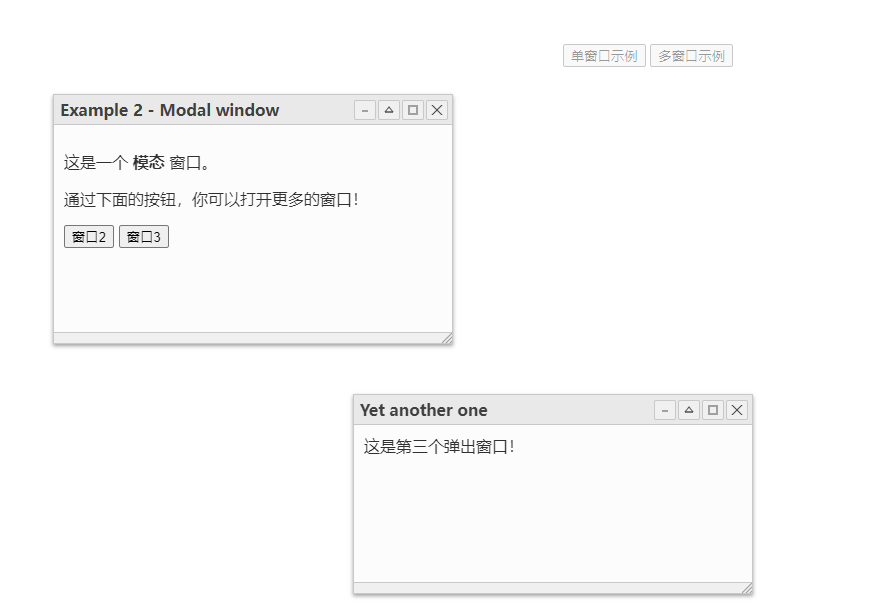
使用方法
在HTML文件中引入。
< link href="src/popupwindow.css" rel="stylesheet">
< script src="//code.jquery.com/jquery.min.js">
< script src="src/popupwindow.js">
HTML结构
< button id="basic-demo_button" class="btn btn-primary">单窗口示例
< div id="basic-demo" class="example_content">这是一个模态窗口
CSS样式
初始化时隐藏窗口内容。
.example_content {
  display :  none ;
}
初始化插件
然后通过下面的代码来初始化插件。
$( "#basic-demo" ).PopupWindow({
  // options here
});
配置参数
$( "#basic-demo" ).PopupWindow({

  // popup title
  title               :  "Popup Window" ,

  // modal mode
  modal               :  true ,

  // auto open on page load
  autoOpen            :  true ,

  // anmation speed
  animationTime       : 300,

  // custom css classes
  customClass         :  "" ,

  // custom action buttons
  buttons             : {
      close               :  true ,
      maximize            :  true ,
      collapse            :  true ,
      minimize            :  true
  },

  // button's position
  buttonsPosition     :  "right" ,

  // custom button text
  buttonsTexts        : {
    close               :  "Close" ,
    maximize            :  "Maximize" ,
    unmaximize          :  "Restore" ,
    minimize            :  "Minimize" ,
    unminimize          :  "Show" ,
    collapse            :  "Collapse" ,
    uncollapse          :  "Expand"
  },

  // draggable options
  draggable           :  true ,
  nativeDrag          :  true ,
  dragOpacity         : 0.6,

  // resizable options
  resizable           :  true ,
  resizeOpacity       : 0.6,

  // enable status bar
  statusBar           :  true ,

  // top position
  top                 :  "auto" ,

  // left position
  left                :  "auto" ,


  // height / width
  height              : 200,
  width               : 400,
  maxHeight           : undefined,
  maxWidth            : undefined,
  minHeight           : 100,
  minWidth            : 200,
  collapsedWidth      : undefined,

  // always keep in viewport
  keepInViewport      :  true ,

  // enable mouseh move events
  mouseMoveEvents     :  true

});
API
// open
$( '#selector' ).PopupWindow( "open" )

// close
$( '#selector' ).PopupWindow( "close" )

// maximize
$( '#selector' ).PopupWindow( "maximize" )

// unmaximize
$( '#selector' ).PopupWindow( "unmaximize" )

// minimize
$( '#selector' ).PopupWindow( "minimize" )

// unminimize
$( '#selector' ).PopupWindow( "unminimize" )

// collapse
$( '#selector' ).PopupWindow( "collapse" )

// uncollapse
$( '#selector' ).PopupWindow( "uncollapse" )

// get the current position of the firset popup window
// return an object with numeric top and left values.
$( '#selector' ).PopupWindow( "getposition" )

// set the poisition
$( '#selector' ).PopupWindow( "setposition" , position)

// get the current size of the firset popup window
// return an object with numeric width and height values.
$( '#selector' ).PopupWindow( "getsize" )

// set the size
$( '#selector' ).PopupWindow( "setsize" , size)

// get the current state  of the firset popup window
// return a string representing the state: normal, closed, collapsed, minimized or maximized
$( '#selector' ).PopupWindow( "getstate" )

// set the state
$( '#selector' ).PopupWindow( "setstate" , state)

// set the title
$( '#selector' ).PopupWindow( "settitle" , title)

// set the content in the status bar
$( '#selector' ).PopupWindow( "statusbar" , content)

// destroy the plugin
$( '#selector' ).PopupWindow( "destroy" )

 浙公网安备 33010602011771号