目的:创建组合的刚体模型——为两个刚体间添加约束
约束类型:
point2poiint
Hinge Constraint(铰链约束)
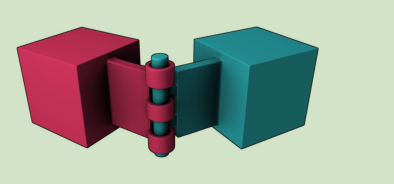
图1 铰链约束示意
铰链约束可以限制刚体的旋转轴,使得物体只有绕轴旋转这一个自由度。
btHingeConstraint(btRigidBody& rbA, btRigidBody& rb
B, const btVector3& pivotInA, const btVector3&
pivotInB, btVector3& axisInA, btVector3& axisInB, bool useReferenceFrameA = false);

btHingeConstraint(btRigidBody& rbA,btRigidBody& rbB, const btTransform& rbAFrame, const btTransform& rbBFrame, bool
useReferenceFrameA = false);

btHingeConstraint(btRigidBody& rbA,const btVector3& pivotInA,const btVector3& axisInA, bool useReferenceFrameA = false);
通过以上语句进行铰链关节的设置:
btHingeConstraint(btRigidBody& rbA,const btVector3& pivotInA,const btVector3& axisInA, bool useReferenceFrameA = false);
rbA: btRigidBody,需要进行设置的刚体模型;
pivotInA:(类似于Unity中的锚点(Anchor)), 设定铰链关节的关节位置点。
axisInA: 铰链关节的轴,设置刚体的旋转轴。
useReferenceFrameA: (?)设置是否设置参考坐标系A
例子:
    double len = 0.4;
    double wid = 0.1;
    double hei = 0.8;
    bulletboxhinge = new cBulletBox(bulletWorld, len, wid, hei);
cBulletBox(cBulletWorld* a_world,
        const double& a_sizeX,
        const double& a_sizeY,
        const double& a_sizeZ);
//立方体的申明形式
bulletboxhinge->setLocalPos(0.0, -1.0, 0.0);
//设定立方体的位置
在环境中插入一个立方体模型
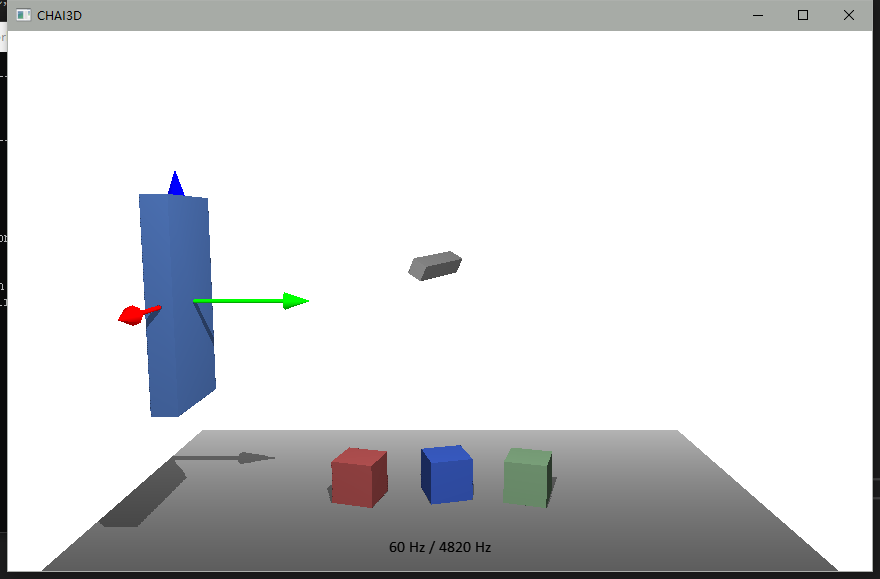
插入立方体,立方体的坐标系是建在集合中心处
hinge0 = new btHingeConstraint(
        *(bulletboxhinge->m_bulletRigidBody),
        btVector3(0.2, 0.0, 0.0),//pivot 锚点
        btVector3(0.0, 0.0, 1.0),//axis 坐标轴
        true);
//插入铰链关节
铰链关节的“锚点”设置在(0.2,0.0,0.0)处,设置在以立方体坐标系为参考系的坐标处;同时,Axis轴也是物体相对的参考轴。
btHingeConstraint(btRigidBody& rbA, btRigidBody& rbB
, const btVector3& pivotInA, const btVector3&
pivotInB, btVector3& axisInA, btVector3& axisInB, bool useReferenceFrameA = false);
将两个刚体通过铰链关节连接,

 浙公网安备 33010602011771号