
MicroPython 实现 DS1232 外置看门狗的全流程解析
 `DS1232` 是一个 **外部看门狗芯片**,用于 MCU 的硬件复位保护。驱动目标是:
* 通过 MCU 的 GPIO 输出 WDI(Watchdog Input)脉冲。
* 定期翻转 WDI,避免 DS1232 超时复位 MCU。
* 提供 **自动喂狗(Timer 定时器)** 和 **手动喂狗(kick)** 两种方式。
* 支持 **停止喂狗(stop)**,以触发复位测试或安全复位场景。
* 提供 **简单易用、稳定可靠、ISR-safe** 的接口。
`DS1232` 是一个 **外部看门狗芯片**,用于 MCU 的硬件复位保护。驱动目标是:
* 通过 MCU 的 GPIO 输出 WDI(Watchdog Input)脉冲。
* 定期翻转 WDI,避免 DS1232 超时复位 MCU。
* 提供 **自动喂狗(Timer 定时器)** 和 **手动喂狗(kick)** 两种方式。
* 支持 **停止喂狗(stop)**,以触发复位测试或安全复位场景。
* 提供 **简单易用、稳定可靠、ISR-safe** 的接口。
1.DS1232 芯片驱动代码设计
DS1232 是一个 外部看门狗芯片,用于 MCU 的硬件复位保护。驱动目标是:
- 通过 MCU 的 GPIO 输出 WDI(Watchdog Input)脉冲。
- 定期翻转 WDI,避免 DS1232 超时复位 MCU。
- 提供 自动喂狗(Timer 定时器) 和 手动喂狗(kick) 两种方式。
- 支持 停止喂狗(stop),以触发复位测试或安全复位场景。
- 提供 简单易用、稳定可靠、ISR-safe 的接口。
驱动代码文件如下所示:
# Python env : MicroPython v1.23.0
# -*- coding: utf-8 -*-
# @Time : 2025/8/25 下午6:46
# @Author : 李清水
# @File : ds1232.py
# @Description : 外部DS1232看门狗模块驱动程序
# ======================================== 导入相关模块 =========================================
# 导入硬件相关模块
from machine import Pin, Timer
# ======================================== 全局变量 ============================================
# ======================================== 功能函数 ============================================
# ======================================== 自定义类 ============================================
class DS1232:
"""
该类控制外部 DS1232 看门狗模块,通过周期性翻转 WDI 引脚喂狗,避免 MCU 被复位。
Attributes:
wdi (Pin): machine.Pin 实例,用于输出喂狗脉冲。
state (int): 当前 WDI 引脚输出状态,0 或 1。
timer (Timer): machine.Timer 实例,用于周期性喂狗。
Methods:
__init__(wdi_pin: int, feed_interval: int = 1000) -> None: 初始化看门狗并启动定时喂狗。
stop() -> None: 停止自动喂狗,将 WDI 引脚置低。
kick() -> None: 手动喂狗,立即翻转一次 WDI 引脚。
Notes:
- 初始化时会创建 Timer 对象以定时翻转 WDI。
- _feed 为内部回调方法,不建议直接调用。
- 该类方法大多非 ISR-safe,Timer 回调 _feed 是 ISR-safe。
- stop() 后 WDI 引脚保持低电平,DS1232 将在超时后复位 MCU。
==========================================
DS1232_Watchdog driver for controlling an external DS1232 watchdog module.
Periodically toggles WDI pin to prevent MCU reset.
Attributes:
wdi (Pin): machine.Pin instance for feeding pulses.
state (int): Current WDI output state, 0 or 1.
timer (Timer): machine.Timer instance for periodic feeding.
Methods:
__init__(wdi_pin: int, feed_interval: int = 1000) -> None: Initialize the watchdog and start automatic feeding.
stop() -> None: Stop automatic feeding and set WDI low.
kick() -> None: Manually feed the watchdog by toggling WDI once.
Notes:
- Initializes a Timer to periodically toggle WDI.
- _feed is an internal callback method, not recommended for direct user call.
- Most methods are not ISR-safe; _feed callback is ISR-safe.
- After stop(), WDI remains low; DS1232 will reset MCU on timeout.
"""
def __init__(self, wdi_pin: int, feed_interval: int = 1000) -> None:
"""
初始化 DS1232 看门狗。
Args:
wdi_pin (int): WDI 引脚编号。
feed_interval (int): 喂狗间隔时间,单位 ms。默认 1000ms。
Returns:
None
Raises:
ValueError: 当 wdi_pin 非整数或 feed_interval > 1000 时。
RuntimeError: Timer 初始化失败时。
Notes:
创建对象后会立即启动定时喂狗。
调用会涉及定时器资源,非 ISR-safe。
==========================================
Initialize DS1232 watchdog.
Args:
wdi_pin (int): WDI pin number.
feed_interval (int): Feeding interval in ms. Default is 1000ms.
Returns:
None
Raises:
ValueError: If wdi_pin is not an integer or feed_interval > 1000 ms.
RuntimeError: If Timer initialization fails.
Notes:
Feeding starts immediately after object creation.
Uses Timer resource, not ISR-safe.
"""
# 参数检查
if not isinstance(wdi_pin, int):
raise ValueError("wdi pin must be an integer")
if feed_interval > 1000:
raise ValueError("feed_interval must be less than 1000ms")
self.wdi = Pin(wdi_pin, Pin.OUT)
# 当前输出状态
self.state = 0
self.timer = Timer(-1)
# 启动定时器,周期性喂狗
self.timer.init(period=feed_interval, mode=Timer.PERIODIC, callback=self._feed)
def _feed(self, t: Timer) -> None:
"""
定时器回调函数:周期性翻转 WDI 引脚。
Args:
t (Timer): 触发本回调的定时器对象。
Returns:
None
Raises:
None
Notes:
内部方法,不建议用户直接调用。
在中断上下文中执行,ISR-safe。
==========================================
Timer callback: toggle WDI pin periodically.
Args:
t (Timer): Timer instance triggering this callback.
Returns:
None
Raises:
None
Notes:
Internal method, not recommended for direct user call.
Runs in interrupt context, ISR-safe.
"""
# 翻转 0/1
self.state ^= 1
self.wdi.value(self.state)
def stop(self) -> None:
"""
停止自动喂狗。
Args:
None
Returns:
None
Raises:
RuntimeError: 当定时器释放失败时。
Notes:
停止后 WDI 引脚保持低电平,DS1232 将会在超时后复位 MCU。
==========================================
Stop automatic feeding.
Args:
None
Returns:
None
Raises:
RuntimeError: If timer deinitialization fails.
Notes:
WDI pin is held low after stopping, DS1232 will reset MCU on timeout.
"""
self.timer.deinit()
self.wdi.value(0)
def kick(self) -> None:
"""
手动喂狗:立即翻转一次 WDI 引脚。
Args:
None
Returns:
None
Raises:
RuntimeError: 当引脚写入失败时。
Notes:
通常用于临时喂狗,或在停止自动喂狗后手动维持。
==========================================
Manually feed watchdog by toggling WDI once.
Args:
None
Returns:
None
Raises:
RuntimeError: If pin write fails.
Notes:
Useful for temporary feeding or manual feeding after stopping auto mode.
"""
self.state ^= 1
self.wdi.value(self.state)
# ======================================== 初始化配置 ==========================================
# ======================================== 主程序 ===========================================
在初始化方面,我们传入 WDI 引脚编号和喂狗间隔,DS1232 类会自动创建 GPIO 引脚对象并启动定时器,实现周期性喂狗,保证 MCU 在正常运行时不被复位。
DS1232 类有如下几个方法:_feed 为内部 Timer 回调用于自动翻转 WDI,kick 可手动喂狗,stop 可停止自动喂狗并让 DS1232 在超时后复位 MCU。
在应用时,我们只需要创建 DS1232 对象,接着:
- Timer 开始,每
feed_intervalms 调用_feed。 _feed翻转 WDI → DS1232 看门狗计时器被复位。- MCU 正常运行 → 可以通过
kick手动喂狗。 - 需要测试或复位 → 调用
stop()→ WDI 置低 → DS1232 超时 → MCU 被复位。
2.应用实验
在下面的代码中,我们初始化 DS1232 看门狗、周期性喂狗、检测复位信号,并在模拟超时或手动停止喂狗时观察 MCU 被复位的流程。
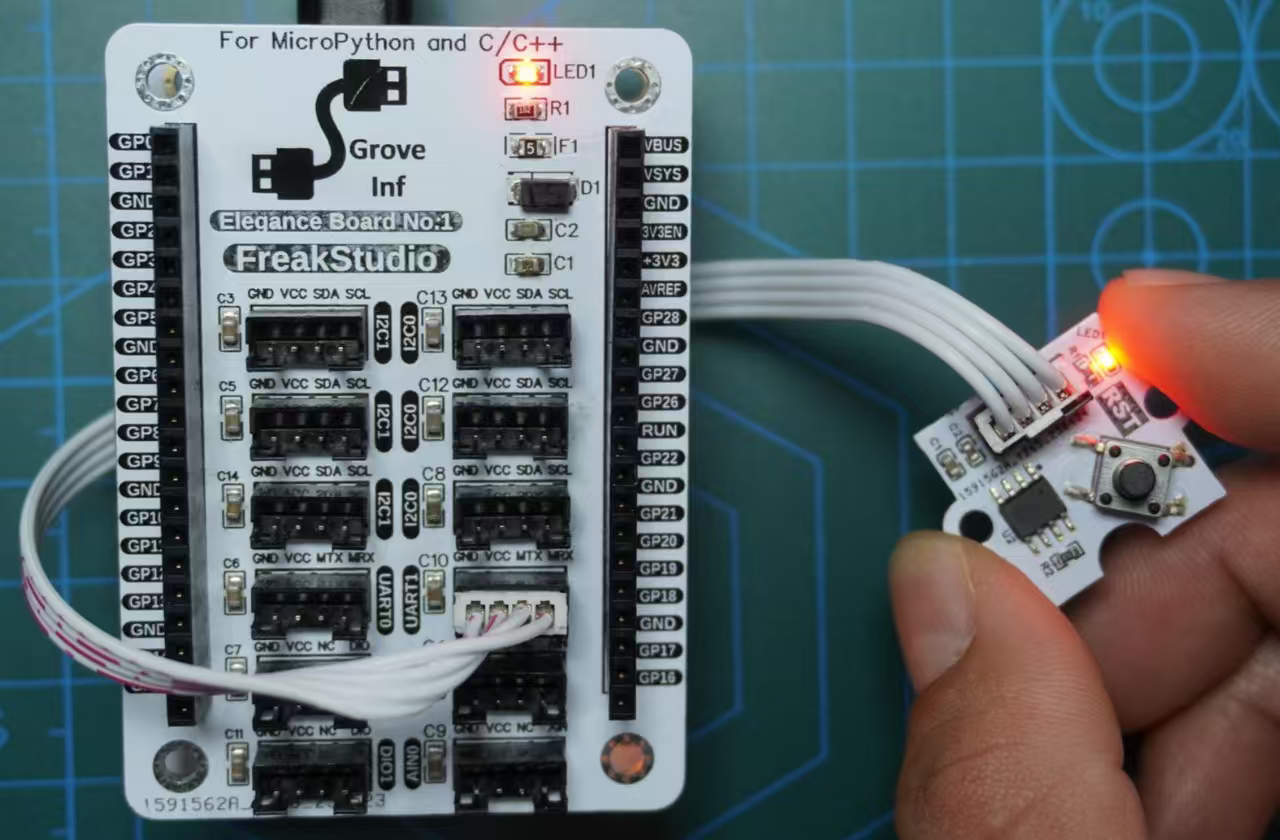
这里,我们首先将风雅一号板-Grove接口扩展板插入到风雅一号板-通用兼容扩展板上,然后使用 HY2.0-4P 排线将GraftSense-DS1232看门狗模块连接到风雅一号板-Grove接口扩展板的 UART1 接口上,如下图所示:
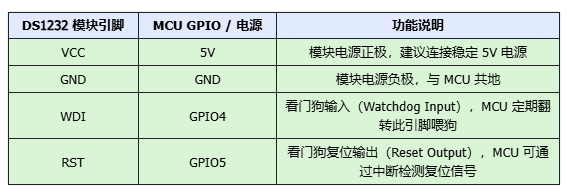
接线情况如下表所示:
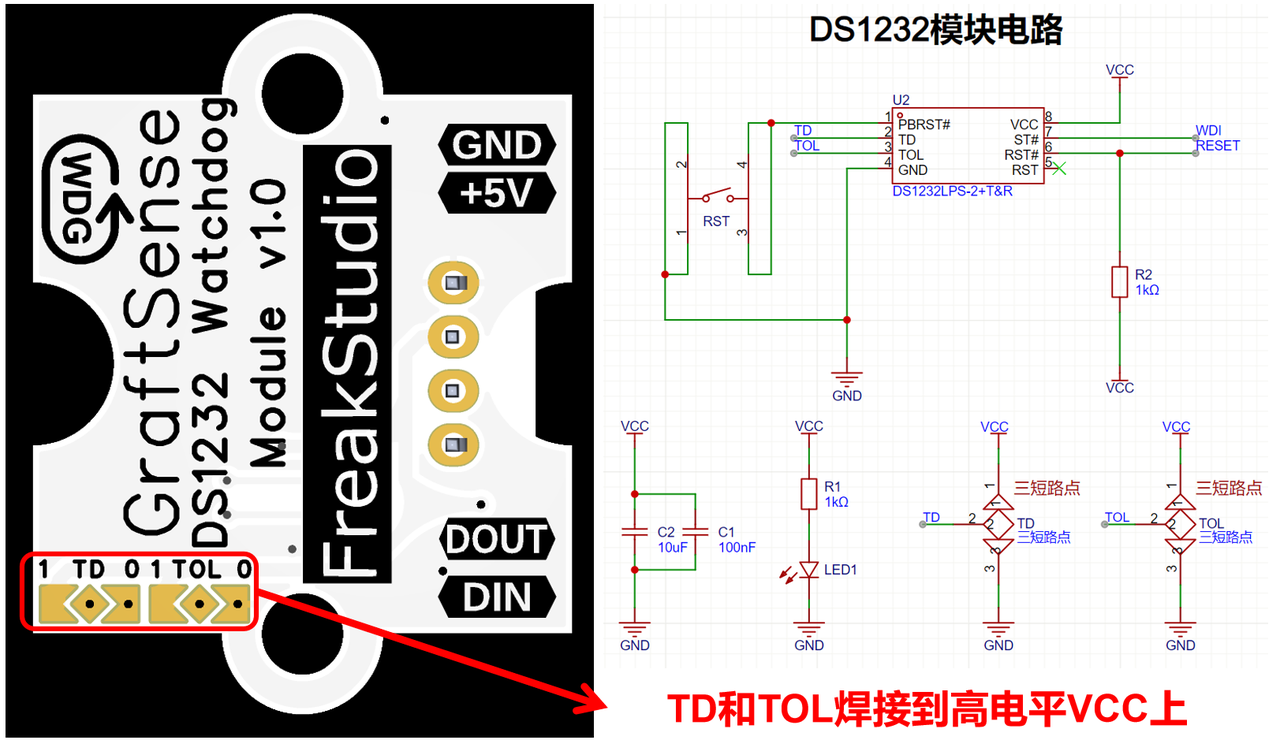
这里,GraftSense-DS1232看门狗模块背面的 TD 和 TOL 的短路点都焊接到了 VCC 上。
以下代码可以在我们提供的资料包中 elegance-devkit v1\Demo\75 WDG_EXT 文件夹找到。
示例如下所示:
# Python env : MicroPython v1.23.0
# -*- coding: utf-8 -*-
# @Time : 2025/8/25 下午6:46
# @Author : 李清水
# @File : main.py
# @Description : 外部DS1232看门狗模块测试程序
# ======================================== 导入相关模块 =========================================
# 导入硬件相关模块
from machine import Pin, Timer
# 导入时间相关模块
import time
# 导入 DS1232 看门狗模块
from ds1232 import DS1232
# ======================================== 全局变量 ============================================
# DS1232 WDI 引脚连接的 GPIO
WDI_PIN = 4
# DS1232 RST 引脚连接的 GPIO
RST_PIN = 5
# 喂狗间隔,单位 ms
FEED_INTERVAL = 300
# 延迟停止喂狗时间,单位 ms
STOP_FEED_DELAY = 10000
# 定义全局变量
wdg = None
stop_feed_timer = None
# 全局标记:检测是否触发 RST
system_reset_flag = False
# ======================================== 功能函数 ============================================
def rst_callback(pin: Pin) -> None:
"""
DS1232 RST 引脚触发回调函数。
Args:
pin (Pin): 触发该回调的 GPIO 引脚。
Returns:
None
"""
# 声明全局变量
global system_reset_flag
# 设置标志,主循环检测后跳出
system_reset_flag = True
print("DS1232 RST pin triggered.")
def stop_feed_callback(t: Timer) -> None:
"""
定时器回调:停止自动喂狗,模拟喂狗失败触发复位。
Args:
t (Timer): 定时器对象
Returns:
None
"""
# 声明全局变量
global wdg, stop_feed_timer
print("Stop feeding watchdog.")
# 停止喂狗
wdg.stop()
# 停掉本定时器,只执行一次
stop_feed_timer.deinit()
# ======================================== 自定义类 ============================================
# ======================================== 初始化配置 ==========================================
# 上电延时3s
time.sleep(3)
# 打印调试信息
print("FreakStudio:: DS1232 Watchdog Test Program.")
# 初始化 DS1232 看门狗
wdg = DS1232(wdi_pin=WDI_PIN, feed_interval=FEED_INTERVAL)
# 立即手动喂狗
wdg.kick()
# 配置 RST 引脚为输入,带上拉,触发回调
rst_pin = Pin(RST_PIN, Pin.IN, Pin.PULL_UP)
rst_pin.irq(trigger=Pin.IRQ_FALLING, handler=rst_callback)
# 定义定时器,延迟停止喂狗
stop_feed_timer = Timer()
stop_feed_timer.init(period=STOP_FEED_DELAY, mode=Timer.ONE_SHOT, callback=stop_feed_callback)
# ======================================== 主程序 ===========================================
# 开始喂狗
print("Start feeding watchdog.")
try:
# 无限循环
while True:
# 打印带时间的日志
current_time = time.ticks_ms()
print(f"System running... Time: {current_time} ms")
# 检测 RST 触发标志
if system_reset_flag:
print("System starting reset...")
# 跳出 while 循环
break
time.sleep(1)
except KeyboardInterrupt:
print("Program interrupted.")
finally:
# 停止喂狗
wdg.stop()
# 停掉定时器
stop_feed_timer.deinit()
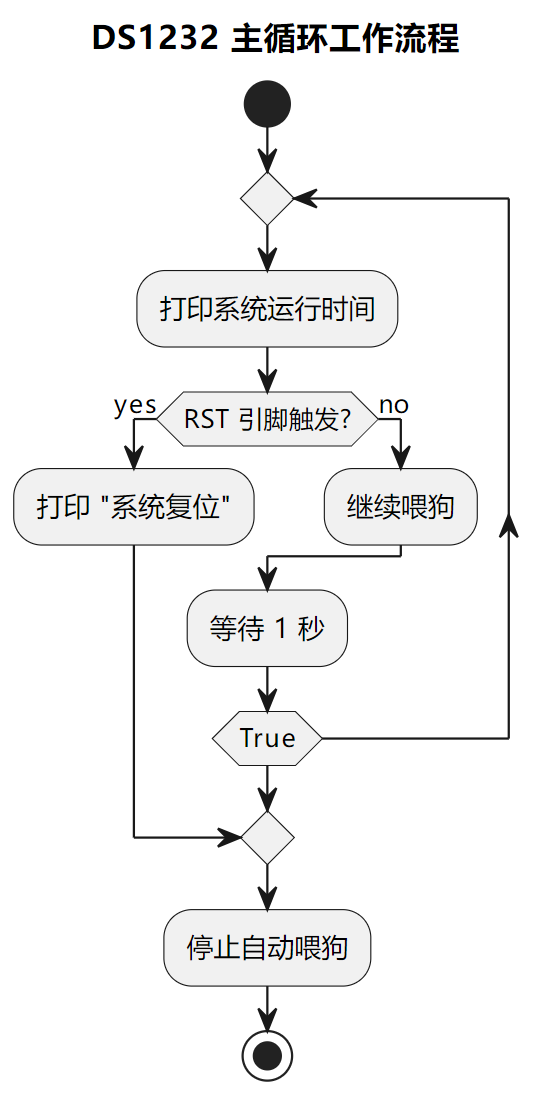
这里我们首先,MCU 上电后延时 3 秒以完成稳定启动,然后打印调试信息,并创建 DS1232 对象初始化 WDI 引脚和 Timer,实现自动周期性喂狗,同时立即调用 kick() 手动翻转一次 WDI 确保看门狗开始计时;接着配置 RST 引脚为输入上拉并绑定中断回调,用于检测 DS1232 超时复位信号;然后启动一次性定时器,用于延迟停止自动喂狗,模拟喂狗失败触发复位。程序随后进入主循环:
- 每秒打印系统运行时间(毫秒级)。
- 检查
system_reset_flag标志,如果RST引脚触发,打印复位信息并跳出循环。 - 捕获
KeyboardInterrupt,允许用户手动中断程序。
循环结束后,在 finally 中停止 DS1232 自动喂狗,并释放定时器资源,确保 MCU 和 Timer 状态安全,从而完成整个看门狗测试流程。
烧录代码,打开终端,运行结果如下所示:
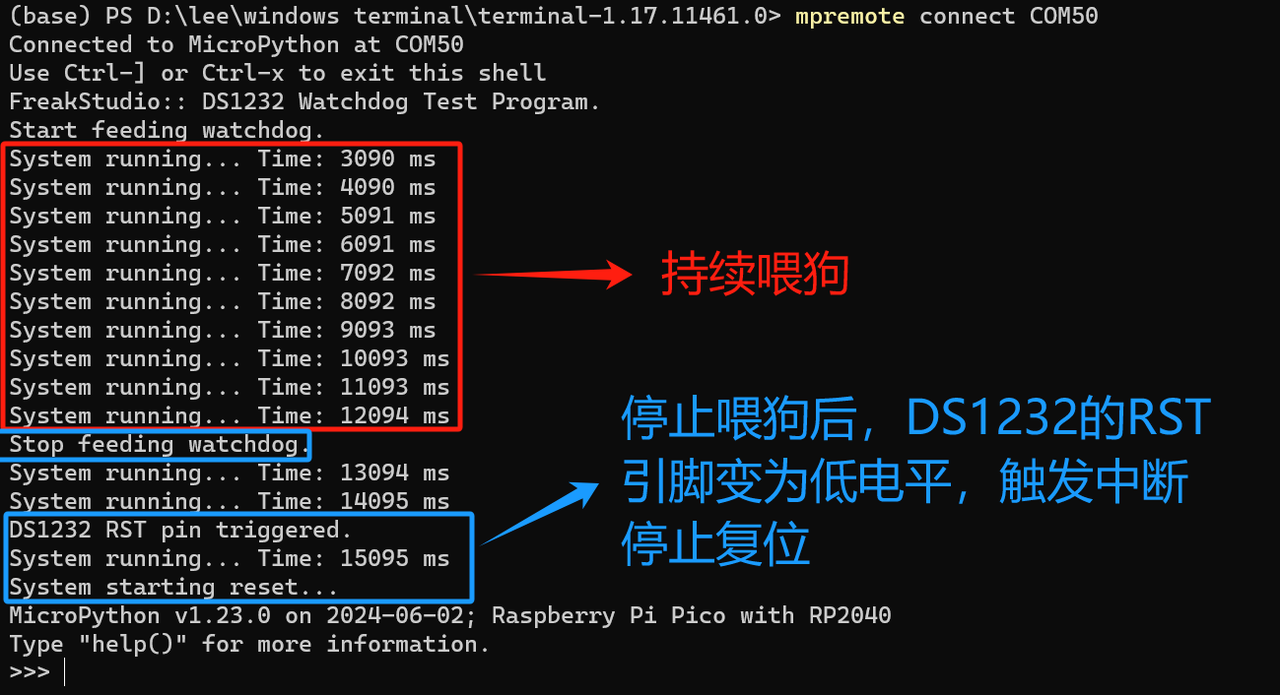
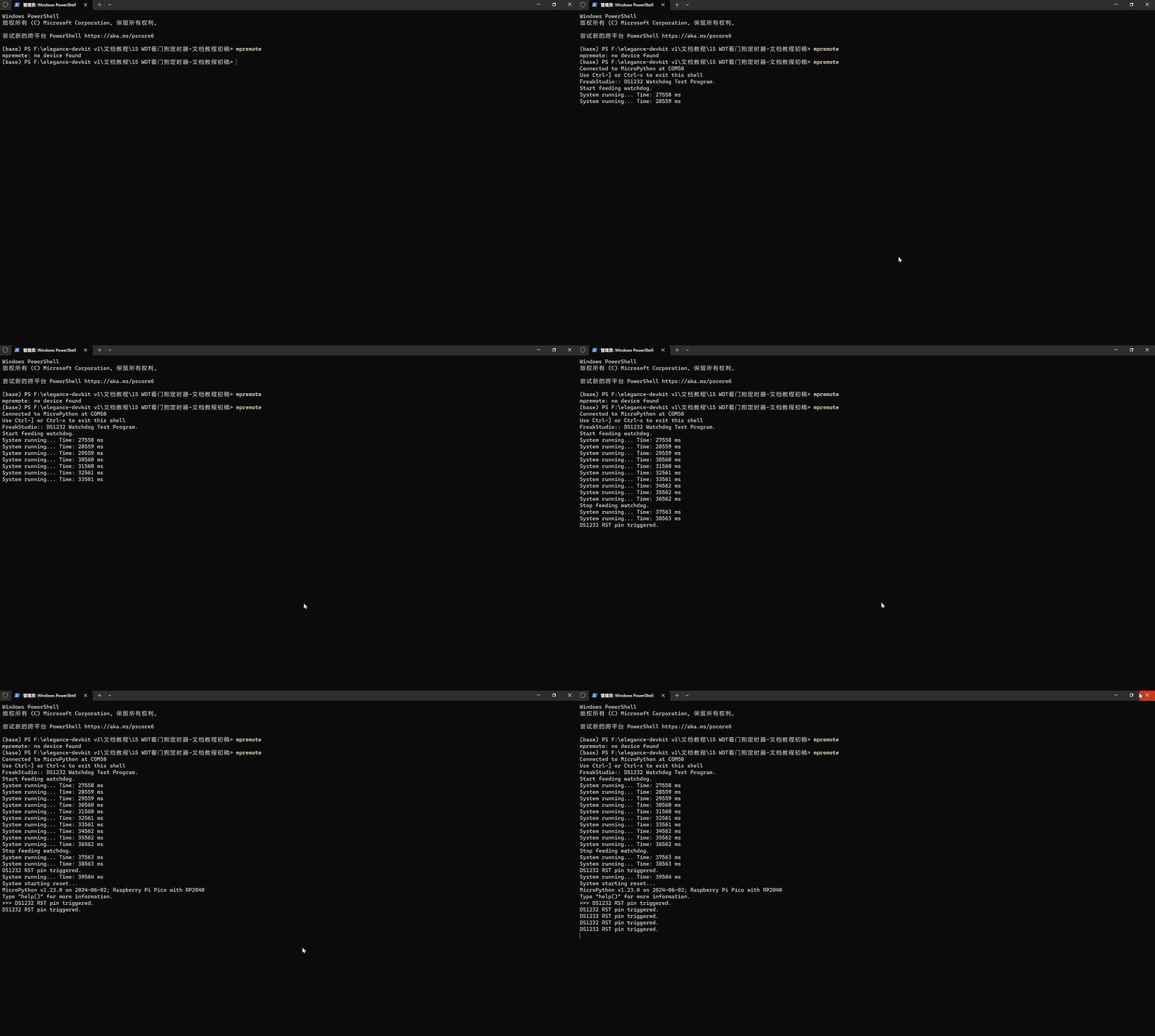
可以看到,程序正常运行,整体流程如下:
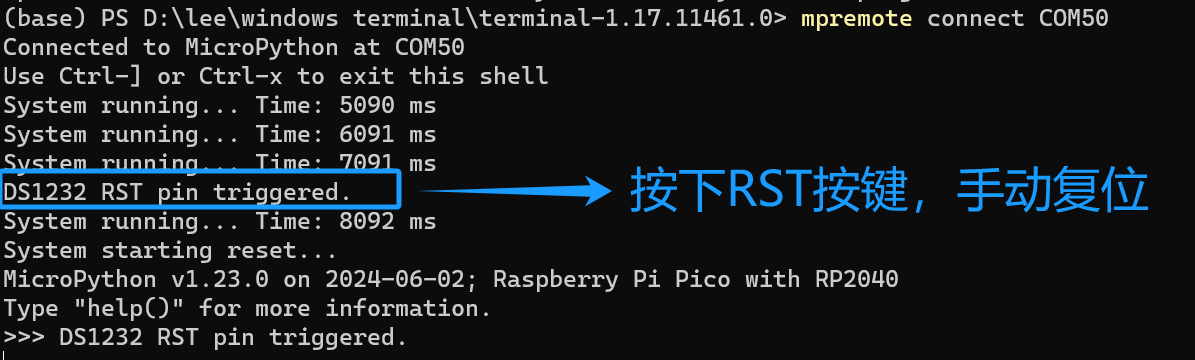
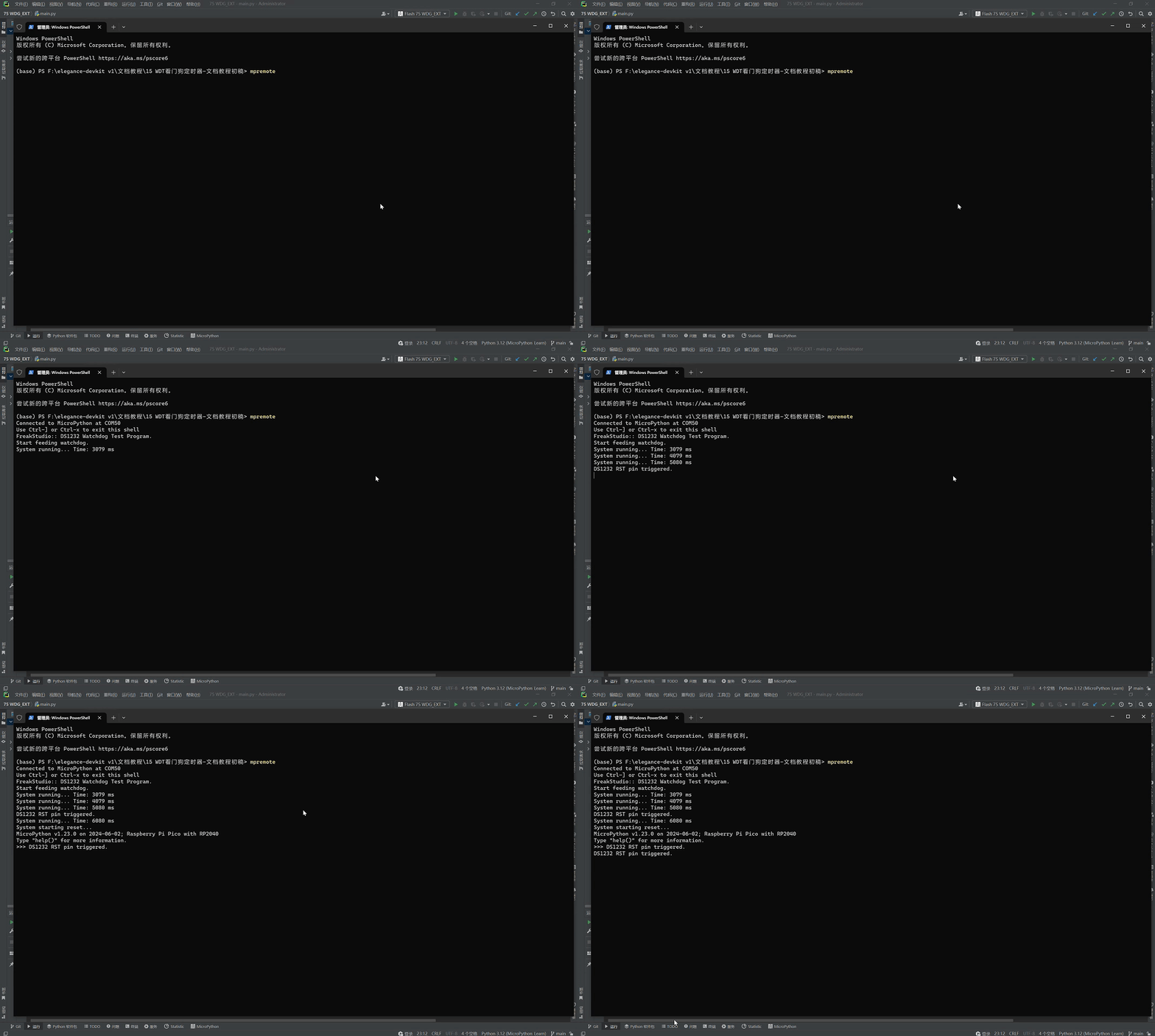
重启后,我们可以在停止喂狗前,在 MCU 给看门狗正常输入脉冲时,按下看门狗模块上的 RST 按键,可以看到还是可以正常复位,这样设计的原因是提供可靠的外部硬复位途径:当软件跑飞、或者你想人工重启整板时,人工复位应当具备最高优先级。

 浙公网安备 33010602011771号