


【蓝牙小程序】echart 折线图浮点数组元素数量超过3时,标记最大值就出错,什么原因?
简短不看版本
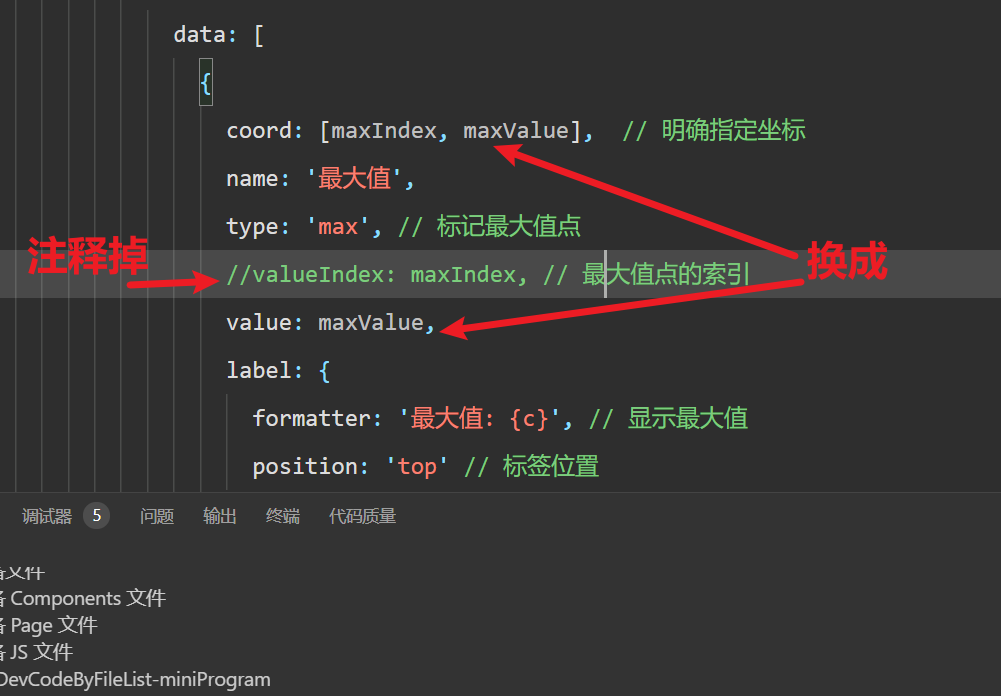
注释掉 valueIndex 属性,换成 coord 和 value 属性。
正文
当你在微信小程序中使用 ECharts 标注浮点数组最大值时,遇到元素数量超过3就出错的情况,可能有以下几个原因:
可能的原因
-
数据精度问题:
-
浮点数计算时可能存在精度问题,导致
Math.max()无法正确识别最大值 -
例如:
[1.1, 1.2, 1.3, 1.3000000000000001]可能无法被正确比较
-
-
ECharts 版本问题:
-
小程序使用的 ECharts 版本可能存在特定 bug
-
特别是早期版本对浮点数支持不够完善
-
-
数据格式问题:
-
数据可能包含非数字元素或格式不正确
-
例如:
[1.1, 2.2, "3.3", 4.4]
-
-
标记点配置问题:
-
markPoint配置可能不正确,特别是当数据量大时
-
解决方案
1. 确保数据是纯数字数组
// 过滤非数字元素
const data = originalData.filter(item => typeof item === 'number');

// 或者转换为数字
const data = originalData.map(Number).filter(item => !isNaN(item));
2. 使用更精确的最大值查找方法
function findMaxIndex(arr) {
  let max = -Infinity;
  let index = -1;

  arr.forEach((item, i) => {
    // 使用 Number.EPSILON 处理浮点数精度问题
    if (item - max > Number.EPSILON) {
      max = item;
      index = i;
    }
  });

  return { max, index };
}

const { max, index } = findMaxIndex(data);
3. 明确指定最大值坐标
option = {
  series: [{
    data: data,
    markPoint: {
      data: [{
        coord: [index, max],  // 明确指定坐标
        name: '最大值',
        value: max,
        itemStyle: {
          color: '#ff0000'
        }
      }]
    }
  }]
}
4. 更新 ECharts 版本
确保使用的是最新版的 ECharts 小程序版本:
npm install echarts-for-weixin@latest或通过 GitHub 获取最新版本:
https://github.com/ecomfe/echarts-for-weixin
5. 完整示例代码
Page({
  data: {},
  onLoad() {
    this.initChart();
  },

  initChart() {
    // 模拟浮点数据 - 超过3个元素
    const originalData = [1.1, 2.2, 3.3, 4.4, 3.5, 2.6];

    // 确保数据有效性
    const data = originalData.map(Number).filter(item => !isNaN(item));

    // 精确查找最大值
    const { max, index } = this.findMaxIndex(data);

    // 初始化图表
    const ec = wx.createCanvasContext('echarts-canvas');
    const chart = echarts.init(ec);

    const option = {
      xAxis: {
        type: 'category',
        data: ['A', 'B', 'C', 'D', 'E', 'F']
      },
      yAxis: {
        type: 'value',
        scale: true  // 对于浮点数,建议开启scale
      },
      series: [{
        data: data,
        type: 'line',
        markPoint: {
          data: [{
            coord: [index, max],
            name: '最大值',
            value: max,
            symbol: 'circle',
            symbolSize: 12,
            label: {
              show: true,
              formatter: '{c}',
              color: '#fff'
            },
            itemStyle: {
              color: '#ee6666'
            }
          }]
        }
      }]
    };

    chart.setOption(option);
    ec.draw();
  },

  // 精确查找最大值的方法
  findMaxIndex(arr) {
    let max = -Infinity;
    let index = -1;

    arr.forEach((item, i) => {
      // 处理浮点数精度问题
      if (item - max > Number.EPSILON) {
        max = item;
        index = i;
      }
    });

    return { max, index };
  }
})
其他建议
-
调试技巧:
-
使用
console.log输出数据数组和计算出的最大值,确认是否正确 -
检查控制台是否有报错信息
-
-
替代方案:
-
如果问题持续,可以考虑使用
markLine替代markPoint来标注最大值
-
-
性能考虑:
-
对于大数据量,建议在服务器端计算好最大值再传给前端
-
如果以上方法仍不能解决问题,建议提供具体的错误信息和数据示例,以便进一步分析。

 浙公网安备 33010602011771号